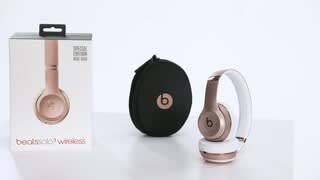
A:AnswerI originally purchased these headphones with the intent of using them as a headset with my Xbox. Later I found out that the aux/Mic cable used by beats is not compatible with gaming controllers.
A:AnswerYou can go to the Beats website to reset or update them to see if that helps. After you troubleshoot, if you still need help, you can contact the retailer or Apple Support. Beats and Apple offer a limited one-year manufacturers warranty. Other retailers may offer their own separate warranties or protection plans (check with the individual retailers for their terms and details). You can contact Apple Support for more details: https://www.beatsbydre.com/support/service-warranty
A:AnswerDifferent retailers stock different colors and may offer promotional pricing for various reasons. For an accurate response, please contact your local retailer. You can learn more about Beats Solo 3 Wireless Headphones here: https://www.beatsbydre.com/earphones/powerbeats3-wireless
A:AnswerBefore you buy - If you're having any doubts or concerns, your best bet is to reach out to the retailer or seller. Ask about their return policy, what accessories are included, and whether or not they are new - used - refurbished - or authentic Beats.
A:AnswerIt is best to check with the retailer directly for more information. Before you buy - If you're having any doubts or concerns, your best bet is to reach out to the retailer or seller. Ask about their return policy, what accessories are included, and whether or not they are new - used - refurbished - or authentic Beats.
A:AnswerYes. Beats are made to work with most devices, including iOS and Android. Functionality may vary by product. Please review this resource for product compatibility: https://www.beatsbydre.com/support/info/product-compatibility.
Please review this resource on pairing Beats Solo 3 Wireless Headphones with your bluetooth enabled device: https://www.beatsbydre.com/support/how-to/set-up-and-use-solo3-wireless
A:AnswerRetailer pricing may vary for many reasons. Retailers also determine what colors and product models they stock. Before you buy - If you're having any doubts or concerns, your best bet is to reach out to the retailer or seller. Ask about their return policy, what accessories are included, and whether or not they are new - used - refurbished - or authentic Beats. Included accessories for refurbished product may vary.
A:AnswerSeamless switching is an iOS feature and works with other iOS devices operating on iOS 10 or above and connected to iCloud. For switching Android devices, you pair through your bluetooth settings each time you want to switch devices. This is due to the Apple W1 Chip technology in Apple products. To learn more about pairing and switching devices with your Beats Solo 3 Wireless Earphones, please visit this resource: https://www.beatsbydre.com/support/how-to/set-up-and-use-solo3-wireless
A:AnswerService options, parts availability and response times may vary according to country.
Please contact Support to find out if your product is eligible for repair and to find out if there is a repair cost associated: https://getsupport.apple.com/?caller=bbd&PFC=PFC6007
If you’ve lost an eartip, replacement kits are available for purchase. Click on “Service or repair,” then “Start a repair request” then click on “Service Request” here: https://www.beatsbydre.com/support/service-warranty. If you have another part that needs replacing, contact Apple Support to see if your product is eligible for repair. You can contact support through the same link or through your Apple Support app (download here): https://itunes.apple.com/us/app/apple-support/id1130498044?mt=8
If your product has a serial number, you’ll need it when you contact support. Please review this resource for how to find your serial number: https://www.beatsbydre.com/support/how-to/find-serial-number
A:AnswerBeats Solo 3 Wireless Headphones feature passive noise isolating technology. Beats Studio 3 Wireless Headphones feature Pure ANC technology (pure adaptive noise cancelling).
Please visit this resource to learn more about noise cancelling vs. noise isolating: https://www.beatsbydre.com/support/info/noise-canceling-isolating
A:AnswerBeats are made to work with most devices, including iOS and Android. Functionality may vary by product. Please review this resource for product compatibility: https://www.beatsbydre.com/support/info/product-compatibility
A:AnswerBeats Solo 3 Wireless Headphones feature passive noise isolating technology. Beats Studio 3 Wireless Headphones feature Pure ANC technology (pure adaptive noise cancelling).
Please visit this resource to learn more about noise cancelling vs. noise isolating: https://www.beatsbydre.com/support/info/noise-canceling-isolating