“How can I transfer my data from my old computer to a new one? Can I have Mircosoft Office instaleed on the new one?”
Answer This Question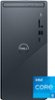
1-3 of 3 Answers
I did my own transferring from my old computer to my new computer. Get a portable hard drive or large-capacity portable SSD or flash drive. (I had a 2TB portable HD, but anything 512GB or larger will do.) Copy/paste anything from your old computer which can't easily be downloaded or installed from a CD-ROM/DVD-ROM to the portable storage medium. Then attach the portable storage medium to the Dell tower AFTER basic setup is complete, and copy/paste from the portable storage medium to the Dell tower. Just make sure you're copy/pasting to the equivalent of where you were used to accessing things on your old computer. (F.ex., Documents should be copy/pasted to Documents, anything which was in Program Files x86 should be copy/pasted to Program Files x86, etc.) If your old computer was pre-Windows 11, download current drivers for any peripherals such as printers, rather than installing old drivers from a CD-ROM or DVD-ROM. I was able to install an old version of MS Word from the original media (don't recall if it was a CD-ROM or DVD-ROM) without any problems. You will get "encouraged" to spring for an MS Office 365 subscription during the hardware setup (a trial version is pre-installed). If you're comfortable with the MS Office version you were using on your old computer, though (and for which you still have the original discs), go ahead and install that; you'll be fine.
Sorry, there was a problem. Please try again later.You can save the data from the old computer to a flash drive/external hard drive. Then, connect the flash drive/external hard drive to the new computer and transfer the data to that. For more details on MS Office and technical assistance on this desktop, we recommend reaching out to the Dell technical support team after the purchase. They are available on Facebook and Twitter(@Dellcares).
Sorry, there was a problem. Please try again later.yes done
Sorry, there was a problem. Please try again later.