“HOW TO ATTACH HOW DO I ATTACH FROM MY SAMSUNG 32' HDTV TO MY DVD PLAYER?”
Answer This Question
1-6 of 6 Answers
Does your DVD player have a connection for an hdmi cable some don't and some do you have to see if it does to be able to connect it
Sorry, there was a problem. Please try again later.Check to make sure cables and ports match and you might have to use scan on your TV as a troubleshooting tool.
Sorry, there was a problem. Please try again later.Just find the HDMI slot on your DVD player and plug in one end of the wire to it and the other to the Samsung TV. Simple
Sorry, there was a problem. Please try again later.Your dvd player must have a usb port. Should only need for blue ray, not a standard dvd player.
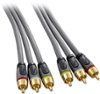
Sorry, there was a problem. Please try again later.A DVD player may not have an HDMI connection depending on the type of player and how old it is. My DVD/VHS player uses RCA cables to connect to my TV. I decide to buy a Blue-Ray player to play DVD's to improve the picture and sound quality.
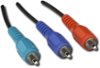
Sorry, there was a problem. Please try again later.I would first use an HDMI cable for best quality. If you can't do that, then use Composite cables for the next best quality. If that doesn't work then use Component cables.
I would recommend:
Sorry, there was a problem. Please try again later.