“can you set this camera to auto track and move 360 every few seconds or is it only controlled by the app”
Answer This Question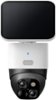
1-2 of 2 Answers
To enable auto tracking on the SoloCam S340: Open the Eufy Security app on your smartphone. Select the SoloCam S340 from your device list. Go to "Camera Settings". Scroll down and select "Motion Detection". Enable the "AI Tracking" option. The camera should now automatically follow a person when they walk past its field of view. However, please note that the camera does not support 360-degree movement.
Sorry, there was a problem. Please try again later.Contorted by the app and will motion track
Sorry, there was a problem. Please try again later.