Questions & Answers
- Model:
- PA03643-B205
- |
- SKU:
- 7683058
Highly rated by customers for: Ease of use, Speed, Size
Page Showing 1-14 of 14 questions
Q: QuestionTrying to organize and eliminate paper. Looking for a scanner which will scan receipts and documents and send them to specific files. Will the scanner effectively and efficiently provide this function?
Asked by Anonymous.
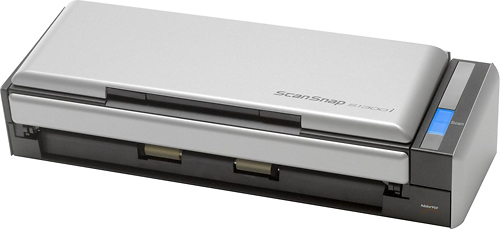
- A:Answer Hello, and thank you for your interest in our ScanSnap S1300i. Yes, the S1300i can scan to a specific folder. It also comes with software to help you organize your scanned document and make it easier to find specific documents. One of the main things to consider when selecting a scanner is the number of pages that you will scan per day. If you are planning to scan a larger number of pages, the faster ScanSnap iX1500 is worth considering. The iX1500 scans at 30 pages per minute, and has a 50 page input chute (compared to 12 ppm with a 10 page input chute for the S1300i). The iX1500 also has built-in Wi-Fi which allows you to scan to a mobile device (Android or iOS smartphone or tablet). Regardless of which model you choose, all ScanSnap models are very easy to use and are great organizational tools that will help you to become more productive. S1300i, 12 ppm, duplex, 10 page input chute, 100 page daily duty cycle Part Number: pa03643-b005 or pa03643-b205 https://www.fujitsu.com/ca/en/products/computing/peripheral/scanners/scansnap/s1300i/ iX1500, 30 ppm, duplex, 50 page input chute, 500 page daily duty cycle Part Number: pa03770-B005 https://www.fujitsu.com/ca/en/products/computing/peripheral/scanners/scansnap/ix1500/ Regards, Eric Fujitsu Canada Inc.
Answered by Fujitsu Canada Scanners

Q: QuestionCan this scanner work on Microsoft 8.1 software?
Asked by Brandy.
- A:Answer Thank you for your interest in our product. Yes, the s1300i supports Microsoft 8.1. You can find the software download link here, http://scansnap.fujitsu.com/global/dl/
Answered by Fujitsu Canada Scanners

Q: QuestionHI I would like to know if this scan ID's ,Passports, drivers license etc.
Asked by VERO.
- A:Answer Thank you for contacting PFU Canada Support. No, the S1300i cannot scan passports and/or hard cards like driver's license, health cards. The S1300i is strictly a paper scanner. The fi-800R can scan passports, hard cards etc and it has a similar footprint to the S1300i. https://www.fujitsu.com/ca/en/products/computing/peripheral/scanners/business/fi800r/ The iX1500 can scan hard cards, but no passports. https://www.fujitsu.com/ca/en/products/computing/peripheral/scanners/soho/ix1500/
Answered by Fujitsu Canada Scanners

Q: QuestionI’m trying to organize pictures and receipts. Do I need to have a computer hooked up to this scanner? Or can I use the scanner and have the computer in a separate room or if I’m out and have the scanner and my computer is home, would I be able to scan?
Asked by Anonymous.
- A:Answer Thank you for contacting PFU Canada support. The s1300i requires a computer attached via USB to do anything. You cannot operate the scanner without it. Our iX1500 can operate via Wifi and does not require the computer. The Ix1500 can upload to the cloud and can also be used with IOS/Android devices. Here's a link to the iX1500. https://www.fujitsu.com/ca/en/products/computing/peripheral/scanners/soho/ix1500/
Answered by Fujitsu Canada Scanners

Q: QuestionDoes this work with MacBook Pro version 10.11.6 El Capitan?
Asked by Bette.
- A:Answer Thank you for contacting PFU Canada support. Yes, the S1300i works with MacOS El Capitan, and most recently Big Sur. The software updates need to be updated from our website. Just download from the following link. https://scansnap.fujitsu.com/global/dl/ Depending on the model of Mac you have, you may need the following adapter to convert UBS-C to USB. USB-C Digital AV Multiport Adapter
Answered by Fujitsu Canada Scanners

Q: QuestionIs this scanner compatible with IOS on an iPad Pro with USB C connection?
Asked by EddieB.
- A:Answer Thank you for your interest in our Fujitsu product. The S1300i is not compatible with IOS. the S1300i supports Windows and MacOS only. The IX1500 works with USB and Wifi. There is an app that runs on IOS to scan documents etc with this scanner. Please see the following link for the IOS guide. http://www.pfu.fujitsu.com/imaging/downloads/manual/ssca-ios/English/ssca/topic/top_basic.html Here is the link for the actual IX1500 scanner. https://www.fujitsu.com/ca/en/products/computing/peripheral/scanners/soho/ix1500/ Thank you.
Answered by Fujitsu Canada Scanners

Q: QuestionWill updates be needed with the scanner? If so with doing the updates will the scanner still work well with windows/microsoft 8.1?
Asked by Brandy.
- A:Answer Thank you for contacting PFU Canada support. No updates are required on the scanner. The scanner operates with a program that is installed on your Windows or Mac machine. From the download site, you select the model you have, operating system and click on display software. The s1300i, supports Windows 8, 8.1 and 10 and others. The link is attached here. http://scansnap.fujitsu.com/global/dl/
Answered by Fujitsu Canada Scanners

Q: QuestionLooking at a small scanner for office work. Will this work on Windows 10?
Asked by W10User.
- A:Answer Thank you for your interest in Fujitsu scanners. Yes, all our current ScanSnap models including the S1300i will work with Windows 10. The latest drivers and software can be found on our website. http://scansnap.fujitsu.com/global/dl/ Hope that helps.
Answered by Fujitsu Canada Scanners

Q: QuestionWill this scanner work with the macOS Catalina 10.15.4 and newer?
Asked by Rog.
- A:Answer Hi Rog, yes the S1300i will run on Catalina when you run the new ScanSnap Home software. Note: the older ScanSnap Manager software (which was replaced by ScanSnap Home) will not run on Catalina because the old programs are 32 bit software.
Answered by Fujitsu Canada Scanners

Q: QuestionCan this scanner scan double sided documents? Thank you.
Asked by Documentscannerdoublesided.
- A:Answer Yes, the S1300i has two cameras, so it can scan the front and the back in a single pass. The two cameras means that it can scan both sides in the same time that it takes to scan only one side. Regards, Eric
Answered by Fujitsu Canada Scanners

Q: QuestionWhat is the length of the printer itself? I see that it's 3 inch high and 11.2 inch wide. I can't understand if it's 11.2 inch long or if that is the depth of the printer. Please let me know full dimensions.
Asked by dimensions.
- A:Answer Hello, the dimensions of the ScanSnap S1300i are: 11.2 inches wide by 3 inches tall by 3.9 inches deep (front to back). These dimensions are with the input chute folded closed. With the chute open the height and width are larger. Regards, Eric
Answered by Fujitsu Canada Scanners

Q: QuestionI am looking to buy a scanner. Does this scanner (S1300i, 12 ppm, duplex, 10 page input chute) scan 12 pages at a time? Is that what 12ppm means. I need to a scanner that can scan 10 pages at a time.
Asked by bill.
- A:Answer Hi Bill, the S1300i can hold up to 10 pages in the input chute, and it scans at a speed of 12 pages per minute (PPM). If you ever need to scan more pages into a single document, you can turn on Continuous Scan Mode, and then reload the input chute multiple times until the job is done. Using Continuous Scan Mode you can scan up to 1,000 pages into a single PDF file. Best regards, Eric
Answered by Fujitsu Canada Scanners

Q: QuestionDoes this also scan photos?
Asked by Rachelle.
- A:Answer No, it doesn't scan photos.
Answered by CommunityAnswer
Page 1, Showing 1-14 of 14 questions
Most-viewed items
- $239.99$239.99The price was $269.99
- $329.99$329.99The price was $469.99
- $149.00$149.00The price was $399.00
- $159.99$159.99The price was $179.99
- $122.00$122.00The price was $129.99
- $449.99$449.99The price was $649.99
- $1,149.00$1,149.00The price was $1,299.00














