“From the Google Nest app, can I turn off the camera video/audio (without having to unplug it)? This would come in handy if camera is mounted high up and I temporarily (minutes/hours) don't want to record video / audio.”
Answer This Question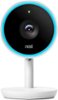
1-2 of 2 Answers
Absolutely! You can turn on and off your Nest Cam IQ Indoor using the Nest app alone. To turn it on/off: -Tap Settings in the top right corner of the Nest app home screen. -Scroll down and select the camera you want to control. -Tap Camera On/Off to reveal the switch. -Tap the switch to turn your camera off or on.
Sorry, there was a problem. Please try again later.Absolutely, You can also make all the changes to image quality and everything else you need. I have mine mounted high up in my living room and it looks and works great. -Jake
Sorry, there was a problem. Please try again later.