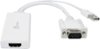
“I have a new Dell computer that has one VGA and one HDMI output on the back, my new Dell monitors only have two HDMI inputs. I tried this to convert the VGA output to the HDMI input on the computer to no avail. Will this work? TY”
Answer This Question
1-3 of 3 Answers
I will let you know, I'm due to get a new computer tower on Tuesday. I hope to make it work.
Sorry, there was a problem. Please try again later.That wont work with this product, the product note says "Product does not convert VGA sources (computers) to HDMI (TV input), it only converts HDMI sources (computers) to VGA displays." Your best option would be to buy a HDMI to HDMI cable or look for converter that does VGA to HDMI. There are a few on this site like StarTech - VGA to HDMI Video Converter - Black or j5create - VGA to HDMI Video adapter - White . Never used one so don't know how well they work.
I would recommend:
Sorry, there was a problem. Please try again later.I think I had a similar issue to what you are describing. I found that I had to match the type of cable to the monitor and then use an adapter when connecting it to my PC. E.G. when I tried to go from VGA cable from PC with a Display Port adapter connecting to the monitor it did not work, but when I used the Display Port cable from the monitor and then connected to my PC with the VGA adapter it did work. This is purely anecdotal and I don't know why one way worked and the other did not.
Sorry, there was a problem. Please try again later.