“I just bought a jbl310 and I cannot get it to pair with my Bluetooth. When I plug in a usb cable, I don’t get any sound either. Please help!”
Answer This Question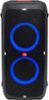
1-1 of 1 Answer
We're here to help you with your JBL PartyBox 310. To use the Bluetooth function; 1. Switch to the BLUETOOTH source by pressing the source button (button with an arrow inside a semi-circle) on top of the speaker. Please make sure that the led on the side of the Bluetooth label is lit. 2. Press on the speaker to enter Bluetooth pairing mode. 3. Choose “JBL PARTYBOX 310” on your Bluetooth device to connect. 4. Once successfully connected, you can stream audio from your Bluetooth device to this speaker.
Sorry, there was a problem. Please try again later.