“Can this or any other computer plug into my old Gateway computer? (The keyboard and computer screen work just fine) The old Gateway still works it's just really old and have run out of space.....so I'd like to update and get a tower.”
Answer This Question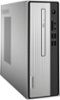
1-1 of 1 Answer
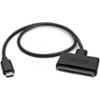
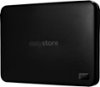
Depending on how old your system is, you might try using an external hard drive. If your Gateway still runs well and has functioning usb ports, using a usb flash drive or a larger usb-connected external hard drive will provide more storage options. If, however, your computer is too old to support a flash drive or an external drive, the 1 TB on this Lenovo desktop is a very good alternative. Just note that the processor is not the fastest on the market today. Now, if by "plugging in" your Gateway to another computer, you mean can you still use the Gateway and view all its data on the new machine, you'd probably have to remove the hard drive from the old computer and invest in some special hardware and (in some cases) a program to connect the hard drive to the new computer via a usb (or usb-type "C") cable.
I would recommend:
Sorry, there was a problem. Please try again later.