“How do you replace the water filter onmodel LRD2603”
Answer This Question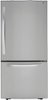
1-1 of 1 Answer
Hello there! To replace the water filter on the LG refrigerator model LRDCS2603S, first locate the filter, which is typically found inside the refrigerator compartment, either in the upper right corner or on the ceiling. Remove the old filter by turning it counterclockwise or pressing a release button if it’s a push-button type. Install the new filter by inserting it into the compartment and turning it clockwise until it is securely in place, or push it in until it clicks if it’s the push-button type. Finally, run water through the dispenser for a few minutes to clear out any air or residues from the new filter. For more detailed instructions, refer to your user manual or send us a private message on Social Media @LGUSSupport. Our team is here to assist you further. We appreciate your patience. —Renzo
Sorry, there was a problem. Please try again later.