1-2 of 2 Answers
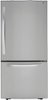
Thank you for reaching us regarding LG Refrigerator. To locate the water filter for the ice maker in the LG LRDCS2603S refrigerator, follow these steps: 1. Open the Doors: Open both refrigerator doors. 2. Locate the Filter: Look for the water filter in the back left of the fridge. You might need to remove the top left shelf to reach it. 3. Remove the Old Filter: Press the button on the filter housing to release the old filter, then pull it down and out. 4. Install the New Filter: Take the new filter (part number ADQ36006101) from its packaging. Align it with the housing and push it in, turning it clockwise until it's secure. 5. Flush the System: To clear out any air or impurities, dispense about 2.5 gallons of water. You can download its owner's manual through this link for more information: https://www.lg.com/us/support/product/lg-LRDCS2603S.ASTCNA0. For additional assistance, please reach out to us on social media @LGUSSupport so we can help you further. ^Cris
Sorry, there was a problem. Please try again later.It's in the main compartment of the fridge, top left corner. One comes with the fridge in a box. They recommend a new one every six mos.
Sorry, there was a problem. Please try again later.