Black Friday is hereShop new DoorbustersShop now

Main Content

Questions & Answers

Page Showing 81-90 of 90 questions
  • QuestionWill it also work with a TV?

    Asked by Janice.

    • Answer If you connect this device to a computer, and if that computer has an HDMI port to connect to an HDTV, then you can play on this device, using your computer, connected with that kind of TV. If you have a special adapter which can connect your Cable Signal after being decodified for your TV, maybe you can record the decodifief signal with an specific software, and if you are able to do that, which I cannot guarantee, then you can also save your recorded signal on Disc to watch the videos again for personal use, like people did time ago with Video Player/Recorders. I suggest you ask Best Buy Geek Squad either by email, chat or phone to tell you if you can do any of this things, and if they recommend you any software and adapters.
      Answered by LOVEWarrior777

  • QuestionIs this compatible with hooking up to your car that has a USB port?

    Asked by TMG.

    • Answer I understand it is engineered to function with a computer which make it work to save or play. I think there is NO way for you to control it just to play CD's & you may not be able to hear or see. If your car comes with a PC or a Mac computer, then maybe, but IT MAY NOT BE MADE FOR PLAYING IN MOTION & I advice you not to try connecting with your Car's USB port, to avoid accidental damage. Surely, my best knowledge is: it may not compatible: it may not work. My best advice for you is: go to your preferred Best Buy, call or chat online with Geek Squad, or contact the company product support, & give them model number or ask them your question just to be sure. (Degree in Information Systems, Computers & Electronics)

      Answered by LOVEWarrior777

  • QuestionI need a DVD/CD player/recorder for My HP laptop. I am not very computer savvy. Will this work without too much fuss?

    Asked by Chota55.

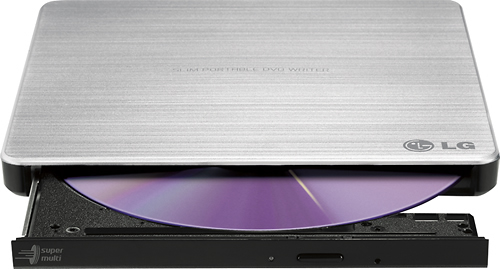
    • Answer The LG - 8x External USB 2.0 Double-Layer DVD±RW/CD-RW Drive - Silver, Model # GP60NS50 connects via USB and the USB ports on your laptop must be able to deliver power to the drive. It is compatible with the Windows 10, Windows 7, Windows Vista™, and Windows XP Operating Systems and it comes with a Software CD for Windows that includes DVD software for use with Windows that you will need to download and install on your laptop first before using the drive. The drive supports the plug and play(not swap) function of Windows. System Requirements are a Pentium IV 2.4 GHz or Higher(with USB 2.0) for basic performance (Recommended for optimal performance: Pentium IV 3.2 GHz or Higher) CPU with 256 MB or larger (Recommended: 512 MB), a Hard Disk with 20 GB or more free space. (The free space needed for writing depends on the quantity of data.), and Video Memory of 64 MB (Recommended: 128 MB)...^IFV

      Answered by LG Digital Customer Care

  • Questioncan this burn dvds when it's NOT connected to the innernet? How ridiculous would that be. That's the point. I need to be able to burn DVDs, like back in ancient times.

    Asked by TuckerdogNC.

    • Answer The only difference between the LG 8x External USB 2.0 Double-Layer DVD±RW/CD-RW Drive, Model # GP60NS50 and a built-in DVD Player in a laptop or PC is that one is internal and the other is an external device that connects via the USB port on your PC/Laptop. It does not have to be connected to the internet, but you will need to download the software that comes with the unit to your PC/Laptop and the unit has to be connected to the PC/Laptop...^IFV

      Answered by LG Digital Customer Care

  • QuestionDoes this unit play 3.5" DVD's? I know it does the larger ones..... I have a Sony camera that recorded on them & I need to save them to my computer.

    Asked by Jamunn.

    • Answer I successfully used it to get data from a mini disc.

      Answered by Jeff

  • QuestionCan this be connected to a television that has the proper connectors USB etc. I take movie DVDs on the road and want a device other than my laptop to connect to the television typically via USB. Thank you

    Asked by Johnnyreno.

    • Answer This device is designed for use with laptops and desktop computers. We would be happy to help you find a DVD player to use with your TV. Our support team is available via Twitter @LGUSSupport, Facebook https://www.facebook.com/LGUSA/ or you can give us a call at 800-243-0000. ^CP

      Answered by LG Digital Customer Care

  • Questionwill this work with google crhome

    Asked by keith.

    • Answer Great question , Keith. This drive works with the following operating systems: Windows 7, Windows Vista™, Windows XP, Mac OS® X. ^CP

      Answered by LG Digital Customer Care

  • QuestionWill it work on a hp chromebook 14?

    Asked by Anonymous.

    • Answer The answer is yes.

      Answered by stuba

  • QuestionWill this work with an HP chrome book?

    Asked by Slade1903.

    • Answer This drive is plug and play. There should be no problem on a Chromebook.

      Answered by Kristoph

  • QuestionDoes this play 3.5" sony dvd's ?

    Asked by Jim.

    • Answer Yes, this product is a portable DVD rewriter and does play DVDs.

      Answered by CommunityAnswer