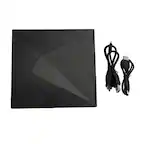
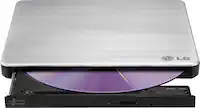
A:AnswerHi there, David. Thank you for sharing your inquiry with us regarding the LG 8x External USB Double-Layer DVD Writer.
https://www.bestbuy.com/product/lg-8x-external-usb-double-layer-dvdrw-cd-rw-drive-black/JXTZZLCVZK
We understand your inquiry! This drive allows you to read and transfer photos from your CDs directly onto your computer by simply inserting the disc and using your computer's file explorer to copy the images. We want to ensure you can easily preserve and access all your important memories. For further assistance and any specific concerns you may have, please contact us on [email protected]. —Renzo
A:AnswerIt has a usb port only. I used a off the shelf c to usb female adapter to hook it up to my macbook air and it worked without any problems. It also works just fine on my pc.
A:AnswerYou can use Media Player on the laptop to rip the CD's inserted into this external drive. Then, you can listen on your laptop or transfer the files elsewhere (phone).
A:AnswerHello there. We understand your inquiry regarding the compatibility of your LG External USB Double-Layer DVDRW/CD-RW Drive with Windows 11.
This drive is designed for plug-and-play functionality and is compatible with modern operating systems, including Windows 11. We understand the importance of ensuring your external hardware is compatible with your current computer setup.
https://www.bestbuy.com/product/lg-8x-external-usb-double-layer-dvdrw-cd-rw-drive-black/JXTZZLCVZK
For further assistance and any specific concerns you may have, please contact us on [email protected]. —Renzo
A:AnswerHi there. We understand your inquiry regarding the setup process for your LG External USB Double-Layer DVDRW/CD-RW Drive.
This unit is designed for plug-and-play functionality, meaning it should be recognized by your computer automatically via the USB port without the need for additional driver downloads. We understand the importance of having a quick and easy setup so you can start using your device immediately.
https://www.bestbuy.com/product/lg-8x-external-usb-double-layer-dvdrw-cd-rw-drive-black/JXTZZLCVZK
For further assistance and any specific concerns you may have, please contact us on [email protected]. —Renzo
A:AnswerHello there. We understand your inquiry regarding the use of your LG External USB Double-Layer DVDRW/CD-RW Drive for software installation.
This drive is fully capable of reading installation CDs, allowing you to install software for your Brother printer onto your HP laptop. We understand the importance of ensuring your external hardware can handle your specific setup tasks seamlessly.
https://www.bestbuy.com/product/lg-8x-external-usb-double-layer-dvdrw-cd-rw-drive-black/JXTZZLCVZK
For further assistance and any specific concerns you may have, please contact us on [email protected]. —Renzo
A:AnswerHi there. Thank you for sharing your experience with us. We understand your inquiry regarding the compatibility of the LG 8x External USB Double-Layer DVDRW/CD-RW Drive with a vehicle's infotainment system. While this drive is designed for use with Windows and Mac operating systems, most car USB ports are intended for data sticks or phone connectivity and do not have the necessary drivers or power output to support an external optical drive. Your feedback is important, and we'd like to assist you further.
https://www.bestbuy.com/product/lg-8x-external-usb-double-layer-dvdrw-cd-rw-drive-black/JXTZZLCVZK
For further assistance and any specific concerns you may have, please contact us on [email protected], and our team will be more than happy to assist you. —Renzo
A:AnswerHello there! We understand your inquiry regarding the LG 8x External USB Double-Layer DVDRW/CD-RW Drive. This model supports 80mm mini DVDs as long as the drive is placed horizontally during operation.
https://www.bestbuy.com/product/lg-8x-external-usb-double-layer-dvdrw-cd-rw-drive-black/JXTZZLCVZK
For further assistance and any specific concerns you may have, please contact us on [email protected]. —Renzo
A:AnswerHello there! Thank you for reaching out to us. We understand your inquiry regarding the LG 8x External USB Double-Layer DVDRW/CD-RW Drive. This drive is a plug-and-play device that is compatible with Windows 11; simply connect it to an available USB port on your PC, and the operating system should automatically recognize it without the need for additional software installation.
https://www.bestbuy.com/product/lg-8x-external-usb-double-layer-dvdrw-cd-rw-drive-black/JXTZZLCVZK
For further assistance and any specific concerns you may have, please contact us on [email protected]. —Renzo
A:AnswerYou need a soft modded Wii and the right app to run backups. YouTube videos are helpful. Sometimes it is more complicated than what it is worth to keep switching out dvds and the Wii disk reader is finicky. Used an external hard drive to run backups…would go that route but it’s up to you. Not advocating piracy, and I know you said backups so I’m assuming you have the original copies- I just had to mention.
A:AnswerHello there. We understand your inquiry regarding the LG 8x External USB Double-Layer DVDRW/CD-RW Drive. This unit is designed to play and read standard music CDs when connected to a compatible computer with media player software.
https://www.bestbuy.com/product/lg-8x-external-usb-double-layer-dvdrw-cd-rw-drive-black/JXTZZLCVZK
For further assistance and any specific concerns you may have, please contact us on [email protected]. —Renzo
A:AnswerA: Answer The LG - 8x External USB Double-Layer DVD±RW/CD-RW Drive - Black, Model # SP80NB80 will read DVD-ROM DVD-R, DVD-R DL, DVD-RW, DVD-RAM (Ver. 2.2), DVD+R, M-Disc (DVD+R SL), DVD+R DL, DVD+RW, CD-R, CD-RW, CD-ROM, and CD-DA(DAE) discs, and it will write to DVD-R DL, DVD-RW, DVD-RAM (Ver. 2.2), DVD+R, M-Disc (DVD+R SL), DVD+R DL, DVD+RW, CD-R, CD-RW discs. You can use it to transfer files on compatible discs to folders or files in your connected PC/Laptop. ~Tanisha
A:AnswerYes. When you plug this drive in, it will act as a partition of your hard drives, allowing you to look through the contents of the CD as if it is a folder. Think of it like that, a folder, on a disk. Once you have the CD loaded, you can browse through the folder and select/move around pictures. You may need additional software to perform certain actions, so I would do some additional research. In short though, yes, this will allow you to do those things.
A:AnswerHello there. We understand your inquiry regarding the LG - 8x External USB Double-Layer DVDRW/CD-RW Drive.
Most LG external optical drives are designed for use with computers (Windows or macOS) and may not be compatible with a TV's USB port, as TVs often lack the necessary drivers to operate an external disc drive.
https://www.bestbuy.com/product/lg-8x-external-usb-double-layer-dvdrw-cd-rw-drive-black/JXTZZLCVZK
We understand that you may have further questions about compatibility. For further assistance and any specific concerns you may have, please contact us on [email protected]. —Renzo
A:AnswerHello there! We understand your inquiry regarding the compatibility of the LG 8x External USB Double-Layer DVDRW/CD-RW Drive with Windows 11.
https://www.bestbuy.com/product/lg-8x-external-usb-double-layer-dvdrw-cd-rw-drive-black/JXTZZLCVZK
Yes, we can confirm that this unit is plug-and-play compatible with Windows 11 operating systems. For further assistance and any specific concerns you may have, please contact us on [email protected]. —Renzo
A:AnswerHi there, Chuck. We understand your inquiry regarding the LG 8x External USB Double-Layer DVDRW/CD-RW Drive.
https://www.bestbuy.com/product/lg-8x-external-usb-double-layer-dvdrw-cd-rw-drive-black/JXTZZLCVZK
Yes, we can confirm that this unit is designed to read, copy, and burn DVD and CD content when used with compatible software on your computer. For further assistance and any specific concerns you may have, please contact us on [email protected]. —Renzo