A:AnswerRegrettably, I do not have this information. LG is a Korean company with manufacturing plants in South Korea, the US, China and Mexico. ^Daphane
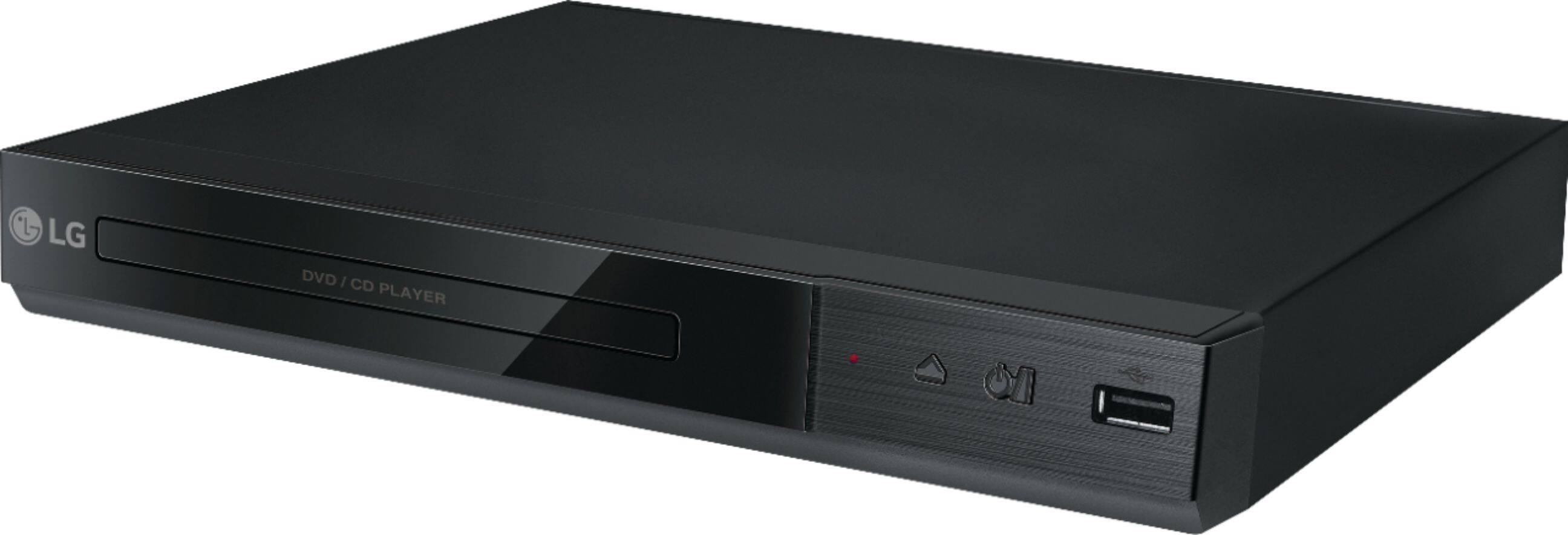
A:AnswerWe regret to read that your LG DVD Player with MP3 Playback/JPEG Viewer, Model # DP132H will not play and only shows a constant red light and the buttons are unresponsive. We sincerely apologize for any inconvenience. Regrettably, the unit will need to be inspected to diagnose what the issue is and it will require a service repair. You can visit our page at https://www.lg.com/us/support/find-service-center to see if there is an LG Authorized Service Repair Center near you that you can contact to have the unit repaired or contact our Support Center at (800) 243-0000 for assistance in making arrangements to have it repaired...^IFV
A:AnswerAs implied in the title, the LG DVD Player with MP3 Playback/JPEG Viewer, Model # DP132H has a JPEG Viewer, meaning that you can view JPED files on a DVD/CD disc. You can also view photo files as a slide show, rotate photos or enlarge the photos, and listen to music during slide show, if the disc contain music and photo files together...^IFV
A:AnswerHi Macc. The LG DVD Player with MP3 Playback/JPEG Viewer, Model # DP132H is not a region-free player. It is coded for Region 1 and will only play DVD discs that are coded for Region 1 or those coded as "All" or "0"...^IFV
A:AnswerHi Randy. Blu-ray DVD, and standard DVD technologies are backward compatible which means each technology can play the technologies that preceded it. The LG DVD Player with USB Direct Recording, Model # DP132H is a DVD player so it can play standard DVDs and CDs that preceded it. It cannot play Blu-ray DVDs since Blu-ray DVD technology succeeded it...^IFV
A:AnswerThe LG DVD Player with MP3 Playback/JPEG Viewer and USB Direct Recording, Model # DP132H has an HDMI® Out for connecting to external units. If your stereo receiver has HDMI inputs on it, you can connect the DVD Player to it and play compact music discs through your stereo...^IFV
A:AnswerThe LG DVD Player with USB Direct Recording and MP3 Playback/JPEG Viewer, Model number DP132H will only play DVDs that are coded for region 1 or DVDs that are coded as "ALL" or "0". It will not play DVDs from other regions...^IFV
A:AnswerYou don't need a monitor for the USB Direct Recording function on the LG DVD Player with USB Direct Recording, Model # DP132H. To record from a CD is as simple as connecting a USB Flash Drive to the player before recording then inserting an audio CD into the tray then selecting a track using ▲/▼ DVD Menu.to record a track, press Audio O)) in play, pause or resume stop mode. To record all the tracks on the CD, press Audio O)) in complete stop mode. For program list recording, while in stop mode, press Audio O)) after selecting a track on the program list. When using this function, the “CD_REC” folder will be created automatically in the USB Flash Driver then the music file(s) is saved in it. External HDD, Multi Card reader, Multi Partition USB, Locked device and MP3 player are not supported. You can set the recording speed pressing AUDIO during USB direct recording...^IFV

A:AnswerThe simple answer is that the LG DVD Player with MP3 Playback/JPEG Viewer - Black, Model # DP132H DOES NOT play any region DVD. Manufacturer's of DVD Players and DVD discs are required by their licenses to included region coding functionality, The DP132H that is marketed and sold in the U.S. will only play Region 1 DVDs or DVD discs that are coded as "ALL" or "0". It will not play Regions 2-8. Region ALL discs have all 8 flags set, allowing the disc to be played in any locale on any player and Region 0 is an informal term meaning “worldwide”. Region 0 is not an official setting. Discs that bear the region 0 symbol either have no flag set or have region 1–6 flags set...^IFV
A:AnswerPlease contact LG Customer Support so that we can better investigate your issues and quickly assist you towards a resolution. You can contact our Customer Support by any of the below options:
Phone: 1-800-243-0000
Live Chat: https://www.lg.com/us/support/chatbot
Email: https://www.lg.com/us/support/email-appointment
Facebook Messenger: https://www.facebook.com/LGUSA/
Twitter: @LGUSSupport
The LG Community Forum is also a great resource for getting help from other LG customers: https://lgcommunity.us.com ^CP
A:AnswerThis unit has a regional code printed on the rear of the unit. This unit can play only DVD discs labeled same as the rear of the unit or “ALL”. This cannot be changed. ^CP
A:AnswerThat is correct. The only outputs on the DVD Player with USB Direct Recording, Model # DP132H are the HDMI Output and the Composite Video Output with its associated Analog Audio Stereo Output (also referred to as RCA Output). The USB port is used for recoding or for playback...^IFV