“Do I have to have a tripod for my Moto Z2 Play to use the Projector Accessory?”
Answer This Question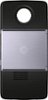
1-5 of 5 Answers
No the projector itself has a sturdy kickstand to support the phone.
Sorry, there was a problem. Please try again later.No, just a table or stand to set it on.
Sorry, there was a problem. Please try again later.No, you will need to place it on a flat surface however. The device has its own built -in stand that will allow you to angle the projection. The device has an automatic keystone correction feature that is surprisingly good, so no matter the angle of projection the display will be squared off properly.
Sorry, there was a problem. Please try again later.No. It has a attached small lever that adjusts in and out. Place your phone on a flat surface and pull the lever all the way up, point projector towards the wall then gently, in a slow manner push the front of projector down to set the picture height. For the best viewing experience, use a blue tooth compatible speaker for a better sound quality, viewing experience. It's a really cool little projector.
Sorry, there was a problem. Please try again later.Not at all. I've been able to just place it on a level area. To adjust the height/angle just be creative with anything like a small book to to adjust the front/ back. Not difficult at all.
Sorry, there was a problem. Please try again later.