A:AnswerYes, you can disable the WiFi, and I strongly encourage it because the WiFi is terrible. On the back of the modem is a WLAN button. Press and hold for 10 seconds and release - the wireless icon should go off. Connect another WiFi router via Ethernet, and boom - you'll have much better signal.
A:AnswerUnfortunately, there is no provision for telephone modem within this particular unit. It is a gateway, however, and that means you can add a SIP- based phone to it or an IP phone to it with the 4 Ethernet jacks on the rear panel.
A:AnswerYes. I currently use it for my Comcast/Xfinity service and it works great. Double check the speed of service your internet plan is on. Most likely it's less than 300 MBPS so you'll be fine.
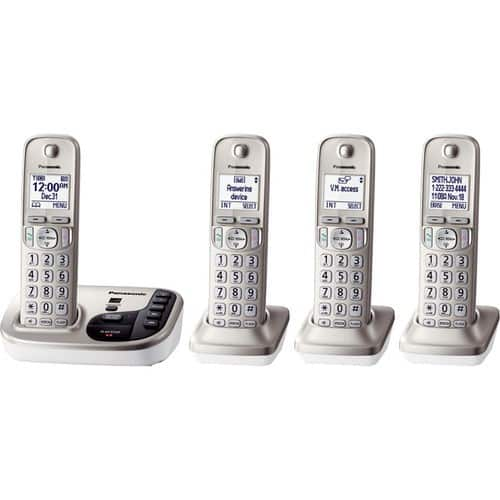
A:AnswerThis router definitely works very well with a Vonage phone, which uses Voice Over Internet Protocol. The cable internet snaps into the router and then another cable, included with your Vonage package but nothing you can't find yourself , goes from the router to the Vonage router. The telephone line to your physical phones connects from the Vonage device to your phone like a regular phone line. Set-up is easy, but it will be even easier if you have a good light and even a magnifying glass to read the tiny lettering in raised print on both devices before you are knee deep in wires. I bought a set of Panasonic phones from Best Buy that has a home base the line feeds into. From there I have four wireless extensions that can be put anywhere in the house where you have an electric plug for the charger. The portable wireless phones were not expensive and make access easier all over the house without trying to remember where you left your smart phone.
A:AnswerI recommend you check TWC modem/router compatibility page on their website. It'll better let you know if it's compatible. They have a pretty extensive list of devices that are. It'll also depend on the speed of your internet service you get from them. I'd start there. Hope that helps.
A:AnswerThe answer to your question is yes. The IPv4 portion is located in Advanced Settings. You can also add proxy information, and exclusions from the network, among other things.
A:AnswerMy house is a large 10 room house good signal in all rooms. I also have attached sunroom with stone walls and exterior glass door between . Signal is strong and I also have my wireless printer in that room with no problems.
A:AnswerYou will still need an ISP and cable TV. The Motorola modem would save you money as you would not need to rent a modem from TWC. This product replaces your modem and router. You would just replace the modem that you received from TWC.
A:AnswerRG6 is the cable type used by Dish/DirecTV for satellite service, a heavier guage than is required for cable TV from Comcast, TWC, etc. Both cables are terminated in an F-type connector, and this gateway has the standard F-type connection, so either wire guage will connect.