“I forgot password to connect devices to the extender? Is there a reset and start all over?”
Answer This Question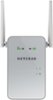
1-4 of 4 Answers
There is a reset on the side below the power button. You need a paperclip or pin to hit the reset button.
Sorry, there was a problem. Please try again later.Yes ..the reset button is located on the back side of the extender.. After reset, simply set the product up like you did the first time.
Sorry, there was a problem. Please try again later.Yes, the written material explains what to do it you need a factory reset (button on side of device).
Sorry, there was a problem. Please try again later.Generally, the password to your extender is the same as the password to your modem/router.
Sorry, there was a problem. Please try again later.