1-4 of 4 Answers
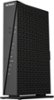
Push your connect button and do a wifi signal search on the item you want to connect and the Netgear product should appear on your device. Enter the password and you should be all set.
Sorry, there was a problem. Please try again later.The device you want to connect has to support the feature but you choose that option when attempting to connect then you push the button on the router and after a few seconds it's connected.
Sorry, there was a problem. Please try again later.First be sure that the push to connect option is enabled in basic setup. Once it is scan for networks on the device you want to connect, select your network and push the button on the modem so that it will broadcast the ID. It should then connect without a problem.
Sorry, there was a problem. Please try again later.Read the manual that is available online. Fairly clear explanation (for geek speak).
Sorry, there was a problem. Please try again later.