“How do I hook up dual monitors and what cheap monitors should I get”
Answer This Question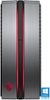
1-2 of 2 Answers
You should be able to plug one monitor in to the dvi port, and another into the hdmi port. The pc should automatically detect your monitors and extend the desktop to both monitors. I chose the Samsung 24" curved monitors CF390 and they're great! If you want duplicate displays you'd have to go in to display settings and change the setting from extend to duplicate. I hope this helps!
Sorry, there was a problem. Please try again later.I just got a HP Omen with the GTX 1060 video card and it only has 1 HDMI output and 1 DVI output. I also purchased a HP 25"(25es) monitor which they had on sale for $120 and have a 32" HDTV that I am using. I ran the HDMI cable to the monitor and also picked up a HDMI to DVI cable and ran that to my TV an both are working amazing right now. For a simple solution this is what I suggest as it has worked extremely well for me. Hope this helps.
I would recommend:
Sorry, there was a problem. Please try again later.
