“How to change greeting when line is in use I own a Panasonic KX-TG7644M. I am trying to change (or delete) the greeting that plays for an incoming call, when I am talking on the phone. My husband recorded a greeting, and I would like to change it, since we are separated. I have searched and searched on the panasonic website/manual, and cannot find any directions.”
Answer This Question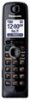
1-2 of 2 Answers
READ MANUAL
Sorry, there was a problem. Please try again later.It is on page 58 of the downloadable manual. Google "panasonic kx-tg7644m manual", first choice, "Operating Instructions (English) - FTP Directory Listing" Here are two ways to do this: Recording your greeting message 1 [MENU] #302 2 Up/Dn Arrows to: “Yes” press [SELECT] 3 After a beep sounds, hold the handset about 20 cm (8 inches) away and speak clearly into the microphone (2 minutes max.). 4 Press [STOP] to stop recording. 5 [OFF] OR 1 [MENU] 2 Up/Dn Arrow to "Answering Device", then [SELECT] 3 Up/Dn Arrow to "Greeting", then [SELECT] 4 Up/Dm Arrow to "Record Greeting", then [SELECT] 5 Up/Dn Arrows to: “Yes” press [SELECT] 6 After a beep sounds, hold the handset about 20 cm (8 inches) away and speak clearly into the microphone (2 minutes max.). 7 Press [STOP] to stop recording. 8 [OFF]
Sorry, there was a problem. Please try again later.