“I bought this remote at Best Buy to use with my Magnavox tv. However I didn’t realize I needed a code. How do I get a code that will make it work with my tv??”
Answer This Question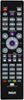
1-1 of 1 Answer
Hi Jeanie , I will walk you through the instructions for using the AUTO CODE SEARCH for this remote. 1st = manually turn on the device you want to control 2nd = on the remote PRESS AND HOLD THE TV BUTTON - do not remove your finger (Note: the power key should illuminate), with your other hand place your finger firmly on the POWER BUTTON .... the POWER KEY will turn off BUT DO NOT REMOVE YOUR FINGERS ----- WAIT FOR THE POWER KEY to come back on and stay on THEN ..... RELEASE YOUR FINGERS ........ YOUR MAGNAVOX TV should now be synced with your remote ps: if you have a DVD PLAYER or an AUDIO SOUNDBAR SYSTEM and wish to use your RCA REMOTE CONTROL ...... just repeat the steps above and use the proper buttons on your remote hope this is helpful to you Jeanie ..... Happy Holidays
Sorry, there was a problem. Please try again later.