1-1 of 1 Answer
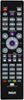
The steps in pairing your universal remote are as follows. 1. Turn on whatever device you want to program. 2. Press and release the button on the remote that corresponds with whatever device you’re currently attempting to program (i.e. the TV, the DVD player, etc.). You’ll notice that the ON-OFF button will turn on and stay on as you complete this step. 3. Press the device button again, this time simultaneously with the ON-OFF button. The ON-OFF button will turn off and then come back on immediately. Release both buttons once the ON-OFF button comes back on. It should stay on once you release the buttons. 4. Press the PLAY button on the remote. The device you’re programming should respond within five seconds. If it doesn’t respond after five seconds, press the PLAY button every five seconds until the device turns off. 5. Press and release the REVERSE button once the device turns off to see if it will turn on again. 6. Press and release STOP to save the new code.
Sorry, there was a problem. Please try again later.