“My model does not come with the button on the top of the ice bucket for easy removal. How do I remove the ice bucket?”
Answer This Question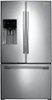
1-7 of 7 Answers
When looking at the ICE MAKER, look on the side of the unit at the very top right corner, there you should see the button, push it and ease the tray out. If it is not really there then contact Samsung
Sorry, there was a problem. Please try again later.I called the 800# in the user manual and was directed by the customer rep, who told me to put my hand in the opening hole under the basket and to pull it out. While doing so I was instructed to hold the button on the side for eight seconds to reset the icemaker as it had stopped producing ice.It was a little tight trying to remove the basket but my hubby was able to get it released. Unfortunate that this info was not indicated in the user manuel. I hope this was helpful.
Sorry, there was a problem. Please try again later.You have to lift from the bottom middle and press the tab there. Then pull out.
Sorry, there was a problem. Please try again later.Grab and pull straight out, fairly hard. They could have made this somewhat easier. I pull mine out every day to load a cooler with ice. If it doesn't go all the way back in turn the augur a little bit.
Sorry, there was a problem. Please try again later.Lift up and pull out.
Sorry, there was a problem. Please try again later.Thanks for the question, Donna. Most new Refrigerator models with the Ice Master ice maker don't have a release button on the side of the ice bucket. Instead, lift the front of the bucket to release it then pull it toward you. It isn't unusual for the bucket to require a firm lift and pull to be removed initially. - Ms. Samsung
Sorry, there was a problem. Please try again later.Do you even own this fridge? Mine had no button! Just pull out the freezer and it's there, ice ready. The bucket is not locked to anything. Check to see if you removed the tape lol
Sorry, there was a problem. Please try again later.