“What cables and connecting devices will I need to be able to use my MacBook Air with this? Also, can I use the apple keyboard and mouse too with this monitor?”
Answer This Question
1-3 of 3 Answers
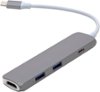
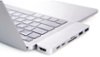
I you have a USB-C MacBook Air, you'll want a USB-C hub. I use a HooToo USB-C hub and connect the display with an HDMI 2.0 cable that comes with the display. If you have an older MacBook Air, get an HDMI to ThunderBolt adapter.
Sorry, there was a problem. Please try again later.The monitor comes with a HDMI Cable, but if you'd like to achieve the higher hertz, you'd need to get a Display Port cable. For this device you'll need to have either HDMI or DP inputs available on your MacBook Air, otherwise you'll need a dongle/adapter (attached below) in order to achieve this. As the apple keyboard and mouse are bluetooth, all you'll need to do is connect them through your Macbook Air, and you'll be able to connect.
I would recommend:
Sorry, there was a problem. Please try again later.You either need an HDMI port to plug this into or a USB-C to HDMI adapter.
Sorry, there was a problem. Please try again later.