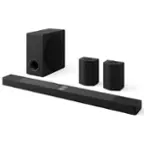
A:AnswerFor the price, this system will rock. My room I use the sound bar in is 12 x 16, and I have to adjust the bass. The bar has tingy highs and the added center channel weak add voice clarity. If you want more front end sound, there are optional wireless Samsung satellite speakers that pair with this system. Keep in mind that sound bar placement plays a major role in the acoustics your trying to achieve within your media space.

A:AnswerI found the HDMI connection the most practical as it allows me to control the sound from my TV remote controller. As for sound quality, I did not notice any difference between HDMI and optical (I tried that, too). The bluetooth is for the woofer and this works great for me.
A:AnswerHi Carlos,
The HW-B650 Soundbar will work with any TV that supports Bluetooth, Digital Optical, or HDMI inputs.
The total wattage is 430W.
~Samsung Solutions
A:AnswerHi Jerms,
One of the first things I would do is make sure that you are running the newest firmware for your HW-B650 Soundbar. Go to the link: https://www.samsung.com/us/support/downloads/?model=N0021404&modelCode=HW-B650/ZA and follow the steps to update your soundbar.
Another thing to try is press the SOUND CONTROL button until you see AUDIO SYNC scroll across the LED display of your soundbar. Use the UP/DOWN buttons to adjust the audio sync between 0 - 300 milliseconds.
~Samsung Solutions
A:AnswerYes HDMI ARC is the best, I looked at the specs of this tv and it seems it doesn't have this but you may be able to use a regular hdmi imput or the digital audio imput for sure.
A:AnswerHello Khan,
The HW-B650 Soundbar does not support 4K pass through, for this feature you will need to move up to the Q-Series Soundbar series.
~Samsung Solutions
A:AnswerHi Zaka,
The HW-B650 Soundbar is compatible with the 7 Series TVs, you can connect using Bluetooth, a Digital Optical, or HDMI.
~Samsung Solutions