“Why must I use a SMART PHONE to connect these speakers via Bluetooth??? Why can't my 2 speakers just connect independently? This was a complete waste of money!!”
Answer This Question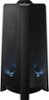
1-2 of 2 Answers
Hi! You do not need to use a Smart Phone to connect multiple Sound Tower speakers together via Group Play. Press the GROUP PLAY button on the back of the host or main Sound Tower system. The “HOST” message appears on the display and the LED blinks on the GROUP PLAY button. 2. Press the GROUP PLAY button on the 2nd Sound Tower system (SUB 1). The “GROUP PLAY CONNECTED” message appears on the display and the GROUP PLAY button on both systems stops blinking. 3. Press the GROUP PLAY button on the 3rd Sound Tower system (SUB 2). The “GROUP PLAY CONNECTED” message appears on the display and the GROUP PLAY button on the system stops blinking. 4. If you want to add more Sound Tower systems, repeat step 3. 5. Play music on the HOST Sound Tower. Sound outputs from all the connected system. ^Tim
Sorry, there was a problem. Please try again later.It's just a guess but, that speaker plugs into to an electrical outlet. Every speaker i ever seen that plugs into an a tuner don't have an a/c plug. It would be conflicting with 2 sources of electricity and possibly blow something out. Besides that speaker is for outdoor. It's wireless. Why would you want to connect wires to it anyway???
Sorry, there was a problem. Please try again later.