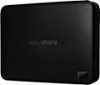
“Is this a good for storing data for over 5+ yrs? I don't plan to use it often, just wanna back up data once every 6 months and forget it. Also, can we disable encryption to minimize data loss risk, in case something fails or forget pswd.”
Answer This Question
1-3 of 3 Answers
If you are just storing data and using it every 6 months or so without planning to be using it constantly I would recommend a normal HDD in all honesty. You can get a 4TB one for the cost of this one that serves the same purpose. A SSD is only REALLY good if you will be constantly using it (video editing, playing games from it, moving files from) cause of it's speed advantage and not so much for long term storage in all honesty.
I would recommend:
Sorry, there was a problem. Please try again later.The original answer to this question should not be taken as fact. Solid state storage offers major advantages when choosing storage for archival or "cold storage”. As the name suggests, there are no moving parts in a solid-state storage device. They utilize flash memory, which is also used for thumb drives, the memory (RAM) inside your computer, and the memory on dedicated graphics cards. Traditional, spinning, storage devices contain magnetic platters spinning at 5,400-7,200 RPM. Similar technology to a record (LP), only 160 times faster. This causes problems for hard drives, because when spinning at high rates of speed, even a small bump can knock the magnetic platters out of their alignment causing them to literally shatter. Not good when those platters contain precious family photos or important documents. The other concern with spinning storage, is that the platters tend to seize up preventing them from spinning and rendering the drive useless. This is especially true when spinning drives sit unused for long periods of time, are stored in high humidity environments, or high temperatures. This makes SSDs an excellent choice for long term archival storage. But you should follow the 3-2-1 backup philosophy. For every important piece of data (photos, documents, etc.), you should have 3 copies. They should exist on 2 different media formats (SSD, SD Card, Blu-Ray, cloud storage, Tape Backups, etc). And, perhaps most importantly, at least 1 of them should be offsite, in case of natural disaster, fire, theft, or negligence. Offsite could be in a safety deposit box, at a parent/child’s house, or cloud storage provider. Check all backups at least once every 6 months to make sure the media still works and has not been rendered obsolete (Remember Zip Disks?). Follow these principals and you will never have to have the horrible feeling of lost data.
Sorry, there was a problem. Please try again later.It's a SSD so if SSD can store data for 5+ years safely than this can. The hardware encryption is optional and only begins after setting a password, until then their is NO encryption active.
Sorry, there was a problem. Please try again later.