“Will this Seagate External Hard drive be compatible with Mac also?”
Answer This Question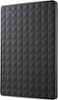
1-6 of 6 Answers
If you go to the Seagate website there is a driver for NTFS for Mac that you can download, and I believe have both Macs and PCs use it at the same time. I haven't tested this yet, but it seems a better option than having to completely reformat the disk using the Mac OS utilities program on your computer. There are also disk utilities software you can download to Seagate hard drives. Hope this helps. Check it out....
Sorry, there was a problem. Please try again later.I used it for my mac to transfer all the files I wanted to save after selling my Mac.
Sorry, there was a problem. Please try again later.I am not 100 percent sure but I am 80% certain this will work on a Mac as long as it is formatted to the HFS+ format in Disk Utility. I have used backup Plus drives and many flash drives none were Mac specific and work perfectly. Macs can Support NTFS and FAT32. NTFS is read only on a Mac and FAT32 is a good universal between windows and Mac but is only good if files sizes are 4GB or less.
Sorry, there was a problem. Please try again later.Yes if you format it as fat32 instead of its default ntfs.
Sorry, there was a problem. Please try again later.I thought I saw the drive labeled specifically if it would work with PC or Mac. I think they sell them separately. Your Best Buy can tell you in a heartbeat.
Sorry, there was a problem. Please try again later.No, it is not compatible with Mac computers - Windows 7, Windows Vista, or Windows XP are required as an operating system.
Sorry, there was a problem. Please try again later.