A:AnswerI'm not using that same setup, but I use a Broadlink Blackbean (very similar) and was able to learn all the remote commands and resend them easily. I assume you are trying to put together some sort of smart remote functionality. I'll be adding more buttons later as soon as I find a better TV remote to copy with the extra buttons. I used plain HTML for display so every device (like my phone) can get to a screen like this ...
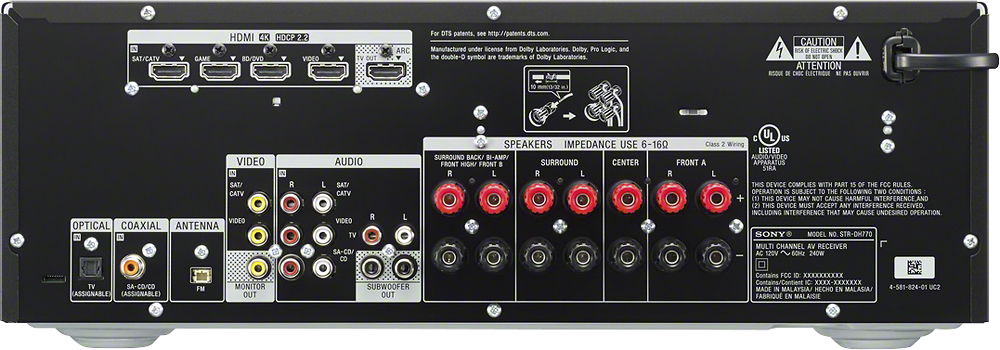
A:AnswerThey are labeled TV, Blurey/DVD, cable, other so that is how they would match up to your existing. If you have a more recent TV you can check which in on your TV is ARC and that way can run TV audio direct through the receiver. Just make sure the CEC is off on your TV sound in settings.
A:AnswerHi there! All you have to do is connect the speaker wires in, and make sure that you set the receiver to the correct input and that's it. You may check this link for more information: https://docs.sony.com/release//QSG_4584087111.pdf Thanks, -Mark
A:AnswerHi Rodney, yes, HDMI 2.0 is capable of passing 18gbps max bandwidth. Additionally, we recommend using high-speed HDMI cables with our devices. Thanks, -Mark
A:AnswerYes. If you turn pass through on you can watch using the TV speakers or turn the amp on and have surround sound with whatever input you choose.
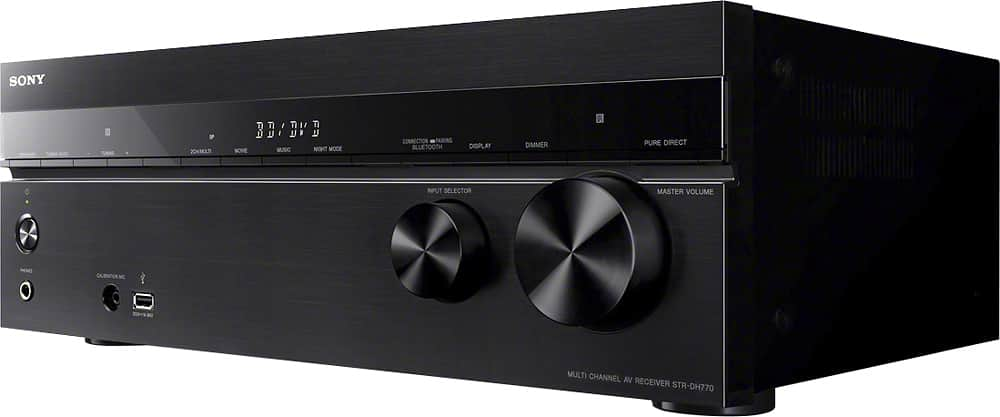
A:Answertry pressing the movie button on the remote. cycle through till you can hear sound from your speakers. make sure you are close to the other speakers rather than the fronts. the tone may be low.
A:AnswerYes, you can use your 5.1 speaker system but you will only be able to connect 5 satellites and one subwoofer speaker. This receiver supports up to 7 satellite speakers and 2 subwoofers. Yes, you will need speaker cables.