Questions & Answers
- Model:
- BDPS1700U
- |
- SKU:
- 10938700
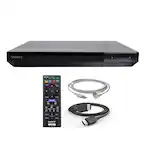
Q: QuestionHow long is the HDMI cable that is included with this player?
Asked by Paul.
- A:Answer About 2'
Answered by Dg94
Q: QuestionDoes item come with protective case, or is one available model:BDPS1700U
Asked by Buck.
- A:Answer Thank you for contacting Sony, Buck. The BDP-S1700U does not come with a protective carrying case, as it is designed primarily as a stationary home theater component. While Sony does not manufacture a specific travel case for this model, third-party dust covers may be available from various retailers if you are looking to protect the unit from dust while not in use. In the box, you’ll find the Blu-ray player, a remote control (with batteries), and the AC power adapter. We hope this helps! We appreciate your interest in Sony products. Should you require any further assistance, please don't hesitate to reach out for support here: https://us.esupport.sony.com/support/s/support-contact?language=en_US&category=bd Best regards, Gus, Sony North America Customer Support
Answered by SonyListens
Q: QuestionIs the remote compatible with a tcl roku tv model 43S455?
Asked by Elaine.
- A:Answer Hi Elaine, While we cannot confirm compatibility with third-party devices such as TCL Roku TVs, the remote for the BDP-S1700 is primarily designed to control the player and Sony brand televisions. We recommend using your original TCL remote to ensure full access to your TV's specific Roku features and navigation. Thanks for choosing Sony. Best regards, Eliab
Answered by SonyListens
Q: Questioni want to buy a blu ray player that I can plug into my mac computer and play blu ray 4K without any additional software. What do you recommend?
Asked by Roberto.
- A:Answer Thank you for contacting Sony, Roberto. We appreciate your interest, but unfortunately, you cannot plug a standalone Sony Blu-ray player into a Mac to play movies. Our players, like the BDP-S1700U, are designed to connect directly to a TV via HDMI. Additionally, the BDP-S1700U is a standard HD player and is not compatible with 4K Ultra HD discs. For the best 4K experience, we recommend using a player like our UBP-X700 connected directly to a 4K TV. We appreciate your interest in Sony products. Should you require any further assistance, please don't hesitate to reach out for support here: https://us.esupport.sony.com/support/s/support-contact?language=en_US&category=bd Best regards, Gus, Sony North America Customer Support

Answered by SonyListens
Q: QuestionIs there a way to loop a DVD on this device? I am looking to run the same DVD all day for my business. When the video finishes, I would like to have it restart automatically, can this machine do this?
Asked by MaryAnn.
- A:Answer Hi Reginleif, We appreciate your interest in the BDP-S1700 for your business needs! You can certainly loop a DVD by using the Repeat function found under the Options menu during playback, which allows the player to automatically restart the title or chapter indefinitely. For a seamless all-day display, we also recommend adjusting the "Auto Standby" setting to ensure the player remains active as long as you need it. Thanks for choosing Sony. Best regards, Eliab
Answered by SonyListens
Q: QuestionWill it play region B blue rays?
Asked by Anonymous.
- A:Answer Thank you for contacting Sony. By default, Sony Blu-ray players sold in the United States are coded for Region A discs and Region 1 DVDs. This means the BDP-S1700U will not play standard Region B Blu-rays, which are typically intended for Europe, Africa, and the Middle East. However, it will play any "Region Free" or "All Region" discs regardless of where they were purchased. If your movies specifically have the Region B logo on the back, they unfortunately won't be compatible with this model. We appreciate your interest in Sony products. Should you require any further assistance, please don't hesitate to reach out for support here: https://us.esupport.sony.com/support/s/support-contact?language=en_US&category=bd Best regards, Gus, Sony North America Customer Support

Answered by SonyListens
Q: QuestionDOES THIS PLAYER HAVE WI FI WIRELESS CAPABILITY? SONY BDPS1700U BLU-RAY PLAYER.
Asked by GG.
- A:Answer Hi GG, Thank you for your question! No, the BDP-S1700U does not have Wi-Fi or wireless networking capabilities. This model is designed with a "Wired-Only" connection via the Ethernet port on the back of the device. This connection is used specifically for: - Downloading necessary system firmware updates. - Accessing BD-Live content (extra features found on certain Blu-ray discs). If you require a Blu-ray player with built-in Wi-Fi for wireless streaming and updates, we recommend looking at our UBPX700M or UBPX800M2 models, which both support wireless connectivity. Thank you for considering Sony! Regards, Dominick
Answered by SonyListens
Q: QuestionWhat is the model number of this remote? I would like to buy a silicone case for it so it doesn’t get lost.
Asked by Poppersgalore03.
- A:Answer Hello Poppersgalore03, Thank you for considering Sony products! We appreciate your inquiry regarding the remote control for the BDPS1700U. The model number of the remote is 149350811 REMOTE COMMANDER (RMT-VB500U). We would like to inform you that Sony does not manufacture or offer a silicone case specifically designed for this remote. However, you may consider using a third-party silicone case compatible with this model to help protect the remote and reduce the risk of misplacement. For comprehensive information about the BDPS1700U unit, please refer to the following link: https://www.sony.com/electronics/support/res/manuals/5043/9bf387fdef45845189a891b85b87783b/50433041M.pdf Best regards, -Fred
Answered by SonyListens
Q: QuestionWhat is the model number remote comes with this dvd player? I want to get a silicone cover for the remote.
Asked by Poppersgalore03.
- A:Answer Thank you for contacting Sony, Poppersgalore03. The BDP-S1700U comes with the RMT-VB500U remote control. A silicone cover is a great idea to keep it protected! We appreciate your interest in Sony products. Should you require any further assistance, please don't hesitate to reach out for support here: https://us.esupport.sony.com/support/s/support-contact?language=en_US&category=bd Best regards, Gus, Sony North America Customer Support

Answered by SonyListens
Q: QuestionDoes this Sony BDPS1700U Blu-ray player come with a remote control?
Asked by Anna.
- A:Answer Yes, it comes with a remote
Answered by Poppers0304
Q: QuestionCan this play audio CDs?
Asked by AaronI.
- A:Answer Hi FunkyShoes, Yes, the BDP-S1700 is fully compatible with standard audio CDs. In addition to Blu-ray and DVD playback, it supports CD-DA (audio CD), CD-R, and CD-RW formats, making it a versatile option for enjoying your physical music collection alongside your favorite movies. Thanks for choosing Sony. Best regards, Eliab
Answered by SonyListens
Q: QuestionIs this unit able to play videos on DVD DL discs? I've heard that DVD DLs often aren't compatible with audio. Is this able to play the audio that accompanies the video?
Asked by Anonymous.
- A:Answer Thank you for contacting Sony. The supported DVD formats are limited to DVD-ROM, DVD-R/DVD-RW, and DVD+R/DVD+RW. Since DVD DL is not included in the list of playable discs for this specific unit, we cannot guarantee compatibility for that format. Additionally, please note that while the player supports standard DVD audio, the specifications list the audio material side of DualDiscs as a format that cannot be played. For the best experience, we recommend using the standard DVD and Blu-ray formats officially listed in your manual, and ensuring that any recordable discs have been correctly finalized. We appreciate your interest in Sony products. Should you require any further assistance, please don't hesitate to reach out for support here: https://us.esupport.sony.com/support/s/support-contact?language=en_US&category=bd Best regards, Gus, Sony North America Customer Support

Answered by SonyListens
Q: QuestionCould I plug this device into a computer with a hdmi port ?
Asked by Anonymous.
- A:Answer Hi there, Most computer HDMI ports are output-only, meaning they cannot receive a signal from a Blu-ray player; however, if your computer has an HDMI-In port or you use a video capture card, it may work. For a standard setup, we recommend connecting the player directly to a monitor or TV for the best performance. Thanks for choosing Sony. Best regards, Eliab
Answered by SonyListens
Q: Questioncan this unit connect to a home network?
Asked by network.
- A:Answer Thank you for contacting Sony. The BDP-S1700/U can connect to a home network only via a wired Ethernet port (it does not support Wi-Fi), and this connection is strictly for performing essential Software Updates and accessing the BD-Live™ Service. We appreciate your interest in Sony products. Should you require any further assistance, please don't hesitate to reach out for support here: https://us.esupport.sony.com/support/s/support-contact?language=en_US&category=bd Best regards, Gus, Sony North America Customer Support

Answered by SonyListens
Q: QuestionDoes it play SACD and DVD Audio discs? Will the audio comeout thru the HDMI port?
Asked by Floyds.
- A:Answer HI Floyds, The BDP-S1700U Blu-ray Player is designed to play standard Blu-ray Discs, DVDs, and CDs, but it does not support the playback of DVD-Audio discs. Furthermore, according to specifications, this model does not support Super Audio CD (SACD) playback of the high-resolution layer, though it will play the standard CD layer of hybrid SACDs. Regarding connectivity, the audio signal will come out through the HDMI port, which is the primary digital output for both video and high-quality audio formats like Dolby TrueHD and DTS-HD Master Audio. Thanks for choosing Sony. Best regards, Eliab
Answered by SonyListens
Q: QuestionCan this be used with Roku TV?
Asked by Ginger.
- A:Answer Hi Ginger, Yes, the Sony BDPS1700U Blu-ray player can be used with any Roku TV or any modern TV with an HDMI port. You simply connect the player to one of your TV's available HDMI inputs using the included cable, and then select that HDMI input (Source) on your Roku TV to watch your discs. Thanks for choosing Sony. Best regards, Eliab
Answered by SonyListens
Q: QuestionIs player compatible with ARC/eARC configuration (new Sonos sound system). My old player requires a separate cable which Sonos does not support.
Asked by Bruce.
- A:Answer Hi Bruce, That is an excellent pre-sales question. Based on the official product specifications, the Sony BDPS1700U Blu-ray player has one HDMI Output and one Coaxial Digital Audio Output. The HDMI port on this player is designed only to output the audio and video signal from the disc; it does not support ARC (Audio Return Channel) or eARC functionality, as those technologies are typically found on a TV's HDMI input to receive audio back from a connected sound system. Therefore, the player is not able to utilize an ARC/eARC connection to your Sonos system. Thanks for choosing Sony. Best regards, Eliab
Answered by SonyListens
Q: Questiondoes this have the capability to record
Asked by Mac.
- A:Answer Hi Mac, Thank you for your question! The Sony BDP-S1700U is a Blu-ray Disc player and does not have a recording function or capability. It is designed only for playback. Thank you for considering Sony products! Regards, Dominick
Answered by SonyListens
Q: Questiondoes it have a remote?
Asked by Anonymous.
- A:Answer Hello there, Thank you for considering Sony products! We appreciate your inquiry regarding the Sony BDPS1700U Blu-ray Player. We can confirm that the BDPS1700U includes a remote control, specifically the RMT-VB500U model. This remote is designed to provide full operational control of the BDPS1700U, allowing you to easily navigate menus, control playback, and access various features from the comfort of your seat. For detailed specifications and additional information about this model, please visit the official Sony product page: https://electronics.sony.com/tv-video/blu-ray-dvd-players/all-blu-ray/p/bdps1700u Best regards, -Fred
Answered by SonyListens
Q: QuestionHow do you make it play music CDs? Does it need any cables to do that? Also is this compatible with Bluetooth?
Asked by Elaine.
- A:Answer Hi Elaine, The Sony BDPS1700U is designed to play standard music CDs; you simply load the disc into the tray just like a Blu-ray or DVD. To get the audio and video signal from the player to your TV or sound system, you must use a cable: the included HDMI cable connects the player to your TV for both picture and high-quality sound. However, please note that the BDP-S1700U does not have built-in Bluetooth for wirelessly connecting to headphones or speakers. Thanks for choosing Sony. Best regards, Eliab
Answered by SonyListens