“Since this is voice activated, it will use up the batteries faster. Is there a way to turn off the voice activation until you're ready to use it? Say, if I don't use it for a few days, no sense in draining the batteries then, or do I pull them out?”
Answer This Question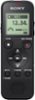
Clearance
$71.99
Save $3
The comparable value is $74.99
1-1 of 1 Answer
Voice activated pauses recording when decibels are below threshold How to turn off voice activated recording. The Select “ Settings” - “Recording Settings” - “VOR” from the HOME menu, and then press . Press or to select “ON,” and then press . “VOR” is set to “OFF” by default. Press REC/PAUSE For more detailed information follow link to Sony’s Help Guide. https://helpguide.sony.net/icd/p37/v1/en/contents/TP0001272000.html
Sorry, there was a problem. Please try again later.