“Does this phone come this large buttons and large screen icons?”
Answer This Question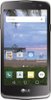
1-1 of 1 Answer
Hi. This is Cristy from TracFone Wireless. The phone doesn't have large buttons. To enlarge the screen icons, you may try going on the Applications screen. From the Home screen, tap Apps to open the Applications screen. Touch the Menu Key > Show large icons > OK.
Sorry, there was a problem. Please try again later.