“HI , CAN I BACKUP MY COMPUTER HARDLINE WITH OUT HAVING TO GO ON THE CLOUD ALL THE TIME ?”
Answer This Question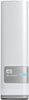
1-5 of 5 Answers
Assuming you are in Wndows . . . ??? IF you are on the same network hub (i.e., you and the NAS are hanging off the same router) try the following... Find the IP address for the NAS ... it might be something like 192.168.1.123<- you probably set this up at some point when you were accessing the boxes' front end administrator page ... HOWEVER do NOT use a browser in this next part. Instead open a window where you might typically view your local hard drive In there find a dropdown menu for TOOLS > Map Network Drive ... the server is \\192.168.1.123\ <-i.e., the same IP as the NAS. The share ... is well the Share ... the folder you have set up for access on your NAS So maybe you might map to your Z drive \\129.166.1.123\MyShare When you try that -- if you have it password protected (and please do) -- a pop-up should appear asking you for the user name and password. Enter that. THEN when successful (and you might have to try to a few combinations -- I recall something was hinkey about how the user name and the share mapped here (but I could be wrong -- and the password will be the password associated with the share on the drive -- not the share on the website ... they can be two different things [PAIN!]), but ... once you get it -- you can use that drive just like it was part of your computer -- without going thru anything. If you are hard wired into the same GB router as the NAS, your access times will rock -- as in USB competitive (wireless add overhead that really slows things down). OF COURSE when done, close all windows, right click on the drive -- and disconnect -- to leave everything orderly. and if hanging -- log of / shut down. Hope this helps!
Sorry, there was a problem. Please try again later.Yes
Sorry, there was a problem. Please try again later.Absolutely.
Sorry, there was a problem. Please try again later.Yes, you can find all the WD software available here (http://www.mycloud.com/learn/?id=mycloud#mc_download).
Sorry, there was a problem. Please try again later.Yes, provided you're always on the same Local Area Network you can back up to this Network Attached Storage device without being connected to the Internet (or Cloud).
Sorry, there was a problem. Please try again later.