Customer Ratings & Reviews
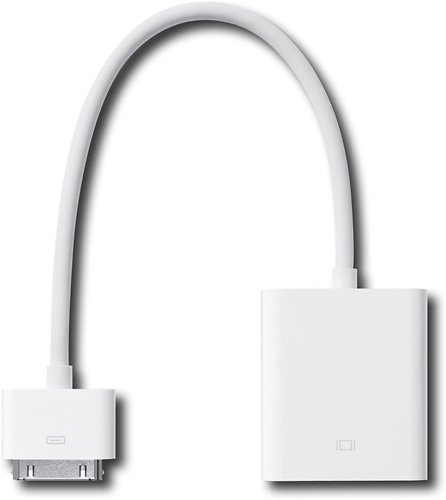
- Model:
- MC552ZM/A
- |
- SKU:
- 9889724
Customer reviews
Rating 4.3 out of 5 stars with 131 reviews
(131 customer reviews)to a friend
Customers are saying
Customers praise the Dock Connector-to-VGA Adapter for Apple® iPad® for its ease of use, especially when connecting to a projector or monitor. They find it a great tool for presentations and displaying their iPad screens. However, some customers express concerns about its compatibility, as it is only suitable for iPads 2 and later versions, and its short cord length.
This summary was generated by AI based on customer reviews.
Rated 5 out of 5 stars
iPad to VGA
||Posted .This reviewer received promo considerations or sweepstakes entry for writing a review.Attached adapter to iPad and worked liked it was advertised.
I would recommend this to a friendRated 5 out of 5 stars
Working great!
||Posted .This reviewer received promo considerations or sweepstakes entry for writing a review.This item is working great! Perfect for the tech use in my classroom.
I would recommend this to a friendRated 3 out of 5 stars
Typical apple adapter
||Posted .This reviewer received promo considerations or sweepstakes entry for writing a review.Does what it is intended to do. As expected overpriced in comparison to other adapter options, but if you need a quick adapter or prefer OEM, no complaints... other than price.
I would recommend this to a friendRated 5 out of 5 stars
Convenient
||Posted .This reviewer received promo considerations or sweepstakes entry for writing a review.Connects great to my BOSE wireless speakers 4 iPhone.
I would recommend this to a friendRated 5 out of 5 stars
Works great!
||Posted .This reviewer received promo considerations or sweepstakes entry for writing a review.This cord suits my needs. I use it often for school projects.
I would recommend this to a friendRated 1 out of 5 stars
Bought it, quickly returned it
||Posted .This reviewer received promo considerations or sweepstakes entry for writing a review.I bought this adapter hoping that the 30-pin connector would lock into the 30-pin slot in the iPad, however it doesn't lock, and when the iPad is shifted, the connector easily disconnects.
No, I would not recommend this to a friendRated 5 out of 5 stars
Great
||Posted .This reviewer received promo considerations or sweepstakes entry for writing a review.Does exactly as it says. Only works with iPhone 4. Not 5.
I would recommend this to a friendRated 3 out of 5 stars
Projecting iPhone to tv solution
||Posted .This reviewer received promo considerations or sweepstakes entry for writing a review.A little awkward but this works to although me to watch Comcast on the go as I travel
I would recommend this to a friend- Pros mentioned:Vga
Rated 4 out of 5 stars
The product does what it is supposed to do
Posted .This reviewer received promo considerations or sweepstakes entry for writing a review.I am not sure why so many people are posting up 1 star reviews. I guess they didn't read anything about video output and just expected every app out there to have video out capabilities. Now, with the iPad 1 (along with the 4G iPod touch and iPhone 4, both of which this accessory works with!), you need to have an app that supports video output. You won't be able to plug it in and expect everything to work. Keynote will work when in slideshow mode, you can watch movies with the Video app, etc. The instructions have to actually be in the app in order for video to be coming out of those older devices. The iPad 2, iPad 3, and iPhone 4S all support display mirroring which means you can plug this in and immediately get some type of video output showing the contents of your iDevice (just like a full fledged notebook). This means that everything will be displayed through the VGA connector regardless of if the app supports video output or not. For example, I can play Angry Birds and have it mirrored to my HDTV or projector. There are limitations to it though as certain apps will lock video output. Hulu Plus and HBO Go come to mind where they won't allow the iPad to output video using this adapter (Netflix works though). Copy protected music videos (the older ones), TV Shows, and Movies also can't be output using this accessory. That is why the VGA adapter is more geared towards business use. Apple released their HDMI adapter last year and that works with Hulu Plus along with copy protected video content purchased from the iTunes Store. It still doesn't work with HBO Go. VGA is really a legacy video connection in this day and age when notebooks, graphics cards, and monitors are working with mini display port and HDMI. However, many businesses and institutions still heavily rely on VGA due to having older equipment (that and business oriented projectors still tend to focus on just VGA input). That and VGA has never, ever supported audio output whereas HDMI carries both video and audio. Do yourself a favor and pick this VGA adapter up only if you plan on using your iPad/iPod/iPhone in a business/school related environment. Otherwise you will have limited functionality (some of that is due to the MPAA) with some apps/functions.
I would recommend this to a friend - Pros mentioned:CompatibilityCons mentioned:Cord length
Rated 4 out of 5 stars
Works great but just 1 thing
Posted .This reviewer received promo considerations or sweepstakes entry for writing a review.This thing works unbelievably great. Works with every single app, supports rotation, there seems to be no problems at all. I think the reason there are so many negative reviews on this product is because it only works fully with the iPad 2 (which is the iOS device I have) and the Dual Core A5 chip. Theres only one thing that keeps me from giving this 5 stars, and that is that the I think the cord itself. The cord I believe is too short, sometimes I try to move the iPad then all of a sudden, the part that connects to the iPad just disconnects on you. So, I think if the cord were to be longer, then I would have less trouble with it. It's still however a very good useful tool.
I would recommend this to a friend Rated 1 out of 5 stars
Apple - Dock Connector-to-vga Adapter For Apple® I
||Posted .This reviewer received promo considerations or sweepstakes entry for writing a review.Apple - Dock Connector-to-vga Adapter For Apple® Ipad® - White This item did not connect to tv.
No, I would not recommend this to a friendRated 1 out of 5 stars
It did not work.
||Posted .This reviewer received promo considerations or sweepstakes entry for writing a review.It did not work with my iPad--was not read at all.
No, I would not recommend this to a friend- Pros mentioned:Ease of use
Rated 4 out of 5 stars
As expected.
Posted .This reviewer received promo considerations or sweepstakes entry for writing a review.This attachment is well built and easy to use. You have to be using a compatible program like Keynote or a video though. Keynote is only for presentations. I used this in a high profile presentation and it made me look like an advanced technogeek. The Pad fires up quickly and the adapter just plugs in. It is SO easy! Perhaps the next Padware will allow for a duplicate screen output so that when you are working on one program you can see the other one at the same time? Not yet though. (Bummers, but if you read enough reviews you know this going in so it is not a huge letdown.)
I would recommend this to a friend Rated 5 out of 5 stars
Does what it is supposed to
Posted .This reviewer received promo considerations or sweepstakes entry for writing a review.I needed to connect my iPad to an overhead projector for a class I am teaching because my laptop died. This worked great. If you are thinking of buying this you need to know it does not work the same as when you connect a regular laptop to a projector. Not all of the apps are compatible with output. When you connect the iPad, your output device will say "no signal" until you open an app that is compatible. Some of the apps that work include Netflix, YouTube, keynote, photos, just to name a few. Safari is not compatible.
I would recommend this to a friend- Pros mentioned:Compatibility
Rated 2 out of 5 stars
Current very limited functionality
Posted .This reviewer received promo considerations or sweepstakes entry for writing a review.At least with the current 3.2 software, this VGA adapter is very limited. Of the built-in apps, the only items that are sent out the VGA output are YouTube videos, and slideshows within the Photos app. All videos I tried to output from the Videos app were blocked. As for add-on apps, supposedly Keynote supports the VGA. Netflix and ABC Player definitely don't support it. I seem to have more functionality with Apple's component and AV cables. Also, unlike those cables, you cannot keep the iPad charging at the same time with this adapter. Apple has an article with more info: http://support.apple.com/kb/HT4108
No, I would not recommend this to a friend - Pros mentioned:Vga
Rated 5 out of 5 stars
Full mirroring only with IPad2
Posted .This reviewer received promo considerations or sweepstakes entry for writing a review.You will only get full mirroring with an IPad 2 due to the A5 chip. All other Apple devices will output video only through compatable apps. When connected to an IPad 2 it works perfectly. Just remeber that VGA doesn't carry audio like HDMI does so you'll need a 3.5mm to RCA cable to accompany this adapter. I just wish that they would come out with an updated version that has a pass-through charging port like its HDMI cousin. Ignore all the low star reviews because they obviously didn't read the full description of the product.
I would recommend this to a friend - Cons mentioned:Cord length
Rated 4 out of 5 stars
Just plug it in and you're projecting
Posted .This reviewer received promo considerations or sweepstakes entry for writing a review.Bought 5 of these for the sales team to use when presenting to customers from their iPads. If you don't need to rotate the iPad, it's fine; but if you do need to rotate, the cord is so short, it'll pull out and then you're disconnected.
I would recommend this to a friend - Pros mentioned:Compatibility
Rated 3 out of 5 stars
Cable is good, but the apps...
Posted .This reviewer received promo considerations or sweepstakes entry for writing a review.If you want to work with your iPad, this is definitively a must buy. However, I didn't like the fact few apps are compatible with this cable. Not a problem with the cable itself: it's a problem with the apps that weren't written to use it (including iPad "Finder"). It works perfectly, but may be disappointing to many people out there willing to buy this item to project everything. It's not gonna happen.
I would recommend this to a friend Rated 3 out of 5 stars
Good product but the packaging lacked key info
Posted .This reviewer received promo considerations or sweepstakes entry for writing a review.there is no information on the packaging to indicate that it only works with iPad 2 or 3. In fact, there is virtually no info on the packaging which might be helpful to the users. It does not even tell you what it is or what it can be used for. So i have made a wasted purchase. It took me quite a lot of time to figure out that is was not designed to work with iPad 1
No, I would not recommend this to a friend- Pros mentioned:Compatibility
Rated 5 out of 5 stars
does exactly what it says
Posted .This reviewer received promo considerations or sweepstakes entry for writing a review.so much nicer being able to do power point presentations with the ipad instead of hauling the laptop. this adapter works great.
I would recommend this to a friend
People also viewed
- $24.99Your price for this item is $24.99$29.99The comparable value for this item is $29.99
- $14.99Your price for this item is $14.99$19.00The comparable value for this item is $19.00
- Clearance$28.99Your price for this item is $28.99
- $10.99Your price for this item is $10.99$22.99The comparable value for this item is $22.99
- $19.99Your price for this item is $19.99
- $69.99Your price for this item is $69.99
- $24.99Your price for this item is $24.99$29.99The comparable value for this item is $29.99
- $39.99Your price for this item is $39.99
- $9.00Your price for this item is $9.00
- $49.00Your price for this item is $49.00
- $19.00Your price for this item is $19.00
- $19.99Your price for this item is $19.99
- $6.99Your price for this item is $6.99
- $8.99Your price for this item is $8.99
- $9.99Your price for this item is $9.99
- $19.99Your price for this item is $19.99
- $14.99Your price for this item is $14.99
- $9.99Your price for this item is $9.99
- $19.99Your price for this item is $19.99