Customer Ratings & Reviews




- Model:
- GT15CF-I73080VR
- SKU:
- 6501307
Rating by feature
- Value
Rating 4.2 out of 5 stars
- Quality
Rating 4.2 out of 5 stars
- Ease of Use
Rating 4.4 out of 5 stars
Customers are saying
Customers are enthusiastic about the ROG Gaming Desktop's exceptional performance and powerful NVIDIA GeForce RTX 3080 GPU, frequently praising its impressive gaming capabilities and high-quality components. While the case design receives positive feedback, some users express concerns regarding the cooling system and the included RAM. A few customers also mention issues with the power supply, highlighting the need for potential upgrades.
This summary was generated by AI based on customer reviews.
- Cons mentioned:Cooling, Ram

CPU too easily/often overheats
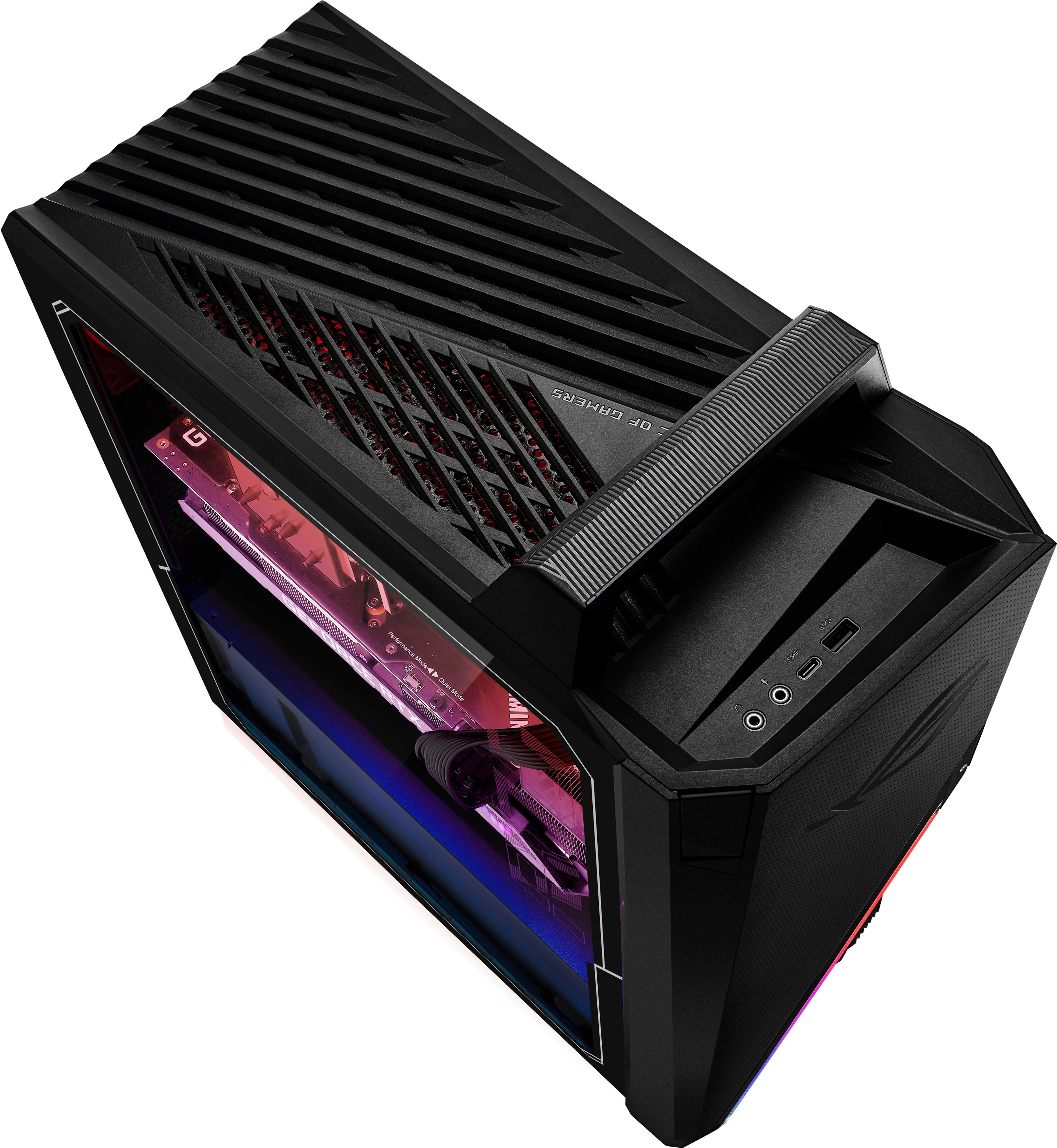
|Posted .This reviewer received promo considerations or sweepstakes entry for writing a review.As a TIN reviewer, I have guidelines to follow that narrow the scope of my review. I have a duty to evaluate the product as shipped for the features and capabilities advertised. This product isn’t presented as a build-your-own PC kit or OEM device grab bag, even if many purchasers intend to use it as such. It’s advertised as a high-performance gaming PC, which is how I treat it. _SUMMARY_ With the poor ventilation and stock configuration, this system is designed to cook its CPU to an early death. Properly fixing the thermal problems to get this system to a point it should already have been out-of-box will cost money and probably void the warranty. Anyone with the knowledge and capacity to fix this system would probably be better served to build one from scratch. __COMPONENT MODELS (as shipped)__ - MOTHERBOARD: appears to be a slightly modified TUF GAMING B660M-PLUS WIFI D4 with model-specific UEFI firmware (G15CF version 300) - MEMORY: 2x 8GB SK Hynix DDR4-3200 (HMA81GU6DJR8N-XN) - SSD: 512GB Micron 3400 PCIe 4 NVMe (MTFDKBA512TFH) - HDD: 2TB Seagate BarraCuda (ST2000DM008-2FR102) - PSU: AcBel 750 Watt 80 PLUS GOLD (API-5751AP2-172G) - Ethernet: 2.5 GbE Realtek (RTL8125) - WiFi: Intel Wi-Fi 6 (AX201) - The rest as listed __CPU THERMAL / FAN CONTROL ISSUES__ The official Asus web page for the GT15 product line makes statements that would reasonably lead us to believe that they have the cooling well managed. Unfortunately, I did not find this to be the case with this model. Examples include - "Innovative cooling elevates performance in the focused, thermal design of the GT15." - "Comprehensive cooling is what enables the high-level, sustained performance required for heavy gaming and multitasking." - "Its aerodynamic chassis has widened vents that stealthily direct more cool air through the internal cooling system." When I ran the 3DMark Time Spy benchmark from a cool start, the CPU ran at about 10-20% load during the GPU testing phases, yet still managed to have significantly higher temperatures than the GPU while it was under 100% load. When it came to the CPU benchmarking phase, the CPU immediately shot up to the thermal junction point of 100 C, triggering throttling. My best run scored 16,898 overall; 17,299 GPU; 14,941 CPU. Games were all too easily and frequently causing the CPU to hit 90 C and even the junction temperature of 100 C. I could reproducibly see it sit at 80 C with only 35 to 40% load. The GPU, on the other hand, would usually only hit the low 70s C, and infrequently hit the mid-70s while under regular heavy load. To me, these CPU thermals are unacceptable. Though not leading to spontaneous shutdowns, reboots, or blue screens, the stock configuration has particularly heavy gaming or other CPU-hammering activities resulting in performance throttling and reduced CPU lifespan. Part of the problem is the default fan curve built into the system, which does not spin up the fans fast enough or soon enough to adequately control the heat buildup. Ideally, the fan curve could be manually adjusted using Asus’ Armoury Crate software, but unfortunately, they’ve purposefully removed that functionality for this system model. Additionally, the fan operating mode presets didn’t do much if anything towards solving the problem. Fortunately, the Q-Fan controls in the UEFI firmware allow adjustment of the fan curve to boost the fan speeds. This can help the CPU thermals significantly at the cost of extremely loud fans. Though you have to be careful to not let Armoury Crate override the fan controls with its own presets. And this fix necessitates avoiding a UEFI firmware upgrade because Asus purposefully removed the Q-Fan controls in version 301 of the model-specific G15CF firmware. Alternative fixes for fan control include using third-party software, or installing a hardware fan controller (not just a simple fan hub) and plugging the fans into that. On the hardware side, the CPU’s heatsink and attached 90mm fan offer lackluster heat dissipation, to say the least. Behind the CPU, attached to the upper rear of the case is a 90mm exhaust fan. This is the only case fan in the entire system, which I find to be incredibly inadequate design. It looks like the large slab of plastic covering the upper front portion of the case would hamper the efficiency of any intake fan to be added there. There are no front air filters, so dust build-up will likely add to the thermal issues. The case was not designed with ease of access or modding flexibility in mind, but there is room for improvements. I’ll be replacing the CPU heatsink and fan and adding case fans in order to get the ventilation to where I think it should have been out-of-box, to attain reasonable CPU temperatures and fan noise levels. I’ll also be using third-party software to control the fan curves. __SSD PERFORMANCE__ CrystalDiskMark benchmarked the SSD up to 6,573 MB/s sequential read speed and 3,986 MB/s sequential write speed, which is entirely respectable for a PCIe 4 drive. The drive performed really well when gaming, allowing for fast load times. It’s important to have both the Operating System and all games installed on the SSD to maintain reasonable performance, and with game sizes being what they are these days, 512 GB is fairly limiting. I would gladly have given up the 2 TB HDD entirely to upgrade the SSD to 1 TB. I like to avoid having HDDs attached to gaming systems anyway because of their potential to interfere with system IO performance. __MISC. THOUGHTS__ Gaming on this system (CPU thermals and fan noise issues aside) was a smooth ride during many several-hour-long gaming sessions. The i7-12700KF CPU and RTX 3080 GPU complement each other well and offer great high-end performance. While I didn’t have any issues with the memory, 16 GB is basically a minimum requirement, with 32 GB being in the comfort zone and making much more sense as a match for this CPU and GPU. But with the standard wisdom being to use a single unified memory kit to avoid problems (such as latency and voltage mismatches), replacing the existing RAM for a proper upgrade is somewhat wasteful. The top/front IO panel is a bit inconvenient to see and reach, and its single USB-C and USB-A ports seem stingy. I do appreciate the separate headphone and microphone jack, though, whereas many other front panels use a combo jack.
No, I would not recommend this to a friendBrand response from ASUS Answers
Posted .Dear Gerbil,
Thank you for sharing your detailed feedback on this model. Rest assured we will make a note of this review and pass it on to our development team. We do value our customers and take negative customer service experience very seriously. This is not the quality of service expected from ASUS. We do stand behind our product and we continuously strive to improve our approach and processes in order to achieve customer service excellence.
For more information send us an email at [email protected] and provide the link of this review for reference. We’ll do our best to provide a quick resolution to your case. Your feedback is important as it helps with improvements to ASUS Support channels. Please copy a link to this post as a reference.
Thank you for choosing ASUS.
Best Regards,
Joan
ASUS Customer Loyalty US Support
Not worth the price
||Posted . Owned for 3 weeks when reviewed.This reviewer received promo considerations or sweepstakes entry for writing a review.This pc is only good for basic applications . The case doesn’t accodate additional addons and the hard drive is a 500gb drive. I had to buy additional items to install to make this system work. Not worth what I paid.
No, I would not recommend this to a friendBrand response from ASUS Answers
Posted .Dear RodwardH,
We sincerely apologize for this PC not living up to your expectations. Based on the specifications it comes with a 2TB HDD and a 512GB SSD so you should have no issue with storage. We do stand behind our product and we continuously strive to improve our products and processes in order to achieve customer service excellence. For more information send us an email at [email protected] and provide the case number "N2207014405-0007" for reference. We’ll do our best to provide a quick resolution to your case. Your feedback is important as it helps with improvements to ASUS Support channels. Thank you for choosing ASUS.
Best Regards,
Leonardo
ASUS Customer Loyalty US Support
- Pros mentioned:PerformanceCons mentioned:Cooling
Good computer. Bad airflow. Bad GPU power.
Posted .This reviewer received promo considerations or sweepstakes entry for writing a review.Bought this on sale and was happy with the perforamce of it. The major downside as a lot of other people have noted is the cooling. There's awful stock airflow that will probably damage your pc under high load for a long time, so I recommend getting another fan or a new case entirely. Another large issue I have had is that the GPU doesn't get enough power. The ROG symbol on the side of the card should be colorful RGB lights, but mine flashes red. I have the 750W PSU that come with the computer, but I never have been able to figure out how to get enough power to the PSU to get it to stop blinking red. Any help with that would be appreciated!
No, I would not recommend this to a friendBrand response from ASUS Answers
Posted .Dear Aidan R,
We appreciate your feedback on this ASUS Gaming PC. The PSU included provides adequate power to the GPU, you can control the RBG through the Armoury Crate software which should be preinstalled on your device. We would also like to hear from you as to what changes you think would make this a 5-star product. We do stand behind our product and we continuously strive to improve our products and processes in order to achieve customer service excellence. For more information send us an email at [email protected] and provide the case number "N2208003067-0005" for reference. We’ll do our best to provide a quick resolution to your case. Your feedback is important as it helps with improvements to ASUS Support channels. Thank you for choosing ASUS.
Best Regards,
Leonardo
ASUS Customer Loyalty US Support
- Pros mentioned:Case design
Great build
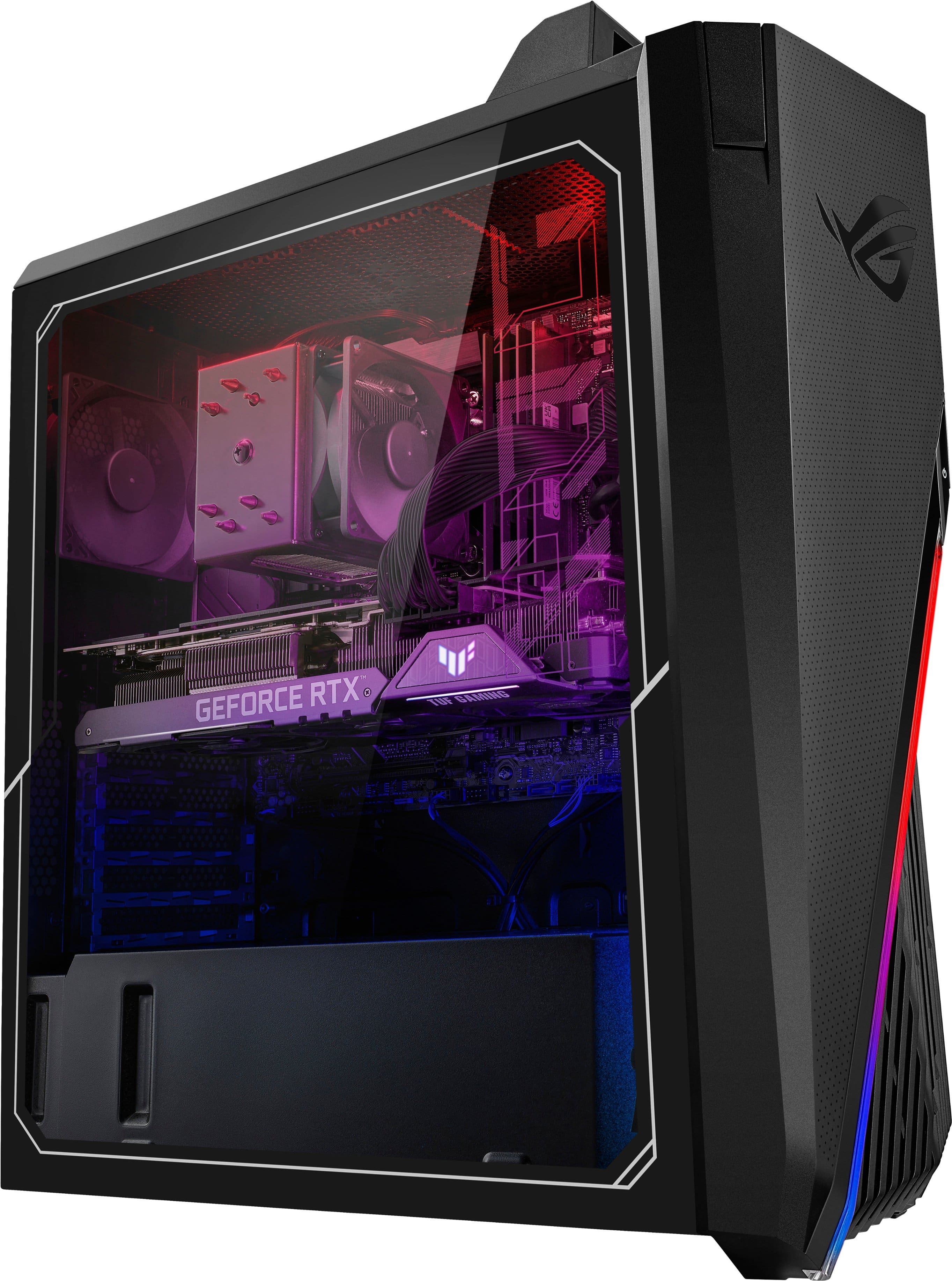
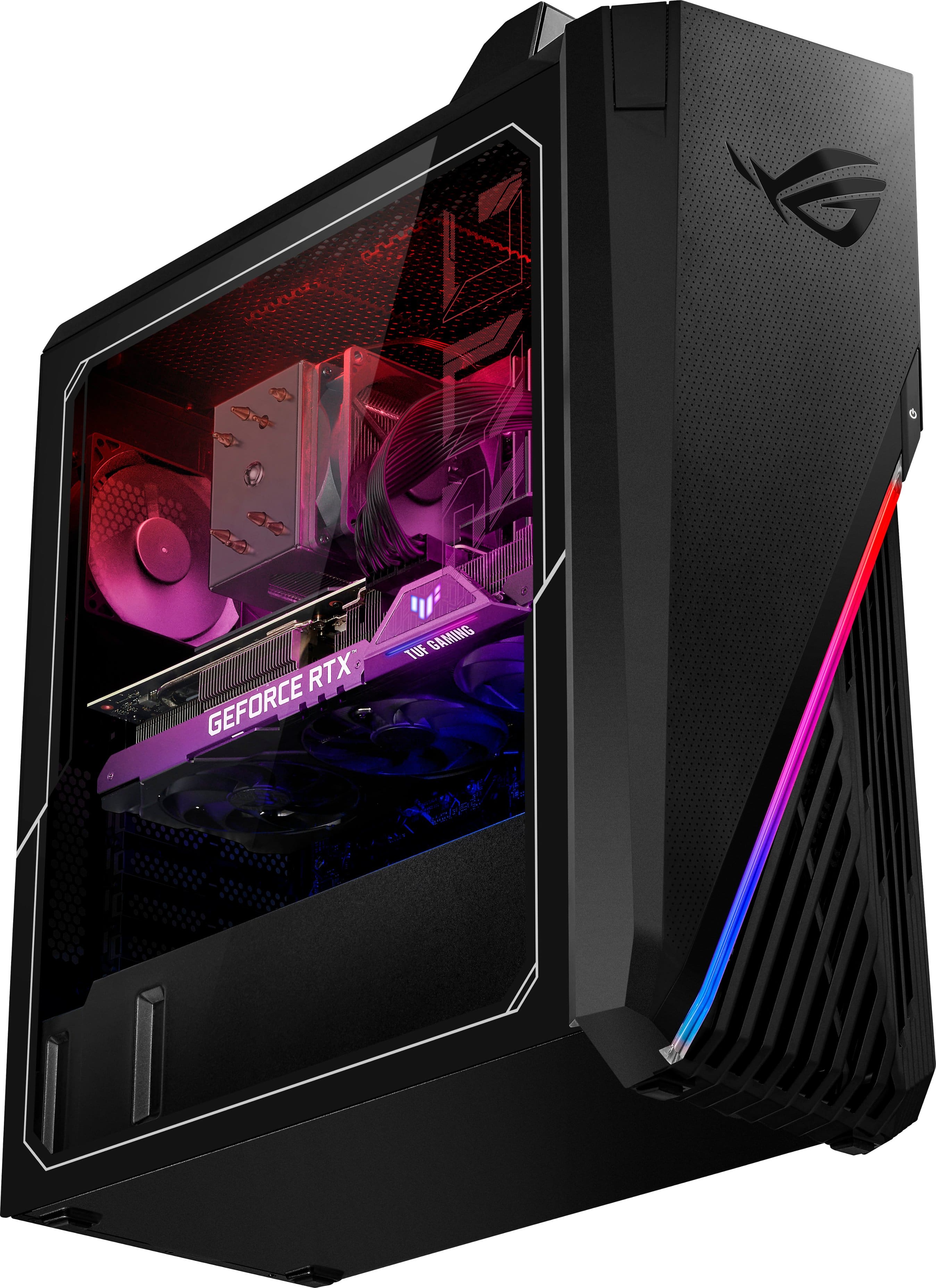
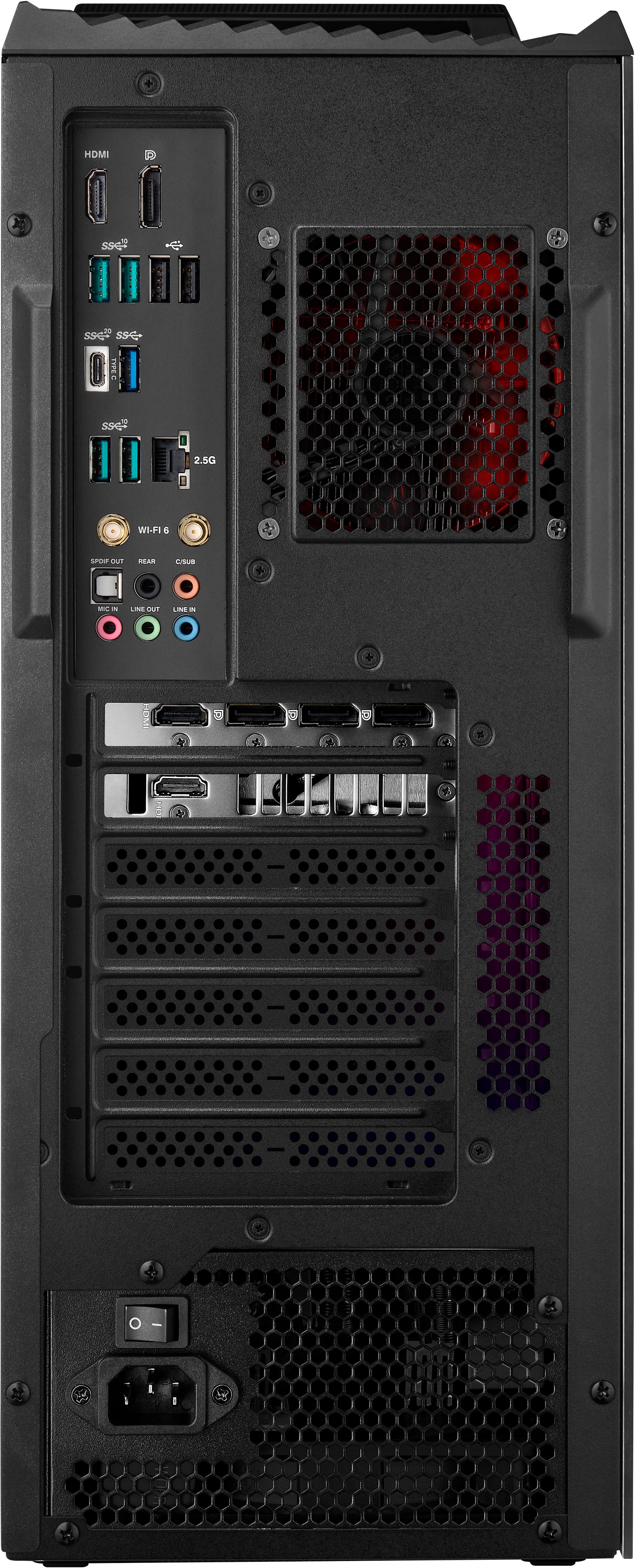
|Posted .This reviewer received promo considerations or sweepstakes entry for writing a review.I used to build all types of desktops. Gaming, video editing, office, you name it, I was into it. Then full featured laptops became the norm and the "hobby" fell to the wayside. With the release of the newer RTX cards, and the further implementation of VR, I wanted to get back into the desktop scene. Being that I didn't necessarily enjoy building desktops, I wanted to see how far the "turn key" systems have come. All that being said, this system is something I would have built. It's clean, sleek, eye catching, powerful and thoughtfully arranged and assembled. It has just about every port I would need(and several at that), complete with a pretty cool Wifi moving antenna interface. There is plenty of storage with both an SSD and a much larger higher RPM hard drive. Hits all my bells and whistles. I have been using it consistently for a short time, and so far, I have had no issues. Heat dissipation has been fine with no overheating, and should I need to kick it up, there is plenty of fan power to get things back in line. One thing that I found extraordinary is also the one area I was weakest at when I was building, the cabling. Everything would be running, but my guts were never configured so cleanly. All cables are neatly bundled and tucked for optimal usage and aesthetic. This may seem simple, but I love a clean, sharp looking system. Match that with the chroma lighting and transparent case side, I enjoy the look it adds to my office space. I also enjoy the handle!! Such a simple addition, but helps immensely when I need to move the system around. It's nothing new, but it is implemented well here. This isn't my first ROG system, so I'm used to the installed software, ie. Armory Crate, and I actually use it for monitoring. No extra bloatware or virus protection and I appreciate that. A note for the builders, and the curious DIYers. I installed an extra SSD and will most like add a liquid cooling system for extra assurance. The way the system is built, al is/will be easy to upgrade. No proprietary screws of ties, this is built for growth. With this system, I can confidently detach my Alienware and go back to using it on the go. Speaking of which, this build costs less than both of my laptops with a beast of a video card to boot. I'm thoroughly impressed, and don't feel regretful at all for not building. I would definitely recommend to those gamers on the fence and anyone else looking for a great "out-of-the-box" system. A
I would recommend this to a friend - Cons mentioned:Cooling
Good components, needs better cooling
|Posted .This reviewer received promo considerations or sweepstakes entry for writing a review.Let’s start with the good stuff. The hardware included in this computer such as the 3080 graphics card and the 12700kf processor are really good, and as long as you don’t want to overclock the processor at all (which honestly for normal use is not needed) then the motherboard is decent as well. If you're just looking for a solid gaming machine this is a good starting point. However, I say that with some caveats. This computer at least in my testing had some minor issues with heat. The case while it looks nice does not really offer much in the way of airflow. Sure, there are openings in the front of the case to allow for air to move but the case does not come with any fans in the front to help draw fresh air in and a single exhaust fan in the back. Most modern cases have intake fans to help pull fresh air in not relying on just the CPU cooler fan and a single exhaust. This seems to be an oversight on ASUS's part. The one thing I noticed the most is how quickly this system reaches the point where it thermal throttles while doing most anything that requires any sort of processing power. And as soon as you reach those temps the lack in fans and cooling really start to show as the sound goes up. This thing is very loud when the fans are running at full speed and considering there are only two fans in the case (the exhaust and CPU fan) that’s kind of sad. With that said if you’re willing to put a little work into the system it could be a solid base to build on later if you find it’s not what you were hoping for. My only real wish is that they would have included a better CPU cooler out of the box I think that would have gone a long way to improving the overall experience. I will say what I will probably do is take the hardware out of the ASUS case and put it in a case that is more compatible with modern cooling hardware it’s a little work and some cost to purchase some decent fans but that would take this already good hardware and turn it into a good overall system in my opinion. If you’re looking for a simple gaming setup and you don’t mind the noise, then this system is workable. Just know going into it that you may feel the need to update some aspects later regarding cooling at least. On a side note, the LED lighting is a nice touch but honestly to help drown out the noise I need to move the computer someplace I can’t see that lighting anyway so honestly it does not really matter at that point anyway because I can’t see it.
- Pros mentioned:Case design
A lot of bang for the buck
|Posted .This reviewer received promo considerations or sweepstakes entry for writing a review.The ASUS GT15CF-I73080VR has been great in the ~1 week I've had it. Set up was a breeze, everything was up and running and I was gaming in no time. I threw countless titles at in over the course of three days. All the Metro titles, all of Rockstar's offerings (ray tracing packs and HD re-packs, too), Forza 5, M$ Flight Sim, Far Cry 5, etc etc etc. Heck, even Crysis... Every. single. game. I maxed out every single setting I could and RD2 gave it the biggest stress test from what I could tell. (~50fps @ 1440p) The case itself is very nice and spacious. Plenty of room to add fans, drives, expansion slots, etc etc...all the usual stuff. Aside from a momentary burst here and there, the rig is very quite. Even when I notice temperatures starting to creep towards 80-85* C you really don't have a huge problem with the fan noise being a distraction RGB lighting straight out of the box is more than adequate. Sure, if you want to replace all of the fans with lit versions and add some strips here and there you could put the large plexi side window to better use. But, as-is, it really isn't too much or too little; it's just right. Adjustments are made via the R.O.G. interface to the lighting (and all other critical aspects). Profiles can be made for quickly switching all settings in a single go. All in all, you are getting a very solid performing gaming PC for nearly less than the street-price of the GPU that comes with it.
I would recommend this to a friend - Pros mentioned:Case design
Illuminated
|Posted .This reviewer received promo considerations or sweepstakes entry for writing a review.Asus really went above and beyond. This is a great out the box build. This is great looking PC build, The video card is just perfect and compatible with today's gaming needs. Has enough ports for your devices and built in WIFI receiver as expected. The set up is very simple nothing much more different than a normal PC. Out the box it comes with a wired mouse and keyboard, power cable and instruction. It was packed very nicely and secure. Overall very satisfied with this new PC. Pro: Verry nice looking and illuminated interior, you can use ICUE software to change the light setting, The case is perfect and everything in the interior looks clean and you dont have random wires running from place to place. Cons: Wish it would come with more memory i do see myself running out of space pretty soon and will definitely be upgrading memory capacity, or getting a separate external hard drive. one other thing I don't like is the clear hatch is screwed on while others come with easy to remove covers. Final: I love it has minopr issues as stated above but very satisfied for a prebuilt PC.
I would recommend this to a friend - Pros mentioned:Performance
Just What the Gaming Doctor Ordered
|Posted .This reviewer received promo considerations or sweepstakes entry for writing a review.Let me start by saying that I am coming from an older 1080 TI GPU, as with the GPU shortage, I have not been able to upgrade. This system is the whole package, and upgraded everything. My first, favorite thing I noticed: the boot up time. It takes around 30 seconds or less to boot up, which is in and of itself amazing. On top of that, my whole family is made up of gamers, so I waited to write this review until we had all had a turn on the new system. The gaming performance is amazing. I can maximize the settings on everything I play, and it looks amazing. From CoD to Fortnite to photoshop, the performance was great. Another thing that struck me about this system is that despite the amazing performance, it is so quiet. I am used to my older system, which gets decently loud after gaming for some time. It feels cooler, and has an amazingly sleek chassis that just looks great in my desk. If you are looking to upgrade your entire system with a new one, you won't be disappointed with the Asus G15.
I would recommend this to a friend - Cons mentioned:Cooling, Power supply
Good on paper...bad in practice
Posted .This reviewer received promo considerations or sweepstakes entry for writing a review.I have had to return this computer twice because the parts broke on me twice in the first month. The airflow is c-tier, and I had to replace it with an AIO. If you decide to buy this, replace the CPU fan because it is booty. If not, then you will have temperature problems. A year later, the power supply gave out, and I had to buy a new one. I say hard pass. Look for another build. I have seen some really good ones on Amazon if you know what you want. There are other builds that include a better CPU for the same price.
No, I would not recommend this to a friendBrand response from ASUS Answers
Posted .Dear Valued Customer,
I'm sorry to hear that you are experiencing issues. All ASUS products undergo intensive quality control, testing and inspections. What you've experienced was not intentional or representative of our brand. I understand that you have returned the unit , but I will forward your feedback to the Product team for review. If you have any general or technical questions, send us an email at [email protected] Please refer to this case number (N2206039703-0012) for us to better assist you. Thank you for choosing ASUS.
Best regards,
Schottky
ASUS Customer Loyalty – US Support
- Cons mentioned:Ram
Good for the price
Posted .This reviewer received promo considerations or sweepstakes entry for writing a review.Works great. The only downside is green rams and small fan but that can be fixed easily
I would recommend this to a friend - Cons mentioned:Power supply
500 watt PSU won't fully support a rtx 3080
Posted .This reviewer received promo considerations or sweepstakes entry for writing a review.500 watt power supply??? Bottleneck the GPU from the start 750 is suggested to fully power a rtx 3080 with maybe a 650 be sufficient, but a 500w? No wonder ive watched this drop in 100$ increments the last week, poorly thought out build.
No, I would not recommend this to a friendBrand response from ASUS Answers
Posted .Dear CaseyF,
It's unfortunate to hear that you are having issues. All our products do go through an intensive quality control testing process to ensure that customers get units that are in proper working condition, what you've experienced was not intentional.
Can you please reach out to us with your case number so we can investigate this issue? We would love to have your issues resolved in a timely manner.
For more information, email us at [email protected] and provide the link to this review for reference. We’ll do our best to provide a quick resolution to your case. Your feedback is important as it helps with improvements to ASUS Support channels. Please refer to this case number ( N2206039703-0008) for us to better assist you.
Thank you for choosing ASUS.
Best Regards,
Schottky
ASUS Customer Loyalty US Support
ASUS very bad warranty service claim
Posted .This reviewer received promo considerations or sweepstakes entry for writing a review.I bought this desktop computer back in February after couple of months it started to have rattling sound. I sent it for repair to ASUS. They dont give you an update on the repair. I had to call them multple times for the update and they make you wait for 24 to 48 hours for a call back which they never call me back. I had to call them back on my own everytime. They told me they were going to replace it and then they changed their mind not to replace it and wait again for an update. I regret buying this computer. Never again I would buy any of ASUS computers.
No, I would not recommend this to a friendBrand response from ASUS Answers
Posted .Dear Jeth,
We do apologize about the inconvience faced with the repair process. Be assured that your situation was an exception. As you can see on other reviews, we are known for taking ownership and caring deeply about our customers. We can’t fix the past but you have my personal commitment to improve the way our staff assist every customer. Until then, please accept my sincerest apologies on behalf of everyone on the team. If you should have any other concerns or feedback feel free to reach out to us at [email protected]. We'll be happy to provide a quick resolution to your case. Please refer to this case number (N2206039703-0010) for us to better assist you.
Thank you for choosing ASUS!
Best Regards,
Saskeia
ASUS Customer Loyalty US Support