Customer Ratings & Reviews

- Model:
- GRI070800G516
- SKU:
- 6370586
Rating by feature
- Value
Rating 4.3 out of 5 stars
- Quality
Rating 4.1 out of 5 stars
- Ease of Use
Rating 4.1 out of 5 stars
Customers are saying
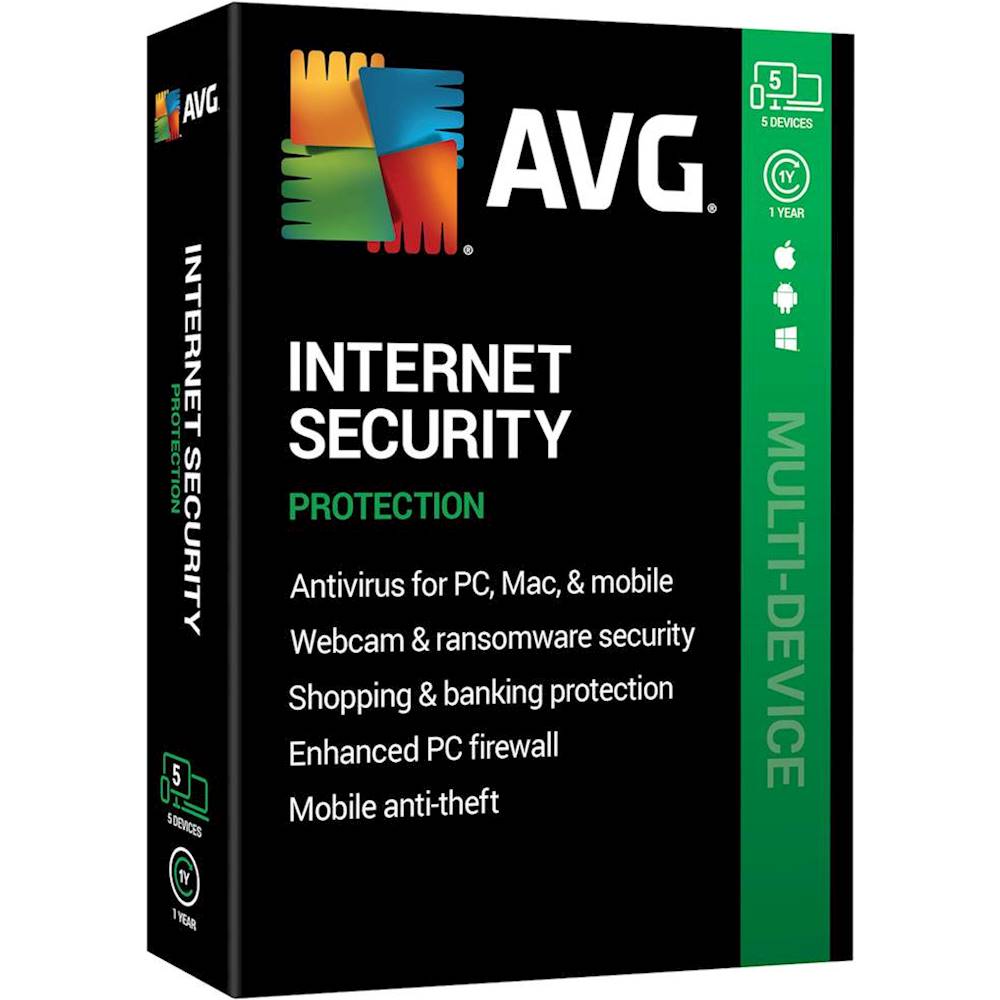
Customers admire AVG Internet Security for its reasonable price, user-friendly interface, and reliable virus protection. Many users appreciate the ability to protect multiple devices with a single subscription. However, some customers express annoyance with the product's attempts to upsell additional features and services.
This summary was generated by AI based on customer reviews.
- Pros mentioned:Virus protection

Smooth Installation on a Mac
|Posted .This reviewer received promo considerations or sweepstakes entry for writing a review.I downloaded AVG and activated it on my 21.5" iMac 4K. Installation went smoothly. Be aware that you will need to grant some permissions to allow disk access and notifications. If you're not aware how to do that it will walk you through it somewhat. While I don't usually venture onto shady sites or open fishy emails, it's nice knowing that if I let my guard down I'm still protected, especially from ransomware, which is included in the package. Also nice is the fact it comes with coverage for 5 machines. That means I'm able to protect my iMac and MacBook Air and the Windows Bootcamp partitions on each, with one leftover for my kid's gaming PC. On my machines I'm using lighter protection and am full shields-up on his. So far I've seen no slowdowns on my Mac or the Windows machines. I'm currently running a full disc scan while writing the review and there is no lag at all.
I would recommend this to a friend avg is not a good antivirus for your compture
||Posted . Owned for 10 months when reviewed.This reviewer received promo considerations or sweepstakes entry for writing a review.my compture got hacked and alot of virus and it shut my compture down.
No, I would not recommend this to a friendBad system
||Posted .This reviewer received promo considerations or sweepstakes entry for writing a review.Open new packages and try to activate code avg systems say invalid code.
No, I would not recommend this to a friendIts ok l wouldnt buy it again
||Posted . Owned for 3 weeks when reviewed.This reviewer received promo considerations or sweepstakes entry for writing a review.Its ok , if you get virus you need to upgrade to Avg pro to remove it .
No, I would not recommend this to a friendOk
||Posted . Owned for 2 weeks when reviewed.This reviewer received promo considerations or sweepstakes entry for writing a review.Could not tell u whether it was good or bad I returned it
I would recommend this to a friend- Pros mentioned:Virus protection
Good but one issue
|Posted .This reviewer received promo considerations or sweepstakes entry for writing a review.Downloaded and installed the protection. Did a scan of my laptop and no viruses were found. But there were some issues detected that were affecting PC performance. When I went to resolve the issues, I was presented with an option to purchase additional coverage. Not really sure I like that. My PC is and has been virus free, so I guess I can’t complain too much.
I would recommend this to a friend Good overall protection
|Posted .This reviewer received promo considerations or sweepstakes entry for writing a review.Internet Security (5 Devices) (1-Year Subscription) - Android|Mac|Windows AVG Internet security has a very light footprint on performance. It slows down boot times by only about 2 seconds, that will vary on the machine. I have tested this on Windows 10 only. Let me start with one thing that is wrong, but maybe just be for me. The web login does not work at all. I installed the software on the first machine and used the supplied activation code provided. After successful activation I was asked to create an account, I did. On the next machine I installed the software and used my account to activate the software, it activated as expected. I then went to the avg.com web site and logged in using my account information I created the first time. As far as the web site sees, I have no subscriptions and it suggests I buy one. I rechecked both machines and both say my subscription is active. I’ve logged out and back in on the machines and it works as expected. However, the web site still says no subscriptions and wants me to buy one. I am using the same log on and password when installing, as I am when logging into the web site. 3 calls to support could not remedy this. They can see my subscription and my account, but the 2 will not link together. I can use my account information to install the product, I just can’t see the machines from the web site. The machines can only see themselves, so each installation is a standalone. Ok, so that is broken for me and can’t be fixed. Now the product itself. I have used AVG free in the past and was happy with what it did. This is so superior to the free version it doesn’t even compare. The antivirus stopped everything I through at it. It was a little slower than my other antivirus that I use, but it did it without a problem. By a little slower I’m only talking about 2 or 3 seconds. The firewall is a little hard to find in the settings, but you can find it. When first installed it installs with a setting of just checking the site for issues and then approving or blocking them. You can configure the firewall to ask before setting a rule. When set up this way it will ask and you have options of allow, block, and a check box to remember or not. This is the way I set up my personal machines. Nothing goes in or out without asking first. When setting up a machine for someone else I just let the firewall do its own rule making. You can add or remove rules, block sites, allow sites, all the normal stuff. There are no parental controls that I could find. For the price this is a usable and safe option. I would consider using this on machines where you don’t need parental controls.
I would recommend this to a friend- Cons mentioned:Upsell
AVG ticks all the boxes for the most part
|Posted .This reviewer received promo considerations or sweepstakes entry for writing a review.I picked up the AVG anti virus programs to protect my PC and can be used for Windows, Android and Mac OS systems. AVG is a good anti-virus that contains a firewall and a very good file scan process that isolates virus and helps protect you from spy and ransom ware. The only issue I have is that AVG will identify weaknesses in your system and will correct those short coming for an additional cost. It doesn't seem to use a lot of resources and works well in the background. Outside of the pop-ups asking you to correct identified issues for an added cost, the anti-virus works well.
I would recommend this to a friend Easy Install-feel protected now
|Posted .This reviewer received promo considerations or sweepstakes entry for writing a review.The installation on my desktop completed without any issues in about 20 minutes. Once finished it prompted me to start a full scan of my PC. It took some time to scan for advanced threats and it found one issue related to sensitive documents being visible. One click of the RESOLVE button had it fixed. It doesn't get any easier than that! It then told me my location was exposed but in order to resolve that a paid subscription would be required as I guess this is outside the scope of this product. I am now protected from a virus, risky web sites, bad email attachments, hacker attacks, and ransomware attacks. For the casual user that's all you have to know but for the advanced user there are many advanced settings to tweak the program to better suit your particular needs, especially in the area of the firewall. There is even a firewall log to see who may be attempting to get into your computer. There is a file shredder included to really delete sensitive documents and files. That's a nice addition. For the more casual user there is a web browser included that offers default protection from many of the bad elements one can encounter when surfing the internet. I also installed the package on my laptop. It took 15 minutes start to finish which included the post install scan and that is not a fast laptop. I have not noticed any slowdown loading pages when surfing. Now that it has been installed for a few days I am getting a NAG SCREEN to sell me the VPN to further protect me. I’m not a fan of being hounded for an up-sell This is a necessary addition to any computer. You install it and hope never to have to use it but its good to know it is there.
I would recommend this to a friendRight amount of features. Simple and light.
|Posted .This reviewer received promo considerations or sweepstakes entry for writing a review.Pro: -Light system resources -Not as intrusive Con: -Tries to scare you to buy their VPN service (can turn off within menus) -UI and settings not as intuitive to use Quick install and not bloated with unneeded features. When running, it doesn’t take that much system resources while scanning and updating. It offers the typical protection from malware, ransomware, and guarding sensitive documents. It also has webcam protection, which is something I didn’t have with my previous protection suite. The main UI keeps it simple with a subset of tabs that you can toggle on/off, but the more advanced settings are accessible from the small dropdown menu. It would have much simpler to have the option to open those menus from the main page. Beyond that everything seems to work fine upon the first install. It’s quick and simple, and I didn’t have to in and turn off unneeded features or settings except for the product offers and ads in the privacy settings. The most annoying thing for me is that it tries to push me to buy its VPN services every time a system scan is done and with popups. The popups can be turned off within the privacy settings but it will still show a message warning me that my privacy is at risk. So far it seems to offer the right amount of protection for an average user, and isn’t constantly hounding me about features I don’t care about, or to restart my system upon updates. Simple and clean, I like that.
I would recommend this to a friendComprehensive Protection
|Posted .This reviewer received promo considerations or sweepstakes entry for writing a review.AVG has been my go-to free antivirus solution for years, especially for my non-techy friends' computers. Because it doesn't max out system resources, stays up to date automatically, and has a full suite of protections that are on-by-default without any user intervention required, it's a great first line of defense for most computers. AVG Internet Security is a setup designed for stopping some of the worst threats: malware, viruses, hijacking/ransomware, and purchase fraud. My one issue with this particular software is that install requires two admin-level permission workarounds to enable full protections, which is a 5-minute problem for geeks with admin passwords but for non-techies, it's a show-stopper, even with good documentation. Overall, this is a one-time problem that shouldn't reoccur after setup. Setup is really fast, scanning is enabled by default, and setting up protections against ransomware is super easy. The user interface is highly visual and simple, showing you if something is wrong at a glance. It's very easy to both scan the computer or individual files with a few clicks. The always-on protections scan every new file and also help protect against phishing, fake websites, unsafe downloads, and dangerous email attachments. AVG shows time and time again that it is capable of good protection with minimal impact to system resources all wrapped in a friendly and easy-to-understand user-interface.
I would recommend this to a friend- Cons mentioned:Upsell
Ok with some quirks.
|Posted .This reviewer received promo considerations or sweepstakes entry for writing a review.Does not really bog down the system like some of the other packages out there. Installation was smooth with a few quirks that popped up during installation but a quick Google Search found my answers to the issues I was having. A plus is that I am able to install this product on my phone included in one of the licenses. A bad item which takes away 1 star from the review is that I keep getting reminded that my privacy is not secure to pop ups about hiding your online activity blah blah blah from a window interface. It is a premium product and should not try to up sell me to purchase additional modules for better support. The suite is Good, but it does its best to upsell you more. I own a product of a competitor and it does not upsell me like this one does.
No, I would not recommend this to a friend - Cons mentioned:Upsell
Works Well
|Posted .This reviewer received promo considerations or sweepstakes entry for writing a review.Installation was easy but took awhile. Almost 25 mins. After installation, there were 'offers' once installed. Software seems to work well without noticing any slow down or issues. I do have issue with all the up-sells, and would prefer everything just being included. I do like that the scans seems fast. I have had other anti-virus software which seemed to take forever,
I would recommend this to a friend - Cons mentioned:Upsell
Decent Security. Adware/Up-selling a big negative.
|Posted .This reviewer received promo considerations or sweepstakes entry for writing a review.I'm a long-time (on-and-off) user of AVG products, but let me start with what I don't like about AVG Products: The upsell. Here I am, with a newly installed copy of AVG Internet Security, I run the suggested scans as part of setup, and at the fourth scan, it seems to be telling me that if I want to 'tune up' my computer (to "fix" what the scan found), I've got to purchase ADDITIONAL AVG subscription software. (I will note that my computer did not feel slow or like it needed a tune-up.) At the same time it is selling me a subscription to a VPN package in a bundle deal. It tells me this will cost me around $80 for length of subscription. If you now ignore the fourth scan, we come to the fact that it didn't really find anything of interest (no malware, etc.), so that makes it (unfortunately for this review) hard to know if (a) it is really bad and didn't catch any malware that was there, or (b) my windows machine is 'secure-enough' that in 6 months running without anti-malware subscription software, I may not need this software for anything other than "peace of mind". It does come with a 'secure browser', which from what I can tell is basically Chromium (the open source version of Google Chrome), which I guess is secure, but I'm never convinced I want to switch to it. Okay, here's another thing I really (I mean, really) don't like, it installed "AVG SafePrice" extension in Google Chrome without asking me. What this really is, is an extension that spies on all your traffic and sends it to a third party site to "compare prices" on items you are viewing. I can tell you it is sending your web traffic to a third party site, because how else would it get the prices for the items you are looking at. It is also adware in a sense, because it will be promoting purchasing at sites it probably collects advertising revenue from. Okay, so at this point, I've basically uninstalled AVG Internet Security. Please note if you uninstall, it seems after you do, you will have to separately uninstall "AVG Secure Browser" because the AVG Internet Security Uninstaller didn't handle that. Oh, after you uninstall that, there are still THREE(3) AVG extensions in Chrome that stay behind and you'll have to go into your chrome settings to remove those by hand. I did all that and I'm still not certain I am fully rid of this product. This product might be a fine set of security software if it wasn't for the unwanted adware and unnecessary extra software and marketing that comes with it.
No, I would not recommend this to a friend - Cons mentioned:Freeze
It’s just okay
|Posted .This reviewer received promo considerations or sweepstakes entry for writing a review.I was excited to download this security software for my home computer. Once it downloaded, it scanned my computer. It found very few errors BUT the ones it did find were things I couldn’t have fixed unless I downloaded another trial subscription for or pay a fee per month to have the problem fixed. I have a Lenovo desktop which is about 2 years old. It’s not the top of the line but it has been pretty flawless for us. After downloading the software I did notice a speed decrease and a lot of lags when trying to just surf the web to pay bills. Once I turned off the security software just as a troubleshoot, my computer went back to its normal speed. I have since removed the software from my computer. Maybe my computer just wasn’t up to par to handle the software but it did match all the requirements to handle it. Not sure what happened.
No, I would not recommend this to a friend Peace of Mind
|Posted .This reviewer received promo considerations or sweepstakes entry for writing a review.So far so good. AVG has always been my go-to security application. Interface is clean and simple to use and the app does not appear to be a huge resource hog. I see about 85mb of memory being used. I did my first scan on 3 computers and the software found no problems on any of them. Looks like the Windows Defender software is doing a pretty good job. Not a bad idea though to have a second layer of protection. I will evaluate this over the next year to see if it is necessary in the future. This software does have in-app purchases it pushes for cleaning up your computer for performance issues, i.e. Clean up system junk , broken registry items and shut down programs that may be slowing down your system..etc. Honestly I would have expected to have that included for the paid version.(loss of 1 star) So my verdict is still out as I have not run this long enough to see what is catches that Windows Defender misses. I am using the Android Pro versions as well. For the price, it does offer a peace of mind for my 3 PC’s and 2 Android phones.
I would recommend this to a friendReliable and Not a Resource Hog
|Posted .This reviewer received promo considerations or sweepstakes entry for writing a review.The 5-device AVG Internet Security package provides an easy install on up to 5 devices of either Windows, Mac or Android. I tested it out on Windows 10. It is less "noticeable" than previous versions of AVG both free and paid that I've used many times over the years. The product has a great reputation and scores well in tests. You get an occasional pop-up to tell you something in your system or network needs attention. My PC seemed unaffected by the program running in the tray. No noticeable effect. It does notify you when you are about to go to a site that has been deemed suspicious, and stops you cold if there is a known exploit. It uses it's own firewall, disabling the built-in Windows one. I found it pretty high tech to tweak and wasn't successful getting access to my music server from my phones and tablet. I'm sure I could contact support and resolve the issue but the fact that I've never had a problem exempting programs from a firewall before makes it a bit less attractive.
I would recommend this to a friendBetter safe than sorry!
|Posted .This reviewer received promo considerations or sweepstakes entry for writing a review.I've been an avid AVG user for many years. Outside of the built-in software suites that sometimes comes installed on many computers (ie. McAfee), I've always used AVG as my antivirus solution. This is one of those products where you can't really be too sure that it's doing what it's supposed to be doing. As I have not had any malware, bug, issues, explosions of either of my computers, I can venture to say that AVG is doing it's job. If there was any complaint, it's that the suite is packaged into multiple different applications, all with a unique subset of tasks, all that cost extra money. it would be nice if there wasn't a profit-model that was quite so split and a product that offered a one-stop-shop experience that gives you everything that the various AVG apps provide. Either way, this software has kept my computer running in tip-top shape and does not seem to cause any negative drag or system degradation while running.
I would recommend this to a friendAVG Internet Security
|Posted .This reviewer received promo considerations or sweepstakes entry for writing a review.With a passcode, I was able to effortless install on 2 Win 10 PCs. The install time was only a few minutes. With a push of a button, the software does a system scan to evaluate on different things like browser, Virus, Advanced and Performance issues. Unfortunatly I needed to buy a sub to actually clean anything. Fortunately I did individual searches to find certain tings like location and change if I wanted. Does not allow me to see and select specific files or anything. I woulld of enjoyed the AVG software much better if almost everyting I looked at eventually asked for money. I would prefer just an anti-virus app that told me just what I need to know for what I have. Feels like it shows me the software is now protecting me, and didnt find anything on scan persay, but if it did, would I need to pay even more money? Hopefully they redesign this app to focus on the job at hand instead of other things it could be doing.
No, I would not recommend this to a friend- Pros mentioned:Easy to use
Excellent and easy setup
|Posted .This reviewer received promo considerations or sweepstakes entry for writing a review.So far I feel well protected by AVG’s internet security. The set up was super easy and they perform a thorough scan of my computer to diagnose and problems or potential problems and offer suggestions how to fix it or in some cases fix the problem for you. There is even a AVG protected browser that you can enable and use. I try not to go to any funny looking or suspicious sites so I haven’t come across any warnings after my two weeks thankfully but I feel safe surfing knowing I’m protected.
I would recommend this to a friend