Customer Ratings & Reviews

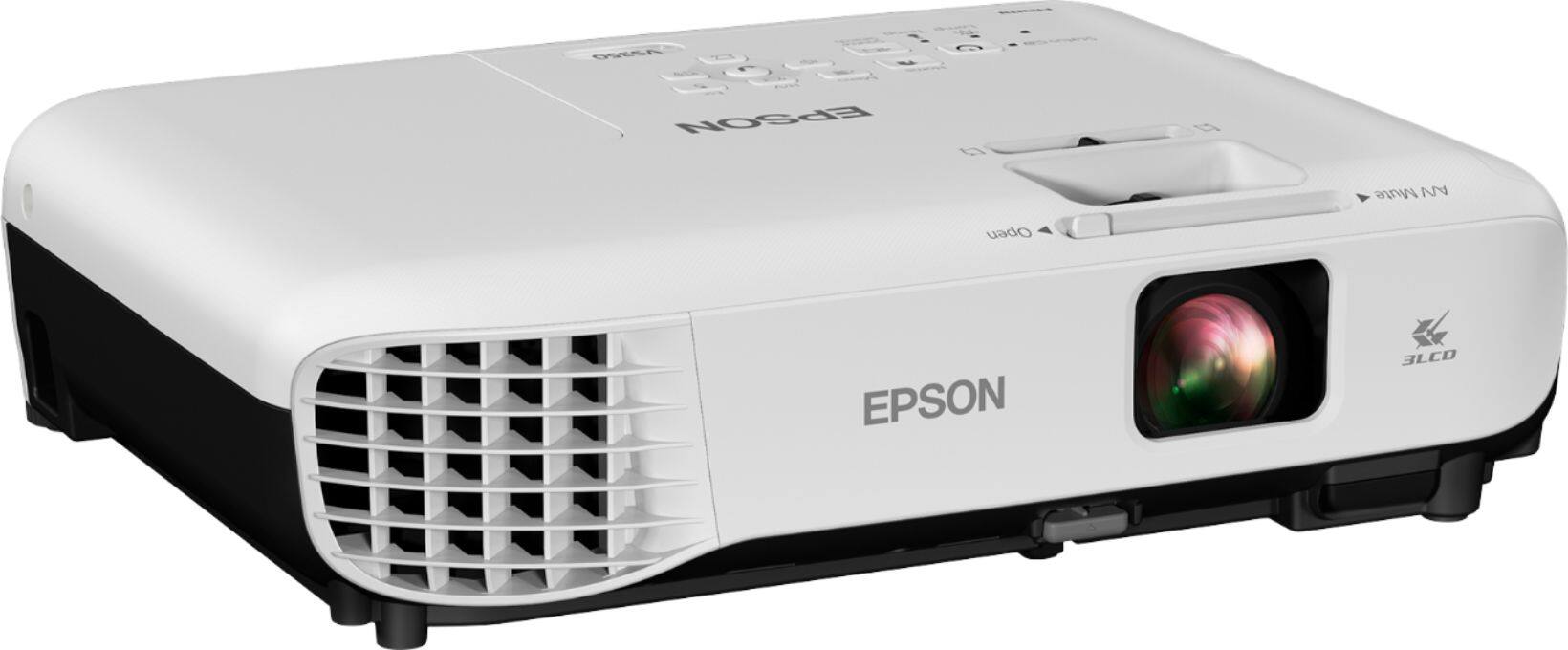
- Model:
- EPSON VS350 PROJECTOR V11H8392
- SKU:
- 5979300
Rating by feature
- Value
Rating 4.4 out of 5 stars
- Quality
Rating 4.6 out of 5 stars
- Ease of Use
Rating 4.8 out of 5 stars
Customers are saying
Customers are positive about the VS350 XGA 3LCD Projector, frequently praising its picture quality, brightness, and ease of setup. Many appreciate its convenient features, such as the HDMI port and included remote control with pointer functionality. The projector's lightweight design also receives positive feedback. Overall, the reviews highlight a user-friendly and high-performing device.
This summary was generated by AI based on customer reviews.
- Pros mentioned:Picture quality
Very easy to use
||Posted .This reviewer received promo considerations or sweepstakes entry for writing a review.Works great, easy to hook up, and very good picture.
I would recommend this to a friendBrand response from Epson
Posted .Hi Julie, thank you for this five-star review of your new Epson VS350. We are glad to hear that the setup was easy, and that you’re enjoying the amazing image quality you get with a 3LCD projector. Here's to many happy years of projecting! Regards, Brandon – The Epson Team.

- Pros mentioned:Ease of use
Great pick for projector
||Posted . Owned for 1 month when reviewed.This reviewer received promo considerations or sweepstakes entry for writing a review.Very nice and slim portable projector. Great for displays and has crisp graphics.
I would recommend this to a friend Gift
||Posted . Owned for 1 week when reviewed.This reviewer received promo considerations or sweepstakes entry for writing a review.I decided to gift one to my son for his new place. He and his girlfriend love it. They started off with one that you couldn't see with unless it was pitch dark so when he saw mine he had to have one. Just missing an audio output on this one. I see its been added to the newer brands but a bit pricey for me right now
I would recommend this to a friendGreat display
||Posted . Owned for 1 month when reviewed.This reviewer received promo considerations or sweepstakes entry for writing a review.I wasn't able to zoom it down to fit my space, although I thought I did the calculations on their website that showed it would. Using a computer we're making it work though.
I would recommend this to a friendProjector
||Posted . Owned for 2 months when reviewed.This reviewer received promo considerations or sweepstakes entry for writing a review.This is so dope. We will use this to do movie nights at the church to show Christian movies. It's really cool.
I would recommend this to a friend- Pros mentioned:Brightness, Picture quality

A Great, Compact, Bright Projector
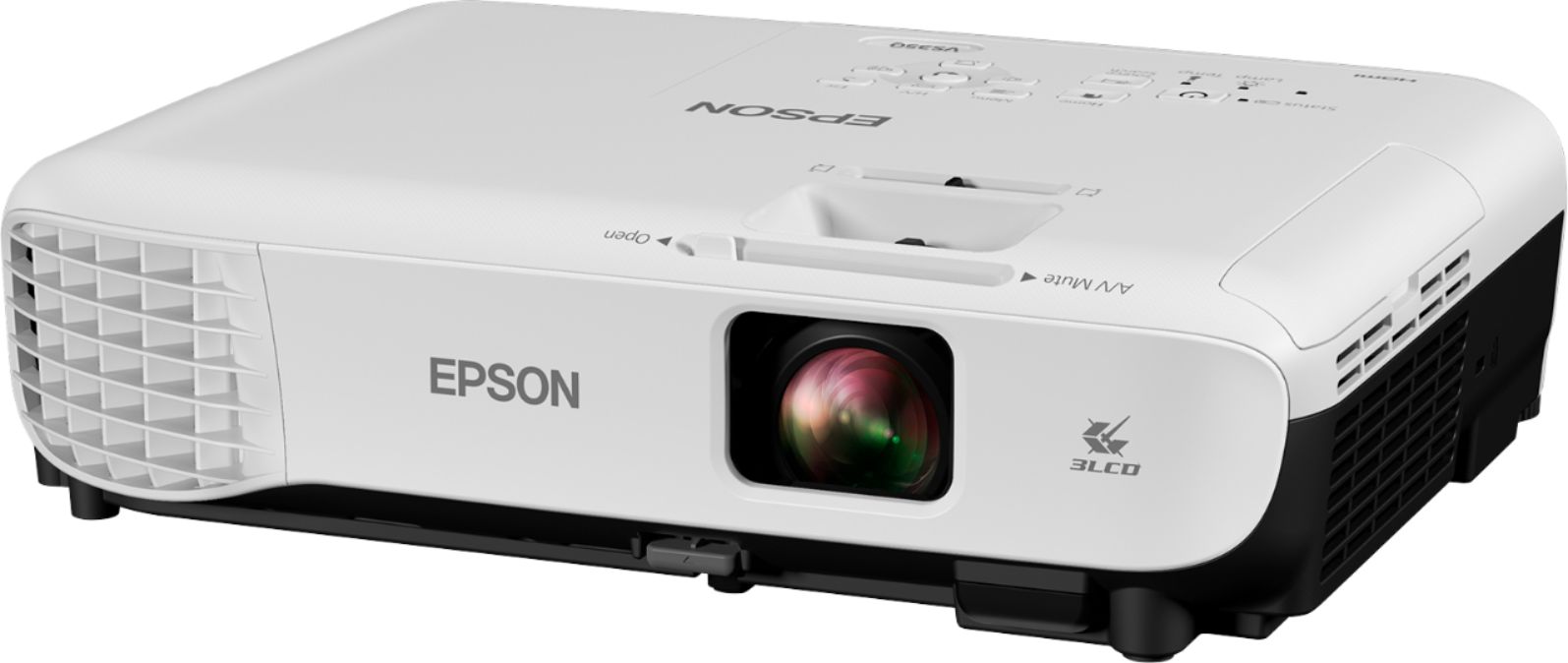
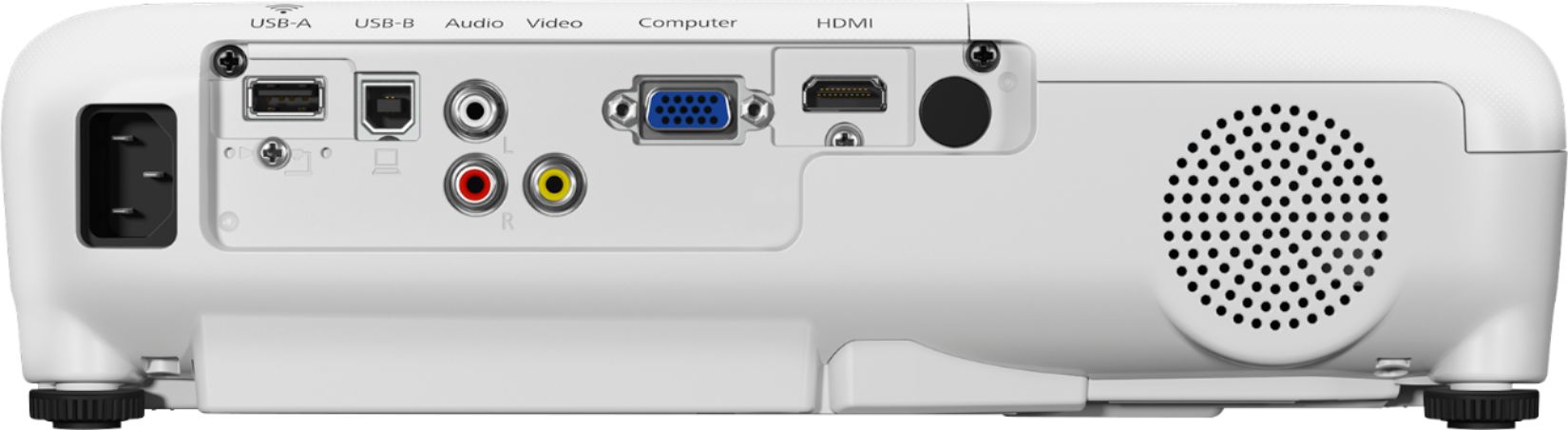
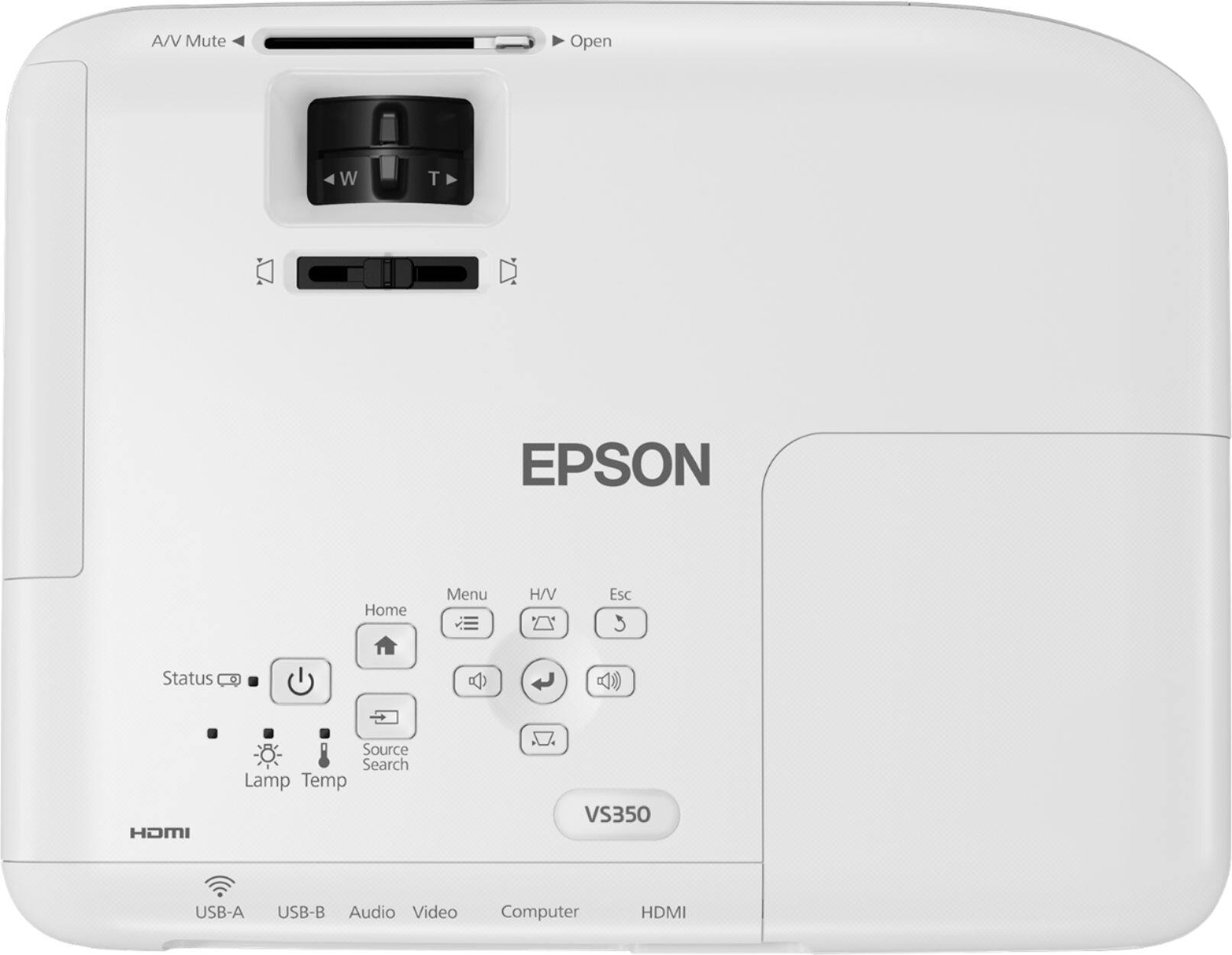
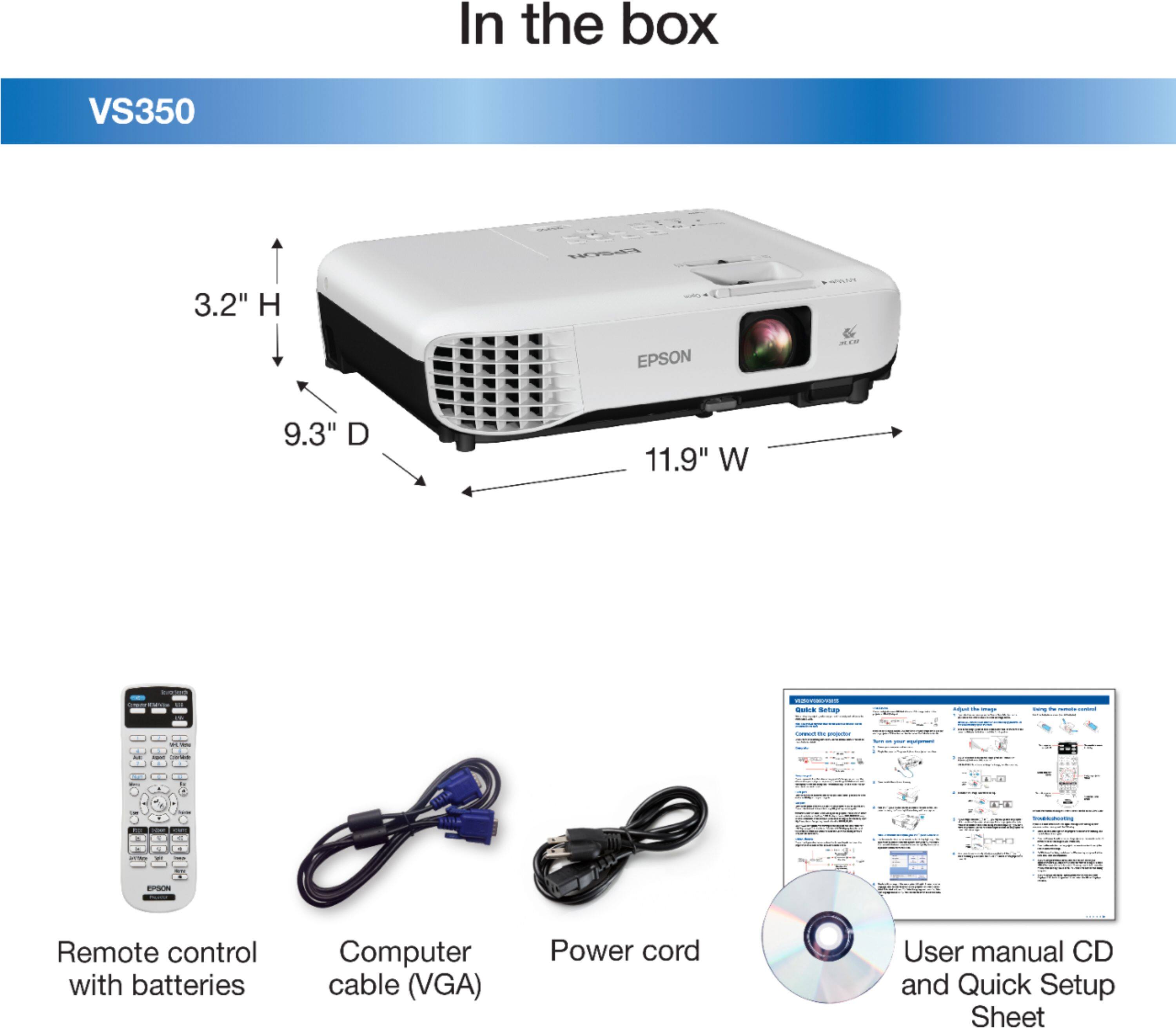
|Posted .This reviewer received promo considerations or sweepstakes entry for writing a review.First off, I feel the need to disclose the fact that I really know nothing about projectors, especially business-class projectors. I know TVs, I know cell phones, I know home theater receivers, I know DVD/Blu-ray players, and I really know computers…but I know nothing about projectors. Obviously, this won’t be a professional-quality review. Being the Tech Lead for my church, and knowing that, as of this weekend, we’d be in a new location, and losing the projector we’ve been using for the past 6 years, this gave the perfect opportunity to put the VS350 through its paces…especially considering the new projector the church is planning on getting us won’t hit the market for another 1-2 months. Once the new projector arrives, the VS350 will be an excellent backup, as you will see. UNBOXING & INITIAL IMPRESSIONS: Not sure what I was expecting., except…maybe…”more”. The box (a plain brown box, with ‘Epson’, the model number, and a few additional/minor pieces of info printed on the box) contained the projector, power cord, remote, batteries (for remote), a 15-pin VGA cable, a plastic bracket (to mount the (optional) Wi-Fi USB adapter), and the usual instructions in several languages. No color graphics printed on the box…just a plain brown box. The projector was in a clear plastic bag, as was every item in the box (except the batteries, which were shrink-wrapped together. SETUP: The Epson VS350 is extremely simple to set up – simply place it where you want (table, bookshelf, etc), plug the power cord in, connect the video cable (more on that in a minute) between projector & projection source, open the lens cover, turn on projector, and boot up the projection source. It doesn’t get any simpler. As for the video cable, that’s where you have some options. You can connect it via the included 15-pin VGA cable, but you also have other options, such as HDMI, USB Type-B (which requires installing drivers on your PC/Mac) & composite cables. The HDMI & USB options transmit both video & audio, whereas the VGA & composite are video only (there are, however, red & white composite audio jacks). Additionally, the USB port also allows you to use the projector’s remote as a mouse. If purchasing the Wi-Fi USB adapter, that plugs into the USB Type-A port. Lastly, you have the option of placing the projector in front of, or behind, the screen, as well as upright (tabletop), or upside-down (ceiling mount). SETTINGS: The settings menu is fairly straight-forward, divided into Image, Signal, Settings, Extended, Network & ECO categories (there’s also Info & Reset, but I’m ignoring those for this review). Being an XGA projector, the output resolution is 1024x768 (ie. 4:3 ratio), although the projector does have a 16:9 output option. Adjusting image size, focus, & “horizontal keystone” are all easily accomplished via two rotating rings, and a slider, located just behind the lens. Additional functions, such as volume, source, menu, as well as other basic functions, are controlled via a panel on top of the projector. More advanced functions are accessed within the previously-mentioned menu system, as well as via the remote, all of which are fairly simple. IMAGE QUALITY: I was impressed by the brightness. I’m somewhat accustomed to the white brightness of home theater projectors, but their colors tend to be somewhat muted. I realize this is by design, as viewing is done in darkened rooms. The VS350 is not only bright on the whiteness scale, but also on the color scale, which makes sense considering its business-class. Images were sharp & bright. The fact that the images were so bright almost made me forget the projector doesn’t have a higher resolution. Considering what this projector will be used for, that’s perfectly alright. ADDITIONAL THOUGHTS: As our church campus moved, from an elementary school cafeteria/auditorium, to a hotel meeting room, our ability to control lighting was greatly lessened. This is what makes having a business-class projector perfect. With the previous location, we had very good lighting control, thus a home theater-class projector was perfect. However, in the hotel meeting room, the lights are either on, off, or “mid-level” (which isn’t dark enough for a home theater-class projector. The brightness level of the Epson VS350 allowed us to perfectly see all the slides, as well as the videos, even with the lights turned completely on. FINAL VERDICT: Considering what the Epson VS350 is designed for, I think it to be an excellent projector…the price is good, the image quality is extremely good (for a non-HD projector), and the brightness is outstanding. If you’re looking for a fairly inexpensive, high-quality, very-bright business-class projector, this projector will meet your wants, needs, and budget. Again, I don’t know much (or anything, for that matter) about projectors…especially business-class projectors…but, as far as I’m concerned, the Epson VS350 would be an excellent choice. For years, I’ve known Epson to be an outstanding manufacturer of printers…now I also know they’re great with projectors. Disclaimer: This product was provided free, or at reduced cost, for the purpose of reviewing the product. Nevertheless, the above review, be it positive, negative, or anywhere in-between, is a 100% honest review, and the price paid played absolutely no part in my review.
I would recommend this to a friend - Pros mentioned:Brightness, Ease of use, Picture quality
Great Value; Good Picture; Fits presentation needs
|Posted .This reviewer received promo considerations or sweepstakes entry for writing a review.This projector is targeted for indoor presentations. This particular unit does not reach HD levels of resolutions, so should not really be a focus point for your home theater usage. It has HDMI input and is capable of displaying a nice picture... but if you are thinking of swapping out your LCD TV for this to get a bigger picture, this isn't the one for you. This unit has a lumen (picture brightness) that is fairly high, and will work in MOST lighted rooms. It didn't fair so well with an over abundance of sun-light, so be sure your conference room is limited on windows or they are covered, but you won't have to shut all the lights out to be able to see the presentation. Setup, usage... take just minutes if that. If you know how to turn on the external display option of your laptop, then hooking this projector up is a breeze. It has an HDMI and VGA connectors for direct connections, you can also use USB and the supplied software to connect that. Also supports an optional (add-on) lan option. This unit is still light enough to be portable, but it is thicker then other Epson projectors. I would highly recommend this one be used in a building, and moved around internally. I would not be taking this with me on a plane, or travel often for presentations. No carrying bag was provided (nit-pick) as well as no HDMI (VGA was included). This unit can be EASILY mounted to a ceiling or other flat service, with an appropriate bracket. Remote can be used from front or back, to make adjustments to picture quality. Contains all the adjustments you would expect: Focus, Zoom, as well as a physical and digital keystone adjustments. Has options to be used from floor or ceiling, as well as a FRONT or REVERSE projects. (Reverse projection works GREAT!!!! for Halloween or other types of presentations). Bottom line this gets a 4.5 (but have to rate as a 4, since 4.5 isn't an option). Just a few nitpicks. GREAT value for the projector. If you are looking for something to do work, scouting, and other small presentations without high-grade video needs... this is a solid contentor.
I would recommend this to a friend Good Resolution
||Posted . Owned for 1 year when reviewed.This reviewer received promo considerations or sweepstakes entry for writing a review.The projector has great resolution for a good price.
I would recommend this to a friendGreat projector!
||Posted .This reviewer received promo considerations or sweepstakes entry for writing a review.This product is great. I recommend this product, not for business.
I would recommend this to a friendBrand response from Epson
Posted .Hi, thank you for sharing your experience. We're glad to hear you are happy with your VS350. We appreciate your business and value your feedback. Kind Regards, Marina – The Epson Team.
Great looking projector
||Posted . Owned for 1 month when reviewed.This reviewer received promo considerations or sweepstakes entry for writing a review.Great product will recommend it..................:
I would recommend this to a friend- Pros mentioned:Brightness
Good projector!
|Posted .This reviewer received promo considerations or sweepstakes entry for writing a review.This projector is great for the price point. Light weight: super light weight projector, easily portable. Easy setup: setup took just 5 mins. Connected my laptop through HDMI cable. Presentations: Great clarity for PowerPoint presentations. Brightness is more than needed with lumens. Even with window blinds open during middle of a sunny day, able to see the presentation with good clarity. Colors are very vibrant. Movies: there is a movie mode available which works great with HDMI cable. Projection: could project on a huge wall and the maximum size doesn’t affect the clarity/ colors. Overall, a very good portable projector.
I would recommend this to a friend - Pros mentioned:Brightness, Hdmi
Bright Sharp Vibrant Images
|Posted .This reviewer received promo considerations or sweepstakes entry for writing a review.My Macintosh computer users group has been using a Hitachi projector for presentations since 2001 (it cost us over $3200) and it's getting old in features. Nowadays we want to connect devices using HDMI and that projector didn't have HDMI. It was also pretty low res and the image wasn't very bright. People were complaining that it was getting hard to read the screen so we decided to get a new one. We bought an unknown Chinese brand home cinema LED projector that claimed to be 4200 lumens but when compared to ours at only 1200 lumens, ours was way brighter and sharper. That one got returned the following day. We decided to go with a business presentation projector that uses a bulb rather than LED and I have to say this one is way brighter at 3300 lumens than our old one and only cost a little more that $400. If you want a bright image, stick to a name brand like Epson and you can't go wrong.
I would recommend this to a friend - Pros mentioned:Brightness, Ease of use
Great LCD projector for business use
|Posted .This reviewer received promo considerations or sweepstakes entry for writing a review.The Epson - VS350 XGA 3LCD Projector is a nice business portable projector. I found it to be light and portable as I would use it at the different buildings I worked at. It is made for text based presentations using Word, Excel or power point. I found the projector to have nice lamination and it was easy to read the screen in a darkened room but it really works well when you can’t draw the shades completely. Even though it is not a high def projector I did use it to show Yoga videos from a DVD and it was good quality. I was able to move the projector back to a good distance so that the instructors on the yoga videos were almost human size. My student said how they enjoyed this because they were able to see how to correctly do the yoga poses. It was very easy to set up on my laptop too. If you are looking for a less expensive option for large screen viewing and it is text based in not completely dark rooms this is a great projector for you. If you are looking for more high definition video you will need to look and spend more for the HD projectors.
I would recommend this to a friend - Pros mentioned:Ease of use, Hdmi, Picture quality
Quality Projector!
Posted .This reviewer received promo considerations or sweepstakes entry for writing a review.This is a review for the Epson VS350 Projector that I received free of charge to do a beta test and review. When I first got this printer I was struck by how lightweight and compact it is. It was easy to set up and adjust in our bedroom. Some projectors struggle to display in a room that is already well lit but the Epson VS350 Projector had striking images even with the light turned on or outdoors in the middle of the day. I was impressed by the sound quality of the projector. No additional external sound system was needed to enhance the sound quality as the one built-in to the projector was already sufficiently loud. The projector has HDMI and AV inputs so we could easily hook it up to our computer, roku, dvd player, and other media outlets with ease. The image quality of the projector was excellent even when I used it directly on our walls at home without a screen. Overall I'm very impressed with the quality of the projector. It's a great value, especially considering it's price!
I would recommend this to a friend - Pros mentioned:Picture quality
Small, easy to carry but powerful
|Posted .This reviewer received promo considerations or sweepstakes entry for writing a review.The projector is very easy to setup and is just basically plug and play and you not need to install it or anything. The image quality is really good and sharp and with excellent colors and white balance but please understand that this is a business class projector and therefore it is not as bright as a home theater projector. Having said that, keeping the price tag in mind, I believe it really delivers with some excellent image quality. The speakers are decent enough as well. Doesnt have a built in WiFi which I think should be standard for all projectors in this day and age. Overall a really good projector from a price point and the image quality.
I would recommend this to a friend Decent Projector, Not Worth The Price
|Posted .This reviewer received promo considerations or sweepstakes entry for writing a review.It was a struggle coming up with the star rating for this projector. On the one hand, the VS350 does a great job as a business projector and I want to ensure my review and rating reflects that. On the other hand, it introduces very little innovation or improvement in the base model, by comparison to XGA projectors one could have bought ten years ago, and so, while being good, doesn't push the envelope. I think the star rating combined with review summary/title should convey this dichotomy. So, the Epson VS350 is a great business projector. It's lightweight and has all the inputs you'd expect including VGA, which some newer projectors have started to ditch, despite it's remaining prevalence in the business world. The projector is easy to setup, comes with an IR remote, and offers good volume from it's single speaker. Video or image quality is as advertised and the projector has great lighting performance, putting up an image that's not washed out indoors with the lights on at full brightness, and does a decent job outdoors as well against ambient sunlight. The lens is projected with a manual shutter and offers good focus adjustment. Throw size adjustment is limited, as is typical of business projectors. Also, level adjustment is just via a single leg in the front and two adjustable rear legs. A nice touch, though it would be better if one could control things via all four corners. That said, the projector does have keystone correction, so there's a way to address issues where the manual adjustment fails. Pretty much, this is a decent business XGA projector. However, compared to projectors from the 2010 era, there's not much improvement here. Yes, the VS350 is a bit lighter, shaving nearly 5lbs compared to similarly priced projectors from that time. However, older 10lb projectors are price competitive, even after factoring replacement of the bulb. The VS350 also has wifi capability, arguably it's most compelling feature as a new projector, but that requires a separate add-on and I can't comment on how well it actually works. So, if you're in the market for a brand new, business class projector, the VS350 should be a strong contender. If you're a bit more price conscious, I suspect you could easily satisfy your needs with a older unit with similar specs and performance.
No, I would not recommend this to a friend- Pros mentioned:Brightness
Much sharper overall than prior model
|Posted .This reviewer received promo considerations or sweepstakes entry for writing a review.I was able to swap our "old" ceiling mounted office VS250 and placed the VS350 into it place with no issues. The overall clarity and to most the better readability of the text and images was the best part over the older unit. The brightness was also nicely appreciated. The increase in the native resolution is great in making your office presentations easier to read and pop with the increase in clarity and illumination. Controls are all but identical to the VS250, which I loved so love them on the VS350.
I would recommend this to a friend - Pros mentioned:Remote control
great projector
|Posted .This reviewer received promo considerations or sweepstakes entry for writing a review.As a coach I was looking for a projector I could hook up my HD video camera up to and show my players the game footage. It works great for that. We watch video in the weight room which is dark but even when I turn the lights on you can still see the footage projecting on the wall. The pointer on the remote is awesome so from across the room i can point out mistakes while talking to the boys. I have also tried hooking my DVD player and Directv genie up to it and it works ok. it's not like watching tv in 4K but it's good enough as an extra monitor.
I would recommend this to a friend - Pros mentioned:Brightness
Great Presentation Projector
|Posted .This reviewer received promo considerations or sweepstakes entry for writing a review.I do the occasional corporate teaching gig. Most larger companies have great setups for me to connect to show training material. Not all smaller companies do. Instead of renting something for those gigs, I'm now able to take this projector instead (though there isn't a travel bag/case provided). Bright enough for most rooms. Definitely projects an image large enough and sharp enough with its XGA resolution. Have not had the opportunity to test the shared display over a network. That sounds like a great feature. You won't be disappointed here.
I would recommend this to a friend - Pros mentioned:Picture quality
Wonderful projector
Posted .This reviewer received promo considerations or sweepstakes entry for writing a review.This is a review for the Epson VS350 Projector that I received free of charge to do a beta test and review. I am overall very pleased with this projector and its abilities. The speaker that comes built in is quite loud, but wouldnt be loud enough in a room of people. And unfortunately there is no audio output. I am not sure if you could use a splitter or not, but I will try. The picture is very crisp, and very large. You have the ability to 'zoom' in and out depending on your screen size. You also have a 'tilt' option where you can tilt the picture. The keystones are amazing! My projector however, is missing a or a few pixels. Near the bottom right of the picture. It doesnt really effect the picrure, unless you're OCD like me. I would reccommend using a projector screen to project rhe picture or movie ect onto, but a blank white/off white wall works too. Keep in mind the wall texture will show. All in all I am very happy with the Epson VS350 projector, and I would highly reccommend it.
I would recommend this to a friend