Customer Ratings & Reviews
- Model:
- NUVI 255WT
- |
- SKU:
- 9252854
Customer reviews
Rating 4.3 out of 5 stars with 733 reviews
(733 customer reviews)Rating by feature
- Ease of Use4.4
Rating 4.4 out of 5 stars
Customers are saying
Customers often highlight the ease of use, accurate GPS navigation, and helpful traffic updates as top features. Many appreciate the screen size and accuracy of directions provided. While some users mention the battery life could be improved, and the points of interest database may be outdated, the overall feedback is positive. The price point is also frequently cited as a significant advantage.
This summary was generated by AI based on customer reviews.
Rated 4 out of 5 stars
Great value for the money.
Posted .This reviewer received promo considerations or sweepstakes entry for writing a review.One drawback and it it is probably not limited to this model - I bought this unit to navigate roads in North Dakota since I was moving there and had never been there before. The roads in northern ND near the Canadian border were 2 miles off. If I was looking to turn on 129th ST; I would actually be at 131st by the time the Nuvi instructed me to turn. There seems to be no way to correct this (I tried updating the maps online - not fixed). That was the ONLY issue I had with this unit; otherwise it is wonderful.
I would recommend this to a friend- Pros mentioned:Ease of use, Overall performance
Rated 5 out of 5 stars
Very nice GPS - but you need to know...
Posted .This reviewer received promo considerations or sweepstakes entry for writing a review.This is a very nice GPS. It works well and is easy to use. I recommend it to anyone who asks me about GPS's. Things you need to know: 1. This is a "wierd" model from Garmin. You won't find the 255WT on their website. The box is labeled 255WT, but it's marked 255W on the unit itself. It's basically a 255W with the traffic option built in. 2. If you buy from an auction site, Garmin will not warranty it. (It can be registered, though.) 3. You need to register it. The problem is, it does not come with a USB cable to connect it to your computer. The cable can be picked up any where like Best Buy, Radio Shack, possibly Wal-Mart, etc. Once you've got the cable and the unit connected to your computer, go to http:my.garmin.com. Once registered, click the My Dashboard tab, this will tell you what's available to update. This will enable you to install the latest software update and map updates. 4. One of the biggest advantages of this unit vs. the 255W is the free lifetime traffic. A lot of GPS's offer traffic information, but charge quite a bit more for that option. This unit comes with FM Traffic Message Channel (TMC) which it uses to get information broadcast over FM radio frequencies. Important things to know about the traffic feature on this GPS: You must have the GPS connected to your car charger for it to receive the traffic information. The power cord doubles as the traffic receiver. While a bit annoying, at least it doesn't require an additional antenna. I have a Sony GPS that requires the power cord, plus an additional antenna to get traffic, so there's cords dangling all over the place. You do not have to "activate" the traffic; it's automatic. You'll know you're receiving traffic information if you see a little car icon in the upper left portion of the screen. There is MSN Direct traffic available for this unit as well. It costs extra, but has more features. But, according to their website, MSN Direct will cease operations on Jan 1, 2012. 5. Once registered you can go to Garmins website and download customizations like different vehicle icons, voices, etc. Most custom voices don't speak street names, though. They simply say, turn left in 200 feet. Look for the ones labled TTS if you want the street names spoken. You can also download a free program from Garmin that allows you to record your own voice. Or, you can use this to edit the Text to Speech (TTS) file in the unit. This allows you to keep the factory spoken street names but still change what the unit says: http://turboccc.wikispaces.com/TTSVoiceEditor 6. You can create/download your own POI's. This allows you to create a list of custom business, etc, that you want to search on. An example would be BBQ restaurants, WalGreens, etc. There's a very nice site where people build these files and you can download for free: http://www.poi-factory.com/ This is a very handy feature. The only thing I don't like about it is that the custom POI's are not "imbedded" into the factory POI's, so searching for them requires a few more "clicks", but no big deal.
I would recommend this to a friend - Pros mentioned:Ease of use
Rated 4 out of 5 stars
Great GPS at a great price!
Posted .This reviewer received promo considerations or sweepstakes entry for writing a review.My wife and I have used the Garmin nüvi 255WT GPS for almost a month now. We have moved to a new state where the Garmin nüvi 255WT GPS has come in very helpful. It is easy to use and has great features. It shows the speed limit, traffic updates, and has many other great features. It also has long lasting battery life with the ability to be a moble GPS. My only con with the Garmin nüvi 255WT GPS is that in big cities it seems like the GPS can get confused with tall buildings and bridges. Overall, this is a great GPS at a great price and I would recommend this product to anyone.
I would recommend this to a friend - Pros mentioned:Accuracy, Ease of use, Screen size
Rated 5 out of 5 stars
Best GPS on the market
Posted .This reviewer received promo considerations or sweepstakes entry for writing a review.I bought this unit because I know that Garmin has always been the leader in GPS units and I really liked the wide-screen of this model. I was very surprised by how easy this unit is to set-up. You just plug it in, wait a few minutes for the satellites to find it and you're done. I was equally surprised by it's ease of use, accuracy and amount of features (speed limit display for each road you travel, list of near-by restaurants & points of interest, the "Where Am I" emergency locator, etc.). I purchased this online on Thanksgiving Day to take advantage of the 1-day, 40% off sale, but this unit is even worth the full price!
I would recommend this to a friend - Pros mentioned:Ease of use, Screen size
Rated 5 out of 5 stars
This Garmin nuvi 255WT is better GPS then my 370.
Posted .This reviewer received promo considerations or sweepstakes entry for writing a review.My old Garmin nuvi 370 had a smaller display and I did not like how it mounted to the docking device from windshield. This new Garmin nuvi 255WT has a larger display and it mounts much better on it's docking device to windshield. The GPS loads maps much faster then my old 370, and because my maps were far out of date on the old 370, it was a better deal to just buy a brand new unit. It's easy to put address's in the system, and it tracks the streets quickly. it even posts the speed limits on streets your driving. If you know Garmin you know they sell quality built systems, the 255WT is solid and shows it's quality of build. The display is sharp with great colors. being larger it's much easer to view. As it was on sale last week it was great find. My older nuvi 370 did come with a battery charger that the 255WT does not include, it's now and after market item. But most will use the Auto power cord that is included so you really won't need the battery charger. Trust me this Garmin is a really nice GPS, you just can't go wrong buying one.
I would recommend this to a friend - Pros mentioned:Ease of use, Gps
Rated 5 out of 5 stars
Excellent performance1
Posted .This reviewer received promo considerations or sweepstakes entry for writing a review.I have already recommended this GPS to a friend. I bought this as a gift for my mom. There were already a lot of good user reviews on this product so I went ahead and got this one. I wasn't aware just how feature rich this little system is. It's so easy to use, all the menus cascade in a very nice order of importance to let you get your input done quickly. Don't know the address? Type the name of the destination(such as Best Buy) into the points of interest submenu and it will give you a list categorized by distance of all the Best Buys near you! I wasn't sure if it had a feature that told you the speed limit of the road youre on(which my ma wanted) and behold, while i was testing it out, a noticed a little speed limit sign on the side indicating the correct speed limits. It updates the position smoothly, it declutters the screen when a route is entered, and if you just want to cruise around it leaves all the streets up and has a nice angle to keep you oriented on your surroundings. I would buy this product again in a heartbeat.
I would recommend this to a friend - Pros mentioned:Screen sizeCons mentioned:Points of interest
Rated 5 out of 5 stars
So far, so good. Very nice GPS
Posted .This reviewer received promo considerations or sweepstakes entry for writing a review.I bought this as a repalcement for Garmin 350, which I really liked. Some jackhole busted my window a helped themself to it. This is my third Garmin and I really like some newer features on this one. the traffic updates for starters works pretty well. i am in Houston, which is on the map of places this feature will work. I also like the speed limit posted on the screen and i really like the 'where i am" feature that will locate the nearest police station, hospital and gas stations at one touch. So far it picks up satelites really quick, which my 350 had trouble at times. I like the wide screen and points of interest, which is outdated at times. No big deal, no gps will be 100% current. A littel advice, do not leave your gps in your vehicle. the police told me it is an easy target, easy to grab, and can get loser drugheads around $10 to $15. They also told me not to leave your mount on the window to advertise you have one. They will bust your window thinking you hid it in the car. Conclusion: really good gps, get this one.
I would recommend this to a friend - Pros mentioned:Accuracy, Ease of use
Rated 5 out of 5 stars
Great GPS as usual from Garmin
Posted .This reviewer received promo considerations or sweepstakes entry for writing a review.Bought this Garmin the day after Thanksgiving online when all the crazy people hit the local stores. Great price, and very fast shipping. So far it has been very accurate and extremely easy to use. We had no need to look at any directions, since the screen info makes it very easy. Offers all the points of interest anyone would ever want and very up to date. The 4.3 inch screen is very clear, bright, and easy to enter addresses in without hitting multiple keys by accident. The traffic update is great for any conjested areas and construction. Hit detour and it will guide you around it. The only thing that could be a little better is the battery life, but then again theres nothing wrong with plugging it in when using . Over all great unit highly recommended.
I would recommend this to a friend - Pros mentioned:Accuracy, Ease of use, Screen size
Rated 5 out of 5 stars
Great value for the money
Posted .This reviewer received promo considerations or sweepstakes entry for writing a review.Purchased this as an early Christmas present for my wife and it was very easy to set up and use. Love the screen size! I have mainly used a PC based program on my laptop for navigation and it was always off the mark. Not so with this product. It has been spot on every time we have used it. My wife was very impressed with the ease of use and accuracy. She would be the first to admit that she is not tech savvy and she has been off and running since the day I brought it home. Great value, great price and very easy to use. I would recommend this to anyone looking for a GPS unit.
I would recommend this to a friend - Pros mentioned:Accuracy
Rated 5 out of 5 stars
Garmin
Posted .This reviewer received promo considerations or sweepstakes entry for writing a review.I have only used it a couple of times so far BUT I was extremely surprised at the accuracy of the GPS unit. When the map showed a side street we were right there. I also like that you can put it in pedestrian mode to use in a city that you are unfamiliar with. That worked great in Toronto, Ontario. Also the traffice worked great. It told us about a 1-2 minute delay 8 miles ahead and sure enough there was a slowdown. Not enough to reroute but it was correct. The where am I worked great too.
I would recommend this to a friend - Pros mentioned:Screen size
Rated 5 out of 5 stars
Excellent GPS, excellent value
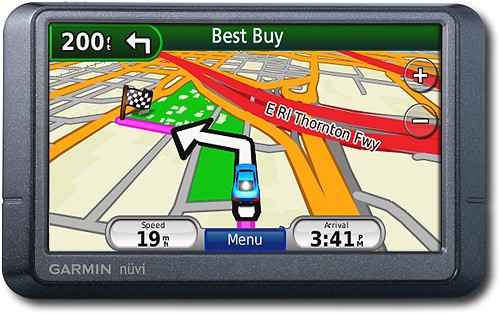
Posted .This reviewer received promo considerations or sweepstakes entry for writing a review.After doing some research, I decided on this model for the following reasons: wide screen, spoke street names and had real time, free traffic. The colorful screen is very easy to read. Along the top, it shows you distance to next announcement, the street of the next announcement, and, what I think is invaluable, a picture of what the next turn will look like. This is very helpful when the official name of a street (what 255WT calls it) and the road sign is different. (See below for more info on this.) The main map is very accurate (I downloaded the free 2010 map. Took 3 hours to download and 3 hours to install, unassisted.) Map page also has zoom in, zoom out, menu button, trip info button, estimated time and icon for traffic. What’s missing is a quick mute function. To mute or unmute the system takes 5-6 taps of the screen. The system will reroute you when you’re about ½ block off the suggested map, unless you’re on a non-street, such as a parking lot. It does a good job giving you a reasonable route (for example, I’ve chosen different routes because I, personally, know the traffic lights are timed better than the one the 255WT suggests). One time, it didn’t recognize an existing street. If it’s surrounded by tall buildings, it can get a little confused, trying to get a satellite. The system will speak the street name along with the next turn 2 or 3 times, as you get closer to your turn. Example: “in one mile, turn right onto Main Street; in 200 feet, turn right onto Main Street; turn right onto Main Street.” If the exit is local lanes for the road you’re on prior to the actual turn (what the exit sign might read), the system will tell you to exit, but will use the access road name before using the exit sign name. That’s where the picture of the exit is helpful (see above). It does a good job with pronunciation. Hearing street names is invaluable when you’re in an area that has streets close to each other and a plain “turn right” isn’t enough information. The real time, free traffic is great is you’re in a covered area. The system icon shows green (no problems), yellow, or red, along with estimated delay. If you’re driving and icon changes to red, system announces “traffic ahead” and automatically changes to the traffic map. The traffic map, which you can get to at any time, is similar to the regular colorful map, but will mark your route and side of the street with green and yellow, rather than the standard colors. Other traffic options are to see a list of current traffic instances and to see map of larger area with traffic instances. In the setup area, you can choose to have the system automatically reroute you around delays or you can choose this at will. The cost of “free traffic” is that you get small advertisement notices. They are about 2 inches wide and ¼ inch high and appear either on top or on bottom of screen. I thought they’d annoy me, but they are innocuous. They come on when you’re stopped, but only sometimes, not every time.
I would recommend this to a friend - Pros mentioned:Ease of use, Screen size
Rated 5 out of 5 stars
Garmin continues to be a GPS leader
Posted .This reviewer received promo considerations or sweepstakes entry for writing a review.I've owned a number of Garmin GPS units and added this one to the collection - as compared to older GPSMAP units this screen is great - much easier to use in the car. Plus: the human interface is much better as well. The only frustration I have is today there are too many products out there from Garmin - takes too long to figure out the product features and differences. Alas - selected this one because it was on a great Black Friday sale. Also supports a 4GB SanDisk flash memory device - much easier for getting things into the GPS (versus the old way of moving data over a slow USB connection).
I would recommend this to a friend - Pros mentioned:Gps, Screen size
Rated 5 out of 5 stars
Excellent value for the money
Posted .This reviewer received promo considerations or sweepstakes entry for writing a review.This was our first GPS system. It took almost no time to set up or learn the system. It was up and running and we were using it in a matter of maybe 10 minutes. It does have some quirky directions like having me go around the block instead of across the street but this only occasionally (rarely) happens. It has been great to go into a city we have never been before and get directions right to the door. I would recommend this Garmin product to anyone. It is an excellent value for the money...
I would recommend this to a friend - Pros mentioned:Ease of use, Screen size
Rated 4 out of 5 stars
Great GPS and a Fair Price
Posted .This reviewer received promo considerations or sweepstakes entry for writing a review.Overall I highly recommend this device, it has a bright screen and a clear voice (my kids call her Sophia). I have seen other GPS models that are much more complicated to use. When you turn it on it offers several icons. The three I use most frequently are the Address, Points of Interest, and Home features. I really like these choices. When I'm running low on gas and don't know where a gas station is, it quickly finds the closest one and guides me there. When I know an address I can easily enter it in. Another very useful function is the "Home" icon. Once you enter your home address the first time, it remembers it. Then if you're ever trying to navigate your way back home, you simply hit the Home icon and it will guide you there without more input. On rare occasion it has been hard to discern which way to go. Generally this happens where there is a fork in the road and the roads diverge gradually (like an express lane running parallel to a highway). It doesn't happen often. I'm guessing this has less to do with the unit and more to do with the ability of the satellites to accurately survey the landscape.
I would recommend this to a friend - Pros mentioned:Accuracy
Rated 5 out of 5 stars
Great GPS
Posted .This reviewer received promo considerations or sweepstakes entry for writing a review.I love this GPS unit. I got it on sale with a case and friction mount, so I'm happy. I did an update on it and it's ready to use! Very accurate, lightweight, and has pretty good battery life. Warns of traffic conditions ahead on road, allowing you to take an early detour, and automatically recalculates your route for you. The only thing that I have a gripe about is no bluetooth, but I have a headset for that!
I would recommend this to a friend - Pros mentioned:Gps, Screen size
Rated 4 out of 5 stars
Great GPS
Posted .This reviewer received promo considerations or sweepstakes entry for writing a review.Good above avarage gps for the money Trafic updates are very useful in busy areas. tells the speed limits and has very fast recalculating. The screen is nice and bright and is pretty easy to see. This GPS is pretty accurate.
I would recommend this to a friend - Pros mentioned:Accuracy, Ease of use
Rated 4 out of 5 stars
Nice unit.
Posted .This reviewer received promo considerations or sweepstakes entry for writing a review.I bought this unit based on research of various Garmin units and holiday pricing from Best Buy. This unit is used primarily for business travel across the country so it's important during setup to get the lastest free download from Garmin. Allow a couple of hours to complete the registration, free download, calibrating the unit and reading instructions. After this prep, the use of the unit is very easy and touchpad driven. My first day's drive was over 300 miles using the unit and it worked like a champ over country roads. The touch points for destinations worked great and programming in repeat locations is easy and convenient. I haven't been in traffic situations to see how the Traffic Update functions work. This is a nice unit for the price purchased. It would have been nice if Garmin included a protective case for the GPS unit, not as a separate purchase item.
I would recommend this to a friend - Pros mentioned:Ease of use, Gps
Rated 4 out of 5 stars
Nice GPS features but traffic is so-so
Posted .This reviewer received promo considerations or sweepstakes entry for writing a review.I picked this up for a great price online the day before Black Friday. The unit is easy to use and it my experiences with it, the GPS appears to be pretty accurate. In overcast/rainy conditions, it appears to take a little longer to acquire the satellites but once acquired it stays connected. I would definitely recommend it as a GPS unit. As for the traffic, I less impressed. There appear to be some stretches that don't get coverage and unfortunately my commute appears to be one of them. Coming from Pleasanton to San Jose over the Sunol Grade, voted the worst commute in the Bay Area, there was no traffic warning until I got over the grade into Fremont, eventhough I was clearly in heavy traffic. Once I got over the hill, it gave me traffic info, although nothing as accurate as online info through sigalert.com.
I would recommend this to a friend - Pros mentioned:Ease of use, Screen size
Rated 5 out of 5 stars
Great GPS!
Posted .This reviewer received promo considerations or sweepstakes entry for writing a review.I bought this GPS for my girlfriend because she was always having trouble in cities and constantly is getting lost, so it made sense to invest in a GPS that would help her to navigate from place to place easier. I wasn't attached to any brand when I looked but was always impressed with the reviews and testimonies from friends with a Garmin who said they never had problems and were in love with it. I looked at the 205 as it's cheap, but for the price the features and peace of mind of having a Garmin are unbeatable. First, the life-time traffic is great because it helps cut-down on time stuck on the high-way and shows her the quickest way from point A to point B before she even knows the difference. Second, the screen is large and the user interface is incredibly easy to use. It's a bit expensive, but if you're going to invest in a GPS unit, then you might as well make sure you do it right. I'm not sure that a GPS is nearly as valuable without the traffic and not having to pay any subscription fees just sent it over the top. Definitely purchase if you're looking for easy to use and for a unit that gets it right every time.
I would recommend this to a friend - Pros mentioned:Ease of use
Rated 4 out of 5 stars
Pretty good GPS
Posted .This reviewer received promo considerations or sweepstakes entry for writing a review.The good: - Although it feels kind of cheap / plasticky, I think that actually makes it more durable, particularly for the screen. I throw it in my bag fairly often and it's fine - It's pretty intuitive when looking for locations - Lots of ways to view your route The bad: - The system hangs more often than I'd like - It takes it a while to get a satellite read at random times, even in wide open spaces - The menus can be a bit tedious, even if they are simple and straight-forward The summary: I've never had a GPS before, so I really don't have any baseline to compare it to. But from what little I know, it seems to be a pretty average GPS system. I got it at a good price because of a Black Friday sale, but don't know if I would pay full retail for it.
I would recommend this to a friend