Customer Ratings & Reviews
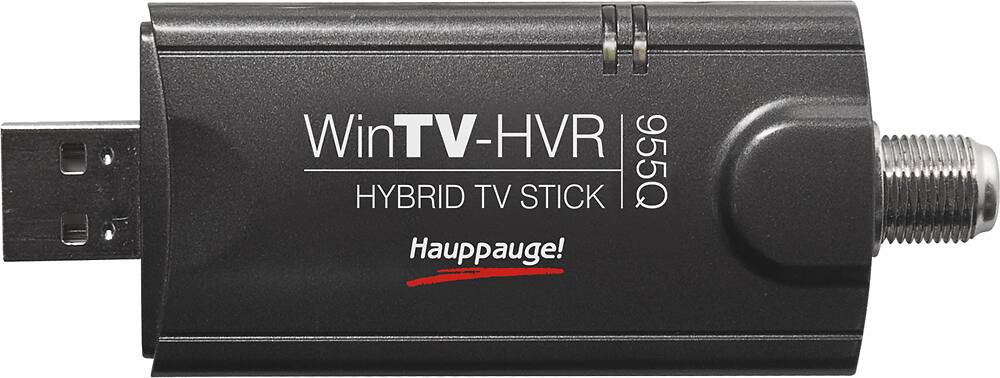

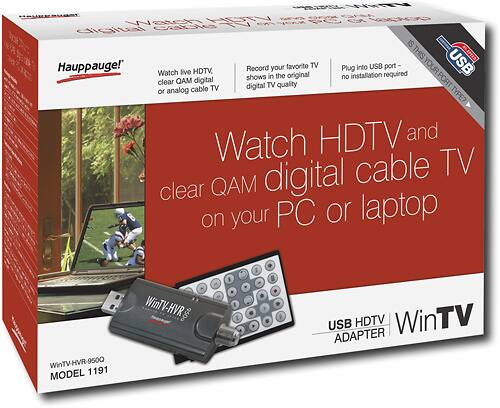
- Model:
- 1191
- |
- SKU:
- 9234205
Customer reviews
Rating 4 out of 5 stars with 253 reviews
(253 customer reviews)to a friend
Customers are saying
Customers praise the WinTV-for Laptop and Notebooks for its easy setup, great picture quality, and portability. They find it useful for recording TV shows and working well with Windows Media Center. However, some customers express dissatisfaction with the remote control, software, and compatibility issues with certain machines.
This summary was generated by AI based on customer reviews.
- Cons mentioned:Remote control
Rated 4 out of 5 stars
Got TV?
Posted .This reviewer received promo considerations or sweepstakes entry for writing a review.I purchased this unit after testing 3 other tuners.... Pairs easy with Window 7 X 64 and Excellent w/ the Media Center. I Had 5 HD channels and 9 digital channels within minutes from plugging in and I live in a TERRIBLE area to recieve a signal of ANY kind... One recommendation if you are going to use it for Over the Air: Attach to an outdoor antenna for the INITIAL channel scan, this way, you get better signal strength to lock in the channels. The Bad: The remote control doesnt work very well or it works off and on. For this and this reason alone it lost a star in rating... Not that big of a deal because you can easily control from the PC and no issues with the actual tuner itself. (2 months use) it comes with an extension incase the Tuner is blocking another USB port, very useful!
I would recommend this to a friend - Pros mentioned:Ease of use, Picture quality
Rated 4 out of 5 stars
Finicky config, great picture; *works* with Linux
Posted .This reviewer received promo considerations or sweepstakes entry for writing a review.Contrary to what a previous reviewer has stated, the 950Q *does* indeed work fine in Linux. I'm using MythTV and TVtime on Ubuntu Karmic 9.10, and the picture is beautiful. Can't speak about other distros or even Ubuntu versions with the 950Q, but with Karmic 9.10, it's great, actually easier to get going than other Hauppauge PVR products I've used. One thing to remember is that its a DVB card, so you're going to use a /dev/dvb device, not a /dev/video device. In any case, I've also gotten it working well in Vista Home Premium using WinTV and Windows Media Center. Very nice tuner bundled with very lousy software, but you can work around the software. Nice unit for $79 bucks.
I would recommend this to a friend - Pros mentioned:SoftwareCons mentioned:Remote control
Rated 5 out of 5 stars
Road Warrior's Dream
Posted .This reviewer received promo considerations or sweepstakes entry for writing a review.I've been playing with HD tuner cards ever since the very first Hauppauge HD card, with its awful 'Janus' Windows driver. This thumb-sized device is every bit as capable as any PCI(e) card tuner. I still wouldn't use it for a permanent installation because the standard high-quality RG6 RF cabling can lead this little unit to tear up its fragile USB plug too easily. The included USB extender is good to use. I carry a short length of more flexible coaxial cable, and gaffer's tape to prevent things from coming apart at both ends. I regularly travel, staying at chain hotels and corporate guest suites. I have yet to see one equipped with a HD TV set. What I have discovered is that there is QAM HD content coming out of many of those cables. Now that I have a wide screen laptop, I picked up this gadget so that I can watch local TV programming in full HD glory. Still no joy with premium channels, of course. I live VERY close to the antenna sites of all of my local TV stations, and expected to be able to use the included 'stubby' antenna for OTA broadcasts. No such luck. A length of bare wire works better. Maybe Hauppauge can find something that supports VHF frequencies better, like a helical design. The bundled software is the best Windows software yet from Hauppauge. But it lacks a program guide, with no replacement after Hauppauge dropped the so-so Gemstar Guide+. This is a major omission! Fortunately, this device is supported by open source PVR software that do include program guides. The included remote is a bit weak. That's an acceptable price to pay for being so small. I suppose that I could try a full-sized remote from a PVR-150 card...
I would recommend this to a friend - Pros mentioned:Installation, Picture quality
Rated 5 out of 5 stars
I could not be more satisfied with this product!
Posted .This reviewer received promo considerations or sweepstakes entry for writing a review.I knew I wanted a TV tuner card, but having no previous experience with them, I was kind of pessimistic. I thought it would be a nightmare to install with marginally-acceptable results. I could not have been any more wrong! I installed this in a matter of minutes. I am running Windows 7 64 bit with 8 GB of RAM. Another reviewer said computers with Win 7 and more than 3 MB of RAM were not compatible with this product. Not so! I am using the small antenna that comes with the card, and it's picking up all broadcast TV here. The picture is stunningly clear, and I now prefer watching TV on my computer monitor instead of the real television. This card works seamlessly with Windows 7 Media Center. I have not watched television for years, because my TV is very far from the computer in my house, but now I am watching television again, and it's awesome.
I would recommend this to a friend - Cons mentioned:Antenna
Rated 5 out of 5 stars
Perfect DVR option for cable-cutters
Posted .This reviewer received promo considerations or sweepstakes entry for writing a review.I purchased this to convert a 3-year-old HP desktop into a DVR for over-the-air digital TV, and it works exactly as I'd hoped. A few notes: 1. Although many Windows computers will automatically download the drivers for this tuner, those drivers will often be out of date. Be sure to download the latest drivers from the Hauppauge website. (If you're using Windows Media Center, it'll hang while trying to find signals if you're using an outdated driver.) 2. If you have a computer with Windows Media Center, you won't need the software that comes with this tuner; Windows Media Center automatically detected the card and TV signals (after I updated the drivers), and it's an intuitive, robust program that works like a charm. 3. The antenna that comes with this tuner will only suffice if you live in a metropolitan area where all of the broadcast signals generate within a 10-mile radius; the rest of us will need a heftier antenna. The Mohu Leaf is a good option, although I use the ChannelMaster DB8 since many of our local broadcasts generate from 30+ miles away. 4. I don't know if the included remote will work with Windows Media Center, but I use the Logitech K400 wireless keyboard with touch pad. It's inexpensive, lightweight, small, easy to use, and has a wireless range of 33 feet. With all of that said, this is a good product if you've ditched cable but still want to be able to record your favorite programs. And for the record, my computer is connected to a 720 HDTV via a VGA cable and male-to-male stereo cable. The picture isn't as good as when the coax was plugged directly into the TV, but it's still quite good. If you have the option of connecting your computer and TV via HDMI, the picture should be excellent.
I would recommend this to a friend - Pros mentioned:Ease of use
Rated 5 out of 5 stars
Awesome product, easy install, free HD TV!
Posted .This reviewer received promo considerations or sweepstakes entry for writing a review.Bought this last night and install was basically painless. I didn't use any of the software that came with the product & decided to go with Windows Media Center (Running Windows 7). I literally plugged it in, scanned for channels, and was off to the races. I bought a separate pair of bunny ears for better reception ($10 bucks). If you are thinking about it, take the plunge and cancel your cable.
I would recommend this to a friend - Pros mentioned:Ease of use
Rated 5 out of 5 stars
Does exactly what it says on the box
Posted .This reviewer received promo considerations or sweepstakes entry for writing a review.Got this to record a TV show off the air with an antenna and had it up and running in less than 20 minutes. Setup was very straight forward, it took a zipcode to speed up the channel search and was ready to go. Files it makes are .ts files and will play in their app or in VLC or Windows Media, so very flexible.
I would recommend this to a friend - Pros mentioned:Ease of useCons mentioned:Heat
Rated 3 out of 5 stars
Works great with Windows Media Center. Free HD.
Posted .This reviewer received promo considerations or sweepstakes entry for writing a review.Thinking about getting rid of Cable so I was looking at a capture device for live TV or TiVo. TiVo requires you to rent a card from Time Warner, but the whole point is to stop paying Time Warner money. The Windows Media Center interface is very user friendly when you looking up channels and trying to record. The remote works great when you are playing back your recordings, you can FFWD, Pause, etc with ease. The capture quality is OK. Sometimes the skin tones look funny, too pink or too green or something. And unlike my DVR, you cannot record 2 things at once, or record one thing and watch another. You have to commit to one show at a time. But watching HD TV shows on your computer or laptop is pretty cool. The device does get super hot so be careful of that. The included software is kind of generic, so use Media Center.
I would recommend this to a friend - Pros mentioned:Ease of use
Rated 4 out of 5 stars
Small, Functional
Posted .This reviewer received promo considerations or sweepstakes entry for writing a review.This TV tuner works well with Windows Media Center once it's set up. Hauppauge offers its own WinTV software for using the device, but if you're running Vista or Windows7 you won't need it. If you have a cable to connect to the tuner it allows you to watch and record TV on your PC -- desktop or laptop, as long as you've got an available USB 2 port. This model works with digital and analog cable transmissions. If you have strong enough broadcast signals in your area the antenna may be useful, but it really works best with a cable attached.
I would recommend this to a friend - Pros mentioned:Tv tuner
Rated 5 out of 5 stars
It works for local tv with outdoor Antenna UTAH
Posted .This reviewer received promo considerations or sweepstakes entry for writing a review.I read reviews and decided to not install the cd that comes with this tuner. (smart move) I run windows 7 home premium with media player. We dumped dish (after yet another increase) and added netflix but we still wanted the DVR . to my surprise all this time I had one my computer combined with media center. so I ran the coax from outdoor antenna to this usb tuner pluged it in to computer usb port started windows media center (find stations) and I receive all 44 local stations (same as on oter tv) that was is. ignore instructions and cd if this is the same thing you are looking for. media center is very close to the same as dish dvr. the best part is you like me may already own it and it is just sitting on computer doing nothing put it to work. I also wanted the recorded show's to watch on our tv. so I purchased the new xbox 360 4g. and remote I connected this wireless and it works perfect. xbox is the only extender that I found to work with media center. but if you do the math it will pay for itself in just a few months.
I would recommend this to a friend - Pros mentioned:Ease of use, Picture quality
Rated 5 out of 5 stars
I Love it & I'll NEVER MISS A TV SHOW AGAIN!!!
Posted .This reviewer received promo considerations or sweepstakes entry for writing a review.I bought this device for use on my Toshiba Satellite Laptop with Intel® Core™ i3 Processor - Quantum Black. I happened to just try it and almost considered returning it, until I realized how GREAT the picture image is. It's so easy to just plug it in, turn on Windows Media Center and it works with or without a cable connection. I watch local digital channels for free on it. Great for breaking news and favorite afternoon shows that you can watch for FREE while at work/home. I watch TV while under the hair dryer at the beauty shop. I never have to miss breaking news or a favorite show AGAIN. I LOVE THIS DEVICE!!!
I would recommend this to a friend - Cons mentioned:Remote control
Rated 4 out of 5 stars
Great with Window 7 remote
Posted .This reviewer received promo considerations or sweepstakes entry for writing a review.http://www.hdtvtunerinfo.com/win7mcqamsetup.html. This link really helped me set up my device. I can lay in bed and use my remote that came with my PC that I linked to watch Netflixs and my local cable. My cable provider made me use and additional box on my HD ready tube tv. After the purchase of my pc I really did not see the need to buy another tv. So I installed this device. Works great except the remote would not work. It took three days of research to find the step that I was missing to make it work on Windows Media Center. If you are not using a cable box you will not get channel guide info. Very happy over all with the product!
I would recommend this to a friend - Pros mentioned:Ease of use, Picture quality
Rated 5 out of 5 stars
Great TV Tuner, Flawless Install, Perfect Picture
Posted .This reviewer received promo considerations or sweepstakes entry for writing a review.Just purchased this USB tuner from Best Buy and it was really worth the money. Unfortunately I had to learn the hard way that you get what you pay for when I purchased a much cheaper Kworld tuner last year that broke 5 months after purchase and was always buggy. The experience with this tuner however is soooo much better. It installed quickly and easily and the picture is amazing when receiving full 1080i broadcasts.
I would recommend this to a friend - Pros mentioned:Picture quality
Rated 5 out of 5 stars
Quick setup, good results
Posted .This reviewer received promo considerations or sweepstakes entry for writing a review.I got this when Comcast went to all-digital signals and I could no longer use an earlier analog USB solution for getting tv signals from my cable to my PC. Wasn't sure if I'd need another Comcast box between the cable and this device, but none was needed. I like that this starts up more quickly than my earlier cable-to-PC converter, with no hassle. The channels are clear, change quickly when I flip the remote or on-screen controls, and give me the complete range of channels I have through Comcast (none are premium). My only drawback with this is that I had to label each channel individually, since the device only assigned a numerical sequence to the channels. For all the improvements this give me, and the ease of using it on my 22-inch monitor with a direct cable plug-in, it's certainly worth that minor bit of work. In fact, I like the picture quality so much I added a second monitor to my PC, so I can either watch TV while working, or use the second monitor to spread my work across two screens. The TV tuner stick was definitely the factor which swayed getting the second monitor. I like it!
I would recommend this to a friend - Pros mentioned:InstallationCons mentioned:Remote control
Rated 5 out of 5 stars
Took a chance
Posted .This reviewer received promo considerations or sweepstakes entry for writing a review.Read all the reviews and decided to take a chance. Before I bought it, I went to antennaweb to see how many channels I could reasonably expect to get (11). Set-up was great. I started by just letting my computer do its thing, and installed using HP Mediasmart. Total install time for this was 7 minutes. I was up and running with 13 channels, all crystal clear! Since everything went so smoothly, I figured that I would go ahead and install the software that came with the tv tuner. Following directions (sort of, never really pay alot of attention to them), total set-up time was 15 minutes. Again, no issues, no problems, and 13 crystal clear channels! The only slight issue that I have been able to find is that the included remote operates both HP Mediasmart and Win7. Once I figured out which button to push, everything worked flawless. If you have any common sense when it comes to installing hardware/software on your computer, this is the way to go!!!! Goodbye Comcast!
I would recommend this to a friend Rated 4 out of 5 stars
Works great but included software is terrible
Posted .This reviewer received promo considerations or sweepstakes entry for writing a review.Downloaded the latest drivers from Happauage webpage before installation, no problems with installation on Windows 7. Tried the included TV software which is just terrible. Scanned my cable channels and labeled all of them unknown. I could tune to each channel just fine, but except for a few memorized ones (for instance I remembered 32 was ESPN), had know clue which was which since none of them were labeled. Terrible software and weak interface. Thanks to info from another reviewer, I tried it with Windows Media Center and it worked great. Found all my analog channels plus network digital channels and labeled them appropriately. (CBS, NBC, Comedy Channel, Cartoon Network, etc.) Channels were clear and crisp, could easily change channels and use the program guide. Programs also recorded fine with Window Media Center, it really is like having a Tivo on your PC. I could watch a previously recorded program while it was recording another show. Haven't tried with supplied antenna, so can't attest to how well it works with it. Device works great, just have some other software to use with it other than what's included.
No, I would not recommend this to a friend- Pros mentioned:Picture quality
Rated 4 out of 5 stars
Great infrared remote control for your computer
Posted .This reviewer received promo considerations or sweepstakes entry for writing a review.I was excited to install this adapter on my laptop so I can watch TV. However the included portable antenna was so weak I could only get one channel where I live. Fortunately the only channel that came in is in HD and the picture quality is excellent.( Oddly enough you need a TV adapter similar to this to configure your Windows Media Center properly) The one and most significant redeeming feature is the infrared remote control. Together with Windows Media Center, the wireless remote gives you control over your PC. This means you can control everything from your music collection, videos, TV and even turn off your computer!! Plus, it also works with iTunes. So if you have cable or a really good aerial antenna and you're looking for a TV adapter and a DVR for your computer, look no further. The Hauppage TV Stick has an excellent remote control that easily turns your computer into a real multimedia center you could dedicate to your big screen TV. However, if you're expecting good TV reception just from the portable antenna, try a different brand.
No, I would not recommend this to a friend - Pros mentioned:SoftwareCons mentioned:Antenna
Rated 5 out of 5 stars
GOOD DVR / HD VIEWING DEVICE
Posted .This reviewer received promo considerations or sweepstakes entry for writing a review.I really love this device. Do not use the software version 4.6 or 6.0. These versions will not work with Vista. They will slow down and crash your computer. Instead, go to the Hauppauge support page and download their new 7.0 viewer. Also while you are there, download the Media Center Plug in. Titan works best when scheduling your recordings. http://www.titantv.com Click the program you want to watch or record and the software does the rest. I have it hooked into my Comcast Cable outlet and gets the high def local channels. Make sure you run QCAM for cable stations. The antenna that came with the unit is worthless. Need a better antenna.
I would recommend this to a friend - Cons mentioned:Compatibility
Rated 3 out of 5 stars
Works w/ Windows (Won't Work w/ Linux)
Posted .This reviewer received promo considerations or sweepstakes entry for writing a review.Once it's up and running it's a fine product. If your running Vista Ultimate (MCE) be sure to install the drivers FIRST, then the WinTV app. Then you'll need to hide the 'update' that Windows wants to stick on there the next time you run updates. That thing will jam up the works and I eventually just dumnped my entire image and started from scratch (which is sort of like killing a fly w/ a canon, but I wasn't in the mood to chase after a PVR driver). One last thing (kind of a biggie for me) WILL NOT WORK AT ALL W/ LINUX!! I've read posts of people getting this thing functioning on some of the newer distros, but try as I might I couldn't for the life of me get this thing functioning. Ended up purchasing a PCIe 1600 that worked pretty much out of the box.
I would recommend this to a friend - Pros mentioned:Picture quality
Rated 4 out of 5 stars
Great alternative to DVR
Posted .This reviewer received promo considerations or sweepstakes entry for writing a review.My VCR quit. New VCR's no longer include tuners unless you want to special order one for well over $400. This little gadget looked promising, and Hauppauge's web site promises it will work with Linux, so I got one yesterday. My $275 Toshiba Celeron Windows7 laptop made a flawless 2 hour recording of a movie last night while I was sleeping. I opened the file using Avidemux in Linux to cut before show, after show and ads and the finished mpeg looks great. Bottom line $83 once for this little device that lets me keep a recording for my own, legal use or $20+ every month to the cable company for their "decoder" and a limited storage DVR... It's a no-brainer.
I would recommend this to a friend