Customer Ratings & Reviews
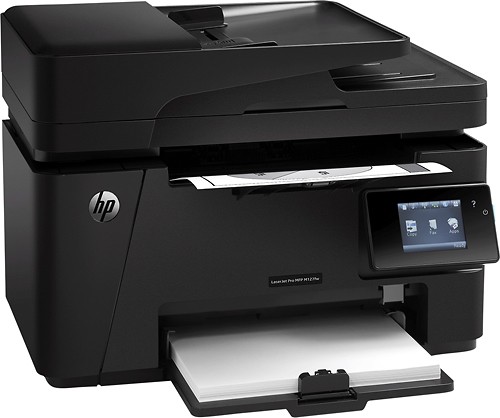

- Model:
- CZ183A#BGJ
- |
- SKU:
- 1883111
Customer reviews
Rating 4.5 out of 5 stars with 353 reviews
(353 customer reviews)to a friend
Customers are saying
Customers admire the LaserJet Pro MFP M127fw's print quality, citing crisp prints and excellent image reproduction. Its ease of use and wireless functionality are also frequently praised, along with its compact size and quiet operation. Many appreciate the inclusion of fax capabilities and find the printer to be reliable. The printer's affordability is also a recurring positive comment.
This summary was generated by AI based on customer reviews.
Rated 1 out of 5 stars
Don't get!!!
||Posted .This reviewer received promo considerations or sweepstakes entry for writing a review.Purchased it 3 times before we gave up...wouldn't connect to internet, wouldn't print. Constant nightmare.
No, I would not recommend this to a friendRated 1 out of 5 stars
poor quality
||Posted .This reviewer received promo considerations or sweepstakes entry for writing a review.very unsatisfied with printer after printing 10 pages stop printing not recommended
No, I would not recommend this to a friendRated 1 out of 5 stars
not Mac friendly
||Posted .This reviewer received promo considerations or sweepstakes entry for writing a review.after hours of trying could not set up with a brand new mac book
No, I would not recommend this to a friend- Pros mentioned:Print quality
Rated 5 out of 5 stars
Really good printer
Posted .This reviewer received promo considerations or sweepstakes entry for writing a review.If you need a fast and reliable printer, this is the one.
I would recommend this to a friend Rated 5 out of 5 stars
Good starter laser printer
Posted .This reviewer received promo considerations or sweepstakes entry for writing a review.Past problem I've experience with inkjet printers is that the color inks never seem to last long enough. They dry up quickly when the printer is not in use. It seemed like I was having to replace all the ink every 4-5 months, even when the printer is not in use. I held out for years in switching to laser because through my frustrations of going through years of costly ink replacement, I still wanted the option to print in color as needed. Looking back at the type of documents I actually print, 95% were in black and white. realizing the cost of replacing 5 laserjet jet toners, I decided that black and white printing is really what I needed. Knowing I would be giving up the option to print in color, I finally made up my mind that I would switch to a laser printer, as long as it had fax, scan, print, and copy functions. I was excited to find this HP laser printer on the BB ad last week on sale for $199 and drove to the nearest BB that had availability. As a starter laser printer, it was a perfect match for my HP desktop and had all the other functions that I was used to, along with wireless connectivity. Compared to other printers, it's not the fastest but it's not a deal breaker for me. 21 PPM is quick enough for the amount of printing I actually do. Set up was easy, just one to two cables needed depending on wired or wireless set up. With the quick start pictured instructions, wireless set up was simple. Just turn on, pick wireless set up in the colored LCD screen, and follow the prompts. I was connected to my wi-fi network within a couple of minutes and so far connection has not dropped at all. I also appreciated HP for including 2 dvd set up discs (one for Windows and one for Mac) in the packaging as I have both program running in lap tops and MB Pro. It came with a starter toner with a 700-page capacity. Wow! I've never printed beyond 200 pages at a time, so it should last awhile. I have yet to try printing from a different location using E-print or with my smart phone, but it's nifty to know that I have the capability! One thing I would like to improve on is the paper storage capacity (only 35 sheets) which could be more. For a starter laser printer, I am happy with my purchase and would recommend it to someone who is looking for a multi-funcion laser printer at a decent price.
I would recommend this to a friendRated 4 out of 5 stars
Great for the Price
Posted .This reviewer received promo considerations or sweepstakes entry for writing a review.This printer is was a great buy, and is great for the little projects I needed it for...note that the Scanner is not that great even when you select the highest DPI for picture scanning, but none the less excellent product.
I would recommend this to a friendRated 2 out of 5 stars
SCANNING Doesn't Play Nice w/ MAC's
Posted .This reviewer received promo considerations or sweepstakes entry for writing a review.Although its a good performer for FAX's and Printing, don't expect the scanner to work well on an Apple Network. Can't speak to windows users. Full disclosure - I've been a loyal HP user for over 20+ years and had this one for a few years, generally pleased - but setting it up on a MAC is a completely underwhelming experience - AGAIN when using the HP support instructions word for word both with and without their software scanning does work
No, I would not recommend this to a friend- Pros mentioned:Print quality
Rated 5 out of 5 stars
Great printer
Posted .This reviewer received promo considerations or sweepstakes entry for writing a review.Does everything I need it to and does it seamlessly. Print quality is great and it the toner lasts a long time. Will never buy an ink jet again!
I would recommend this to a friend - Pros mentioned:Print quality
Rated 5 out of 5 stars
Ink usage low
Posted .This reviewer received promo considerations or sweepstakes entry for writing a review.Great quality print. Toner usage is very efficient.
I would recommend this to a friend Rated 2 out of 5 stars
WiFi isn't that great
Posted .This reviewer received promo considerations or sweepstakes entry for writing a review.The printer has a great number of features, especially for the price. The WiFi won't connect to any network that has the SSID hidden, which is a pretty common security feature on even the most basic WiFi capable devices these days. Even if you set the WiFi up manually, even through the software interface on the computer, it won't connect wirelessly unless you broadcast your network. You can make it work as long as your router is capable of printer sharing via a USB connection at the router. This is one of the primary reasons most people purchase a WiFi enabled printer. I would recommend the printer to users who are comfortable with some connection/configuration trouble shooting, but not to novice users.
I would recommend this to a friendRated 1 out of 5 stars
Bad wireless connect
Posted .This reviewer received promo considerations or sweepstakes entry for writing a review.I bought this printer strictly for the printing capability of using the direct connect feature for printing from mobile devices. The demo unit in the store worked fine but after 2 failed products And poor support from HP I am looking to the competition for my printing needs
No, I would not recommend this to a friendRated 1 out of 5 stars
All-In-NONE
Posted .This reviewer received promo considerations or sweepstakes entry for writing a review.This thing sucks. Not only is the scanning slow as hell, but when I scan multiple pages, it deletes the old one. Multiple scan lines were present right off the mark no matter how well I cleaned the area. Printing is very slow too for a laserjet. Also, the thing randomly become un-findable by the computer every other day and I have to hard boot it. HP "lack of support" is as helpful as they usually are when I have issues with their products, which is frequently. Never had these issues with Lexmark.
No, I would not recommend this to a friendRated 1 out of 5 stars
hate it
Posted .This reviewer received promo considerations or sweepstakes entry for writing a review.must take all of the paper out to print envelopes or anything else - there's no imput tray
No, I would not recommend this to a friend