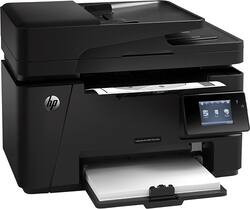
HP - LaserJet Pro MFP M127fw Wireless -and-White All-in-One Laser Printer - Black
- Key Specs
- Networking: Wireless
- Printer Type: All In One
- Duty Cycle: Up to 8,000 (The maximum number of pages per month that the device can produce without failing, as specified by the manufacturer.)
- ISO Mono Print Speed: 21 pages per minute (The number of black ink (grayscale) pages able to be printed per minute in the device's default single-side mode, as tested by the International Standards Organization (ISO).)
- Monochromatic/Color: Monochromatic
- General
- Product Name: LaserJet Pro MFP M127fw Wireless Black-and-White All-in-One Laser Printer
- Brand: HP
- Model Number: CZ183A#BGJ
- Dimensions
- Product Height: 12.2 inches (The out of box height of the item. Height is measured as the vertical distance from the bottom of the item to the top as it would be primarily used or placed.)
- Product Width: 16.5 inches (The out of box width of the item. Width is measured as the horizontal distance from one side of the item to the other as it would be primarily used or placed.)
- Product Weight: 20 pounds (The out of box weight of the item.)
- Certifications Listings & Approvals
- EPEAT Qualified: false (The Electronic Product Environmental Assessment Tool (EPEAT) was designed to provide an environmental assessment tool for purchasers. In order to qualify for EPEAT, a product must meet all 23 required criteria.)
- Paper Info
- Automatic Document Feeder Capacity: 35 sheets
- Maximum Document Length: 14 inches
- Maximum Document Width: 8.5 inches
- Supported Paper Sizes: 3", x 5", to 8.5" x 14", letter, legal and executive, envelopes (#10 and Monarch #7 3/4) and postcards (standard #10)
- Features
- Automatic Reduction/Enlargement: true
- Ink
- Compatible Cartridges: HP 83A; CF283A
- Ink Subscription Service Available: false (The printer monitors ink usage and alerts the subscription provider when levels are low. A purchased subscription provides refills of ink based on usage.)
- Copier Info
- Copier Resolution (Black): Up to 600 x 600 (Refers to the number of pixels/dots, both horizontally and vertically, of the image produced by the copier in black ink. Generally, the higher the resolution, the sharper and cleaner the produced image.)
- Maximum Number Of Copies: 100
- Fax Info
- Integrated Fax: true
- Performance
- Printer Resolution (Black): Up to 600 x 600 (Refers to the number of pixels/dots, both horizontally and vertically, of the image produced by the printer in black ink. Generally, the higher the resolution, the sharper and cleaner the produced image.)
- Scanner Info
- Scanner Resolution: Up to 1200 (Refers to the number of pixels/dots, both horizontally and vertically, of the image produced by the scanner. Generally, the higher the resolution, the sharper and cleaner the produced image.)
- Scanner Type: Flatbed
- Connectivity
- Minimum System Requirements: Windows 8 (32/64-bit), Windows 7 (32-bit/64-bit), Windows Vista (32-bit/64-bit), Windows XP (32-bit) (SP2 or higher), 200 MB minimum hard disk space required (CD and Web Package), 400 MB minimum hard disk space required (Box Spec for Smart Install)
- Other
- UPC: 887111427793
HP LaserJet Pro MFP M127fw All-in-One Printer: Make sure your office runs efficiently with this all-in-one printer that handles your printing, copying, scanning and faxing jobs for you. Just connect your computer or mobile device using the printer's built-in Wi-Fi to get started.
- Laser printers are best for high-volume printing: They handle large volumes quickly and at a low cost per page. Toner (powder) is used instead of ink, so you get smudge-free images and text.
- Wireless and mobile printing capability: Connect this printer to your computer easily with built-in Wi-Fi. Plus, print from your smartphone, tablet and other mobile devices with the free HP ePrint app or Apple® AirPrint.
- 600 x 600 optimized dpi (dots per inch) for good print quality: Sufficient resolution for producing good quality documents.
- Standard paper handling: 150-sheet input and 100-sheet output capacity.
- 1 USB port for simple connectivity: 1 high-speed USB 2.0 port offers a standard connection to your computer.
- More print, copy, scan and fax solutions: Manually print and copy 2-sided documents, scan via HP LaserJet scan application or TWAIN, quickly fax documents and more.
- PC system requirements: Windows XP (32-bit, SP2 or later), Vista, 7 or 8 (32- or 64-bit); 512MB RAM; 200MB available hard drive space; USB or network port; CD/DVD-ROM or Internet.
- Mac system requirements: PowerPC G4, G5 or Intel® Core™ processor; OS X 10.6 or later; 500MB available hard drive space; CD/DVD-ROM or Internet; USB or network port.
Whats Included
- LaserJet Pro MFP M127fw All-in-One Laser Printer
- HP 83A black toner cartridge (CF283A)
- Phone and power cords, USB cable
- Software CD-ROM
- Owner's manual
Q: Does the LaserJet Pro M127FW scan multiple pages?
A: This HP Multifunction Printer can scan up to 35 pages at a time through the Automatic Document Feeder (ADF).
Q: Number of Pages Printed Per Cartridge
A: HP 83A Toner Cartridge prints 1500 sheets; HP 83X (not available at Beet Buy) Toner Cartridge prints 2200 sheets.
A: Great question. The M127fw is compatible with Windows 10. The printer comes with a software CD, but to ensure you get the latest drivers, I will give you the link to get the latest drivers for Windows 10. Here is the link: http://support.hp.com/us-en/drivers/selfservice/HP-LaserJet-Pro-MFP-M127-series/5396666/model/5303419 I hope this helps!
A: You can print from any smartphone. You set it up and locate it on wifi. It works great.
Q: Will this automatically scan both sides of a document?
A: Unfortunately, this HP Printer does not have the automatic duplex scan feature.
Q: Will this printer scan in color and what is the scan resolution?
A: Good question. Yes, the printer scans in color with a resolution up to 1200 x 1200 dpi. For more detailed specs, please visit the following link: http://www.bestbuy.com/site/hp-laserjet-pro-mfp-m127fw-wireless-black-and-white-all-in-one-laser-printer-black/1883111.p?id=1219066385898&skuId=1883111&cmp=RMX I hope this helps.
A: You will need a landline for the fax.






















