Customer Ratings & Reviews
- Model:
- JCD395
- SKU:
- 6515259
Rating by feature
- Value
Rating 4.4 out of 5 stars
- Quality
Rating 4.5 out of 5 stars
- Ease of Use
Rating 4.6 out of 5 stars
Customers are saying
Customers are enthusiastic about the 4K60 Pro USB4 Hub with MagSafe Kit's HDMI and USB4 connectivity, praising its ease of use and compact size, which makes it ideal for both travel and everyday use. Many appreciate its straightforward setup and reliable performance. However, some users noted that the device can get warm during extended use.
This summary was generated by AI based on customer reviews.
Great option for under $100, only 1 problem
||Posted . Owned for 9 months when reviewed.This reviewer received promo considerations or sweepstakes entry for writing a review.Great product! I have trouble with getting Wi-Fi in one side of my house. I could have fixed the Wi-Fi problem, but I prefer Ethernet. This product let my MacBook have Ethernet. This product also let me plug in my wired keyboard and still let me use my wired speakers. Only wish there was an option with these features that was just a wire and not have to plug in directly, but this hub is still great for the price.
I would recommend this to a friend- Pros mentioned:Hdmi, Portability

An easy way to Increase my computers connectivity
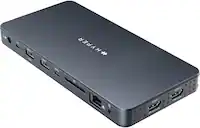
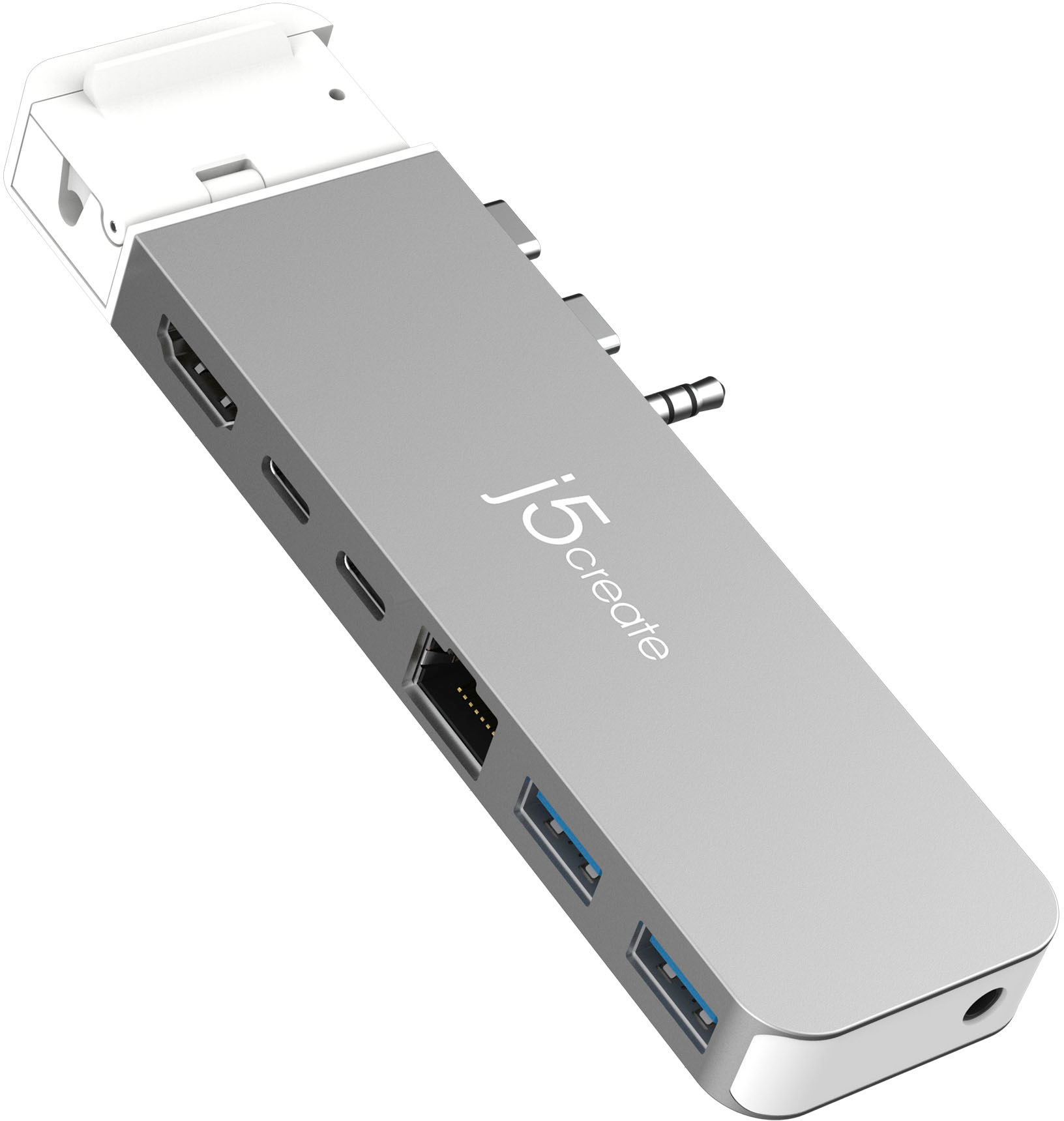
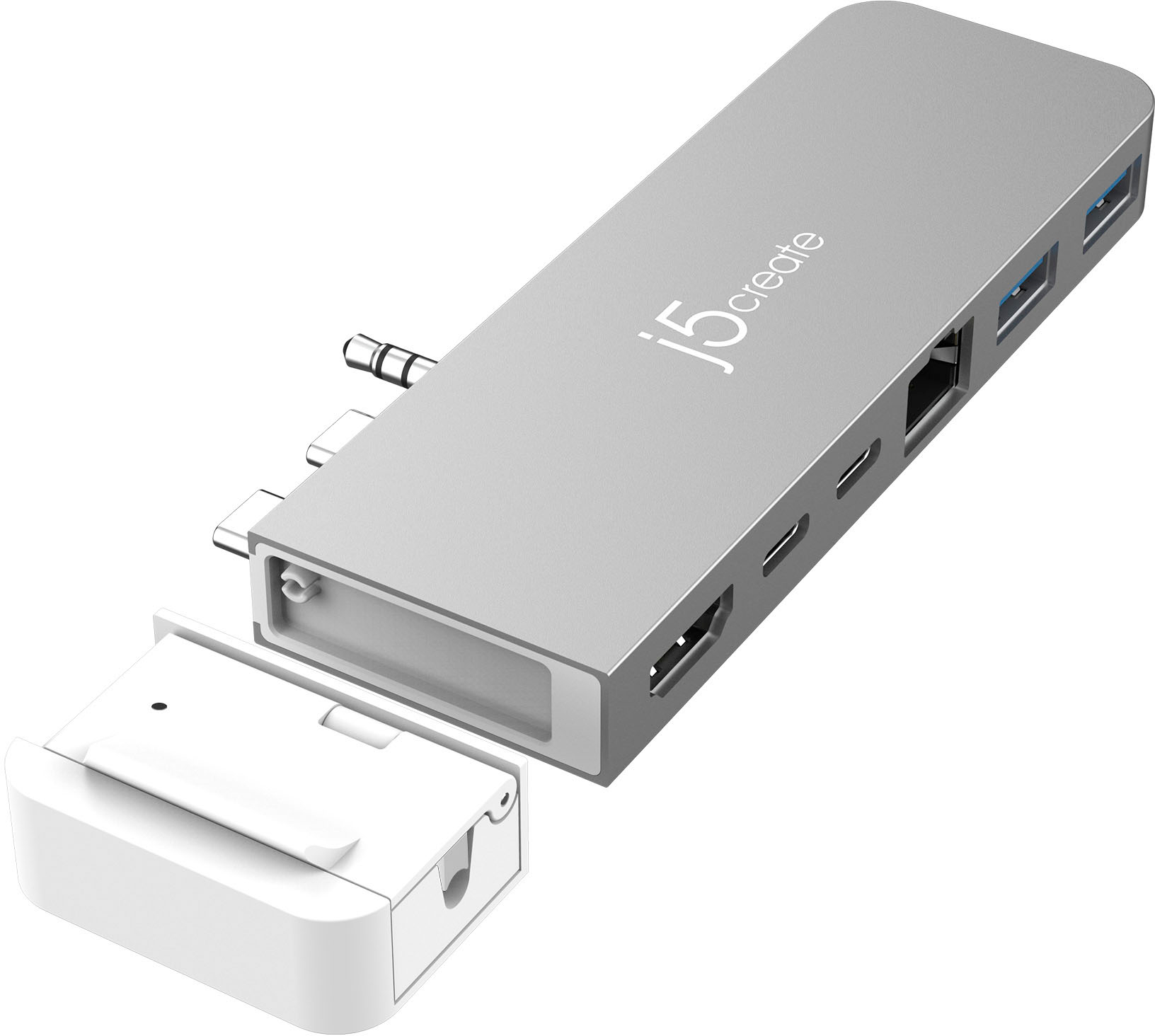
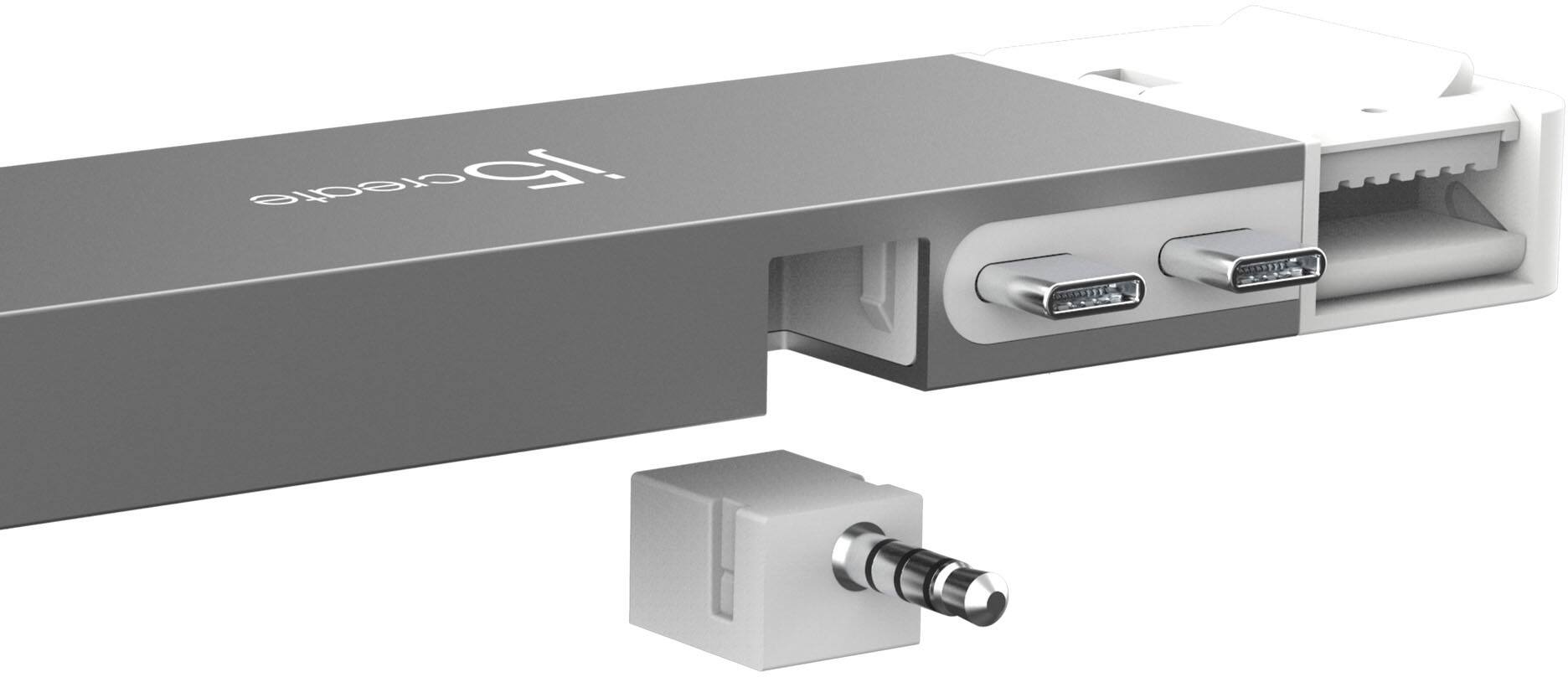
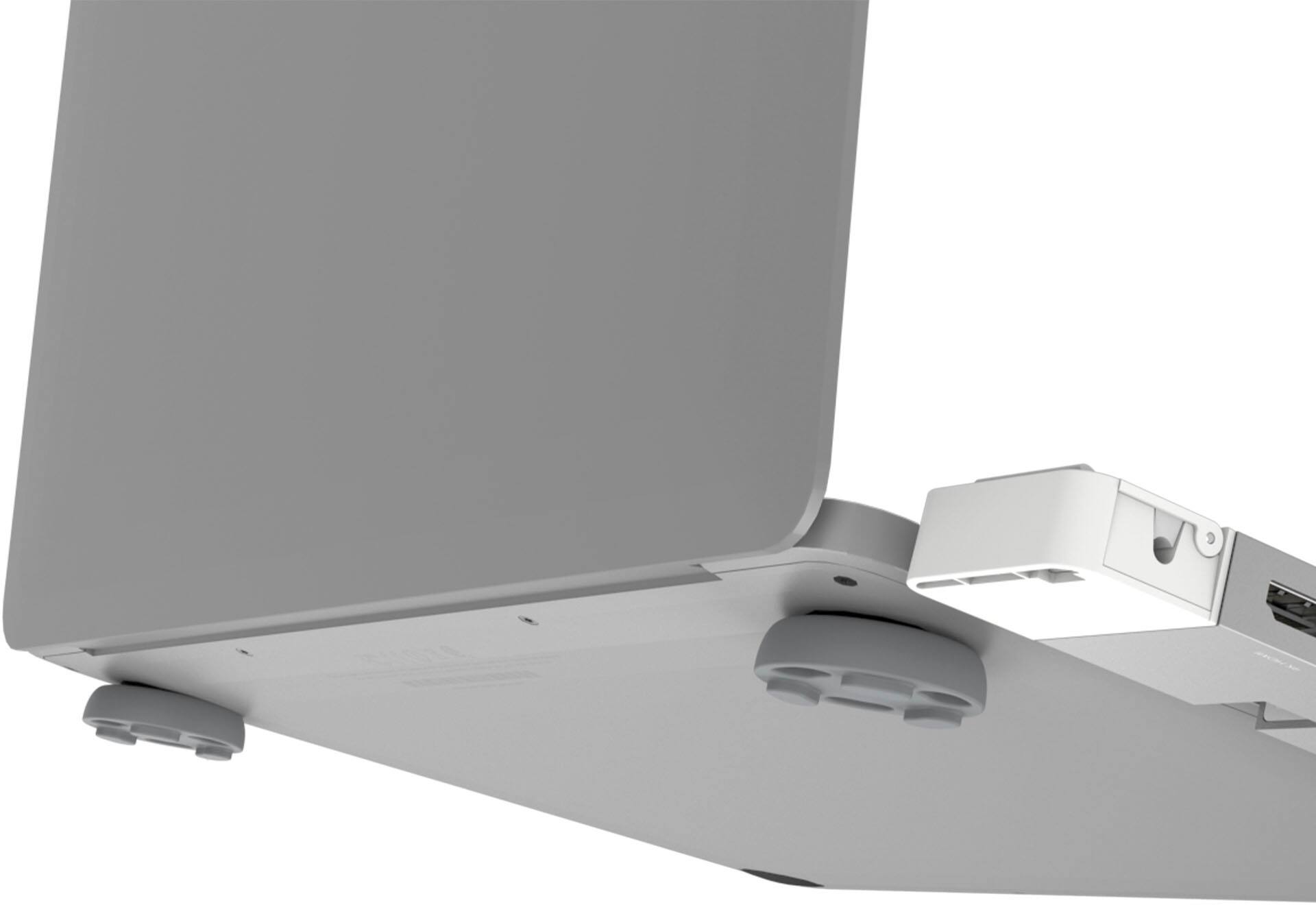
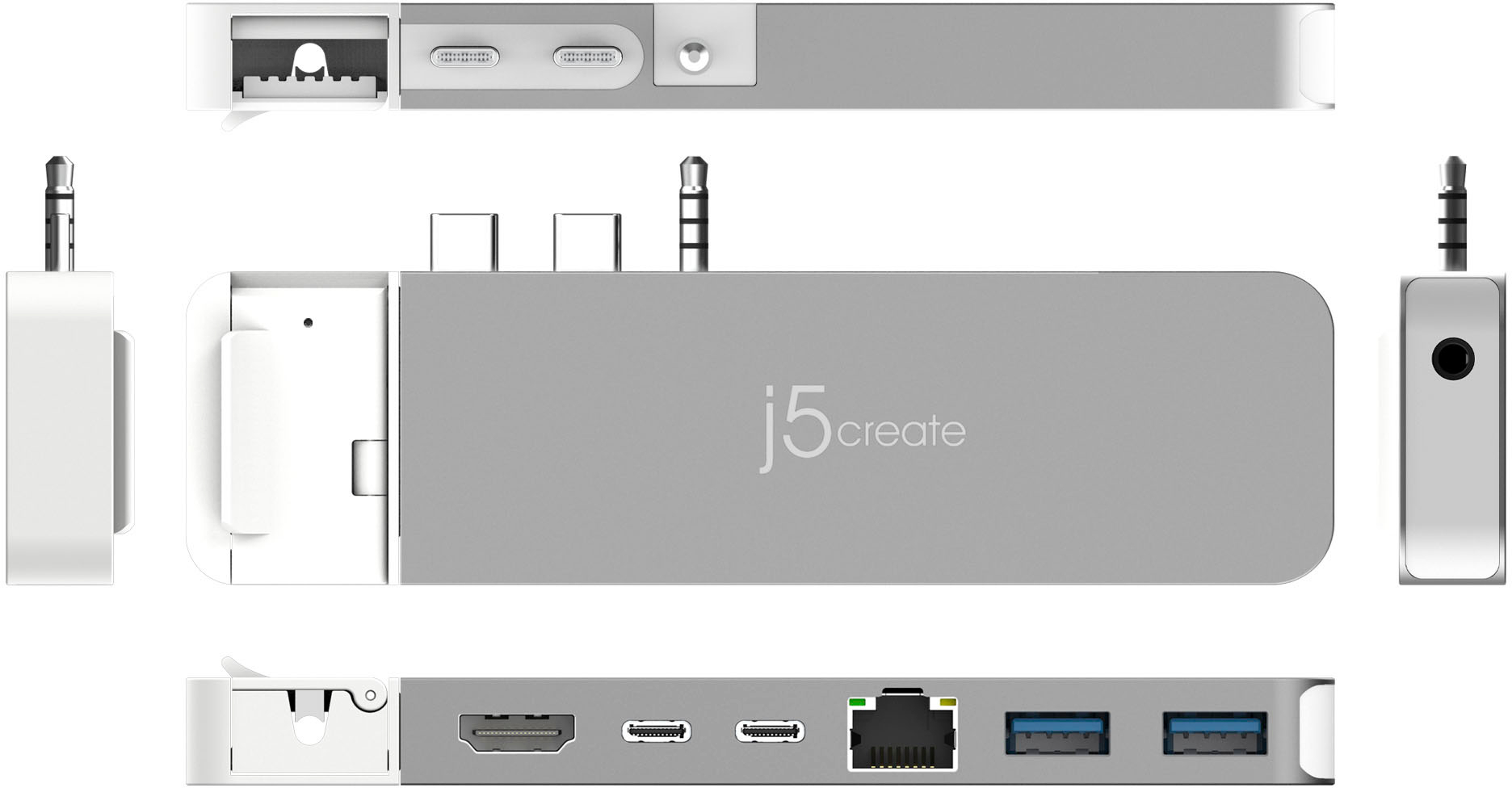
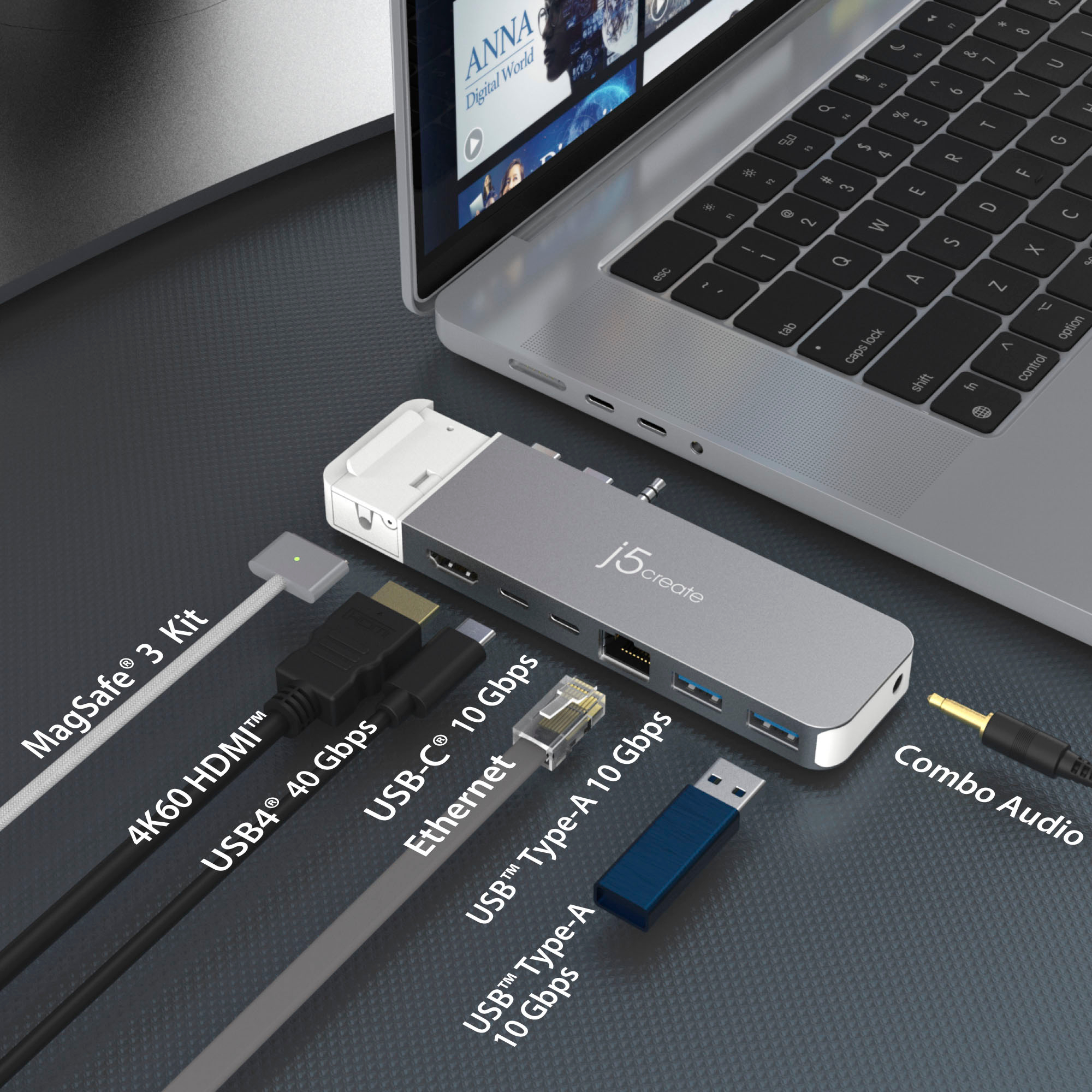
|Posted .This reviewer received promo considerations or sweepstakes entry for writing a review.The 4K60 Elite Pro USB 4 Hub with MagSafe Kit in grey and white is slim and easy to place on either the MacBook Pro or MacBook Air and it is also easy to take off. I have two monitors, the Ethernet cable, my speakers and wireless mouse and keyboard on it and all I have to do is connect my Mac to it and I can work at home. It is also easy to take off so I can work somewhere else. It even comes with silicon thermal pads for my Mac for easier to handle and keeping it cool as well. It does an USB C and 2 USB A ports and I do not have to download a driver to make it work just plug and ready. I like that there is an option to remove the 3.5 mm audio jack in case you do not need it. The 4k60 is small to take with in case you have two different stations as well. It has a total of seven ports, the HDMI the USB4 USB C Ethernet, two USB A, the combo audio mic jack and the MagSafe 3 Kit that it is optional as well as the audio jack. Overall it works great, blends in, easy to use, it is fast and it makes my workspace look much cleaner.
I would recommend this to a friend - Pros mentioned:Build quality
Real USB4 hub + 2 external displays on m2 AIR!
|Posted .This reviewer received promo considerations or sweepstakes entry for writing a review.If you're like me you've searched and tried many usb hubs from various retailers and they are extremely hit or miss in regards to quality and speed. One thing i haven't tried until now is j5create line of hubs. Let me tell you this one is the best hub with TRUE USB4 support 40gbps ive ever used. First things first the hit or miss part of almost any hub you buy these days is they all say thunderbolt 3/4 or usb4 but as you may know not all can actually perform under that guise. I can assure you this is the real deal and the USB4 (basically has to meet a min of thunderbolt 3 specs to advertise this but this one acts like TB4) port actually can support 40gbps transfer speeds. This is a first for me as all the other ones ive used can only hit around 25gbps max except for the $250-300 TB4 hubs which are sooo expensive. The best part is this works with both my macbook pro 14" (2021) (note that the space grey is a direct match to the finish here) and M2 macbook air (comes with feet in the box to level the laptop depth with the hub to not mess with your ports) with the removable headphone jack that the air doesn't have. (see my pictures) For whatever reason the name and even the box doesn't really clearly let you know what this can actually do but it can do more than it says. Everyone knows that the M2 macbook air only allows one external display to be used with it. Well.. If you use the HDMI port on this hub and the USB4 port to displayport as i have it actually supports 2! On my pro the USB4 can run my 4k 165hz monitor with ease which is amazing for this price point. The one thing that i was worried about was the magsafe white piece on this hub being annoying because one of the things i have is kids around my house and the last thing i want is my magsafe charger locked into my laptops with this thing. The good news is that it is magnetic itself and the entire white part can just pull off! Super relief. Daily use on this for my macbook pro ports wise I use one USB-a for an old external hard drive that only needs the 10gbps bandwidth, the other for a hyperx gaming headset wifi dongle, the standard usb c for a studio mic audio interface, the USB4 port for my 4k 144hz samsung monitor (fully supports variable refresh rate through the hub) and HDMI for another 4k 60hz monitor. I do not use the ethernet as i have wifi 6e which does more than fine for me but that comes in handy at the office when required to hard wire. I can't give enough praise to this thing ive actually bought 2 more for my other macbooks as this is EXACTLY the amount of ports and type that i need with my home computers and ive never used hubs (have 7 others) that actually fully work without errors or be able to maintain full transfer speeds and properly drive my monitors. This is it!
I would recommend this to a friend - Pros mentioned:Hdmi, Portability, Usb4
Portable USB4 Hub with Magsafe Kit for Mac
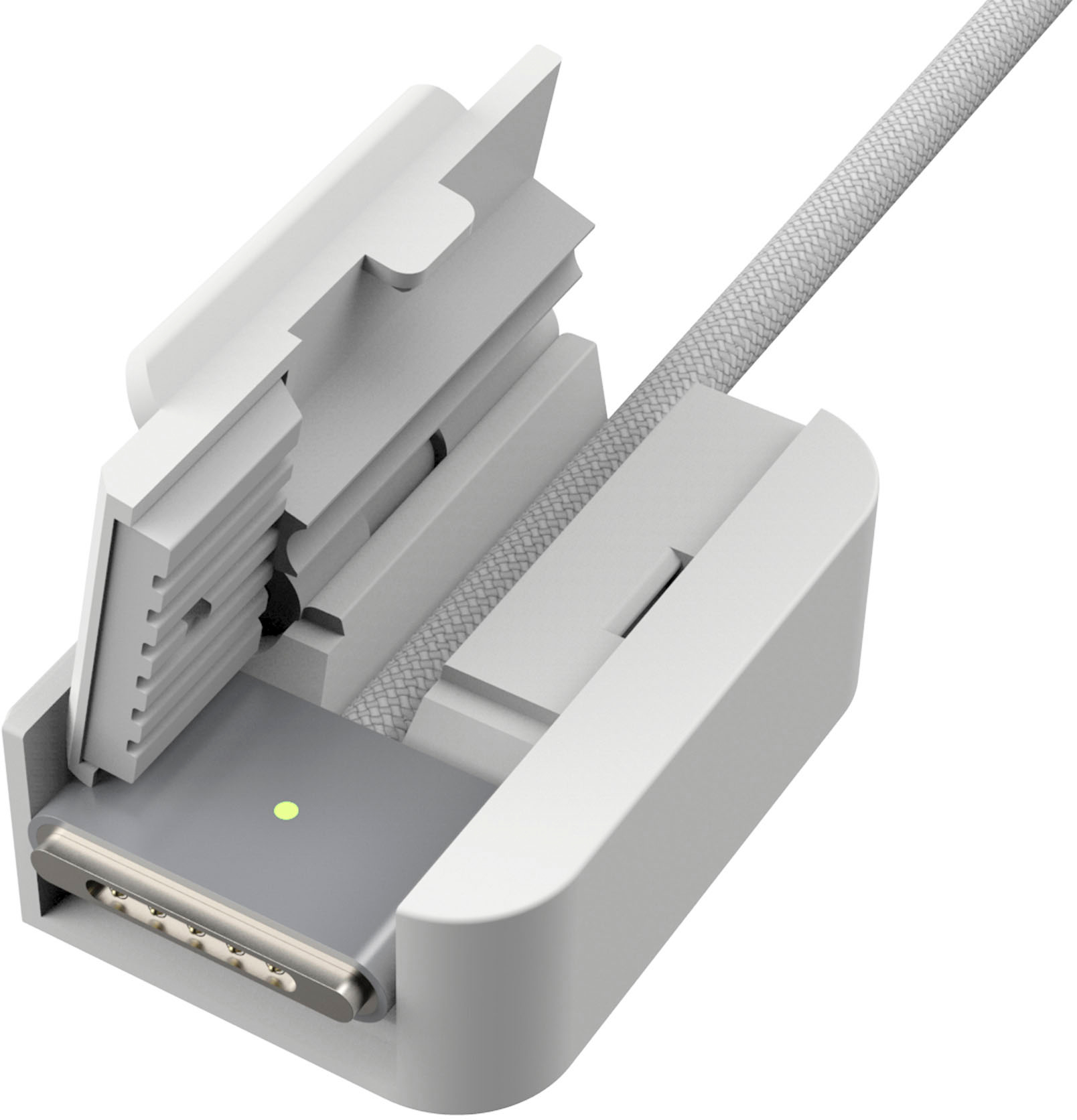
|Posted .This reviewer received promo considerations or sweepstakes entry for writing a review.J5create 4k60 Pro USB 4 hub with magsafe kit is a pocket-sized adapter designed for latest apple MacBook pro and MacBook air products. This adapter was developed to take the frustrations of missing ports like USB A, HDMI, Ethernet, magsafe 3 kit, audio and USB C all in a small portable form factor. Magsafe 3 kit is magnetically attached and can be removed if its required or for another compatible Mac. Works very well and the transfer speeds are quick and easy. Tested by connecting 2 monitors for dual monitor workstation. Just connect using USB4(up to 6k 60Hz) and HDMI (up to 4k60Hz) for ease. Audio jack is detachable but keep in mind that once inserted it’s very difficult to remove even though it says detachable. So, make sure you attach the audio jack only if its needed. USB C port has a power delivery of 100W and can be used to charge your MacBook when a power brick is connected. No drivers are required and its plug and plug feature helps to move this adapter to different machines. Very portable and easy to carry during travel. Also included 2 silicone pads to elevate the MacBook for heat dissipation. Overall, must have accessory to connect various devices in ease without any wires. Highly recommend for latest mac users and is well made with quality products that matches the space grey Mac.
I would recommend this to a friend - Pros mentioned:Hdmi, Usb4
Great All-in-One device
|Posted .This reviewer received promo considerations or sweepstakes entry for writing a review.THE BREAKDOWN: The J5create 4k60 Pro USB 4 hub with magsafe kit is a pocket-sized adapter designed for latest apple MacBook Pro (2021/2022) and MacBook Air (2022). This adapter is a 8 in 1 device making it easy to use and take with you. With this device you do not need several different adapters you have them all in one. This device is plug-and-play, no drivers needed so it works right out of the box. The J5create 4k60 Pro supports a dual monitor workstation. It connects up to 2 displays via USB4 (up to CK 60Hz) and HDMI (up to 4K 60Hz). It has a MagSaffe kit that protects your MagSafe connector and it can be removed from the device itself. It also comes with a detachable audio jack. It delivers 10Gbps using Gen 2 transmission speed. It also comes with some silicon pads to use with the MacBook Air. PRO’s: -All-in-one device -supports dual monitors -detachable MagSafe Connector CON’s: -None SUMMARY: Overall, this product worked as intended, and I would recommend this to a friend if they were in the market for device like this.
I would recommend this to a friend - Pros mentioned:Hdmi
Regain control of all desktop accessories/monitors
|Posted .This reviewer received promo considerations or sweepstakes entry for writing a review.J5 Create Pro USB4 docking Model #JCD395 with MagSafe Kit The quality of construction is excellent, with sleek profile, easy attachment to the laptop, and clears the desktop of your myriad of cords, dongles, and clutter. The docking adapter is optimal for MacBook Pro (2021/2022) and MacBook Air (2022), but will attach to earlier models, back to the Intel power MacBook Pro and Airs of several years ago. The range is MacBook Pro from 2016-2022 and MB Air from 2018-2022). The device opens up extra display capacity, and allows your MacBook to direct output to two external monitors simultaneously. There is both a HDMI port at 4K resolution and USB4 (Thunderbolt™ capable) at 6K resolution; both at 60Hz refresh rate for flicker-free images. If your MacBook has MagSafe 3 power connection capacity, there is a very clever attachment that attaches to the J5 Create. It will stabilize the cord entering the MagSafe plug, eliminating the torque and fraying that might occur over time. If some of the Apple laptops that might use this dock don’t have MagSafe, this adapter can be stowed and used only for the newest laptops. It clips (via magnet, of course) to the upper end of the dock. The device has a pair of USB 3.2 Gen2 ports for data transmission speed of 10 Gbps, twice the speed of Gen 3.1standards. The USB4 Thunderbolt port will accommodate 100W input in Power Delivery mode for rapid charging, when needed. Apple has upped the amount of power their USB C chargers deliver, up to a peak model of 140W to charge up the 16” MacBookPro. But the charging speeds using the MagSafe are reported by Apple are faster than if you use the USB-C Thunderbolt port, and the safety of the MagSafe detaching from your computer if someone gets their foot entangled in the power cord, rather than having the computer crash to the floor. That begs the question as how often does that really happen? MagSafe was Apple's invention to protect your laptop, and widely promoted as such for a decade. Then suddenly it was gone, in favor of USB-C power socket. Did the risk of MacBooks hitting the floor just vanish? Now it is back again, and we all can breathe a sigh of relief that someone's Doc Martins aren't going to destroy your computer via the power cord. If all your newer MacBook Pros have the audio jack on the left side of the keyboard, just proximal to the computer’s 2 USB-C ports that are built in, the JCD395 has a spot to add the audio plug to the docking station. The newest MB Air, M2, still has the audio jack on the right side of the keyboard. If your workstation is used by a mixture of some laptops with the audio output on the right side of the keyboard (MacBookAir models, for example) j5Create advises not adding the audio plug to the docking station. That plug apparently is not meant to be clicked in and out of the docking station repeatedly. If you can use the audio jack add-on, however, the docking station makes having your headphones or speakers one less thing to plug in when setting up your computer for today’s work. Using the 2 additional standard USB-A ports allows easy attachment of legacy style external keyboards, mice, USB flash drives, etc. without searching for a USB-A to C adapter. An additional port for Gigabit Ethernet allows for data transfer port to access a wired network. Supports a super-fast network speed of up to 1000Mbps (Gigabit Connection). You can maintain a stable and long-lasting internet connection. WiFi transfers are usually at 30Mbps, so this access is potentially 30 times faster! The HDMI port (allows connectivity to a 4K UHD HDTV, monitor, or projector) and USB-C ports have already been mentioned. Equipped with a USB4 port it provides 6K60 resolution, 40Gbps data transfer, and charging up to 100W of power for charging your computer when a USB-C power adapter is connected. Apple has just this year released newer, larger capacity USB-C charging adapters up to 140 W, for the larger 16” MBPro with M1Pro chip. All told, this is easy to install and super easy to swap out between laptops. Moving from your desktop, to traveling mode, takes about 3 seconds. If you have a limited space for all the dongles, cables, adapters on your work surface, and find the lack of input/output options are restricting your productivity, this could be a dependable, extremely well built, and stable solution for you. You won’t find yourself needing to unplug a memory stick to insert an SD card to upload your photos, etc.
I would recommend this to a friend - Pros mentioned:Hdmi, Portability
Works perfectly
|Posted .This reviewer received promo considerations or sweepstakes entry for writing a review.This was super easy to connect to my MacBook. I connected it to my MacBook, plugged in my charger and it started to charge easily. I also connected my phone to charge and it is working great. Just a heads up, if you do not need to connect the audio jack, do not connect it. I did that by mistake and it is not easy to disconnect. It isn't difficult either, but it was a little annoying to disconnect. I should have read the little piece of paper that stated that first. Another heads up, if you have a protector on the back of the screen and on the bottom, you will have to remove the bottom one so that it stays in securely. When I had it on, I was not able to push it all the way in. That is kind of a bummer, but that is okay. I also like the MagSafe connector, unfortunately it has no use for my MacBook so I am not exactly sure what to do with it. There QR codes on the instructions to find out more information on the MagSafe and audio jack, but neither one of those links worked and said the videos were no longer available so that was not much help. As far as it working properly and doing what it says, that is 5 stars for me. Now I can connect usb, HDMI and usb-c's all at once. Love it.
I would recommend this to a friend - Pros mentioned:Hdmi
Nice little unit for travel
|Posted .This reviewer received promo considerations or sweepstakes entry for writing a review.Sometimes you need a Network Adapter and some USB-A ports on your M1 14in MacBook Pro; enter j5create to help solve this with minimal effort TL;DR for my frequent readers and details below. Good: Noise-free Form Factor Ports (HDMI, USB-C, USB-A, 3.5mm audio) Magsafe compatible Supports a 4K screen Bad: Small gap between the adapter & the computer, leaving the metal parts visible Doesn’t support my Samsung G9 5120x1440 screen Tough to remove the 3.5mm pin once it’s in Meh: Lid covers interfere with the edge, making a non-so-snug closure Needs an easier way to quickly remove from the computer An adapter to add a physical Network interface and some USB-A ports to a USB-C only MacBook Pro, all while supporting the MagSafe connector is something you should have in your travel bag all the time. While this does have limitations that traditional USB-C docking stations don’t have, it’s good in a pinch and I found it quite useful when I was on the road for work recently. Also, it adds another HDMI port, so if you’re stuck with only HDMI screens at least you could run two vs 1 from off the MacBook Pro alone. Getting the MagSafe connector into the adapter was easy and once I realized that lifting up on the cable (vs the white block) was the way to quickly detach, it made more sense. Once the MagSafe connector has been ‘detached’ from the computer, there isn’t an easy way to remove the adapter from the computer. I felt like I needed to shimmy it off, but that wasn’t right. Pulling on the top and bottom simultaneously disconnects it, however there should be ‘something’ to pull on to take it off easier. Once it’s on and in use, you can see the connectors between the adapter and the computer (see pic). Not sure if I’m a huge fan of this - I always have paperclips, sim pushers, etc out for various reasons and feel that the thinner metal things could fall in the groove & who knows what would happen. When attempting to use my Samsung G9 Gaming screen (5120x1440), it stayed black with no signal, but my Dell 27in 2k display had no issues and a traditional USB-C 4K Samsung screen was also just fine so it may be a refresh rate thing, but it’s one reason I can’t use it as my primary adapter for work. A clear 4K resolution without any flickering or lag was a nice thing to experience. I didn’t have any 3.5mm audio to test, so I can’t speak to that but I’m sure it’ll come in handy for those that are anti-Bluetooth and want a wired headset. All in all, this is a great little unit and I’ll give it 4 stars because of the connection gap and that it can’t support one of my screens.
I would recommend this to a friend Every traveler needs this USB Hub w/ MagSafe
|Posted .This reviewer received promo considerations or sweepstakes entry for writing a review.I was really excited to receive the j5Create USB with MagSafe kit for use with both of my MacBooks. The design is simple and sturdy and the encasement for the MagSafe charger is AWESOME. I am sure, if you are anything like me, you find yourself frustrated with the lack of ports on your MacBooks. I have a 2021 MacBook Pro M1 Max (16") along with and a smaller MacBook M2. All my MacBooks have always had a lack of ports and this j5 Create USB hub is a great solution to expand - and also to have a couple of USB-A ports (woohoo!). However, if you are like me, you more than likely have protected your investment with some sort of a shell or case for your MacBook. This is a weak point on the j5Create USB hub because it doesn't fit snugly to the side (see images). This causes two problems: 1. The 'looser' fit caused me to lose connections to peripherals, one being my Time Machine backup drive which is a critical device to have connected as often as possible. 2. Even though the MagSafe charger fits nicely in to the USB hub, the fact that the hub doesn't fit well with a cover/shell means you may *think* your MacBook is charging even when it's not. There is a small hole where you can see the Amber or Green light indicating the charging status - but twice now, I've opened up my Mac in the morning to a dead - or nearly dead batter. Note - my issue with the looser fit is completely due to the fact that I have a case on the top and bottom of my Mac. When I removed the case, the j5Create hub fit snugly and worked beautifully...I am just not sure I want to be lugging around such an expensive computer with no coverage. Overall, I give this a 4/5 and would recommend it. I hope j5Create comes out with a similar device with longer USB-C connector points so a hub would work even with a case.
I would recommend this to a friend- Cons mentioned:Heat
Plug n play
||Posted . Owned for 2 weeks when reviewed.This reviewer received promo considerations or sweepstakes entry for writing a review.Item works as it should, found the power cord adapter, that separates, troublesome to plug in while the main part is already plugged in, as it does require the main part to be unplugged, interrupting, so i just dont use that part and no issues with plugging and unplugging power cord. It does getting very warm, not an issue but try to unplug when not using so it cools off, typically using for 6-8 hrs a day for connecting an external monitor with HDMI. Overall, satisfied with the products.
I would recommend this to a friend - Pros mentioned:Build quality, Port count
J5create
||Posted . Owned for 1 week when reviewed.This reviewer received promo considerations or sweepstakes entry for writing a review.Excellent product ! From the moment i saw it on Bestbuy , i had a good feeling it’s gonna be a quality product, judging from the design and finish. The low price is also not to miss ! Every port works just perfectly fine. Highly recommended
I would recommend this to a friend - Pros mentioned:PortabilityCons mentioned:Heat
Works without blocking ports
||Posted . Owned for 3 weeks when reviewed.This reviewer received promo considerations or sweepstakes entry for writing a review.this thing is great-works like it should. easy to put on and easy to take off. 2 small issues: 1-its gets a bit hot with prolonged use 2-everytime you connect it, you have to enable the speakers because it thinks headphones on in.
I would recommend this to a friend great dongle
||Posted . Owned for more than 2 years when reviewed.This reviewer received promo considerations or sweepstakes entry for writing a review.came in clutch to use with the macbook pro. excellent product and gave me no issues.
I would recommend this to a friend- Pros mentioned:Port count
Works great
||Posted . Owned for 5 months when reviewed.This reviewer received promo considerations or sweepstakes entry for writing a review.Works great for adding connectivity to my Mac. Ethernet, 2 displays, USB. Everything I need.
I would recommend this to a friend - Pros mentioned:Port count
Great Dongle for Every Day
||Posted . Owned for 7 months when reviewed.This reviewer received promo considerations or sweepstakes entry for writing a review.Works great and gave me the exact ports I was looking for. Added another HDMI port to my 14 inch MacBook Pro which was nice to use dual monitors. I like how it has the 2 thunderbolt ports so you don’t lose any by using the dongle. I use it every day, only thing I've noticed is it can get a bit warm but no issues from that.
I would recommend this to a friend Been enjoying the product looks great
||Posted . Owned for less than 1 week when reviewed.This reviewer received promo considerations or sweepstakes entry for writing a review.Even tested my transfer rates on external ssd and Ethernet fios connections works well. But only reason missing five stars is i keep getting an alert that my devices are drawing too much power so my USB is getting disabled vice just cutting the charging of the devices drawing too much power.
I would recommend this to a friend- Cons mentioned:Heat
Mac adapter
||Posted . Owned for 1 week when reviewed.This reviewer received promo considerations or sweepstakes entry for writing a review.The microphone jack takes away your audio i use bluetooth so i removed it. The power adapter is cheap plastic and interferes and is removable. This runs really hot. According to what i read its expected. Nice adapter so far.
I would recommend this to a friend - Pros mentioned:Usb4
Can't go wrong with this
||Posted . Owned for 1 month when reviewed.This reviewer received promo considerations or sweepstakes entry for writing a review.This J5 hub doesn't disappoint. In an age in which Mac laptops have fewer and fewer connections, this is a real lifesaver. I absolutely recommend it.
I would recommend this to a friend - Pros mentioned:Portability
Computer device
||Posted . Owned for 1 month when reviewed.This reviewer received promo considerations or sweepstakes entry for writing a review.Great product. Easy install. Gives many options for device attachments. Gives computer a sassy look.
I would recommend this to a friend - Pros mentioned:Usb4
Usb type c hub
||Posted . Owned for 1 month when reviewed.This reviewer received promo considerations or sweepstakes entry for writing a review.It does exactly what is says it would no complaints …Well.. kinda over priced but besides that its fine and well
I would recommend this to a friend