Customer Ratings & Reviews

- Model:
- F0D8001LUS
- SKU:
- 6196003
Rating by feature
- Value
Rating 4.2 out of 5 stars
- Quality
Rating 4.1 out of 5 stars
- Ease of Use
Rating 4.2 out of 5 stars
Customers are saying
Customers have good things to say about the 330-20AST's ease of use, screen size, and price, frequently citing its simplicity, clear picture quality, and affordability. The all-in-one design and compact size are also appreciated. However, some customers report that the performance and memory could be improved.
This summary was generated by AI based on customer reviews.
- Pros mentioned:Price
Desktop computer
||Posted .This reviewer received promo considerations or sweepstakes entry for writing a review.This computer works very well and it's price is affordable. We were able to pretty much plug and play. Have gotten 2 for our office already.
I would recommend this to a friendBrand response from Lenovo Product Expert
Posted .Thank you for choosing the lenovo IdeaCentre 330-20 All-In-One system for your office. This is an entry level, light use system with its AMD E2-9000 processor. It is not meant for multi-tasking or demanding programs. It is good for Microsoft Office and light internet browsing. If this describes your computing needs, the IdeaCentre 330-20 AIO would be a good choice.

- Cons mentioned:Performance
Just OK
||Posted .This reviewer received promo considerations or sweepstakes entry for writing a review.We don't need a fancy computer, so we went with this all in one thinking it would be adequate. we were mistaken. it is slower than our old one and everything takes longer to load. Go with something else.
No, I would not recommend this to a friendBrand response from Lenovo Product Expert
Posted .This is an entry level, light use system with its AMD E2 processor. It is not meant for multi-tasking or demanding programs. It is good for Microsoft Office and light internet browsing. Be sure any software you installed is compatible with Windows 10. There is no need to install Microsoft Office software. The software is already part of the operating system, you just need to activate the software with a purchased product key. If you have installed a copy of Microsoft Office, this is conflicting with the existing copy on the system and this will slow your system down. If you have installed a 3rd party anti-virus program, be sure that Windows Defender is turned off and that the trial version of McAfee Anti-Virus software is uninstalled. There can only be one anti-virus program on the system. You may need to restore your system to original factory default settings if any of the programing errors have occurred. You can do that by typing "restore" in the Cortana search window. Just click on the magnifying glass icon at the bottom left of your Windows 10 Desktop. Click on "Reset This PC" Then click on "Get Started" and follow the on screen directions to restore to factory defaults. If the problem persists, we recommend you contact Lenovo Tech Support at: 877-453-6686.

Great computer for those on a budget
||Posted .This reviewer received promo considerations or sweepstakes entry for writing a review.Bought this computer for someone. This is a good computer for someone looking to do basic things, like use Word, surf the web and maybe watch some Netflix here and there.
I would recommend this to a friendBrand response from Lenovo Product Expert
Posted .Thank you for choosing the Lenovo IdeaCentre 330-20 All-In-One system. We are pleased to hear that the performance of the IdeaCentre 330-20 AIO meets the user's computing needs so well.
Nice computer
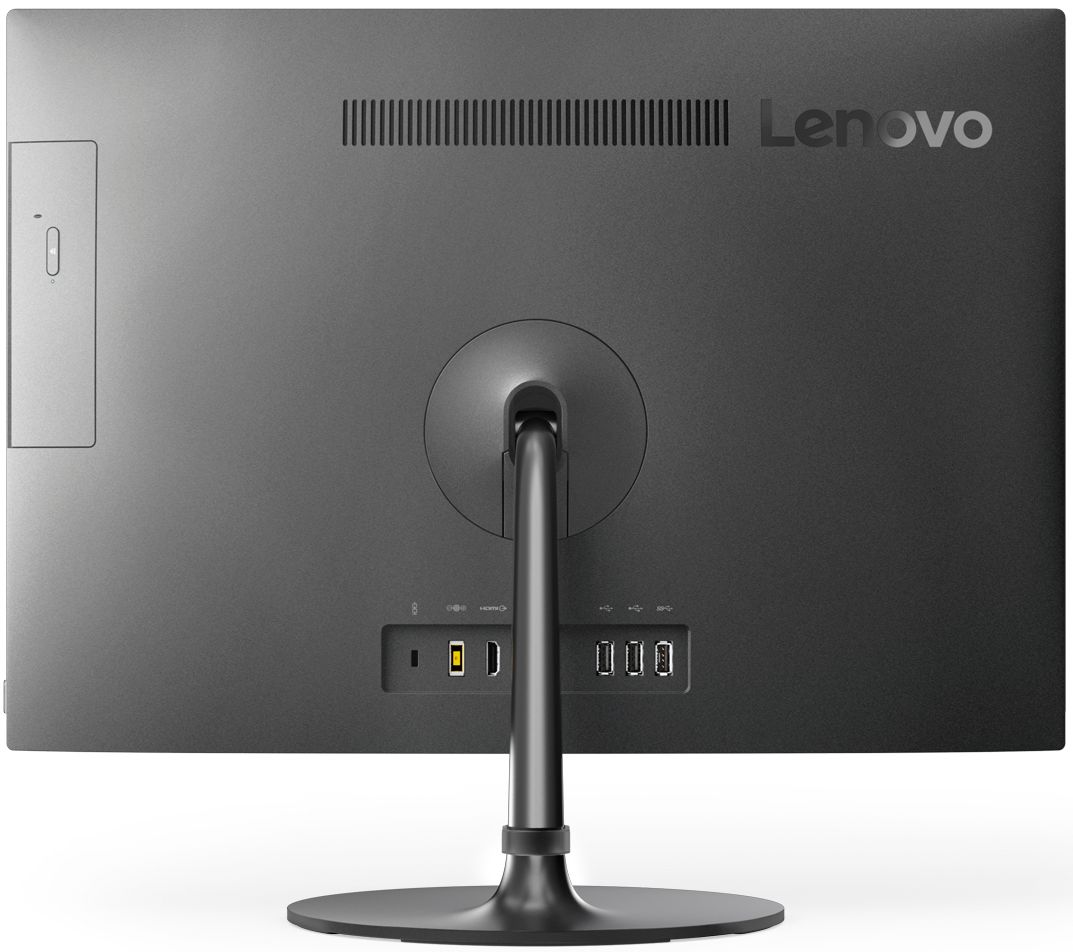
||Posted .This reviewer received promo considerations or sweepstakes entry for writing a review.Good for every day home use or for a small business. I wish it had more USB ports because it only has 2 and I run short. Other than that is good. Not the fastest but good enough since I do not use it for gaming. I am pleased.
I would recommend this to a friendBrand response from Lenovo Product Expert
Posted .Thank you for choosing the Lenovo IdeaCentre 330-20 All-In-One system. If you need more USB ports for this device, you may want to consider using a USB Hub with this device. This is an entry level, light use system with its AMD E2 processor. It is not meant for multi-tasking or demanding programs. It is good for Microsoft Office and light internet browsing. If this describes your computing needs, the IdeaCentre 330-20 AIO would be a good choice.
- Pros mentioned:Screen size
Great for reading PDF docs!
||Posted .This reviewer received promo considerations or sweepstakes entry for writing a review.The big screen makes reading word documents and PDFs easy. Great system for working from home or taking online classes.
I would recommend this to a friendBrand response from Lenovo Product Expert
Posted .Thank you for choosing the Lenovo IdeaCentre 330-20 All-In-One system. This is an entry level, light use system with its AMD E2 processor. It is not meant for multi-tasking or demanding programs. It is good for Microsoft Office and light internet browsing. If this describes your computing needs, the IdeaCentre 330-20 AIO be a good choice.
- Pros mentioned:Screen size
Awesome
||Posted .This reviewer received promo considerations or sweepstakes entry for writing a review.This computer is just right for my kids not too big or small great picture and keyboard all in one is awesome more space
I would recommend this to a friendBrand response from Lenovo Product Expert
Posted .Thank you for choosing the Lenovo IdeaCentre 330-20 All-In-One system for your children. We are pleased to hear that the features and performance of the IdeaCentre 330-20 AIO meets your computing needs so well.
- Cons mentioned:Speed
Painfully Slow
||Posted . Owned for 1.5 years when reviewed.This reviewer received promo considerations or sweepstakes entry for writing a review.This computer is fine except for its speed. It's very, very slow. What can do to speed it up?
No, I would not recommend this to a friend - Cons mentioned:Speed
Im bummed its kinda slow at times.
||Posted .This reviewer received promo considerations or sweepstakes entry for writing a review.I like the all in one except its kinda on the slow side and I cant get it to work with my printer. Please help!!
I would recommend this to a friendBrand response from Lenovo Product Expert
Posted .This is an entry level, light use system with its AMD E2 processor. It is not meant for multi-tasking or demanding programs. It is good for Microsoft Office and light internet browsing. With regard to pairing this device with your existing printer, be sure your existing printer is compatible with Windows 10. You can check this on the printer manufacturer's web site. You will need to install the Windows 10 drivers for the printer on the computer. Follow the printer manufacturer's pairing instructions for a new computer.
- Pros mentioned:Ease of use
Lenovo 330-20
||Posted .This reviewer received promo considerations or sweepstakes entry for writing a review.very good pc for the novice user My user is only using it for word and email and is very pleased with it.
I would recommend this to a friendBrand response from Lenovo Product Expert
Posted .Thank you for choosing the Lenovo IdeaCentre 330-20 All-In-One system. We are pleased to hear that the IdeaCentre 330-20 AIO is working out so well for the user.
Nice computer
||Posted .This reviewer received promo considerations or sweepstakes entry for writing a review.This computer is basic and was purchased for that reason. It's not a gaming computer it is good for web browsing,checking email,and doing everyday research. Its speed is fast enough for what I need.
I would recommend this to a friendBrand response from Lenovo Product Expert
Posted .Thank you for choosing the Lenovo IdeaCentre 330-20 All-In-One system. We are pleased to hear that the performance of the IdeaCentre 330-20 AIO meets your computing needs so well.
- Pros mentioned:All-in-one
Great computer with small footprint
||Posted .This reviewer received promo considerations or sweepstakes entry for writing a review.Love the all in one unit! This is what makes it great because otherwise, it is still a computer LOL
I would recommend this to a friendBrand response from Lenovo Product Expert
Posted .Thank you for choosing the Lenovo IdeaCentre 330-20 All-In-One system. We are pleased to hear that the IdeaCentre 330-20 AIO is working out so well for you.
- Pros mentioned:Screen size
PC VERY COMPACT GREAT
||Posted .This reviewer received promo considerations or sweepstakes entry for writing a review.Fit exactly where I needed it. Compact and easy to set up.
I would recommend this to a friendBrand response from Lenovo Product Expert
Posted .Thank you for choosing the Lenovo IdeaCentre 330-20 All-In-One system. We are pleased to hear that the ease of setup and performance of the IdeaCentre 330-20 AIO meets your computing needs so well.
- Pros mentioned:Screen size
Working great
||Posted .This reviewer received promo considerations or sweepstakes entry for writing a review.Brought it home hooked it up , no problems except took about 18 hrs to do all its updates.
I would recommend this to a friendBrand response from Lenovo Product Expert
Posted .Thank you for choosing the Lenovo IdeaCentre 330-20 All-In-One system. The length of time Windows 10 updates will take is dependent on the number of updates Microsoft has released since the factory install of the operating system on the device.
- Pros mentioned:Ease of use
Really nice computer. Very compact.
||Posted .This reviewer received promo considerations or sweepstakes entry for writing a review.My first all in one, very impressed with it so far. Wouldn’t hesitate to buy another one!
I would recommend this to a friendBrand response from Lenovo Product Expert
Posted .Thank you for choosing the Lenovo IdeaCentre 330-20 All-In-One system. We are pleased to hear that the IdeaCentre 330-20 AIO is working out so well for you.
So far so good
||Posted .This reviewer received promo considerations or sweepstakes entry for writing a review.Purchased new computer for wife's new office. It was easy to setup and liked how Cortona helped you through. Wish that Microsoft office came with it, but can't have everything.
I would recommend this to a friendBrand response from Lenovo Product Expert
Posted .Thank you for choosing the Lenovo IdeaCentre 330-20 All-In-One system for your wife's office. We are pleased to hear that the easy setup and performance of the IdeaCentre 330-20 AIO meets your wife's computing needs so well.
- Cons mentioned:Performance, Speed
garbage
||Posted .This reviewer received promo considerations or sweepstakes entry for writing a review.very slow constantly freezes up slow to boot up just garbage
No, I would not recommend this to a friendBrand response from Lenovo Product Expert
Posted .This is an entry level, light use system with its AMD E2 processor. It is not meant for multi-tasking or demanding programs. It is good for Microsoft Office and light internet browsing. If this describes your computing needs, the IdeaPad 330-20 AIO would be a good choice. With regard to freezing up, this system should not freeze using Windows 10. Be sure any software you installed is compatible with Windows 10. There is no need to install Microsoft Office software. The software is already part of the operating system, you just need to activate the software with a purchased product key. If you have installed a copy of Microsoft Office, this is conflicting with the existing copy on the system and this will slow your system down. If you have installed a 3rd party anti-virus program, be sure that Windows Defender is turned off and that the trial version of McAfee Anti-Virus software is uninstalled. There can only be one anti-virus program on the system. You may need to restore your system to original factory default settings if any of the programing errors have occurred. You can do that by typing "restore" in the Cortana search window. Just click on the magnifying glass icon at the bottom left of your Windows 10 Desktop. Click on "Reset This PC" Then click on "Get Started" and follow the on screen directions to restore to factory defaults. If the problem persists, we recommend you contact Lenovo Tech Support at: 877-453-6686.
- Pros mentioned:Space saving
Good Desk Top Computer
||Posted .This reviewer received promo considerations or sweepstakes entry for writing a review.If looking for a all in one computer as a desk top item the Lenovo 330 works well
I would recommend this to a friend - Pros mentioned:Ease of use
Great all in one
||Posted . Owned for 1 year when reviewed.This reviewer received promo considerations or sweepstakes entry for writing a review.Got on sale and works great with my pos system I’m using for my business.
I would recommend this to a friend - Pros mentioned:Price
Great purch
||Posted .This reviewer received promo considerations or sweepstakes entry for writing a review.I love my new computer and best price. Had a Geek squad associate set it all up.
I would recommend this to a friendBrand response from Lenovo Product Expert
Posted .Thank you for choosing the Lenovo IdeaCentre 330-20 All-In-One system. This is an entry level, light use system with its AMD E2-9000 processor. It is not meant for multi-tasking or demanding programs. It is good for Microsoft Office and light internet browsing. If this describes your computing needs, the IdeaCentre 330-20 AIO would be a good choice.
- Pros mentioned:Ease of use
Great for my parents
||Posted .This reviewer received promo considerations or sweepstakes entry for writing a review.They are not professionals at computers so this is just what they need, simple.
I would recommend this to a friendBrand response from Lenovo Product Expert
Posted .Thank you for choosing the Lenovo IdeaCentre 330-20 All-In-One system for your parents. We are pleased to hear that the ease of use and performance of the IdeaCentre 330-20 AIO meets your parent's computing needs so well. This is an entry level, light use system with its AMD E2-9000 processor. It is not meant for multi-tasking or demanding programs. It is good for Microsoft Office and light internet browsing. If this describes your computing needs, the IdeaCentre 330-20 AIO would be a good choice.