Customer Ratings & Reviews
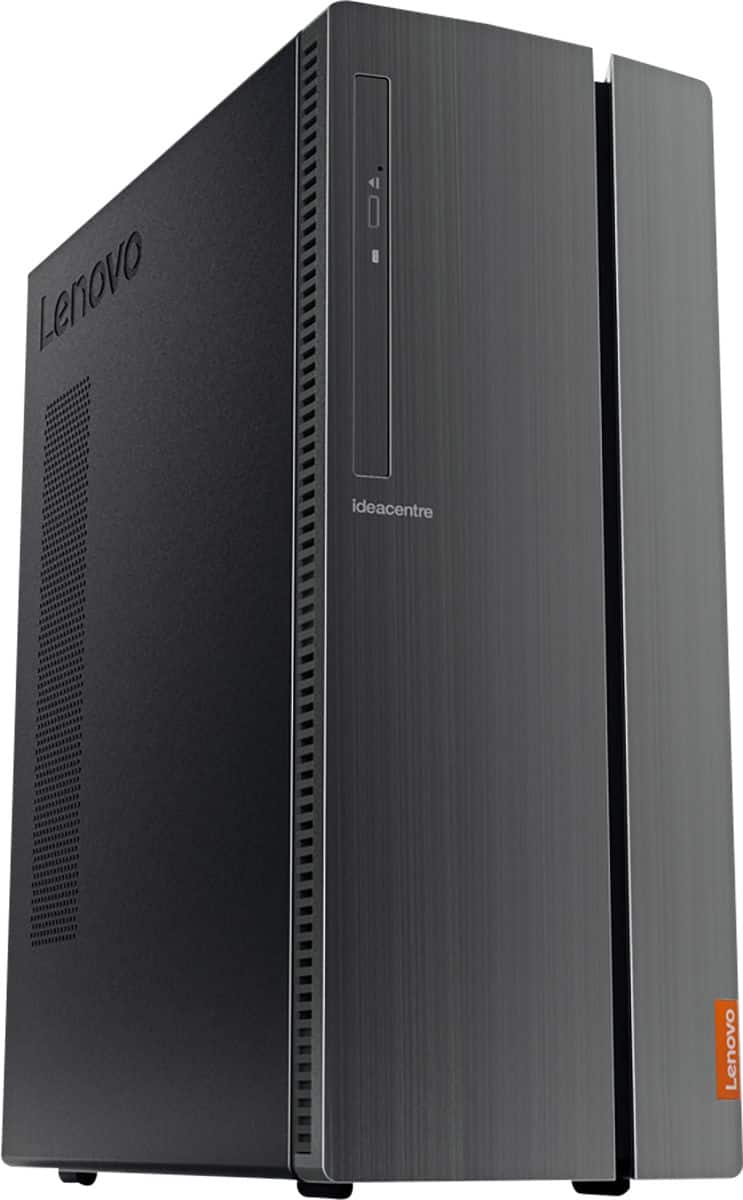

- Model:
- 90HV0003US
- SKU:
- 6203016
Rating by feature
- Value
Rating 4.4 out of 5 stars
- Quality
Rating 4.4 out of 5 stars
- Ease of Use
Rating 4.4 out of 5 stars
Customers are saying
Customers have good things to say about the IdeaCentre 510A's performance, ease of use, and price. Many appreciate its ample storage and quiet operation, finding it easy to set up and use. While some users noted limitations with the integrated graphics card for demanding applications, the overall experience appears positive.
This summary was generated by AI based on customer reviews.
good quality for the price
||Posted . Owned for 1 month when reviewed.This reviewer received promo considerations or sweepstakes entry for writing a review.no complaints, purchased to replace old office computers. purchased 3 of them.
I would recommend this to a friendBrand response from Lenovo Product Expert
Posted .Thanks for choosing the Lenovo IdeaCentre 510A Desktop. We are so happy to hear the features, performance, and user-friendly design of the IdeaCentre 510A Desktop is meeting your computing needs so well! We appreciate your loyalty to the Lenovo brand!

- Pros mentioned:Speed
Nothing special about this pc
||Posted . Owned for 1 month when reviewed.This reviewer received promo considerations or sweepstakes entry for writing a review.No bells or whistles - it is meant to quickly replace an older model that crashed.
No, I would not recommend this to a friendBrand response from Lenovo Product Expert
Posted .The Lenovo IdeaCentre 510A Desktop, model number 90HV0003US ships with the powerful Six-Core Intel Core i5-8400 processor, with a base speed of 2.8GHz and a Turbo Boost Speed of up to 4.0GHz. This processor is supported by 8GB DDR4-2666MHz RAM. This configuration is good for many of today's most demanding programs, browsing the internet with multiple tabs open. If this describes your computing needs, the Lenovo IdeaCentre 510A Desktop, model number 90HV0003US is a great choice.
computer works
||Posted . Owned for 3 weeks when reviewed.This reviewer received promo considerations or sweepstakes entry for writing a review.This computer was recommended by a friend. I am very happy with my purchase.
I would recommend this to a friendBrand response from Lenovo Product Expert
Posted .Thank you for choosing the Lenovo IdeaCentre 510A Desktop, model number 90HV0003US. We are pleased to hear that the IdeaCentre 510A is working out so well for you. The Lenovo IdeaCentre 510A Desktop, model number 90HV0003US ships with the powerful Six-Core Intel Core i5-8400 processor, with a base speed of 2.8GHz and a Turbo Boost Speed of up to 4.0GHz. This processor is supported by 8GB DDR4-2666MHz RAM. This configuration is good for many of today's most demanding programs, browsing the internet with multiple tabs open. If this describes your computing needs, the Lenovo IdeaCentre 510A Desktop, model number 90HV0003US is a great choice.
Great product
||Posted . Owned for 3 weeks when reviewed.This reviewer received promo considerations or sweepstakes entry for writing a review.We have this at the begining but I have to exchange for another one to be more useful than the t Lenovo but is good quality
I would recommend this to a friendBrand response from Lenovo Product Expert
Posted .The Lenovo IdeaCentre 510A Desktop, model number 90HV0003US ships with the powerful Six-Core Intel Core i5-8400 processor, with a base speed of 2.8GHz and a Turbo Boost Speed of up to 4.0GHz. This processor is supported by 8GB DDR4-2666MHz RAM. This configuration is good for many of today's most demanding programs, browsing the internet with multiple tabs open. If this describes your computing needs, the Lenovo IdeaCentre 510A Desktop, model number 90HV0003US is a great choice.
Working well
||Posted . Owned for 3 weeks when reviewed.This reviewer received promo considerations or sweepstakes entry for writing a review.My old PC crashed I bought this I was able to move all the stuff over. Working well except not as fast as I thought it would be
I would recommend this to a friendBrand response from Lenovo Product Expert
Posted .The Lenovo IdeaCentre 510A Desktop, model number 90HV0003US, ships with the powerful Six-Core Intel Core i5-8400 processor, with a base speed of 2.8GHz and a Turbo Boost speed of up to 4.0GHz. This configuration is good for many of today's most demanding programs, browsing the internet with multiple tabs open. If you are getting slower than anticipated performance, be sure any software you installed is compatible with Windows 10. There is no need to install Microsoft Office software. The software is already part of the operating system, you just need to activate the software with a purchased product key. If you have installed a copy of Microsoft Office, this is conflicting with the existing copy on the system and this will slow your system down. If you have installed a 3rd party anti-virus program, be sure that Windows Defender is turned off and that the trial version of McAfee Anti-Virus software is uninstalled. There can only be one anti-virus program on the system. You may need to restore your system to original factory default settings if any of the programing errors have occurred. You can do that by typing "restore" in the Cortana search window. Just click on the magnifying glass icon at the bottom left of your Windows 10 Desktop. Click on "Reset This PC" Then click on "Get Started" and follow the on screen directions to restore to factory defaults. If the problem persists, we recommend you contact Lenovo Tech Support at: 877-453-6686
Great Product.
||Posted . Owned for 3 weeks when reviewed.This reviewer received promo considerations or sweepstakes entry for writing a review.I'm enjoying the new hard drive. Great product. I would recommend this product to anybody looking for a new hard drive.
I would recommend this to a friendBrand response from Lenovo Product Expert
Posted .Once again, thank you for choosing the Lenovo IdeaCentre 510A Desktop. You can keep your computer running at its best by keeping the Windows 10 Operating System and all supporting BIOS files and drivers up to date. You can easily accomplish this by scanning the computer with the Lenovo Utility software available on this computer. Just type "Lenovo Vantage" in the Cortana Search window (if Lenovo Vantage is not installed on your device, you can download the APP and install it now). Select Lenovo Vantage from the list. In the window that opens, click on "Health and Support". In the expanded menu, select "Hardware Scan" In the window that opens, select "Run Quick Tests". This will scan your entire system for errors. Follow any directions that may pop up. If the problem continues after this scan, now click on "System Update". First select Windows update from the menu. Scan your system to be sure you have the latest version of Windows 10. Once that scan is complete, select "Additional Updates". This will scan your device to be sure there are no new BIOS/Driver updates needed. Follow any instructions that may pop up. If you ever need additional help with your Lenovo computer, we recommend you call Lenovo Tech Support at: 877-453-6686 for additional help.
Fast computer love it.
||Posted . Owned for less than 1 week when reviewed.This reviewer received promo considerations or sweepstakes entry for writing a review.Added ddr 4 2666 32gb and works perfect. Deff recommend if the PRICE COMED DOWN TO MATCH OFFICE FOR SAME MODEL FOR 499.99
I would recommend this to a friendBrand response from Lenovo Product Expert
Posted .Thank you for choosing the lenovo IdeaCentre 510A Desktop, model number 90HV0003US. The maximum RAM this configuration can support is 16GB DDR4-2666MHz RAM in two RAM memory slots. The Lenovo IdeaCentre 510A Desktop, model number 90HV0003US ships with the powerful Six-Core Intel Core i5-8400 processor, with a base speed of 2.8GHz and a Turbo Boost Speed of up to 4.0GHz. This processor is supported by 8GB DDR4-2666MHz RAM. This configuration is good for many of today's most demanding programs, browsing the internet with multiple tabs open. If this describes your computing needs, the Lenovo IdeaCentre 510A Desktop, model number 90HV0003US is a great choice.
The machine is all I wanted and more.
||Posted .This reviewer received promo considerations or sweepstakes entry for writing a review.This new Lenovo computer with the Intel chip is fast, powerful and makes my case work much easier than my old Del-no offense to the Del.
I would recommend this to a friendBrand response from Lenovo Product Expert
Posted .Thank you for choosing the lenovo IdeaCentre 510A desktop. We are pleased to hear that the performance of the IdeaCentre 510A meets your computing needs so well.
still going strong
||Posted . Owned for 1.5 years when reviewed.This reviewer received promo considerations or sweepstakes entry for writing a review.No issues so far works as expected. able to upgrade to windows 11 but holding off.
I would recommend this to a friendGood tower for the $$
||Posted . Owned for 1 month when reviewed.This reviewer received promo considerations or sweepstakes entry for writing a review.Only complaint is that now you have to subscribe to Microsoftand pay to get access to all this tower can do.
I would recommend this to a friendBrand response from Lenovo Product Expert
Posted .Thank you for choosing the lenovo IdeaCentre 510A Desktop, model number 90HV0003US. There is a 30-day trial of Microsoft Office 365 included as part of the Windows 10 operating system. In order to keep the program active after the trial period, you will need to purchase a product key. You will not need to download any additional software.
Time to upgrade your old Windows 7 machine
||Posted . Owned for 3 months when reviewed.This reviewer received promo considerations or sweepstakes entry for writing a review.Replaced my Windows 7 desktop with this very nice and very dependable Lenovo unit. I am very happy with this purchase.
I would recommend this to a friendBrand response from Lenovo Product Expert
Posted .Once again, thank you for choosing the Lenovo IdeaCentre 510A Desktop. You can keep your computer running at its best by keeping the Windows 10 Operating System and all supporting BIOS files and drivers up to date. You can easily accomplish this by scanning the computer with the Lenovo Utility software available on this computer. This system has Lenovo utilities installed to help maintain the health of the device and keep the operating system software up to date. Type "Lenovo Vantage" in the Cortana Search window (if Lenovo Vantage is not installed on your device, you can download the APP and install it now). Select Lenovo Vantage from the list. In the window that opens, click on "Health and Support". In the expanded menu, select "Hardware Scan" In the window that opens, select "Run Quick Tests". This will scan your entire system for errors. Follow any directions that may pop up. If the problem continues after this scan, now click on "System Update". First select Windows update from the menu. Scan your system to be sure you have the latest version of Windows 10. Once that scan is complete, select "Additional Updates". This will scan your device to be sure there are no new BIOS/Driver updates needed. Follow any instructions that may pop up. If you ever need additional help with your Lenovo computer, we recommend you call Lenovo Tech Support at: 877-453-6686 for additional help.
PC
||Posted . Owned for 1.5 years when reviewed.This reviewer received promo considerations or sweepstakes entry for writing a review.So far so good. Sometimes gets slow but not sure if it is the computer or provider.
I would recommend this to a friendAwsome for what I need it for.
||Posted . Owned for 1 month when reviewed.This reviewer received promo considerations or sweepstakes entry for writing a review.Awsome did not need a wireless USB just set up connect and tou are good!
I would recommend this to a friendBrand response from Lenovo Product Expert
Posted .Thank you for choosing the Lenovo IdeaCentre 510A Desktop, model number 90HV0003US. This configuration ships with both 5G, 802.11ac WiFi and an ethernet port for 10/100/1000 wired WiFi/Network connectivity.
Good quality for the price!
||Posted . Owned for 9 months when reviewed.This reviewer received promo considerations or sweepstakes entry for writing a review.Good quality for the money. Would refer to a friend. Staff always at the ready to assist you
I would recommend this to a friendLenovo products rock!
||Posted .This reviewer received promo considerations or sweepstakes entry for writing a review.Can't go wrong with a Lenovo computer! We buy nothing but Lenovo computers...have done so for years because of their excellent quality
I would recommend this to a friendBrand response from Lenovo Product Expert
Posted .Thank you for choosing the Lenovo IdeaCentre 510A desktop. We are pleased to hear that the IdeaCentre 510A is working out so well for you. We appreciate your loyalty to the Lenovo Brand.
good computer
||Posted . Owned for 1 month when reviewed.This reviewer received promo considerations or sweepstakes entry for writing a review.Great for kids going back to school. Fast boot up and great operating.
I would recommend this to a friendLenovo desktop computer
||Posted . Owned for 3 weeks when reviewed.This reviewer received promo considerations or sweepstakes entry for writing a review.Only had the product for two weeks, but seems to be doing fine.
I would recommend this to a friendBrand response from Lenovo Product Expert
Posted .Thank you for choosing the Lenovo IdeaCentre 510A Desktop. We are pleased to hear that the IdeaCentre 510A is working out so well for you.
Works great!
||Posted . Owned for 1 month when reviewed.This reviewer received promo considerations or sweepstakes entry for writing a review.Works great! Got it for my daughter for school and some gaming.
I would recommend this to a friendBrand response from Lenovo Product Expert
Posted .Thank you for choosing the Lenovo IdeaCentre 510A Desktop Computer for your daughter. We are leased to hear that the IdeaCentre 510A is working out so well for your daughter.
Good Experience
||Posted . Owned for 1 year when reviewed.This reviewer received promo considerations or sweepstakes entry for writing a review.This computer is good enough for daily usage, I satisfied...
I would recommend this to a friendBrand response from Lenovo Product Expert
Posted .Thank you for choosing the Lenovo IdeaCentre 510A Desktop Computer. We are pleased to hear that the IdeaCentre 510A meets your computing needs sowell.
- Pros mentioned:Price
OKay
||Posted . Owned for 9 months when reviewed.This reviewer received promo considerations or sweepstakes entry for writing a review.SD card reader did not work. But okay value. 90HV0003US
No, I would not recommend this to a friend