Customer Ratings & Reviews
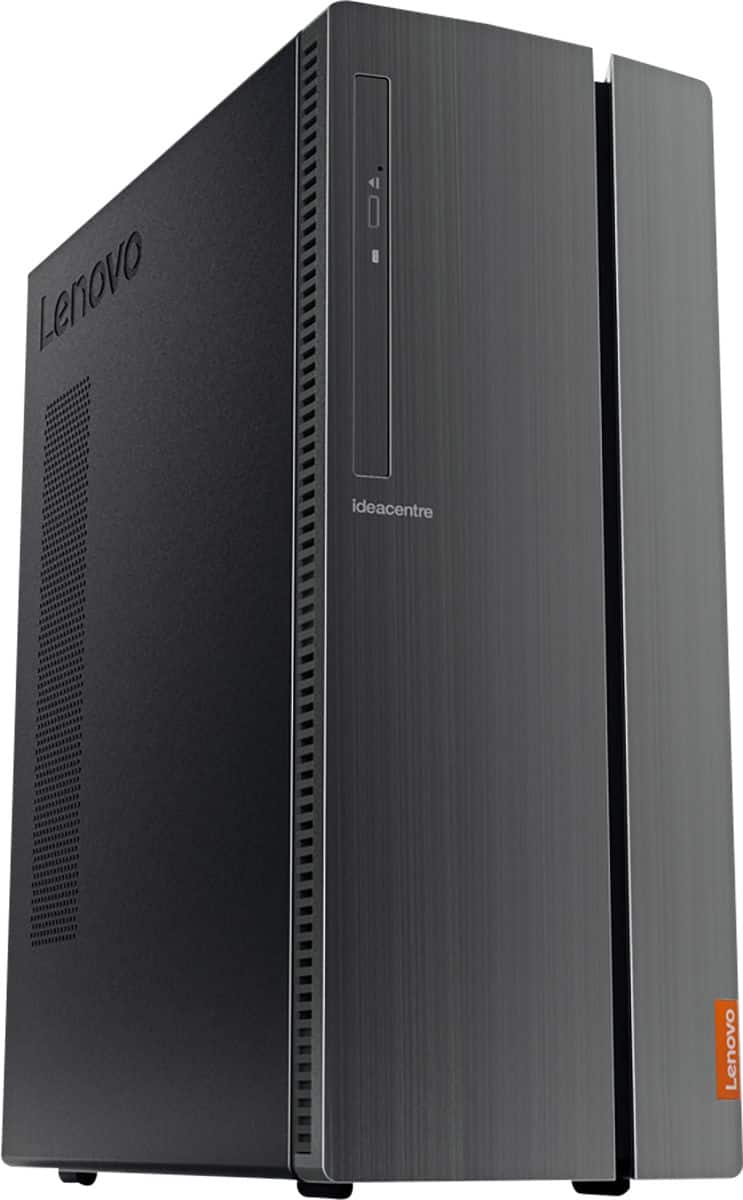

- Model:
- 90HV0003US
- SKU:
- 6203016
Rating by feature
- Value
Rating 4.4 out of 5 stars
- Quality
Rating 4.4 out of 5 stars
- Ease of Use
Rating 4.4 out of 5 stars
Customers are saying
Customers have good things to say about the IdeaCentre 510A's performance, ease of use, and price. Many appreciate its ample storage and quiet operation, finding it easy to set up and use. While some users noted limitations with the integrated graphics card for demanding applications, the overall experience appears positive.
This summary was generated by AI based on customer reviews.
Exactly what I was looking for
||Posted . Owned for 1 month when reviewed.This reviewer received promo considerations or sweepstakes entry for writing a review.looking for a computer with enough memory and processing to do my reports for my business and search the net immediately when I need.
I would recommend this to a friend- Pros mentioned:Performance
Good buy
||Posted . Owned for 2 months when reviewed.This reviewer received promo considerations or sweepstakes entry for writing a review.Good quality case. Solid performance. Boots up fast. Not an i7 but great for an i5.
I would recommend this to a friendBrand response from Lenovo Product Expert
Posted .Thank you for choosing the Lenovo IdeaCentre 510A Desktop, model number 90HV0003US. We are pleased to hear that the performance of the IdeaCentre 510A meets your computing needs so well.

- Pros mentioned:Price
Solid but not dazzling performance
||Posted . Owned for 2 weeks when reviewed.This reviewer received promo considerations or sweepstakes entry for writing a review.I was searching for a moderately priced good desktop computer and this fits the bill. It does not dazzle with performance but does what is expected adequately. There is an annoyance factor with daily notifications from Lenovo and some of the free software that comes with it until you take the time to limit/eliminate the notices. I would recommend only to those that are looking for same expectations as I was.
No, I would not recommend this to a friendBrand response from Lenovo Product Expert
Posted .If you are receiving pop-up notifications on your Lenovo IdeaCentre 510A Desktop, model number 90HV0003US, it means that the 30-day trial of McAfee Virus Protection has expired and your computer is exposed to potential virus attack. You do not need to use McAfee. You can uninstall McAfee and then install any 3rd. party virus protection you choose. Just uninstall McAfee first as there can not be two virus software programs on the computer. This can slow your system down noticeably. Here is a link to information on uninstalling McAfee from Windows 10: https://service.mcafee.com/webcenter/portal/oracle/webcenter/page/scopedMD/s55728c97_466d_4ddb_952d_05484ea932c6/Page29.jspx?wc.contextURL=%2Fspaces%2Fcp&articleId=TS101331&_afrLoop=1355161020222084&leftWidth=0%25&showFooter=false&showHeader=false&rightWidth=0%25¢erWidth=100%25#!%40%40%3FshowFooter%3Dfalse%26_afrLoop%3D1355161020222084%26articleId%3DTS101331%26leftWidth%3D0%2525%26showHeader%3Dfalse%26wc.contextURL%3D%252Fspaces%252Fcp%26rightWidth%3D0%2525%26centerWidth%3D100%2525%26_adf.ctrl-state%3Dx25crirbo_9
- Pros mentioned:Speed
Great buy
||Posted . Owned for 1 month when reviewed.This reviewer received promo considerations or sweepstakes entry for writing a review.Very happy with purchase. Bought to use for my small business. Nice and fast. No issues
I would recommend this to a friend - Pros mentioned:Performance
Lenovo Review
||Posted . Owned for 1 month when reviewed.This reviewer received promo considerations or sweepstakes entry for writing a review.System has been great. Handles all I need it to. Eases through all programs accordingly.
I would recommend this to a friendBrand response from Lenovo Product Expert
Posted .Thanks for choosing the Lenovo IdeaCentre 510A Desktop. We are so happy to hear the features, performance, and user-friendly design of the IdeaCentre 510A Desktop is meeting your computing needs so well!
Excellent Value
||Posted . Owned for 3 weeks when reviewed.This reviewer received promo considerations or sweepstakes entry for writing a review.I work from home and needed to upgrade to Windows 10. I purchased this and it has been everything I needed. It's fast and has plenty of storage.
I would recommend this to a friendBrand response from Lenovo Product Expert
Posted .Thank you for choosing the lenovo IdeaCentre 510A Desktop, model number 90HV0003US. This model ships with the Six-Core Intel Core i5-8400 processor, with a base speed of 2.8GHz and a Turbo Boost speed of up to 4.0GHz. This processor is supported by 8GB DDR4-2666MHz RAM. The Lenovo IdeaPad S340-15 laptop, ships with the powerful Quad-Core/Eight-Thread AMD Ryzen 5 3500U processor, supported by 8GB DDR4-2400MHz RAM and a 256GB solid state hard drive. This configuration is good for many of today's most demanding programs, browsing the internet with multiple tabs open. If this describes your computing needs, the lenovo IdeaCentre 510A Desktop, model number 90HV0003US is a great choice.
- Pros mentioned:Performance
My son love this cumpuer
||Posted . Owned for 3 weeks when reviewed.This reviewer received promo considerations or sweepstakes entry for writing a review.My son love it thank yall this item is my sons lat creasmas gift amd he loves it b
I would recommend this to a friend - Pros mentioned:Performance
Great Desktop for Office
||Posted . Owned for 2 weeks when reviewed.This reviewer received promo considerations or sweepstakes entry for writing a review.Started buying these to replace old workstations. For a standard machine, these work great!
I would recommend this to a friendBrand response from Lenovo Product Expert
Posted .Thank you for choosing the Lenovo IdeaCentre 510A Desktop, model number 90HV0003US. We are pleased to hear that the performance of the IdeaCentre 510A meets your computing needs so well. The Lenovo IdeaCentre 510A Desktop, model number 90HV0003US ships with the powerful Six-Core Intel Core i5-8400 processor, with a base speed of 2.8GHz and a Turbo Boost Speed of up to 4.0GHz. This processor is supported by 8GB DDR4-2666MHz RAM. This configuration is good for many of today's most demanding programs, browsing the internet with multiple tabs open. If this describes your computing needs, the Lenovo IdeaCentre 510A Desktop, model number 90HV0003US is a great choice.
- Pros mentioned:Performance
Works great
||Posted .This reviewer received promo considerations or sweepstakes entry for writing a review.Bought the computer for kids to work on school work and computer works great
I would recommend this to a friendBrand response from Lenovo Product Expert
Posted .Thank toy for choosing the Lenovo IdeaCentre 510A desktop for your children. We are pleased to hear that the performance of the IdeaCentre 510A meets the computing needs of your children so well.

- Pros mentioned:Performance
Computer
||Posted . Owned for 2 months when reviewed.This reviewer received promo considerations or sweepstakes entry for writing a review.Bought this computer for my recirding studio, It has dine all I wanted it to do. Works great for what I use it for.
I would recommend this to a friend - Pros mentioned:Speed
Desktop Computer
||Posted . Owned for 1 month when reviewed.This reviewer received promo considerations or sweepstakes entry for writing a review.Excellent quality and easy to work with. Faster speed than my previous computer.
I would recommend this to a friendBrand response from Lenovo Product Expert
Posted .Thank you for choosing the Lenovo IdeaCentre 510A Desktop. We are pleased to hear that the performance of the IdeaCentre 510A meets your computing needs so well.
- Pros mentioned:Price
Open box computer
||Posted . Owned for 1 month when reviewed.This reviewer received promo considerations or sweepstakes entry for writing a review.Good value on this open box Lenovo PC. Replaced an old Alienware Alpha for my nephew.
I would recommend this to a friendBrand response from Lenovo Product Expert
Posted .Thanks for choosing the Lenovo IdeaCentre 510A Desktop. We are so happy to hear the features, performance, and user-friendly design of the IdeaCentre 510A Desktop is meeting your computing needs so well!
- Pros mentioned:Performance
Nice computer for the price
||Posted .This reviewer received promo considerations or sweepstakes entry for writing a review.Did not know that Lenovo was actually an IBM product so I am very satisfied with the performance and graphics
I would recommend this to a friendBrand response from Lenovo Product Expert
Posted .Lenovo is not an IBM product. We are pleased to hear that the IdeaCentre 510A desktop is working out so well for you. Lenovo purchased the PC division of IBM in 2005.
- Pros mentioned:Ease of use
Good little workhorse
||Posted .This reviewer received promo considerations or sweepstakes entry for writing a review.Not the fanciest computer nor the fastest but its a good little workhorse. Easy to set up and simple interface.
I would recommend this to a friendBrand response from Lenovo Product Expert
Posted .Thank you for choosing the Lenovo IdeaCentre 510A desktop. This is a fast configuration with the six-core/six-thread Intel Core i5-8400 processor, with a base processing speed of 2.8GHz and a Turbo Boost speed of up to 4.0GHz. This processor is supported by 8GB of DDR-4-2666MHz RAM. We are please to hear that the easy setup and use meets your computing needs so well.
- Pros mentioned:Price
Good computer for the price.
||Posted . Owned for 6 months when reviewed.This reviewer received promo considerations or sweepstakes entry for writing a review.Great for the price. Nothing spectacular, but we were only looking for basics.
I would recommend this to a friend - Pros mentioned:Speed
Upgrade for office
||Posted .This reviewer received promo considerations or sweepstakes entry for writing a review.I needed an upgrade for my office desktop and this was the one Best Buy recommended for around $500. I have been pretty satisfied with this product.
I would recommend this to a friendBrand response from Lenovo Product Expert
Posted .Thank you for choosing the Lenovo IdeaCentre 510A desktop for your office. We are pleased to hear that the value and performance of the IdeaCentre 510A meets your business computing needs so well.
- Pros mentioned:Performance
Top class machines!
||Posted . Owned for 1 year when reviewed.This reviewer received promo considerations or sweepstakes entry for writing a review.Awesome machine, Lenovo isn't messing around here! Companies like HP should stick to printers!
I would recommend this to a friend - Pros mentioned:Performance
Mid entry windows 10
||Posted . Owned for 3 weeks when reviewed.This reviewer received promo considerations or sweepstakes entry for writing a review.Was not a fan of the OS upgrade, but, this computer made it easy. Some of the downloaded games play better now. Glad I bought this one
I would recommend this to a friendBrand response from Lenovo Product Expert
Posted .Thank you for choosing the Lenovo IdeaCentre 510A Desktop, model number 90HV0003US. We are pleased to hear that the easy setup and use as well as the performance of the IdeaCentre 510A meets your computing needs so well. The Lenovo IdeaCentre 510A Desktop, model number 90HV0003US ships with the powerful Six-Core Intel Core i5-8400 processor, with a base speed of 2.8GHz and a Turbo Boost Speed of up to 4.0GHz. This processor is supported by 8GB DDR4-2666MHz RAM. This configuration is good for many of today's most demanding programs, browsing the internet with multiple tabs open. If this describes your computing needs, the Lenovo IdeaCentre 510A Desktop, model number 90HV0003US is a great choice.
- Pros mentioned:Ease of use
It seems to be working as anticipated.
||Posted . Owned for 1 month when reviewed.This reviewer received promo considerations or sweepstakes entry for writing a review.It was an easy set up with no problems. It connected to our wifi and we were up and running. I would recommend this computer to others.
I would recommend this to a friendBrand response from Lenovo Product Expert
Posted .Thank you for choosing the Lenovo IdeaCentre 510A Desktop. We are pleased to hear that the easy setup and use of the IdeaCentre 510A meets your computing needs so well. The Lenovo IdeaCentre 510A Desktop, model number 90HV0003US ships with the powerful Six-Core Intel Core i5-8400 processor, with a base speed of 2.8GHz and a Turbo Boost Speed of up to 4.0GHz. This processor is supported by 8GB DDR4-2666MHz RAM. This configuration is good for many of today's most demanding programs, browsing the internet with multiple tabs open. If this describes your computing needs, the Lenovo IdeaCentre 510A Desktop, model number 90HV0003US is a great choice.
- Pros mentioned:Price
Works well. Good price.
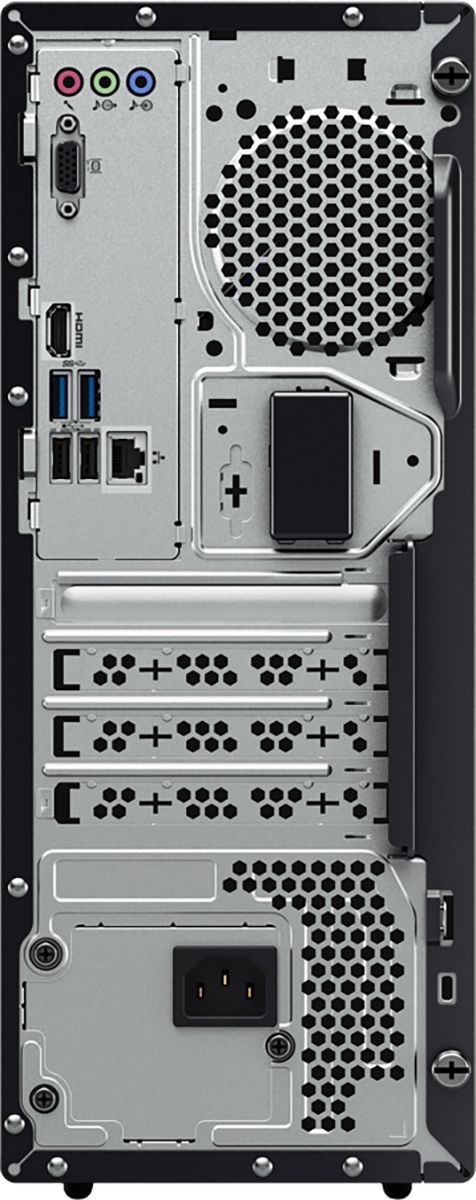
||Posted . Owned for 1 month when reviewed.This reviewer received promo considerations or sweepstakes entry for writing a review.It does what I want, and it was a good price. I did have to get an adapter to attach my monitor but after that it works well.
I would recommend this to a friendBrand response from Lenovo Product Expert
Posted .Once again, thank you for choosing the Lenovo IdeaCentre 510A Desktop. You can keep your computer running at its best by keeping the Windows 10 Operating System and all supporting BIOS files and drivers up to date. You can easily accomplish this by scanning the computer with the Lenovo Utility software available on this computer. Just type "Lenovo Vantage" in the Cortana Search window (if Lenovo Vantage is not installed on your device, you can download the APP and install it now). Select Lenovo Vantage from the list. In the window that opens, click on "Health and Support". In the expanded menu, select "Hardware Scan" In the window that opens, select "Run Quick Tests". This will scan your entire system for errors. Follow any directions that may pop up. If the problem continues after this scan, now click on "System Update". First select Windows update from the menu. Scan your system to be sure you have the latest version of Windows 10. Once that scan is complete, select "Additional Updates". This will scan your device to be sure there are no new BIOS/Driver updates needed. Follow any instructions that may pop up. If you ever need additional help with your Lenovo computer, we recommend you call Lenovo Tech Support at: 877-453-6686 for additional help.