Customer Ratings & Reviews
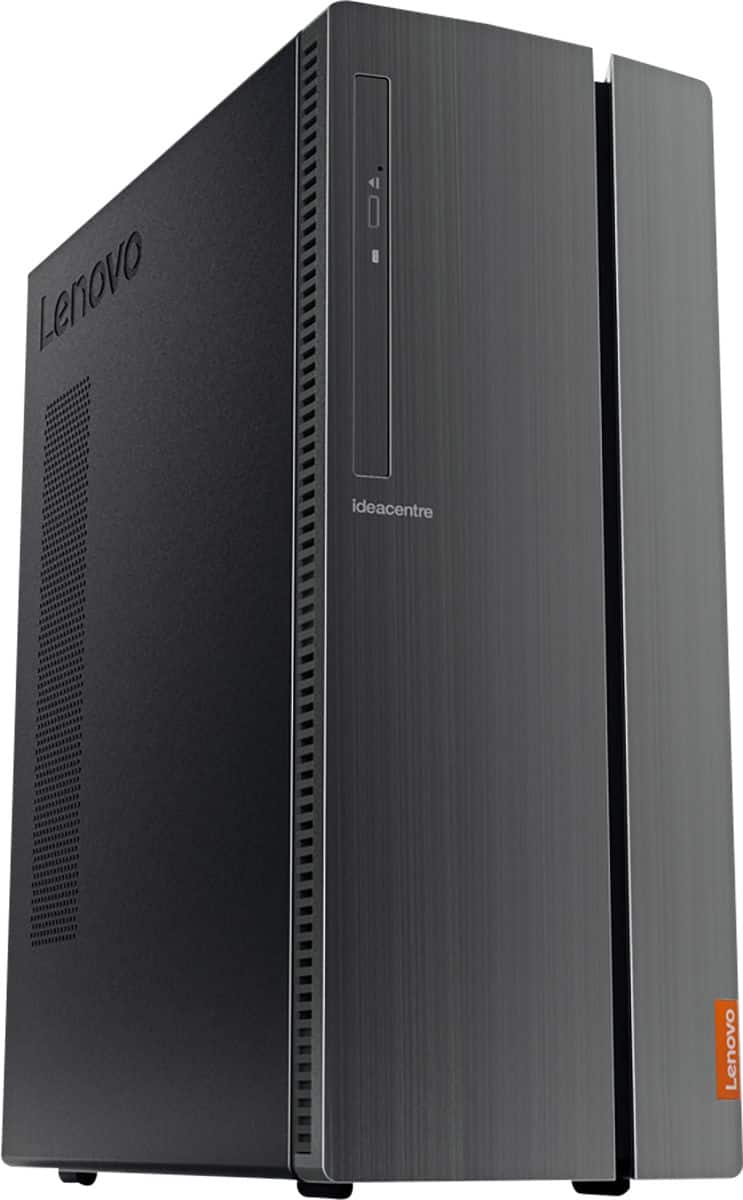

- Model:
- 90HV0003US
- SKU:
- 6203016
Rating by feature
- Value
Rating 4.4 out of 5 stars
- Quality
Rating 4.4 out of 5 stars
- Ease of Use
Rating 4.4 out of 5 stars
Customers are saying
Customers have good things to say about the IdeaCentre 510A's performance, ease of use, and price. Many appreciate its ample storage and quiet operation, finding it easy to set up and use. While some users noted limitations with the integrated graphics card for demanding applications, the overall experience appears positive.
This summary was generated by AI based on customer reviews.
Not for me
||Posted .This reviewer received promo considerations or sweepstakes entry for writing a review.Returned tis computer in wasn't compatible with my devices. to many issues. Just not the right buy for me.
No, I would not recommend this to a friendEXTREMELY SLOW
||Posted . Owned for 1 year when reviewed.This reviewer received promo considerations or sweepstakes entry for writing a review.It’s a good and strong pc but after a couple months it’s EXTREMELY SLOW.
No, I would not recommend this to a friendReturned Unused
||Posted . Owned for 4 months when reviewed.This reviewer received promo considerations or sweepstakes entry for writing a review.The product description was incorrect resulting in the product not meeting our needs. It was returned unused. Customer service handled this quick and painlessly.
I would recommend this to a friendBrand response from Lenovo Product Expert
Posted .The Lenovo IdeaCentre 510A Desktop, model number 90HV0003US ships with the powerful Six-Core Intel Core i5-8400 processor, with a base speed of 2.8GHz and a Turbo Boost Speed of up to 4.0GHz. This processor is supported by 8GB DDR4-2666MHz RAM. This configuration is good for many of today's most demanding programs, browsing the internet with multiple tabs open. If this describes your computing needs, the Lenovo IdeaCentre 510A Desktop, model number 90HV0003US is a great choice.

Not So Good
||Posted . Owned for 1 week when reviewed.This reviewer received promo considerations or sweepstakes entry for writing a review.The computer was extremely slow. I was very surprised to find the poor performance for a 8gb RAM Lenovo with a i5 Intel processor to perform in such a poor state.
No, I would not recommend this to a friendBrand response from Lenovo Product Expert
Posted .The Lenovo IdeaCentre 510A Desktop, model number 90HV0003US is an extremely powerful mid-range desktop computer, shipping with the powerful Six-Core Intel Core i5-8400 processor. This processor has a base speed of 2.8GHz and a Turbo Boost Speed of up to 4.0GHz. This processor is supported by 8GB DDR4-2666MHz RAM. If you are getting slower than expected performance, be sure any software you installed is compatible with Windows 10. There is no need to install Microsoft Office software. The software is already part of the operating system, you just need to activate the software with a purchased product key. If you have installed a copy of Microsoft Office, this is conflicting with the existing copy on the system and this will slow your system down. If you have installed a 3rd party anti-virus program, be sure that Windows Defender is turned off and that the trial version of McAfee Anti-Virus software is uninstalled. There can only be one anti-virus program on the system. You may need to restore your system to original factory default settings if any of the programming errors have occurred. You can do that by typing "restore" in the Cortana search window. Just click on the magnifying glass icon at the bottom left of your Windows 10 Desktop. Click on "Reset This PC" Then click on "Get Started" and follow the on screen directions to restore to factory defaults. If the problem persists, we recommend you contact Lenovo Tech Support at: 877-453-6686.
Great Specs Lousy Performance
||Posted . Owned for 1 year when reviewed.This reviewer received promo considerations or sweepstakes entry for writing a review.Don't buy a Lenovo. Create specs but lousy slow computer
No, I would not recommend this to a friend1
||Posted .This reviewer received promo considerations or sweepstakes entry for writing a review.i haven't been able to install it yet. Have been sick since end of Jan.
No, I would not recommend this to a friendDidn’t work was defective
||Posted . Owned for 3 weeks when reviewed.This reviewer received promo considerations or sweepstakes entry for writing a review.Productive was defective it seems like they didn’t test before shipping
No, I would not recommend this to a friendWould not recommend
||Posted . Owned for 3 weeks when reviewed.This reviewer received promo considerations or sweepstakes entry for writing a review.Sold without letting customers no it doesn’t have a webcam capacity
No, I would not recommend this to a friendBrand response from Lenovo Product Expert
Posted .The Lenovo IdeaCentre 510A Desktop, model number 90HV0003US, is a Desktop computer configuration. It ships with the computer, keyboard and mouse. All other peripherals including monitor, webcam, microphone and speakers are sold separately.
BASIC VERY BASIC
||Posted . Owned for less than 1 week when reviewed.This reviewer received promo considerations or sweepstakes entry for writing a review.THIS WAS THE WORST COMPUTER I HAVE EVER HAD. RETURNING IT TODAY
No, I would not recommend this to a friendBrand response from Lenovo Product Expert
Posted .The Lenovo IdeaCentre 510A Desktop, model number 90HV0003US ships with the powerful Six-Core Intel Core i5-8400 processor, with a base speed of 2.8GHz and a Turbo Boost Speed of up to 4.0GHz. This processor is supported by 8GB DDR4-2666MHz RAM. This configuration is good for many of today's most demanding programs, browsing the internet with multiple tabs open. If this describes your computing needs, the Lenovo IdeaCentre 510A Desktop, model number 90HV0003US is a great choice.
Lenovo purchase
||Posted . Owned for 1 month when reviewed.This reviewer received promo considerations or sweepstakes entry for writing a review.Had to return in less than 30 days for booting issues.
No, I would not recommend this to a friendBrand response from Lenovo Product Expert
Posted .Hello, we are sorry to hear you had an issue with your Lenovo 510a Desktop booting Windows 10. We recommend to ensure you have the latest system software, device drivers, and BIOS installed on your machine. You can easily accomplish this by scanning the computer with the Lenovo Utility software available on this computer. This system has Lenovo utilities installed to help maintain the health of the device and keep the operating system software up to date. Type "Lenovo Vantage" in the Cortana Search window (if Lenovo Vantage is not installed on your device, you can download the APP and install it now). Select Lenovo Vantage from the list. In the window that opens, click on "Health and Support". In the expanded menu, select "Hardware Scan” In the window that opens, select "Run Quick Tests". This will scan your entire system for errors. Follow any directions that may pop up. If the problem continues after this scan, now click on "System Update". First select Windows update from the menu. Scan your system to be sure you have the latest version of Windows 10. Once that scan is complete, select "Additional Updates". This will scan your device to be sure there are no new BIOS/Driver updates needed. Follow any instructions that may pop up. If the issue continues after these updates, we recommend you call Lenovo Tech Support at: 877-453-6686 for additional help.
Wasn't compatible with my software.
||Posted . Owned for 1 month when reviewed.This reviewer received promo considerations or sweepstakes entry for writing a review.Wasn't compatible with my software and was unable to use it.
I would recommend this to a friendBrand response from Lenovo Product Expert
Posted .The Lenovo IdeaCentre 510A Desktop, model number 90HV0003US, ships with Windows 10 Home 64-bit Operating System. We always recommend you check the requirements and compatibility of any software you will be installing on your new computer, before you invest in any computer. Be sure your new computer can support the software you will need to use.
SLOW & SLOWER
||Posted . Owned for 3 weeks when reviewed.This reviewer received promo considerations or sweepstakes entry for writing a review.VERY SLOW, SLOW THAN MY NOTEBOOK. DO NOT USE IT NOT WORRY BUYING.
No, I would not recommend this to a friendBrand response from Lenovo Product Expert
Posted .The Lenovo IdeaCentre 510A desktop, model number 90HV0003US is a fast configuration, with its Six-Core Intel Core i5-8400 processor, with a base speed of 2.8GHz and a Turbo Boost Speed of up to 4.0GHz. This processor is supported by 8GB DDR4-2666MHz RAM. Be sure any software you installed is compatible with Windows 10. There is no need to install Microsoft Office software. The software is already part of the operating system, you just need to activate the software with a purchased product key. If you have installed a copy of Microsoft Office, this is conflicting with the existing copy on the system and this will slow your system down. If you have installed a 3rd party anti-virus program, be sure that Windows Defender is turned off and that the trial version of McAfee Anti-Virus software is uninstalled. There can only be one anti-virus program on the system. You may need to restore your system to original factory default settings if any of the programing errors have occurred. You can do that by typing "restore" in the Cortana search window. Just click on the magnifying glass icon at the bottom left of your Windows 10 Desktop. Click on "Reset This PC" Then click on "Get Started" and follow the on screen directions to restore to factory defaults. If the problem persists, we recommend you contact Lenovo Tech Support at: 877-453-6686
Reurned, dead out of box
||Posted . Owned for less than 1 week when reviewed.This reviewer received promo considerations or sweepstakes entry for writing a review.just a BIG NO! twice blue screens as it powered up
No, I would not recommend this to a friendBrand response from Lenovo Product Expert
Posted .We are sorry to hear that you had issues with the initial activation of Windows 10. Be sure any software you installed is compatible with Windows 10. There is no need to install Microsoft Office software. The software is already part of the operating system, you just need to activate the software with a purchased product key. If you have installed a copy of Microsoft Office, this is conflicting with the existing copy on the system and this will slow your system down. If you have installed a 3rd party anti-virus program, be sure that Windows Defender is turned off and that the trial version of McAfee Anti-Virus software is uninstalled. There can only be one anti-virus program on the system. You may need to restore your system to original factory default settings if any of the programing errors have occurred. You can do that by typing "restore" in the Cortana search window. Just click on the magnifying glass icon at the bottom left of your Windows 10 Desktop. Click on "Reset This PC" Then click on "Get Started" and follow the on screen directions to restore to factory defaults. If the problem persists, we recommend you contact Lenovo Tech Support at: 877-453-6686.
Too slow
||Posted .This reviewer received promo considerations or sweepstakes entry for writing a review.15 minutes booting.My old computer is booting less than 5 min.
No, I would not recommend this to a friendBrand response from Lenovo Product Expert
Posted .We are sorry to hear that you are having issues with your Lenovo IdeaCentre 510A desktop. Obviously this system should not take 15 minutes to boot. In fact, it should boot to your Windows 10 desktop in less than 25 seconds. Be sure any software you installed is compatible with Windows 10. There is no need to install Microsoft Office software. The software is already part of the operating system, you just need to activate the software with a purchased product key. If you have installed a copy of Microsoft Office, this is conflicting with the existing copy on the system and this will slow your system down. If you have installed a 3rd party anti-virus program, be sure that Windows Defender is turned off and that the trial version of McAfee Anti-Virus software is uninstalled. There can only be one anti-virus program on the system. You may need to restore your system to original factory default settings if any of the programing errors have occurred. You can do that by typing "restore" in the Cortana search window. Just click on the magnifying glass icon at the bottom left of your Windows 10 Desktop. Click on "Reset This PC" Then click on "Get Started" and follow the on screen directions to restore to factory defaults. If the problem persists, we recommend you contact Lenovo Tech Support at: 877-453-6686.

- Pros mentioned:Performance
Great PC for the price range.
Posted .This reviewer received promo considerations or sweepstakes entry for writing a review.Overall, the pc is a great replacement for my 9 year old desktop. Performs well, except there is a static buzzing coming from the headphones ports, even after updating all drivers. Doesn't matter which one I use, still same noise. Installed a old USB soundcard I had laying around and using that to listen to music.
I would recommend this to a friendBrand response from Lenovo Product Expert
Posted .Thank you for choosing the Lenovo IdeaPad 510A desktop. With regard to the audio issues you mention, we recommend you call Lenovo Tech Support at: 877-453-6686.
Great and fast even good for gaming
Posted .This reviewer received promo considerations or sweepstakes entry for writing a review.My computer boots up really fast it is good for gaming The people at Best Buy said it wouldn’t be but it handles my games but even AAA games play at 60+ frames and is extremely quiet and slick No joke it’s amazing
I would recommend this to a friendBrand response from Lenovo Product Expert
Posted .Thank you for choosing the Lenovo IdeaCentre 510A desktop. We recommend you check with any demanding software and/or game's software publisher's web sites for their compatibility with Windows 10 Home 64-bit operating system and the minimum/recommended hardware requirements (Is a Graphics card required, the processor speed and the minimum required system RAM and the minimum available hard drive space) to run their program, then compare those requirements to this system's configuration, before you invest in any computer to make sure the software and/or games software you plan on installing is compatible and will work with this system configuration.
- Pros mentioned:Speed
great specs, money saver
Posted .This reviewer received promo considerations or sweepstakes entry for writing a review.I have been running this Lenovo for a month now and its been great. fast right out of the box. no need to spend money on a pc mover, the Lenovo comes with a migrate file that moves your files and setting from your old computer for free. I read the reviews and took a chance , I'm glad I did.
I would recommend this to a friendBrand response from Lenovo Product Expert
Posted .Thank you for choosing the Lenovo IdeaCentre 510A desktop. We are pleased to hear that the features and performance of the IdeaCentre 510A meets your computing needs so well. Lenovo is the number #1 manufacturer of computers in the World:
https://venturebeat.com/2019/01/10/gartner-and-idc-hp-and-lenovo-shipped-the-most-pcs-in-2018-but-total-numbers-fell/
pieces of trash PC
Posted .This reviewer received promo considerations or sweepstakes entry for writing a review.this garbage here is trash, it cant even run games at all without lagging, i regret buying this with my dad, he wont buy me a new one before but now he is buying me a new one, dont ever buy PCs that does not have good graphics card or even have one, this PC should be worth 100 dollars at max for its quality.
No, I would not recommend this to a friendSet Up
Posted .This reviewer received promo considerations or sweepstakes entry for writing a review.Does this need to be connected to my wifi box through the Ether Net?
I would recommend this to a friendBrand response from Lenovo Product Expert
Posted .No, there is WiFi built in.
Best PC
Posted .This reviewer received promo considerations or sweepstakes entry for writing a review.Best windows computer you could ever buy..........
I would recommend this to a friendBrand response from Lenovo Product Expert
Posted .Thank you for choosing the Lenovo IdeaCentre 510A desktop. We are pleased to hear that the IdeaCentre 510A is working out so well for you.