Customer Ratings & Reviews





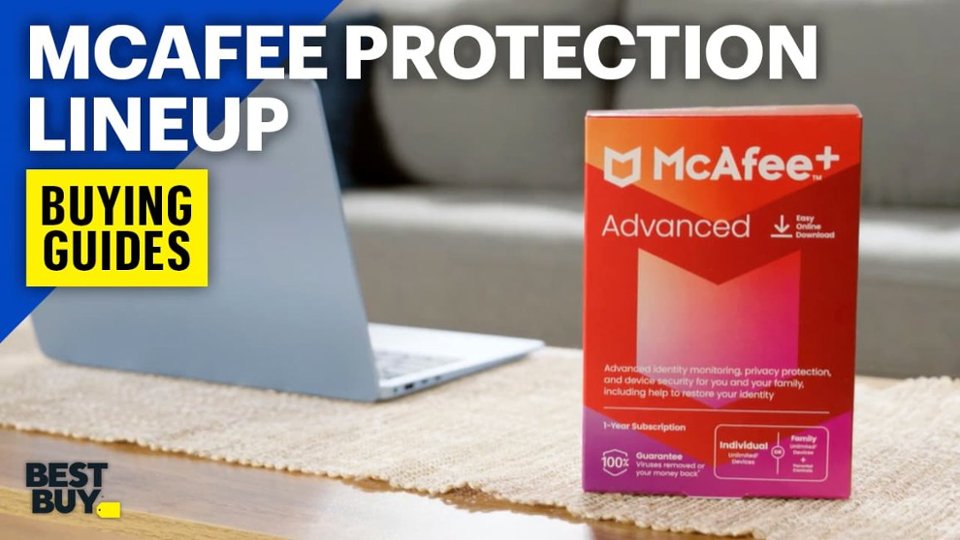



- Model:
- MCA950800V007
- SKU:
- 6518282
Rating by feature
- Value
Rating 4.8 out of 5 stars
- Quality
Rating 4.8 out of 5 stars
- Ease of Use
Rating 4.9 out of 5 stars
Customers are saying
Customers are positive about McAfee+ Advanced Antivirus Software, highlighting its robust protection and overall performance. Users appreciate the quick and easy installation process, as well as the software's efficient resource usage. The inclusion of VPN options and password management features are also well-received, along with its device compatibility and scan speed.
This summary was generated by AI based on customer reviews.
McAfee+ Advanced
||Posted . Owned for 7 months when reviewed.This reviewer received promo considerations or sweepstakes entry for writing a review.Best price on the net. Quick and easy to load. So far, so good.
I would recommend this to a friendGreat security
||Posted . Owned for 4 months when reviewed.This reviewer received promo considerations or sweepstakes entry for writing a review.It is a great product and reasonable price. No hassles.
I would recommend this to a friendGood deal
||Posted . Owned for 3 weeks when reviewed.This reviewer received promo considerations or sweepstakes entry for writing a review.Have been looking for an antivirus scan. This is a really good deal.
No, I would not recommend this to a friendProtection
||Posted . Owned for 3 weeks when reviewed.This reviewer received promo considerations or sweepstakes entry for writing a review.Great product works very well best coverage on the market
I would recommend this to a friendGreat product
||Posted . Owned for 11 months when reviewed.This reviewer received promo considerations or sweepstakes entry for writing a review.Great product. Love the site protectoin and dark scans.
I would recommend this to a friendMcafee
||Posted . Owned for 1 week when reviewed.This reviewer received promo considerations or sweepstakes entry for writing a review.No roll over. Buy as close to experation date as posible.
I would recommend this to a friendBrand response from McAfee Team
Posted .Hi Michael, please note the subscription starts from the date of activation, not the date of purchase. To ensure your new subscription extends your existing subscription, ensure to use the same email to link the two subscriptions. If you need any help, please contact us at mcafee.com/support. Thanks!

- Pros mentioned:Installation, ProtectionCons mentioned:Scan speed

Return of the Mac
|Posted .This reviewer received promo considerations or sweepstakes entry for writing a review.McAfee is one of three major antivirus protection providers which have been around for quite a while. It was a prefered choice for a lot of users for a long time until they started "bloating" their software with useless knick-knacks nobody cared for. It was making the software a memory and resource hog. Many years have passed since then and a multitude of new competitors swooped in. This might have triggered McAfee to re-evaluate their business strategy. So how does it fare today? The advanced, unlimited device version of McAfee Antivirus can keep most of your electronic devices safe. Be it Windows, Mac or Android or any other platform, McAfee boasts to keep all of them safe from the dark side of the internet. Installation is easy and streamlined. You register, you download and install and you're good to go. The initial scan can take a little while, since it's a deep scan, but that's the case with almost all antivirus software. Once it's "implanted" into your system, it will run in the background and do its thing. Now in order to see if it can seek down some of the most common threats, I hooked up an external drive containing a load of infected archives. The toughest one being a rootkit which is notoriously hard to remove. The scanning process was rather slow but it managed to catch all misfits, including the rootkit. It tagged a handful of files as "threats", even though the files were clean. Compressed executables are sometimes falsely tagged as trojans or other threats. I double-checked the files and they were clean. Not a big deal, other virus protection software usually picks these up as well. Better safe than sorry. The software itself comes with a fair amount of other tools. I would argue that most of these are nice, but not as efficient as other software solutions which focus specificaly on these issues, such as the firewall, the browser protection or VPN. It's a nice idea to include those in there, but know that there are better options available. For the sake of simplicity, especially for users who aren't as tech-savvy, it does make sense to include these tools. McAfee is still rather resource hungry compared to other antiviral software. Especially the memory footprint is rather high. On the bright side, the CPU load (unless you're actively scanning) is rather low, which is good. So, the bottom line is this: McAfee has listened to users and made considerable changes to their antivirus. It covers a wide range of protections and offers a solid protection for your devices. The price tag is fair and even if slow during active scanning, it still manages to mostly remain in the background without a huge impact on your system. I would recommend McAfee Antivirus to most users.
I would recommend this to a friend - Pros mentioned:Installation, Overall performance, Resource usage
Peace of mind!
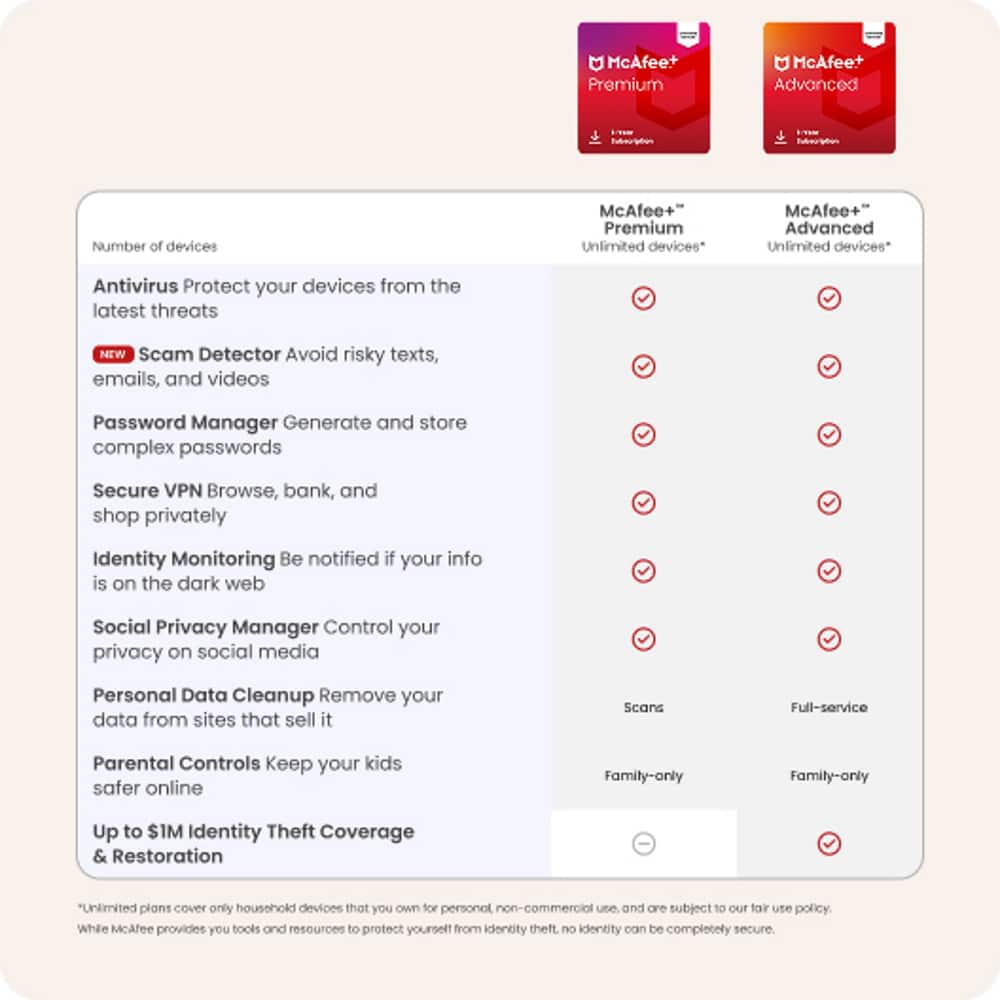
|Posted .This reviewer received promo considerations or sweepstakes entry for writing a review.The McAfee+ Advanced Identity is such a simple product to install, yet provides so much value and peace of mind. Visit the website, download the product/enter your product key, and in just a few clicks you're on your way to safety. The Advance version includes credit bureau monitoring and a monthly credit report/score. Simply enter your email address and a quick scan lets you know if there's any suspicious activity, or identity exposure. Another scan using your Social Security Number (securely, of course) lets you know if there's any fraudulent activity to report. The product also includes five licenses for your very own Virtual Private Network (VPN). The VPN encrypts your identity and allows you to browse securely. This keeps your browser history private, like it should be. Other valuable features include a password manager, identity monitoring, identity theft coverage, and so much more - at a bargain price! The McAfee software runs quietly in the background and doesn't seem to take up too much hard drive space. It doesn't "take over" like some of the other programs out there. Overall, this is a great product and I would recommend it!
I would recommend this to a friend - Pros mentioned:Protection, Vpn
As Good as Always
|Posted .This reviewer received promo considerations or sweepstakes entry for writing a review.I have been using McAfee for years and it protects my computers and other devices without noticeable performance issues. With this newer version, McAfee continues to provide all that. However, I've had issues right after my computer starts. It has only happened twice within a week, but it has kept my windows taskbar from displaying for up to 11 minutes. It seems to be related to it updating right after a Windows update, but I could see on Task Manager that it was the only app at one hundred percent CPU utilization. My computer is fairly new with Intel i7, NVidia GPU, 16 GB ram, and SSD drives, so it was a strange experience. When it finally finished whatever it was doing, performance went back to normal. Other than that issue, everything works well. I could go on and on detailing its protection, but what if found worth mentioning is the ID protection. It makes you feel overwhelmed of information about how vulnerable you are on the Internet. So many breaches and most of the passwords you use is in the hands of millions of hackers out there. My recommendation is that you use McAfee's password manager and generate unique complex password for each site you use. Don't share passwords among sites and use a two-factor authentication until newer technology gets rid of passwords altogether. The VPN part is one of the most loved features to me. I hate sites targeting me with ads related to my location, even when I set my browser not to track, since your IP address, which you usually can’t hide, can feed them with information you didn’t want to share. With VPN, they never know where you’re coming from. I still recommend. The taskbar issue is probably a bug and I hope it will be fixed sometime soon if it hasn’t already.
I would recommend this to a friend - Pros mentioned:Installation
This One Does It All!!
|Posted .This reviewer received promo considerations or sweepstakes entry for writing a review.This is one of the toughest reviews I have ever written. On one hand, McAfee+ Advanced Internet Security seems to be everything a person could want in an antivirus/identity protection/internet security program. In fact, McAfee goes overboard to give you the complete package. A very superior package at that. But on the other hand, providing so much protection in one package is almost too much. Let me explain. The download and installation is about as standard as you can get. If you have ever downloaded any software and installed it before, then the McAfee+ software should be a breeze to download and install. After the installation, the advanced options are quite numerous... Personal Data Cleanup, Antivirus, Secure VPN, ID Protection, and Tracker Remover. And of course each of these has its own subset of options. For me, this is where it became a bit cumbersome. For example, going through the Personal Data Cleanup, McAfee+ searches the dark web to see if there have been any instances in which any personal data related to you has been breached. It then gives you the option to address each instance in which your data has been potentially breached. I had 38 events to address. To find out about each instance, I was forced to go through an email verification process to "make sure" it was me. I was logged in under my user name and password, I had not logged out, and yet each time I had to go through the process of waiting for a six-digit verification code to be emailed to me. Needless to say I did not address all 38 issues. Now don't get me wrong, finding out about data breaches is great because in many instances McAfee can tell you which website actually allowed the breach to occur. I found that most often it involved a simple change of password for that particular site. In several other instances, there was a message stating there is a sensitive ongoing investigation regarding data that was hacked, but I was not given even a hint about who hacked it, what was hacked, or what I could do about it. There is an option to Check Your Protection Score. This is a rather novel idea, but to get your score to 100 takes effort and time...a lot of both. Initially there are four options to choose from, but I will address the Add More Personal Info To Monitor option. To use the comparison again, on one hand I would love to know that ALL my personal data online is safe. That's a no-brainer. But in order for McAfee to monitor this information, it asks you to provide email addresses, phone numbers, social security number, passport info, driver's license info, Tax ID, date of birth, health ID, usernames, credit card numbers, and bank account numbers. McAfee promises that all this information is safe and secure on their website. But as I looked through the list of websites involved in my 38 data breaches, I noticed some high-caliber organizations who also promise to keep all your info safe. As much as I honestly trust McAfee, I absolutely cannot bring myself to offer up all that information, especially to one single website. When it is all said and done, the bottom line is that McAfee+ is not designed to be just another anti-virus program. This package offers the whole complete package. It does what it is designed to do, and in order to do that, it does in fact time and effort on the part of the user. If all you need is protection from viruses and malware, this is not the software for you. But if you need an extremely thorough encompassing package that address every need a person may have online, INCLUDING VPN, then this is the absolute best package available for you. And I am going to heartily recommend McAfee+ to all my friends and family in need of the whole package.
I would recommend this to a friend - Pros mentioned:Vpn
Comprehensive Identity theft protection suite
|Posted .This reviewer received promo considerations or sweepstakes entry for writing a review.McAfee + Advanced internet security is a 1 year subscription to their new identity theft protection suite. The program supports Windows, Mac OS, Chromebook, IOS and Android. There is no smartphone app at this time but the web interface is available on all devices. The setup begins with McAfee asking for your personal information. The interface is clunky, you only enter your email at first but later you can add your Social Security number, Phone numbers, Passport number, Driver’s license number, Tax ID numbers, Date of birth, Health IDs, Credit cards and Bank accounts. It can take a while if you have a lot of accounts. After all the data entry you will have a nice Dash board that lays out what is left to do and the services that are active. I do feel this could be better organized with a better flow. You can then use each of the programs features to look for identity theft issues. This could be a little more automated with a guided flow. After setup you will get a score on the dashboard indicating your relative safety as you take the actions indicated your score will increase. This gives you an idea of how safe you are but is really not necessary a simple bar gauge would suffice. The identity protection module will scan for data breaches on the dark web if a site breach is involved it will allow you to go to the site with a click of a button to change your password, I found some of the sites no longer exist though, these could be weeded out by McAfee. They also warn of lists of breaches that include your info all you can do is note these then archive them. The personal data cleanup feature requires you to reenter all of your accounts again! I feel this could be improved as entry takes some time and effort and asking you to enter it multiple times in the same program is not what I expect. McAfee then scans data broker sites for your info, it will then automatically remove it. On the first scan it requests removal that day, repeat scans are done every 3 months. With McAfee Advanced, you have expert identity theft support specialist ready to help with any identity theft. It is very reassuring to have someone walk you through the required steps to keep you safe and start your identity restoration. If you lose your wallet they can help you replace your cards and ID’s. McAfee covers you with up to 1 million dollars of identity theft insurance that reimburse you for stolen funds, lost wages, and legal fees. The subscription also includes McAfee antivirus and McAfee Total Protection for unlimited devices. This protects your computer from malware and viruses that steal your information right from your computer and protect you while browsing the web. McAfee also includes a VPN for up to 5 devices. All of your online activity is encrypted and your ip address hidden offering even more protection. A password manager is also included to protect those valuable passwords avoiding storing them in your browser which is not as secure. To fully delete sensitive files McAfee’s includes a digital file shredder so they can not be easily recovered by hackers or unauthorized individuals. Overall McAfee + Advanced Internet security is a good package to keep you safe from identity theft and help you recover from it if it occurs.
I would recommend this to a friend - Pros mentioned:Resource usageCons mentioned:Scan speed
Top notch security!
|Posted .This reviewer received promo considerations or sweepstakes entry for writing a review.The best security products, I've found, are those that you don't have to think too much about. Securing your PC and your data is an absolute must, especially in this time of ransomware attacks, botnets and identity theft prevalence, but if you make it hard for folks, they won't keep up with it/won't do it. In that sense, then, this McAfee+ Advanced package is pretty great. It's (from my experience to date) pretty much set it and forget it. You install it, register/set up the protections and just let it do it's thing in the background. Because you don't need to pay attention to it, it works REALLY well and has already found things that other "free" Antivirus packages missed (and those packages weren't hands off, they required care and feeding AND often times they would pop up annoying ads that always seem to come up at the wrong time). So this is a huge step forward and well worth the price of admission. Perhaps the only small improvement or change I might make is that McAfee has REALLY tried to make this package very low resource utilization - which is nice when it's running in the background since you don't want to find your PC suddenly slowed down by the antivirus (a common complaint in the past that is fixed now), but it also makes manual full system scans VERY slow. I know these are not a common occurrence, and you can just do other things while you wait, but it might be nice in the future to allow a user to decide if they want to quickly scan everything, even at the cost of more CPU/etc. But that's just me being nitpicky and wanting more customization - overall, this is a great package at a great price and I can highly recommend it!
I would recommend this to a friend - Pros mentioned:Resource usage
Solid protection.
|Posted .This reviewer received promo considerations or sweepstakes entry for writing a review.I tried out the McAfee Advanced subscription and so far have been quite pleased. The only disadvantage is that TrueKey which is included is not supported on Apple's Safari browser. The use of the password keeper requires either Google Chrome or Firefox. This is not a deal breaker but I will prefer to continue to use Safari. The subscription includes an unlimited number of devices which sets it apart from some others. I have both a PC and several Apple products so it is important that whatever security option I chose it would work with both platforms. I have tested it on my MacBook as well as a Dell laptop. The function on both seems to be solid. I did not notice the software slowing down the computer or browsing the internet. It does come with a VPN function to protect you when on public wifi. With this turned on your banking apps and several others that need IP addresses, etc. will not work. This is because the software is working the way it is supposed to, masking your Internet address and activity, keeping it private. This was a bit aggravating as I use Ring all the time and sometimes am either on public wifi or cell service and need to check a camera or something. When that is the case I turn off the VPN. For most this will probably not be an issue. The installation of the software is very easy and straight forward.
I would recommend this to a friend - Pros mentioned:Installation, Vpn
Close, but not the best
|Posted .This reviewer received promo considerations or sweepstakes entry for writing a review.Recently I've has the opportunity to try a few different antivirus+identity protection products to varying degrees of success. McAfee is another entry with a well known name that has been around forever but is becoming somewhat lost in the crowd. To start, installation is straightforward. It's nice that it has an unlimited device option, though I imagine for most people it's way more than they need. Using a competing product with 20 licenses, I've only managed to install about 7 of them and covered my whole family, PCs, phones, everything. It may be a pricing tier/differentiation that in the long run, doesn't really matter. Once installed it also has you go through the setup of its identity protection functions, which while nice, seem to be a bit limited when compared to stronger names in this arena. They do have more expensive tiers, as do their competitors, but when you're already having to pay a yearly subscription for your AV, do you really want another cost on top of it? It seems a bit extraneous to me. Scanning is straightforward and quick, McAfee doesn't carry the same amount of bloat as some competitors, though more than others. Again, still managing to find itself somewhere in the middle of the pack. It's also less spam-y with advertisements when being used when compared to some competitors. What I do like is the unlimited VPN. In these days it's nice to have an option that secures your traffic leaving your premises if you so choose. All in all, it's got nice features if somewhat average when compared to competitors, the unlimited is nice if a bit extra, and the addon features, as with their competitors, are just an unneeded added expense. VPN is great though. AV products tend to be a bit polarizing in terms of who likes what brand, and if McAfee is your thing, then it's a worthwhile advancement over previous generations... If it's not, then there's nothing here that really makes it stand out from the pack.
I would recommend this to a friend - Pros mentioned:Overall performance, Vpn
So many features to help secure your life
|Posted .This reviewer received promo considerations or sweepstakes entry for writing a review.McAfee Advanced security goes well beyond merely securing your computer. In the past, it took multiple products to keep you safe. McAfee changed this by packaging several components into one amazing package. The installation is fast and simple, with a download from their website. Once the key is entered, it opens up the options for your subscription. While there are credit monitoring tools, I stick to the PC and Android phone protection for the most part. I have not noticed any performance degradation on either my laptop or my Android phone. I enjoy the assurance that scans have been completed and the results are clearly communicated. The product does a great job of leading a person into the multitude of features available. I tried the service to search for my data on various websites and I was shocked at the number of times it found my information at unknown sites. It performed a dark web search as well. The service also offers a password vault for storing the numerous passwords that we all need to track these days. It also provides VPN options for securing your data connectivity. This offers excellent protection for your PC and mobile phone and it's very simple and efficient.
I would recommend this to a friend - Pros mentioned:Installation
Great protection
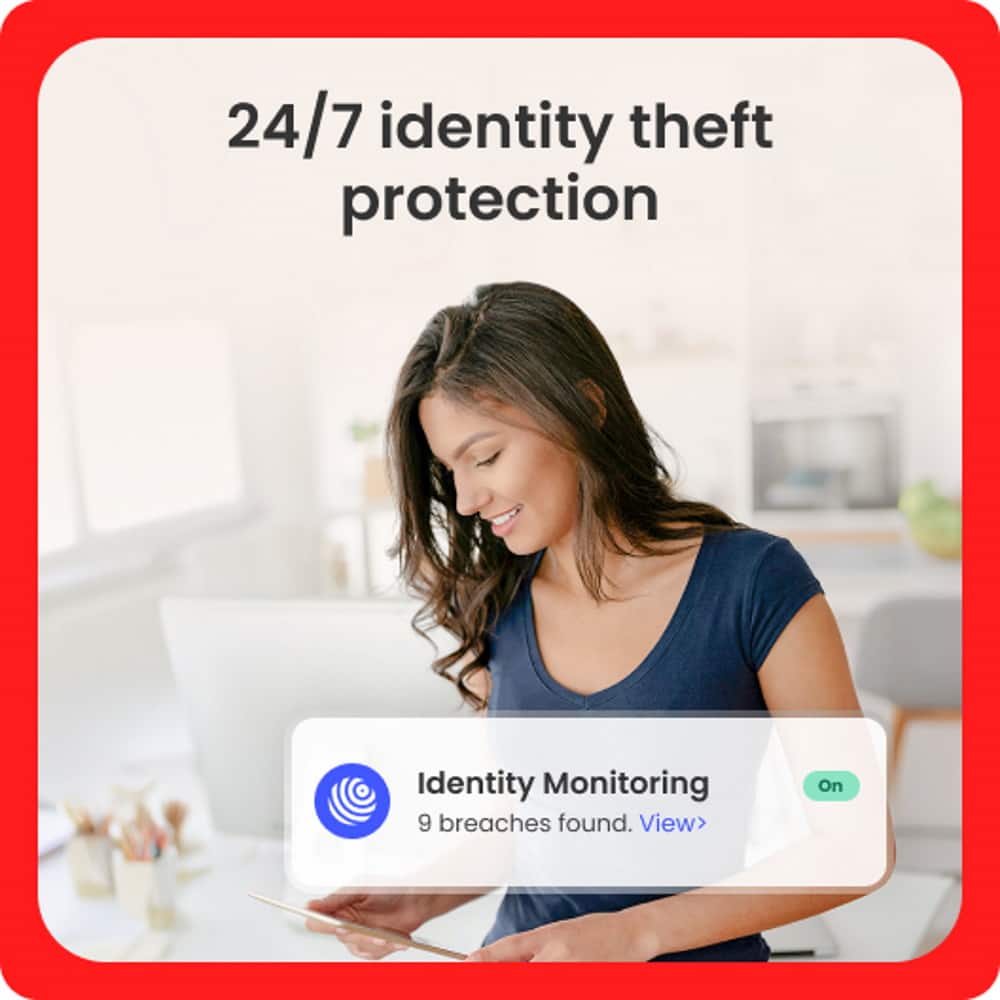
|Posted .This reviewer received promo considerations or sweepstakes entry for writing a review.I am ao glad that i have the McAfee + Advanced Individual protection to protect my identity and my information. It is easy to download onto your devices. I love that it can be downloaded onto any device for yourself. I was ablw to use it on my android phone, tablet, and laptop to protect all of my information. Installation is quick and easy. All the steps walk you through it and its very comprehensive. Upon downloading i was able to see that some of my information was compromised, the dates it was compromised, and where it was compromised. Seeing this allowed me to go in and start changing passwords to better protect myself. I also love that it has up to a 1 million dollar identity theft coverage if i was ever to need. This coversge is great to have and i thibk everyone should utilize protecting their identity and credit. Overall the McAfee + Advanced Individual is great for notifying you of any compromised information, easy to install, can be used across all of your devices, and is a continuous monitor to protect you.
I would recommend this to a friend - Pros mentioned:Installation
McAfee+ Adv. Ind. Identity & Privacy Protection
|Posted .This reviewer received promo considerations or sweepstakes entry for writing a review.So I've been using McAfee+ Advanced Individual Identity, Privacy, and Device Protection software over the past week and have been putting it through its paces on both my Mac and my Windows PC. This particular version is for unlimited devices for one individual person for a year. I installed this on my brand new M1 Mac Mini (macOS Ventura) that I just purchased a couple months ago, and my almost 7 year old Acer Laptop from 2016 with Windows 11. Downloading and installing on my Windows PC went without a hitch and I was up and running in no time. However, on my M1 Mac Mini, I ran into a couple of issues. Downloading wasn't necessarily the problem but installing it was. On the first install, the firewall would not turn on. There are very specific instructions that you have to follow when installing on a Mac, that involves using the Terminal. Following step by step, I still could not get it to turn on and operate as it should. Becoming frustrated, I did uninstall it from my system. Initially I was going to just keep it installed on my Windows PC and not worry about it on my Mac. But I waited a couple of days and made a second attempt at installing it on my Mac and voila it finally installed correctly. Using the software is very easy. After I got it installed and up and running on both computers I did a deep scan on my computer for any viruses and/or threats. None were found on my Mac, however, it did find something on my Windows PC. It was something that was embedded in a screensaver that I had download a couple months ago. Once it detected and quarantined that file, I simply erased it. Funny thing is that I had another highly priced competitor Antivirus Software program installed on my PC that had not detected that threat. Aside from the initial hiccups I had with installing it on my Mac, I have had no other issues. You can protection yourself and your devices a numbers of ways with this pretty amazing program: * Protect Your PC : Run a Scan, Real-Time Scanning, Scheduled Scan, Quarantine Items, Firewall, Secure Apps, and App Boost. * Protect Yourself on Web: Secure VPN, Browser Security, Web Boost, and Tracker Remover. * Protect Your Identity: ID Protection, Password Manager, and File Shredder. * Protect Your Privacy: Personal Data Cleanup And there's even more security and privacy features. What I like about this Antivirus software suite, is it allows you to turn on or off the features that you would like to use versus being forced to use everything. This is something I have seen in other Antivirus/Internet Security programs over the years, where they force you to use everything or nothing. There's some areas such Identity, that it wanted me to input my personal info like my social and home address and date of birth. It says that its to scan the web for my personal information, however, that's one area that I didn't feel comfortable with giving my info, being, what happens if its breached through McAfee. Just something to think about, but again, I like that I have the option not to use that feature rather than being forced to use it.
I would recommend this to a friend - Pros mentioned:Installation
Great Identity and Device Security
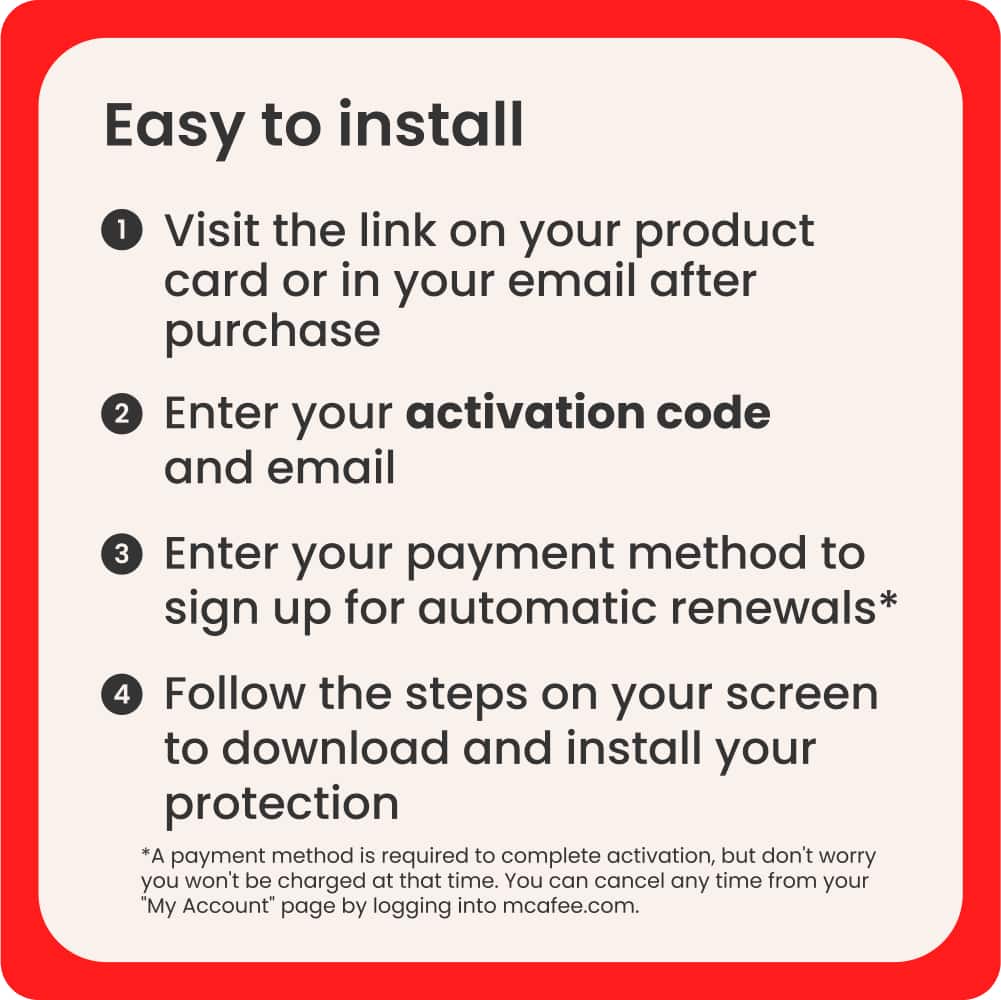
|Posted .This reviewer received promo considerations or sweepstakes entry for writing a review.In reviewing the McAfee+ Advanced Individual, I'd have to say I'm pleasantly surprised. I've previously owned and used McAfee antivirus, it used to be preinstalled on every new system. As an IT professional, it was just another piece of bloatware to slow down my system and to be removed. So I didn't have high expectations here. Though, once installed on my EliteBook, I must say, it has very little performance interference. The main point I wanted to test, was the the identity monitoring and protection, as usually, Defender is sufficient for me for simple antivirus/malware protection. The process to install was simple enough, I was provided a code via email to input on McAfee's site, which then tied the subscription to my account I setup with them. From there, it's as easy as clicking "download". Once installed, one of the first things to do is to setup your identity information you want monitored, such as emails, name, DOB, SSN(I skipped), phone, and addresses. They then search that on people sites and work to automatically remove the information. They also assist in helping to manually remove info they automatically can't. Pair this with identity theft protection, which is becoming much more prevalent, and it's worth it's cost just for those 2 features alone! The overall security software is straightforward enough, and can be set to run on a schedule for quick/full/custom scans, depending your needs. Depending your usage habits, the daily quick scan and weekly full should be sufficient for most average users. I have yet to put the software to the test with blocking a virus or bogus install of software. Though, I feel much more confident with the browser extension enabled to help secure my internet browsing. I also enjoy that this can be used on mobile, as I am an Android user, hence am more susceptible to infection/security risks. Whereas, Apple users have a much lower risk, though that gap is fast closing. I also am happy this includes a basic VPN service. It's not something I would use to try and spoof locations and watch videos, but if you want to have a secure session while banking or doing something requiring provacy, it will be sufficient to use it for that. Only time will tell if I renew after the year, but it is a solid product thus far, with many alluring features to utilize.
I would recommend this to a friend - Pros mentioned:Installation
Online McAfee purchase.
Posted .This reviewer received promo considerations or sweepstakes entry for writing a review.Excellent product. Purchased online and Installing was easy.
I would recommend this to a friend - Cons mentioned:Scan speed
McAfee+ Advanced Identity, Privacy and Device Prot
|Posted .This reviewer received promo considerations or sweepstakes entry for writing a review.First you register, then download, and set up. After that it runs in the background. This is the first anti-virus I have used that does not constantly pop up with adds to purchase add-ons. The first deep scan went rather slowly. Each feature has its own area and can be configured as needed for your requirements. From the main screen you can check your protection score. This gives guidance to download on additional devices, along with other features not yet turned on. You can also monitor your personal data on the web. With assistance to remove it. There is also a tab for monitoring the Antivirus program and selecting to run different scans. You can either run a quick scan or a Full system scan. The next tab is for Secure VPN. There is an option to have it turn on when you are in unsafe conditions. The ID protection tab is next. Here you enter your information, and you will be notified when it is found. You will get a notification and explanation of what was found, and where the leak was. The attention light on this tab was always on, and I could never tell why. The last tab is for Tracker Removal. Here you set the schedule and setting you want. The bottom line. The McAfee Advanced Individual package is exactly what you need. It is updated and full of advanced features. You will not be bothered by pesty pop-ups asking you to purchase additional items. When you click on do not show again, it actually will not show that pop-up again. I would recommend the McAfee+ package to family and friends.
I would recommend this to a friend