Customer Ratings & Reviews
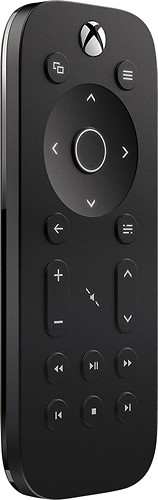
- Model:
- 6DV-00001
- |
- SKU:
- 5257704
Customer reviews
Rating 4.6 out of 5 stars with 1642 reviews
(1,642 customer reviews)to a friend
Customers are saying
Customers enjoy the Xbox One Media Remote's ease of use, backlight, and comfortable size and design. Many appreciate its good battery life and the pleasant feel and texture. However, some users point out limitations in range and the need for a direct line of sight to the console. The infrared technology and occasional response time delays were also noted as potential drawbacks.
This summary was generated by AI based on customer reviews.
- Pros mentioned:Ease of useCons mentioned:Line of sight
Rated 3 out of 5 stars
Xbox one Remote
||Posted .This reviewer received promo considerations or sweepstakes entry for writing a review.Remote has a good feel to it and the buttons make accessing things on Xbox live simple; only down side is that it isn't like a game controller in the sense that it needs line of sight with the system to work. We literally have to move the coffee table to use it haha. A mild irritation but it's still a pretty good remote.
I would recommend this to a friend - Pros mentioned:Backlight
Rated 5 out of 5 stars
Simple and Clean
||Posted .This reviewer received promo considerations or sweepstakes entry for writing a review.I really like this remote. Sometimes I use this remote to control my Cable Box through the Xbox One. The fade in and out backlight is really cool. It feels wonderful in the hand, and the buttons have a really nice feedback to them. The backlight is also motion sensitive. Very cool feature. I strongly recommend this product for controlling the Xbox.
I would recommend this to a friend - Pros mentioned:Ease of use
Rated 3 out of 5 stars
Remote for XBOX One
||Posted .This reviewer received promo considerations or sweepstakes entry for writing a review.This remote is a little easier to use than using the controller. It's constantly on, and will light up when it is moved - which is helpful. You don't have to go through the motions of powering on a controller and waiting for it to sync up. It's great little device - just wish it shipped with the console, or was a bit cheaper.
I would recommend this to a friend - Pros mentioned:Backlight, Battery life
Rated 5 out of 5 stars
Great control
||Posted .This reviewer received promo considerations or sweepstakes entry for writing a review.The texture is soft yet rubbery, it’s self balance and a lot of console functionality. What I like the most is the backlight and logo lighting. Battery last a very long time before replacing.
I would recommend this to a friend - Pros mentioned:Design, Ease of use
Rated 5 out of 5 stars
Perfect assesory
||Posted .This reviewer received promo considerations or sweepstakes entry for writing a review.It is sleek nice touch works perfectly and matches the xbox
I would recommend this to a friend - Pros mentioned:Ease of use
Rated 5 out of 5 stars
Great Remote
||Posted .This reviewer received promo considerations or sweepstakes entry for writing a review.Light weight & very easy to use. This is a great remote.
I would recommend this to a friend - Pros mentioned:Ease of use, Size
Rated 5 out of 5 stars
Awesome
||Posted .This reviewer received promo considerations or sweepstakes entry for writing a review.Easy to use and easy to set up. Very light and compact.
I would recommend this to a friend - Pros mentioned:Ease of use
Rated 4 out of 5 stars
It works, but I prefer the Harmony
||Posted .This reviewer received promo considerations or sweepstakes entry for writing a review.This remote works fine with the xbox - the keys light up when it is moved so if the room is dark you can navigate the remote - I personally found it to be a little bit small. Keep in mind that xbox glass allows your phone to be a controller, and that most universal remotes like the harmony also work. Personally if you can afford the few extra dollars, get the harmony remote.
I would recommend this to a friend - Pros mentioned:Size
Rated 5 out of 5 stars
Fantastic little remote
||Posted .This reviewer received promo considerations or sweepstakes entry for writing a review.I love this little remote. It's small, but not too small. It has a rubber coating that feels nice, the buttons light up when your hands get close to the buttons, and the Xbox is very responsive to button inputs. A must-have if you use your Xbox for media!
I would recommend this to a friend - Pros mentioned:Backlight
Rated 4 out of 5 stars
Great remote for the Xbox One
||Posted .This reviewer received promo considerations or sweepstakes entry for writing a review.Needed a remote to play DVD's on my Xbox One and this one works great and has all of the buttons to operate the player for DVD's. There is a nice feature that lights up all of the function keys whenever the remote is picked up so that you can easily identify the buttons. The remote also has a nice soft rubber finish that feels great and won't slip out of your hands.
I would recommend this to a friend - Pros mentioned:Backlight
Rated 5 out of 5 stars
Best Accessory!
||Posted .This reviewer received promo considerations or sweepstakes entry for writing a review.Pro: Small, lightweight, automatic back light, good matte texture, Cons: No ABYX button, makes quick logins (6 key input) with remote alone impossible, you must use the controller.
I would recommend this to a friend Rated 5 out of 5 stars
Great Remote
||Posted .This reviewer received promo considerations or sweepstakes entry for writing a review.This emote is exactly what our family needed. We have the Xbox one hooked up to my 4K TV, and we were really excited that it was going to replace the blue ray player, however we still had the remote problem. I have remotes for Verizon TV, a 5.1 wireless surround sound system, and the 4K tv, and now I was to control the Xbox with another controller. Too much for us. This remote allowed me to control all 4 devices with one item. I programmed the Xbox so that if it turned on/off, everything turned on/off. The remote controls the sound bar and because of the Xbox live tv function, also my Verizon receiver. Flaws would be that you obviously lose you original remote's functions. We don't use the 4K as a smart TV anymore so can't easily access Netflix with one button. Likewise, the Xbox remote will not control DVR or On Demand functions from the Verizon box. It only acts as a basic remote, but if you set it up correctly, you can enjoy it like we do. I do wish it had a keyboard for easier searching, but for the price of it I'm not going to be that picky.
I would recommend this to a friend- Pros mentioned:Ease of use
Rated 5 out of 5 stars
A must have accessory for Xbox One
||Posted .This reviewer received promo considerations or sweepstakes entry for writing a review.I use my Xbox One for watching blu ray and streaming, this remote has made it significantly easier. No more turning on the gamepad and waiting for it to sync, figuring out what button presses to get into the menu to pause or skip. I wish this worked with the cd player app however.
I would recommend this to a friend - Pros mentioned:Ease of use
Rated 4 out of 5 stars
Works Well
||Posted .This reviewer received promo considerations or sweepstakes entry for writing a review.The remote is small and has great utility. The remote buttons light up when ever you pick up or handle the remote making it user friendly while operating the remote in low light. There was no need to "program" the remote to operate the cable box or A/V. I imagine this is so as my Xbox One is setup through my cable box and interconnected with the A/V.
I would recommend this to a friend - Pros mentioned:Backlight
Rated 5 out of 5 stars
Better than anticipated
||Posted .This reviewer received promo considerations or sweepstakes entry for writing a review.Remote setup was simple. It controls all devices I have hooked into XBone. The motion activated backlight is an awesome feature, as well. When issuing commands make sure you aim the remote directly at the console. Otherwise, it's great!
I would recommend this to a friend - Pros mentioned:Ease of use
Rated 5 out of 5 stars
What's not to love?
||Posted .This reviewer received promo considerations or sweepstakes entry for writing a review.I bought this for my girlfriend and she loves it. If you don't want to use a controller or you don't have a kinect this is your best bet for easy console use with apps like Netflix, Hulu, etc. When you move the remote, the buttons illuminate and that's a really great feature when watching at night.
I would recommend this to a friend - Pros mentioned:Backlight, Design
Rated 4 out of 5 stars
Decent, But Not Everyone Needs This
||Posted .This reviewer received promo considerations or sweepstakes entry for writing a review.The look and feel of this remote is quite good. Overall, it works quite well with changing TV channels, etc. In my opinion, I am not completely convinced this is really all that necessary, as I cannot think of many benefits it adds over simply using your Xbox One controller. One advantage of this might be the fact that the Xbox One controller goes into sleep mode requiring one to press the Xbox logo button whereas this seems to alway be ready-to-use. Of course, if you are switching between gaming and entertainment media, you must have your Xbox One controller nearby anyway. The backlights for the device look appealing. One disadvantage is that this uses IR technology similar to your regular TV remote, so all the considerations with line-of-sight for use still apply.
I would recommend this to a friend - Pros mentioned:Ease of use
Rated 4 out of 5 stars
Good Remote for XBox Media
||Posted .This reviewer received promo considerations or sweepstakes entry for writing a review.It is an OK Remote. It does not have the 4 controllers buttons on it like the last gen XBox 360 Media Remote did. It allows you to navigate the XBox One menu system as well as when you play a DVD or media. I would have given it higher marks if they included all 4 controller buttons. It is much smaller compared to the last gen remote though.
I would recommend this to a friend - Pros mentioned:Size
Rated 5 out of 5 stars
Must have for streaming
||Posted .This reviewer received promo considerations or sweepstakes entry for writing a review.Way better model then the xbox 360 version. Smaller, fits better in hand and when using to stream and watch TV this is so much better. Backlighting at all times and buttons are close and remote is not too big fits right in hand. Wel worth the money paid to make the streaming that much more enjoyable
I would recommend this to a friend - Pros mentioned:Ease of use
Rated 5 out of 5 stars
Great remote for the X1
||Posted .This reviewer received promo considerations or sweepstakes entry for writing a review.I picked up this remote to use with my X1 when watching Blu-ray movies and using Netflix and Amazon Prime. I used to use my iPhone with the Smartglass app, however they changed some of the features there and there is no longer an onscreen button to pause/play or rewind.fast forward. The remote it very easy and simple to use, no pairing is necessary and it can be used without a Kinect. If you have your TV or Receiver linked together with your X1 (along with a kinect) you can also use the volume buttons on the remote. I like the added bonus that the remote lights up when it senses movement. I highly recommend this remote for the X1!
I would recommend this to a friend