Customer Ratings & Reviews







- Model:
- GA00823-US
- SKU:
- 10535382
Rating by feature
- Setup
Rating 4.6 out of 5 stars
- Range
Rating 4.5 out of 5 stars
- Signal Strength
Rating 4.5 out of 5 stars
No Go on Android Instagram App
||Posted .This reviewer received promo considerations or sweepstakes entry for writing a review.For some reason the Android Instagram App would not work with this router. The iPad Instagram App works just find on the same 5 GHz channel. Strangest thing. It did solve the issue of getting a wifi signal to the dead spots in the house, but if not everything works no point in great physical coverage.
No, I would not recommend this to a friendBrand response from Nest Support
Posted .Hi BP77, thanks for writing a review. We're sorry to hear you're having trouble making your Android Instagram app work with the Nest Wifi. This is not the type of experience we want you to have, and we're here to help. We suggest contacting our support team so we can assist you and check on your device. We might need to perform some troubleshooting steps that may help resolve your concern. Reach out to us here anytime: https://support.google.com/googlenest/gethelp

A DISASTER!
||Posted .This reviewer received promo considerations or sweepstakes entry for writing a review.This product constantly goes offline and has to be reset. Could I return it?
No, I would not recommend this to a friendNo Ethernet ports!!!!
||Posted . Owned for 11 months when reviewed.This reviewer received promo considerations or sweepstakes entry for writing a review.No Ethernet ports! Very disappointed! Took them back.
No, I would not recommend this to a friendBrand response from Nest Support
Posted .Hi BallerStatus, thanks for taking the time to share your feedback. We’re sorry to hear that you had to return your Nest Wifi. If you decide to give Nest Wifi another try in the future, our support team is always here to help. Feel free to contact us here: https://support.google.com/wifi/gethelp
Disaster
||Posted . Owned for 1 month when reviewed.This reviewer received promo considerations or sweepstakes entry for writing a review.If I could give it a zero, I would . Stopped working after a month and now Best Buy won’t take it back. $400 in the garbage. I’ve been on the phone with Google for over 4 hours….they tried factory resets. Nothing. I actually resorted to plugging in my old router and now I have service…so it’s 100% mesh system.
No, I would not recommend this to a friendBrand response from Nest Support
Posted .Hi there, thanks for posting your review. We apologize for the frustrating experience you had with your Nest Wifi and our support team. If you're willing, we would like to take another look at your case and help you in finding a better resolution for your Nest Wifi. Please provide your Case ID when you reach out to us again so we can assist better. You can contact us on our Google Help page here: https://support.google.com/googlenest/gethelp
Don't waste your money.
||Posted . Owned for 3 weeks when reviewed.This reviewer received promo considerations or sweepstakes entry for writing a review.This might boost your signal. But, will not carry your speeds you pay for. I was able to connect to my router from my living room however, speeds were terribly slow. So, I used the Nest and it didn't help at all. In fact lost speeds. Says it can carry 1gigabit speeds? But, doesn't come close. Save your money and buy an actual wifi access point.
No, I would not recommend this to a friendBrand response from Nest Support
Posted .Hi Elijah, we appreciate your feedback on Nest Wifi. We're sorry to hear of your disappointment with its Wi-Fi speed.
For the best experience with Nest Wifi, we recommend checking if you´re using a modem/router combo. If you are, we recommend setting it up in bridge mode and disabling its Wi-Fi functionality. This will avoid any network issues caused by both your combo and Nest Wifi Router, broadcasting the same SSID and password. You may then connect your Nest Wifi Router to your modem using an Ethernet cable, and then connect your Nest Wifi Points to your Nest Wifi Router wirelessly.
You may also perform a factory data reset on your Nest Wifi Router and Points, by following the step by step guide here: https://support.google.com/wifi/answer/6246619
You can always contact our support team for further assistance with the issue, if you can reach out to us here: https://support.google.com/wifi/gethelp
No work if Apple devices used
||Posted . Owned for 3 weeks when reviewed.This reviewer received promo considerations or sweepstakes entry for writing a review.Had great hope...like Google Home stuff. But alas, not to be. I tried using it for three weeks, fighting dropping wifi unless very close to main unit. Read on Google search about known issues with people that have iOS devices in use. Does not work if Apple iOS devices used. So, I now own a Linksys Velop mesh wifi router...and it is working fine...so far.
No, I would not recommend this to a friendBrand response from Nest Support
Posted ."Hi JRnFL,
Thanks for taking the time to share your feedback. We´re really sorry for the poor experience you had with Nest Wifi.
If you´re using a modem/router combo, then the issue is most likely caused by a double NAT scenario that happens when both your combo and Nest Wifi Router are broadcasting their own private networks with the same SSID and password. Nest Wifi isn't really compatible with other routers. Nest Wifi can only work with another Nest Wifi or Google Wifi to create a Wi-Fi mesh network. However, if you´re willing to try, you may still use your existing combo router by setting it in Bridge Mode and disable its Wi-Fi functionality in order to set up Nest Wifi Router as your primary router, and create a mesh Wi-Fi system throughout your home. For more information on Bridge Mode, check out this help article on Google Wifi help page: https://support.google.com/wifi/answer/6240987
We also recommend an iPhone or iPad with iOS 12.0 or later to get the best experience using with Nest Wifi.
We'd love to keep having you as a valued customer and we´re hoping you give our products another opportunity to give you a more pleasant experience. You´re more than welcome to contact our support team for any help needed here: https://support.google.com/wifi/gethelp
Google Nest returned for refund
||Posted . Owned for 3 weeks when reviewed.This reviewer received promo considerations or sweepstakes entry for writing a review.Google Nest slowed AT&T internet to .1 from a 5 mps download speed. Google suggested a bridge between Nest and AT&T modem. Best Buy refunded my money for the cost of the Google Nest & protection plan. I lost the cost of the Geek install. $99.00 No using WOW internet with Eero for full house internet.
No, I would not recommend this to a friendunstable at best
||Posted . Owned for 5 months when reviewed.This reviewer received promo considerations or sweepstakes entry for writing a review.I didn't know until months after purchasing that these have an issue where they randomly go down and repowering them is iffy at best to get them back online. the longest they've been up is a month but typically they go down about twice a day which means it's terrible if you work remote
No, I would not recommend this to a friendBrand response from Nest Support
Posted .Hi ThatGuy, thanks for taking the time to share your feedback. We’re sorry to hear that you’re experiencing connectivity issues with your Nest Wifi.
For connectivity issues, we recommend trying out some tips below to help isolate the issue:
- As a general rule, points work best when they’re no more than two rooms away from each other. For example, if the far end of your house has weak Wi-Fi, don’t put a Wifi point in that exact spot. Instead, put it part way in that direction. Try to place it in an elevated position like on a shelf.
- Building materials and other objects located between your Nest Wifi Points and mobile devices may slow your connection. If possible, try to use your device within a clear line of sight to your primary and secondary Points.
- There could be signal interference due to traffic on your Wi-Fi network, on your neighbors' Wi-Fi networks, or from other sources like microwaves or baby monitors.
We value your feedback, and we want to help you as best as we can. For further assistance, please reach out to our support team through this link: https://support.google.com/wifi/gethelp
Only lasted 2 months at best
||Posted . Owned for 1 month when reviewed.This reviewer received promo considerations or sweepstakes entry for writing a review.For the money, this product really disappoints. I’m getting 80-100 mbps down and 10 up hardwired but only 3-5 down and 10 up when on wifi. Unfortunately it’s only 2 months old too. Doesn’t matter on placement either unfortunately. I’ve tried factory reset as well and still no improvement. I would steer clear of this product considering the cost and performance.
No, I would not recommend this to a friendBrand response from Nest Support
Posted .Hi Justin,
Thanks sharing your experience with the Nest Wifi. We’re sorry to hear you encountered such inconvenience and we'd love to help improve your experience.
We appreciate you for letting us know of the troubleshooting steps you’ve done in attempting to fix the slow connection issue, which was very helpful. To help you in the best way possible, we need a few more details on what's going on. Also, we'd like you to know Nest Wifi comes with a 1-year limited manufacturer warranty starting from the date of original purchase.
We're available to help you further if you can reach out to us by visiting: https://support.google.com/wifi/contactflow
Doesn't work
||Posted . Owned for 1 month when reviewed.This reviewer received promo considerations or sweepstakes entry for writing a review.Didn't help at all. Internet still slow it was a waste of my money
No, I would not recommend this to a friendBrand response from Nest Support
Posted .Hi 1234, thanks for sharing your feedback with us about the Nest Wifi. It’s unfortunate to learn that it didn’t help at all and that your internet is still slow.
It is important to check the placement of your Wi-Fi router and point, which are essential to have reliable Wi-Fi throughout your home. As a general rule, points work best when they’re no more than two rooms away from each other. For example, if the far end of your house has weak Wi-Fi, don’t put a Wifi point in that exact spot. Instead, put it part way in that direction. Try to place it in an elevated position like on a shelf.
You can also try the following steps to see if the Wi-Fi connectivity will improve:
- Move the connected device closer to your Wifi router or point.
- Repositioning the points to avoid obstructions like walls, doors, and aquariums can improve performance.
- Make sure all unused devices are off and not draining bandwidth with large downloads.
- Check for possible sources of interference such as microwave ovens, refrigerators or other equipment.
- Run a mesh test to confirm placement of your Wifi points.
We’d be happy to help and guide you with further troubleshooting if you can get in touch with us anytime here: https://support.google.com/googlenest/gethelp
Poor reliability snd poor Google warranty service
||Posted . Owned for 4 months when reviewed.This reviewer received promo considerations or sweepstakes entry for writing a review.Worked well for a few months but within the last week crashes frequently. This is very disruptive to work-from-home and streaming entertainment. What’s worse, Google is dragging their feet about honoring the warranty when this product is less than a 5 months in-service.
No, I would not recommend this to a friendBrand response from Nest Support
Posted .Hi Ethan, thanks for posting your review. We're sorry to hear that your experience with Nest Wifi has been frustrating. Your Nest Wifi, if brand new, comes with a limited warranty of one year from the date of purchase. If you're willing, we'd like to get more details about your Nest Wifi so we can help you with finding a better resolution. Please contact us on our Google Help page and let us assist you with your concern by visiting the link here: https://support.google.com/googlenest/gethelp
Buy net gear
||Posted . Owned for 1 year when reviewed.This reviewer received promo considerations or sweepstakes entry for writing a review.In the beginning it was ok at best. Extremely slow WiFi speeds and coverage was ok compared to a normal router. The Google app was easy to use and I like how I could connect every in my “smart home” to it but overall very disappointed and returned for netgear nighthawk mesh system and boy what a difference
No, I would not recommend this to a friendBrand response from Nest Support
Posted .Hi Fantastic, thanks for posting your feedback. We're sorry to hear of the disappointing Wi-Fi speeds you experienced with Google Wifi. This is definitely not the kind of experience we want our customers to have.
Wi-Fi speed may be affected by different factors, and we recommend trying out some tips below to help isolate the issue:
- As a general rule, points work best when they’re no more than two rooms away from each other. For example, if the far end of your house has weak Wi-Fi, don’t put a Wifi point in that exact spot. Instead, put it part way in that direction. Try to place it in an elevated position like on a shelf.
- Building materials and other objects located between your Nest Wifi Points and mobile devices may slow your connection. If possible, try to use your device within a clear line of sight to your primary and secondary Points.
- There could be signal interference due to traffic on your Wi-Fi network, on your neighbors' Wi-Fi networks, or from other sources like microwaves or baby monitors.
We’re still hopeful that you will give Nest Wifi another chance to improve your experience in the future. If you have any concern, you can always reach out to our support team using this link: https://support.google.com/wifi/gethelp
Does not work with Sonos
||Posted . Owned for 3 weeks when reviewed.This reviewer received promo considerations or sweepstakes entry for writing a review.Would not work with my Sonos system. Looks like there could be work around but too much trouble.
No, I would not recommend this to a friendBrand response from Nest Support
Posted .Hi Nest,
Thanks for sharing your feedback with us. We’re sorry that your device isn’t working with your Sonos system. We want to help improve your experience with Nest Wifi, but first we'd like to know more on what’s causing the issue so we can help you in the best way possible.
We're available to help you further so we can take a closer look at the issue if you can reach out to us by visiting: https://support.google.com/wifi/contactflow
President
||Posted . Owned for 1 month when reviewed.This reviewer received promo considerations or sweepstakes entry for writing a review.Doesn't provide strong signal. I would like to return if i could.
No, I would not recommend this to a friendBrand response from Nest Support
Posted .Hi Talwars, thanks for sharing your Nest Wifi experience with us. It isn’t easy to hear that it’s not providing a strong signal, and we’re sorry for any inconvenience it could have caused you.
It may be helpful to check the placement of your Wi-Fi router and/or points, which are essential to have reliable Wi-Fi throughout your home. As a general rule, points work best when they’re no more than two rooms away from each other. If the far end of your house has weak Wi-Fi, don’t put a Wifi point in that exact spot. Instead, put it part way in that direction. Try to place it in an elevated position like on a shelf.
We also recommend trying the following steps to see if the Wi-Fi performance and coverage will improve:
- Move the connected device closer to your Wifi router or point.
- Repositioning the points to avoid obstructions like walls, doors, and aquariums can boost performance.
- Make sure all unused devices are off and not draining bandwidth with large downloads.
- Check for possible sources of interference such as microwave ovens, refrigerators or other equipment.
- Run a mesh test to confirm placement of your Wifi points.
For further assistance, we’d be happy to work with you if you can reach out to us anytime here: https://support.google.com/googlenest/gethelp
Takes Way too long to setup.
||Posted . Owned for 1 week when reviewed.This reviewer received promo considerations or sweepstakes entry for writing a review.It’s not at all quick to set up. And for its cost, it’s not worth it. Only pro I guess, it looks nice.
No, I would not recommend this to a friendconnection is spoty and the distance is short.
||Posted . Owned for 1 month when reviewed.This reviewer received promo considerations or sweepstakes entry for writing a review.i have been managing networks for over 15 years and heard great things about these, but when i put them in my home i was extremely disappointed. i felt that the professional grade equipment i was using was over kill, but maybe not, looks like i will be going back to cisco.
No, I would not recommend this to a friend
It Is Good
|Posted .This reviewer received promo considerations or sweepstakes entry for writing a review.Was a breeze to install with the App. It wanted to connect with my Samsung Smart things but was not successful. I still manually added all my devices. Wireless streaming speeds are good. connectivity is good. Managing the network is good. I can control internet time on separate devices. Speech recognition is good, however, I would rarely use this function. There is a mic switch that you can turn off. So far, coverage is excellent. Very happy with this package. All my devices are playing nicely. I have approximately 12 devices connected with no issues.
I would recommend this to a friendA Great Mesh Network with extreme speeds
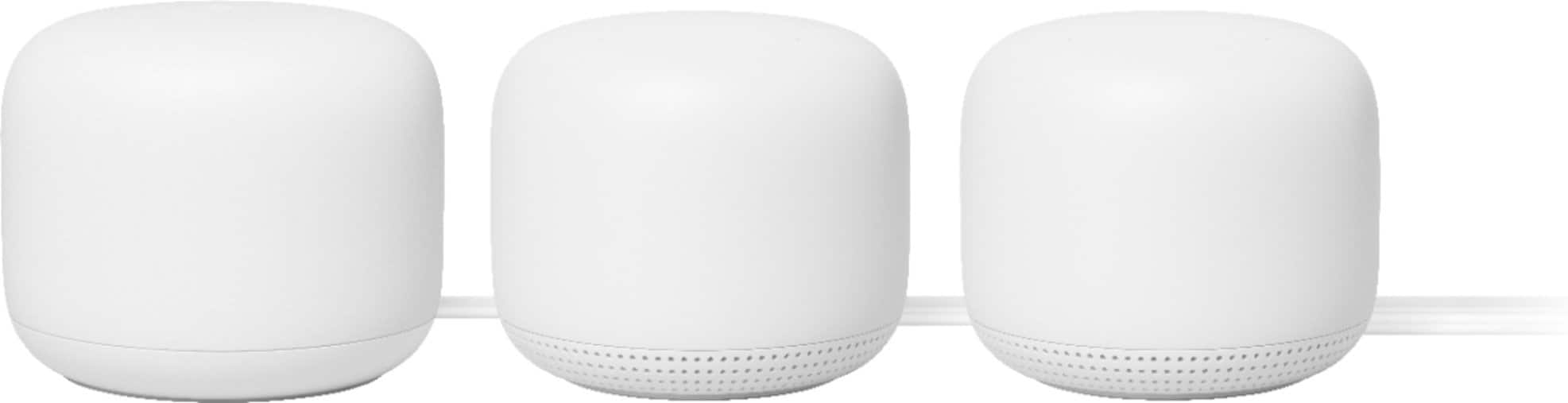
|Posted .This reviewer received promo considerations or sweepstakes entry for writing a review.I have had the Google Nest Wifi AC2200 Mesh Router System for a few days now and have really enjoyed the upgrades from the original Google Wifi AC1200 that I have had since they first came out. The biggest benefit I see in the upgrade is that it covers more square feet than the original. I have an old house (2700 sq. feet) with thick walls that are re-enforced with shiplap (basically wood siding inside) which is then covered with sheetrock, this makes for a pretty thick wall and cuts down on noise, but also cuts down on what gets thru the wall, but I am getting off subject. Anyway, with the original Google Wifi AC1200, I had 4 access points to cover my whole house and yard. I now have only 3. The Nest Wifi Router basically 2200 feet, the new Nest access point covers about the same as the old access points. As far as the specs go the Nest Wifi supports AC2200 with 4 x 4 antennas, in theory it would cover 2200mbps on 2.4ghz and 1700mbps at 5ghz, it has a 1.4ghz quad-core processor and 1GB of RAM. The Nest Wifi AC2200 Mesh Router system is easy to setup and is backwards compatible with the old system. Since the system is completely wireless, you only need to hook up the Router to your internet and a power supply to your access points to get it going. You can use the AC1200 access points with the new AC2200 Mesh Router. The Access points have Google assistant built in. Each access point has the same features as the google mini it can use voice commands, control smart home devices and play music. The music quality is as good as the google minis. There is a mute button on the back of each access point where you can turn off voice recognition. The indicator light is a small led to show the status of the device. I have a “Big Name Brand” service in my house, which is supposed to supply 150mbps download and 10mbps upload speeds. With their Wifi, I cannot even get a single in the back part of the house, in the areas that I get signal, I get around 60mbps download and 5mbps upload. With Google Nest Wifi AC2200 Mesh Router System, I am getting 226mbps download and 11mbps upload, this is across the board on the mesh network, and with running around 1o devices at one time. As you can see the Google Nest Wifi AC2200 Mesh Router System is a huge upgrade to any existing router.
I would recommend this to a friendMeh
||Posted . Owned for 6 months when reviewed.This reviewer received promo considerations or sweepstakes entry for writing a review.Have absolutely no idea why the product cannot connect with my Comcast modem.
No, I would not recommend this to a friendBrand response from Nest Support
Posted .Hi CAlammit,
Thank you for your feedback. We’re sorry to hear you're having difficulty setting up your Nest Wifi mesh system to your Comcast modem. We understand it can be frustrating and we want to help you right away!
We designed Nest Wifi to give you a quick and easy setup experience, but something may have gone wrong during the setup process. If you want to try setting it up again, you can follow the step-by-step guide along with a setup visual showing you how to set it up here: https://support.google.com/googlenest/answer/9548301
We can also help you set it up or figure out if there is an issue with it if you can reach out to us here: https://support.google.com/googlenest/contactflow
Didn't work for what we needed
||Posted . Owned for 3 weeks when reviewed.This reviewer received promo considerations or sweepstakes entry for writing a review.We thought this would speed up the internet but it only helps with connection not speed.
I would recommend this to a friend