Customer Ratings & Reviews


- Model:
- NBDVR322GW
- SKU:
- 6347000
Rating by feature
- Value
Rating 3.7 out of 5 stars
- Quality
Rating 3.9 out of 5 stars
- Ease of Use
Rating 3.9 out of 5 stars
Customers are saying
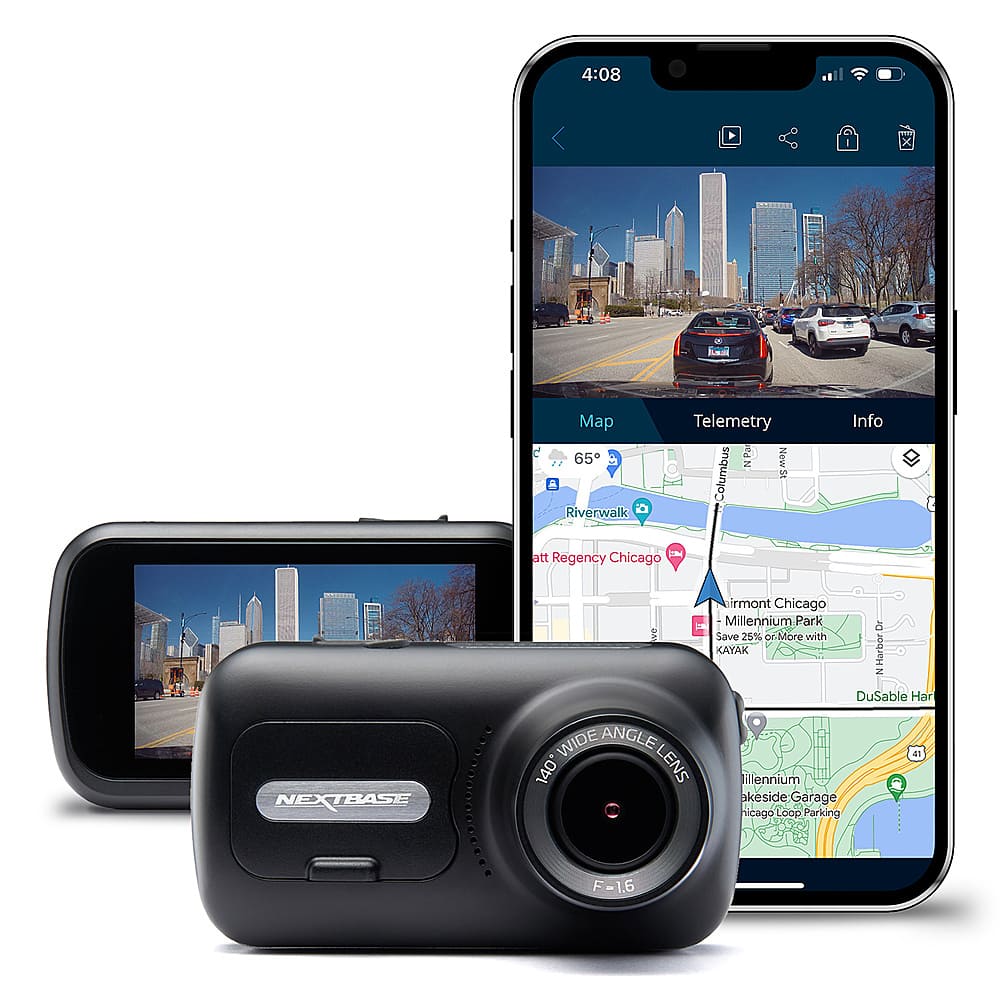
Customers enjoy the 322GW Dash Cam for its video quality, overall performance, and ease of use. The dash cam is also appreciated for its small size, secure mounting, and many features. However, some customers have expressed concerns about connectivity issues, battery life, and overheating. Additionally, a few customers have reported issues with the app performance.
This summary was generated by AI based on customer reviews.
It's decent
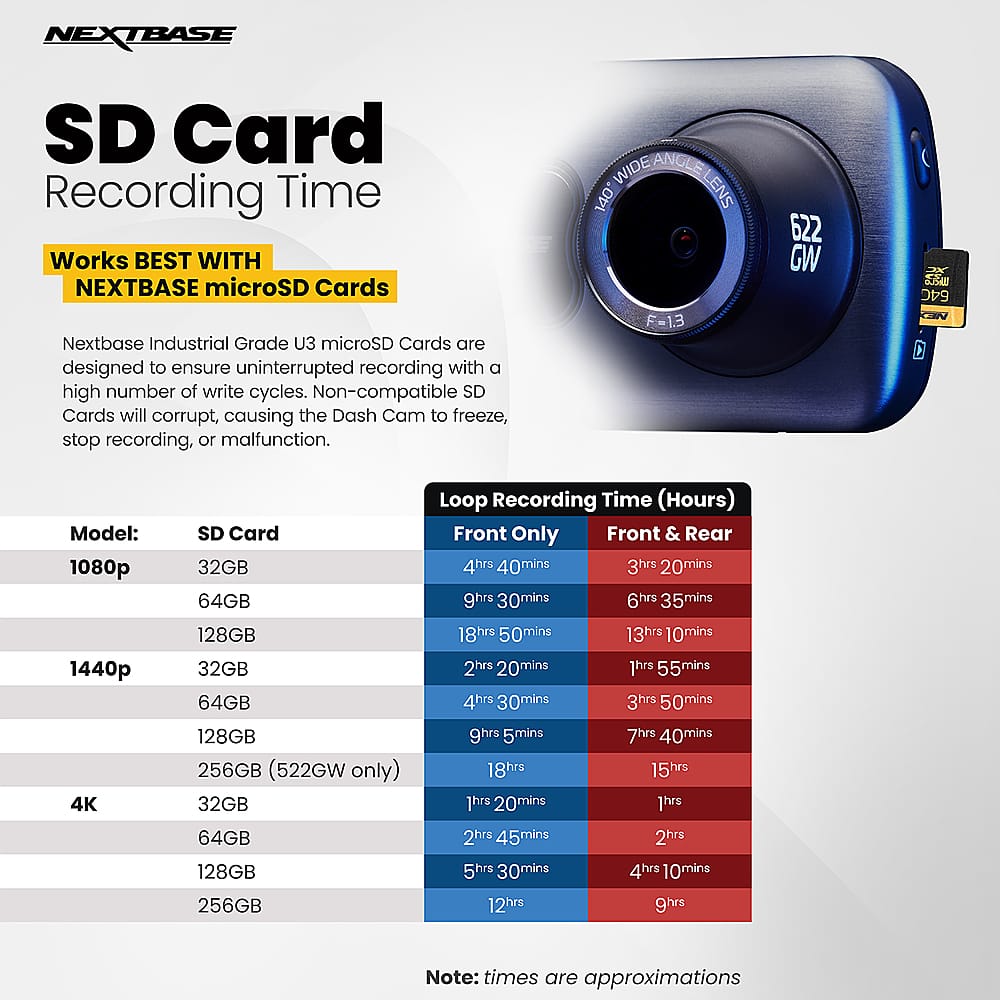
||Posted . Owned for 1 week when reviewed.This reviewer received promo considerations or sweepstakes entry for writing a review.I recently moved out of state and wanted to get a cheap little dash cam just in case anything happened. As previous reviews have said, the 322 isn't going to get you license plate numbers or fine details but you'll be able to get the basic idea of what was happening. The time stamps are in day/month/year sequence on the videos. When it records, it's in one-minute increments and it creates two final recordings- one labeled FL at about 20,500 KB and one labeled FH at about 150,000 KB (for each minute recorded). I bought a Samsung ProEndurance 64 GB SD card to go with it and it was when footage got to around 6 hours 15 minutes that it started to go back and delete the first recordings to make room for the new ones. I'm not sure if the screen flashed or notified of the SD card being full, because I was driving, but luckily nothing happened so it wasn't too much of a loss that the first five hours of the drive are gone. *The screenshot I took from a video is tinted blue because I positioned the camera right at the top of my windshield.
I would recommend this to a friend- Pros mentioned:Video quality
Just as good, half the price
||Posted . Owned for 1 week when reviewed.This reviewer received promo considerations or sweepstakes entry for writing a review.Was unhappy with the 622. 422 and 522 wasn't available so I got the 322. Depending on how it will be used, this provided good enough images
I would recommend this to a friend - Pros mentioned:Video quality
Dash camera
||Posted . Owned for 1 month when reviewed.This reviewer received promo considerations or sweepstakes entry for writing a review.I love the product and the Camara view is great but i we love too get the 4k for upgrading
I would recommend this to a friend - Pros mentioned:Video quality
Next base dash cam
||Posted . Owned for 9 months when reviewed.This reviewer received promo considerations or sweepstakes entry for writing a review.Great quality for how inexpensive it is. Already saved another driver by sending them a video of an accident they were involved in. Easy, affordable great product. Audio is great, video is great. (Photos are screenshots of a meteor falling to earth that I got on my dash cam)
I would recommend this to a friend - Pros mentioned:Ease of use, Mounting, Overall performance

Another Home Run From Nextbase…
|Posted .This reviewer received promo considerations or sweepstakes entry for writing a review.I am already using an earlier model Nextbase dash camera, so I was very excited to give this new model a try in another one of my vehicles. I am happy to report that Nextbase has once again, Nextbase has rolled out a top notch product. If you are wanting a high performance 1080P dash camera, look no further than the Nextbase 322GW. My personal preference is to use a 1080P camera over a 4K one because of the reduced file size of 1080P. While 4K provides sharper videos, the higher resolution comes at the expense of much larger file sizes. 108P provides more than adequate resolution to capture detailed video recordings that can clearly make out numbers and letters of a license plate when zoomed. At some point compression technology and SD card improvements will make 4K the current 1080P, but for right now I prefer to use 1080P. Regarding video quality, the video recordings it captures are outstanding. The 1080P videos are very detailed, clear, and sharp.The 140 degree wide angle lens records with a somewhat fish bowl effect of course , but very effectively captures most everything in front of and slightly to the side of the front of the vehicle. The dash camera is straightforward to set up and operate. Simply connect it to the 12V car charger and the camera will do the rest. Just make sure that you have it angled optimally to capture the biggest sight picture. The camera has such a small footprint, that I mostly forget that it is even there.. Included are most of the accessories needed to use and mount the dash camera, except for a memory card. A high speed U3 memory card is required. I am using a 64GB card that holds about 8 hours of recording before earring over older footage. It is compatible with 128GB memory cards, which can hold 16 hours of footage. The camera records on a loop and when the memory card gets full, it automatically writes over older footage. The camera can be mounted to the windshield using either a suction cup or an adhesive attachment mount. Both mounts attach magnetically to the camera and make for an easy and strong attachment method. I prefer to use the suction cup mount because it gives me the flexibility to move the camera very easily from vehicle to vehicle. I like this flexibility since I often drive rentals. The suction mount creates a suitably strong connection, but I recommend removing and reattaching it at least once a month since the suction vacuum will lose force over time and eventually fail. Instead of the adhesive strip provided, I would use heavy duty double sided velcro, so it would be easier to remove the camera from the windshield and mount in other vehicles. The settings menu can be used to configure many of the camera's features such as video clip length, video resolution, time/date stamp on or off, GPS coordinates stamp on or off, speed stamp on or off, and audio on or off. I personally keep the audio turned off most of the time for my privacy, and the privacy of my passengers who don't appreciate having their conversations recorded. For myself most of the benefit of a dash camera is derived from recording what is going on on the road around my vehicle. This dash camera is compatible with other Nextbase modules that can expand the capabilities of this already capable camera. I am using it with an optional Rear Window Camera module that snaps right into the camera and can be controlled by this dash cam and share the same memory card. The camera can be used with or without the App and is Bluetooth and Wi-Fi capable. I tested the App and it functions well, but you don’t have to use the App unless you want to use the camera wirelessly. The App somewhat reminds me of the Ring App in form and function. I don’t need to access the camera wirelessly, so I won’t be using the App and when I need to copy the footage I remove the memory card and transfer the files that way so I can have the highest resolution. The wireless connections only allow lower resolution transfers in the App. This camera creates files in the universal MP4 format, which makes it simple to transfer files from the card to a computer. Whatever your reason for wanting a dash camera, I can highly recommend the Nextbase - 322GW Dash Cam. It has greatly impressed me with it’s high quality video recordings and reliable operation.
I would recommend this to a friend - Cons mentioned:Connectivity, Heat dissipation
Don’t worth the money
||Posted . Owned for 1 week when reviewed.This reviewer received promo considerations or sweepstakes entry for writing a review.Dont buy it not worth the money first time charge for 4 hours the device itself got extremely hot and it turn off by itself always crap in middle of using it very hard to connect to the app
No, I would not recommend this to a friendBrand response from Nextbase
Posted .Hello Lynn,
All of our cameras are tested between -20'C (-4F) to +45'C (113'F), although if the car temperature exceeds this you could potentially experience issues. We'd recommend removing the Dash Cam and placing in the glove compartment when the Dash Cam is not in use to prevent it being unnecessarily heated on the windscreen. When storing the Dash Cam for an extended time period, store within the following temperature range: from 0° to 25°C (from 32° to 77°F).
Under the mount is a heat sync, so this is the part of the camera that will get hottest. It's nothing to worry about, they're designed to cope with the heat they produce.
However excess heat can be caused by a failed SD card.
SD cards only have limited lifespans. In our manuals we recommend formatting every 2-3 weeks to prolong the life of the card. Without this regular formatting, or if the card is non-compatible or damaged, the card could corrupt which would cause a failure of data writing.
Symptoms of SD card failure are: an audible 'alarm' tone, non-functional buttons, freezing, corrupted files on playback, image missing from files, lack of file recording etc.
Please ensure that you are using a compatible SD card. We always recommend using a Nextbase SD card in a Nextbase camera.
You can also check that the camera's Screen Saver is turned off. The Screen Saver will turn the camera's screen off during use.
1) Turn the Dash Cam on
2) Stop it recording (by pressing the red circle)
3) Go into Settings (the button in the top left)
4) Go into Setup settings
5) Scroll across to ‘Screen Saver’
6) Disable the Screen Saver here
If you need any further help, please contact our Support Team at [email protected] or +1 800 2805 178.
- Pros mentioned:Mounting, Overall performanceCons mentioned:Connectivity
A Compact, Convenient, Witness . . . needs update!
|Posted .This reviewer received promo considerations or sweepstakes entry for writing a review.Nextbase - 322GW Dash Cam. This Nextbase camera has so many desirable features and great basic performance, but it falls short in the setup and also in movie retrieval for SOME end-users. Issues involving setup rarely trouble me too much, ‘cause they are often one-time affairs, with little future consequence. But, here, the Wi-Fi linkage problem I ran into becomes an obstacle for some users to implement other features. I’d predict a future update will solve this . . . but I own it now. SETUP: The instructions could be more helpful. I immediately went looking for the online manual. The startup guide in the box assumes the Nextbase phone App will work for you. If it does, the process is probably fun and easy. Not for me. The first requirement is to update software. This easy phone-based method relies on a temporary Wi-Fi connection between the Nextbase Connect App on my iPhone XR and the camera. The App on the phone manages the download (worked fine) and transfers it to the camera (no dice). My XR won’t make that connection, now or later. It probably works for many other phones, but . . . ALTERNATE SETUP: Make sure you buy a MicroSD card at the same time you buy the camera. Download the more comprehensive Instruction manual. It’s very well done, accurate. loaded with illustrations and useful narrative. A manual firmware update process is described on Pg 39 of the USER MANUAL, and requires you to download the firmware at this same Nextbase online site. The installation was very straightforward, but did require that I format the microSd card on the camera, and have a MicroSD card reader for my computer (Mac). Once downloaded, it was easy to transfer the downloaded BIN files to the card, insert into camera, and allow the update process to proceed. I wasted a few hours trying to figure out why the “easy” process wasn’t working, but this manual download and install only took minutes. After this hurdle, the remaining setup is intuitive and easy. It can be accomplished using the App or directly on the screen. The Camera has a battery for limited use, but it means entering settings on the screen can be done from an armchair. Those basic settings include speed units, sound On/Off, screen dimming, Auto Power, Format SD card. A Video setting menu sets resolution (1080p default), exposure level, video (clip) length (1,2,3 minutes), Time Stamp, Speed stamp, GPS stamp. model stamp, dual (H/L) quality, Time Lapse, your number plate (default off), G sensor (trigger for file protection), Alerts, Recording History, Parking mode. The Nextbase Dashcam also controls accessories, and can record video from a rear camera. Features such as Emergency SOS and Autosync require that same phone link that still vexes me as I write this review. OPERATION and PERFORMANCE: It’s here that you will forget all your setup issues. The camera and its mount are as small as they come, with the mount attaching to the windshield using an effective suction plate or adhesive plate. The camera itself uses a magnet design so removing/attaching the camera to its permanent mount is easy. Video recording is the default mode. You’ll capture everything in a 140 degree wide view out in front of your vehicle. You can review, edit, and save clips directly on the camera screen. or using the App (if you’re able to make that connection), or, my favorite, the spectacular My NEXTBASE PLAYER APP for my computer. See my picture along with this review. It tells the story with far less words. To summarize, everything you enabled in your camera settings is now on the screen underneath the very detailed video image. The speed and other travel conditions are illustrated on a speedometer, a GPS readout, a compass, and a map! It’s all here, waiting for you to select, or trim, or edit, or annotate, add titles, or zoom or save to a shareable file. It’s all pretty impressive. SUMMARY: This moderately priced Nextbase 322GW is a richly features dash cam that will meet the needs of most end users. It has a few neat, phone based features that are out of my reach right now because of a frustrating connectivity issue between my phone and the camera. But, I’m setup, so setup issues are irrelevant now, until the next firmware update, which I know how to accomplish manually. Using the phone App to view videos or edit them is something I would never do. I’m laptop based, and much prefer capturing videos directly from the camera (using provided USB cable) or ejecting the microSD card from the camera and using my card reader. So, what are unfortunate bugs for some phone owners, aren’t significant to me. I can recommend this Dash Cam with some important caveats for users whose needs are different from mine.
I would recommend this to a friend - Pros mentioned:Video quality
Nice Dash Cam for Personal Protection
|Posted .This reviewer received promo considerations or sweepstakes entry for writing a review.The Nextbase 322GW is a nice, full-featured Dash Cam that one can use for protection from Driving accidents, parking accidents, insurance fraud, or even documenting a trip across that famous bridge! This review will be done in 4 parts – features, installation, usage impressions, and Pros/Cons. In addition to this written review you can watch my unboxing video and the video review of this Dash Cam: Unboxing Video: https://youtu.be/IymOXAE3jNk Video Review: https://youtu.be/OMb2WhH6vu0 Features: The NextBase 322GW Dash Cam is nice full-featured Dash Cam that includes many key features including full HD video recording (1080p at 30 fps), 2.5-inch touch screen, 140-degree viewing angle, click and go mounts, 10 Hz GPS module with speed and location, intelligent parking mode, AutoSync, Bluetooth 4.2, WI-FI connection, and SOS mode. In combination with these features, NextBase also has the MyNextBase Connect App and the MyNextBasePlayer for the PC or MAC to playback recordings. The camera also contains a G Sensor to measure forces exerted to know if an incident has occurred. This is used for enabling protect mode for video recordings, intelligent park mode, and with the SOS feature. Two features that are especially nice are the intelligent parking mode and SOS Mode. Intelligent parking mode will detect motion while your car is parked and activate the camera to record the incident. SOS mode will alert emergency services to your location in the event of an accident. This feature requires that you have the camera connected to your phone via the MYNextbase Connect app, an internet connection, and Bluetooth is active. In the event of an accident and in the event, you are unable to call for assistance it will contact emergency services with your last known location. This does require you to set it up to function in this manner. An optional feature of this camera is the ability to add the Nextbase Rear-View Camera module to allow you to add a second camera and select from Rear, Cabin, or Rear Window views. This is done by split screening the view that is recorded between the front Dash Cam and the rear camera add-on. One key item to note is that a class 10 microSD card with a minimum write speed of 48/MBPS up to 128 GB in size is required to use the camera and it is not included. Installation: Installation of the camera is very straight forward and the documentation of the camera provides guidance on proper camera placement to avoid it being a driver distraction and how to route the 4-meter power cable, so it is not interfering with the driver or passenger of the vehicle. NextBase even includes a tool to help tuck the cable into your vehicle’s trim. The Dash Cam comes with two mounting options – a suction cup mount and an adhesive mount. The first time the camera is turned on it will guide you through the set-up menus to configure the unit for language, location, time-zone, speed units, time and date. This is an easy and straight forward process. I recommend checking out all the setup options at this time including the recording and feature preferences that are not turned on by default – for example, intelligent parking mode is not on by default. You can also configure the previously mentioned SOS features. Usage Impressions: Once installed the camera is really there and usable and one does not need to do much from one trip to another trip to manage the device except to remember to plug it in (assuming you are like me and unplug it when the car is not in use). The Dash Cam turns on as soon as it detects power to it and records the action as the vehicle drives. The default setting is video’s in 1-minute increments (can be switched to 2 minutes or 3 minutes depending on your preferences), and it records both high-res and low-res files of the trip. Once the memory card is full, it will delete the older recordings to add new recordings. Should an incident occur, either the camera will record the files to a write-protected area of the card, or you manually force the file to the wite-protected area by pressing the red Protect button to prevent important files from being overwritten. Accessing the videos can be done in multiple ways – you can download them to your phone via Wi-Fi, you can connect the camera to your pc and load them to your computer, or you could remove the card. I found the connecting the camera (via an included USB cable) to my computer the be the fastest of these options but may not be suited for all situations. Wi-Fi Downloads – especially of the larger files is extremely slow. Viewing the videos is best done through the MyNextbase player (see the image accompanying this review for a quick look and the full video review for more details). This software allows one to view, edit, and share the camera footage on your computer. It shows the video, a map, and telemetry (speed, GPS location, G Sensor data) and a file list all in one screen. Once this is done you can use the free MyNextbase Cloud to share and safely store the video files for 30 days maximum. In testing the system, I found that the default G Sensor settings that support the intelligent parking mode were not as sensitive as I expected. I recommend moving from the medium setting to the high setting for improved sensing in this mode. I also found that the Wi-Fi connection takes a bit of time to establish. Overall, I like the Nextbase 322GW. It makes a great first impression with the included features and capabilities. One item that might be a nice addition would be a motion-sensing capability to the intelligent park mode and turn on the camera when motion is detected nearby. Another nice addition would be to include a 32 GB microSD card with the camera to add value to the purchase of this device. Pros: Features, ease of installation, MyNextBase Player Cons: no MicroSD card included, slow wi-fi transfer of videos, lacks motion-sensing features for parking mode
I would recommend this to a friend - Pros mentioned:Mounting, Size, Video quality
Provides great peace of mind…
|Posted .This reviewer received promo considerations or sweepstakes entry for writing a review.---HIGHLIGHTS--- Wide Angle 140° Lens, Sharp 1080P (MP4) Video, Easy to Mount, Compatible with Rear Camera Modules, Bluetooth, Wi-Fi, and GPS Capability ---SETUP--- Setup is very straightforward. The camera mount is magnetic and snaps into the camera. The mount has two attachments (suction cup or adhesive) that can be used. I used the suction cup mount because it gives me the flexibility to move the camera around the windshield easily, as well as between vehicles. The suction mount creates a very strong vacuum and feels very secure once mounted. The camera itself is small and lightweight and some people will not even notice that it is there. Once powered on use the settings to configure the camera to your liking. Nearly everything is customizable, but some of the more important settings are: audio on or off, video clip length, video resolution, time/date stamp on or off, GPS coordinates stamp on or off, and speed stamp on or off. There is also a model stamp setting which can also be turned on or off if you don’t want “Nextbase 322GW” stamped on your videos. Most of the accessories are included except for a microSD memory card. This camera is compatible with up to 128GB memory cards. ---DESIGN AND USE--- Once setup this dash cam is very easy to use. It powers on automatically when you start the car and begins to record. It records to the memory card until the card is full at which point it then overwrites the older video clips first. The overall video and audio quality are excellent. The 1080P recording are sharp and detailed and I had no difficulty making out the letters and numbers on a license plate. The wide-angle lens captures everything in front off and slightly too the side of the vehicle. There is a file protect button that allows you to save video clips from being overwritten. The shock sensor in the vehicle will automatically protect the video clip when it senses a shock. Protected files will not overwrite and stay on the memory card until you manually unprotect them. The camera can be configured using the touch screen or the App. There is also video editing software available. You don’t have to use the App or software unless you want to use the Bluetooth or Wi-Fi function. Since this camera records in the MP4 format, it is easy to transfer files using the memory card. A rear camera module can be connected to and powered by this dash cam. This is not a function that I have added yet, but I intend to, so I can have all around coverage of my vehicle. The touch screen is clear and very responsive. Taping the touchscreen while the camera is recording takes a quick still picture. There is a Parking mode that is powered by a Lithium-Ion rechargeable battery. If the camera shock sensor senses a disturbance it will start recording. ---BOTTOM LINE--- People’s motivation for getting a dash cam are varied, but no matter your reason I highly recommend this model. It is reliable and records sharp, high-quality video that will give you peace of mind and a record of your vehicular adventures.
I would recommend this to a friend - Pros mentioned:Ease of use, Overall performance, Video quality
My new favorite brand dash camera
|Posted .This reviewer received promo considerations or sweepstakes entry for writing a review.I’ve used quite a few different dash cams over the years. Had one of the first ones that came out years ago that you had to get out of Russia “lots of fakes going around at that time too”. Good camera “for the time” but times have really changed since then. We just purchased a Fiat 500e and our old dash camera “being that it was hardwired” went with our old vehicle when we sold it, so I needed a new one. I saw that Best Buy was starting to carry the Nextbase cameras so I got the 322GW to try out. Unboxing: The Nextbase came nicely packed, in a well-padded box, inside were the camera, a base with two different attachment options “adhesive one already attached to the base”, 12v power adapter with a long cord, a short USB cable, extra adhesive pad for the adhesive mount, and manual. A micro SD card is not included so you’ll have to pick one up “easily available” or if you are like us, already have a few lying around. On the camera itself there is a Mini USB port, micro sd card slot, a HDMI video out port, power button and a speaker on the bottom. Setup and Installing: The manual states to charge the unit first, so I used the short USB cable and hooked it into my multi-port charger and let it start charging. Once plugged into the charger the camera came on and I went through the setup options. It’s nice that it has a touch screen and you don’t have to fiddle around with using arrow keys trying to figure out which does what. The on screen menus are very easy to understand and there are quite a few options that you can customize to your own needs. I did set the video recording to 1080 60, instead of the default 30fps “doing this doubles the file size though” and set the clip time to 3min “adjustable from 1, 2 or 3” . I also set up the SOS system; it needs you to install the app on your phone for that to work. The App itself is pretty handy, it will let you do a “live view” while connected and you can download videos to your phone for sharing. It also displays the GPS information on it. As for mounting it, that’s pretty simple. You have two choices, either the suction cup mount or the adhesive mount, both use the same base. I’m not a big fan of the suction mount as the camera has to sit quite a bit lower below it, but the adhesive mount is perfect, it allows you to mount the camera up high and out of the way. I put it above and to the left of the rear view mirror. The mount itself has a USB port for the power, and the camera is held to the mount by a very strong magnet. This makes it very easy to remove the camera for safe keeping, could even get another mount and swap between vehicles very easily. The 12v adapter has a very long power cable and in the 500e there was more than plenty left after running it from the center console, under the dash, up the A pillar and over. Video quality: The video quality is excellent, we couldn’t be happier with it. You can easily make out vehicle license plates “as long as they are close enough, within a couple car lengths”. There’s a button below the screen that when pushed will lock the video so it can’t be written over and you can also take a snapshot with it too. The 1080 60fps has the best video image quality, although a 3min video clip is going to be 500mb+ it’s just worth it to set it on the highest setting for the best image quality you can get. Playing the video back on your PC, the video shows the Date, Time, Speed and GPS position, pretty much all the information you would need, and it’s displayed on the video itself without having to use a separate app to view the video. On the Nextbase website you can download the Nextbase Player, using it to play back videos gives you a lot of detailed information that’s embedded into the video. You can see the Speed, Direction of Travel, G-Force information, time and date. You can also take a snapshot and edit the video with the software. The player can also be used to update the firmware on your camera when new ones are released. Conclusion: I really like these Nextbase cameras, they are very compact and have a nice large very clear touch screen. The video quality is excellent, and more than enough if you ever happen to need it for evidence. I also like that it has a SOS system built in and hopefully we never have to test that out but it’s really nice to know it’s there if your vehicle doesn’t already have that built in. Granted these aren’t the cheapest dash cameras, but If you are looking for an excellent dash cam that doesn’t take up a lot of windshield space, has extremely good video quality with lots of features and looks like it’s built to last, then I’d definitely put the Nextbase cameras on the top of your list.
I would recommend this to a friend - Pros mentioned:MountingCons mentioned:Battery life
Does More Than I Expected
|Posted .This reviewer received promo considerations or sweepstakes entry for writing a review.The Nextbase 322GW is Nextbase’s current middle of the line Dash Cam. This is an up to 1080p at 60 fps dash cam that records to a Micro SD card. It has an app to communicate with your cell phone as well as a desktop application for your computer. What It Comes With Inside the box you will find the dash cam, a suction mount, a sticky mount, a USB A to USB B cord (less than 3 ft long), a 12 volt adapter, a power cable fitting tool, and a quick install set of instructions. Note that a Micro SD card was not listed. You will need to purchase one separately. This dash cam supports up to a 128GB card. Per the Nextbase website the 128GB SD card with hold approximately 16 hours of footage. Installation The installation is not difficult. It’s very similar to a GPS or radar detector. The sticky and suction cup mounts attach to the front of the camera with a magnetic attachment. The other side attaches to the windshield. Plug the 12 volt adapter into the accessory outlet at one end and the camera at the other. I opted to go ahead and have Geek Squad professionally mount the device in the vehicle. I purchased a part that allowed me to hardwire the dash cam and keep my accessory outlet free. If you have the Total Tech Support plan from Best Buy this installation cost is reduced. Features The camera has several settings that can be controlled. You can chose your video quality (720 vs 1080), units of speed, parking mode, device sounds, and screen brightness. There are also settings to set for language, time and date, and time zone. The app for your phone allows you to communicate through a local Wi-Fi and pull information from or control settings on the dash cam. If you are out and about but need to share video footage you can load it to your phone and/or share the footage through your wireless network. The app for your computer can be downloaded from the Nextbase website. This will install the “Nextbase Player” which is program that will help you read, edit, and save files from the dash cam. You can connect your cam via the USB wire that comes with it or by inserting the SD card to the computer without the camera. The Nextbase Player overlays all information about the recording onto one video playback screen. It will simultaneously show the date, time, speed, direction, longitudinal and latitudinal coordinates as well as the video. A Google Map is shown at the top right of the player with the recorded trip highlighted and a directional arrow. This feature went above and beyond a typical dash cam for me. Recordings As I mentioned previously you can choose between 720 and 1080p recordings. The upper models offer higher recording resolutions. They can be recorded in segments as chosen in the settings for 1, 2, or 3 minute segments. The file format is MP4. I recorded mine in 1 minute segments at 1080p 60 fps. The recording quality was okay. Depending on environmental factors such as weather, sun glare, cleanliness of your windshield (summertime bugs), etc you could get less than ideal footage. This isn’t the camera’s fault. I did notice that even when in ideal conditions, it may be hard to read a person’s license plate. The camera’s image quality suffers while in motion and you’d have to be fairly close to see a license plate clearly. Also, I get a lot of glare from my dash reflecting in the windshield. The 322GW has an option to purchase a polarizing filter separately. I may consider purchasing this at a later time. Here is a list of Pros and Cons for the dash cam Pros *Video Quality is good *Amount of metadata information on the video recording is substantial *Does audio and video *Has options for separately purchased add-ons such as a hardwire kit, polarizing lense, and rear camera *Support up to a 128GB Micro SD card (Approximately 16 hours of footage per Nextbase) *Can pull video straight to phone or share through app *Can plug in dash cam to computer or just use the SD without the camera *Nextbase Player program for computer is feature loaded and can help with editing, screenshotting, and saving footage *Suction mount works very well to secure camera to windshield *Parked Monitoring feature can help detect something hitting your vehicle and turn on the dash cam while car is off Cons *Instructions in box weren’t very clear *Initial setup was rough. Didn’t want to talk to my cell phone. Had to do firmware upgrade which wasn’t smooth. Couldn’t tell if the firmware update had finished. *Dash Cam does not hold a charge for very long. I can charge with the USB cord to maximum charge, but won’t stay powered for more than a few minutes. *Dash Cam turns on too often which is creating a shorter battery power storage. Turns on every time I leave the vehicle. Turns on with slightest bump even with gyro sensor set at medium *No SD Card. SD Cards are cheap. I think that this should have come with at least a smaller one. *Polarized filter not standard. This would help with glare issues. Overall, I was very impressed with the dash cam. I am very picky about video quality, so I might look at a higher model if I were to make another purchase. I think Nextbase has a lot of good things going here, and that the dash cam seems pretty reliable. The Nextbase Player is really impressive to me and is one of my favorite features.
I would recommend this to a friend - Pros mentioned:Ease of use, MountingCons mentioned:App performance
Great value with plenty of features
|Posted .This reviewer received promo considerations or sweepstakes entry for writing a review.The 322GW dash cam is a fantastic value for what it offers, I recommend this for anyone looking to spend $200 or less on a dash cam. With a wide 140 degree viewing angle and smooth 1080p 60FPS recording, the 322 has what you need to get the job done but with a nice set of features and room for expansion. The dash cam includes a “Click&Go Pro” GPS magnetic mount, 12/24V socket power cable, usb cable, suction mount, and a cable tool tp help hide the wire in your vehicle’s crevices. The camera was very easy to install. I opted for the suction mount, which is strong and easy to use, allowing you to easily move the cam between vehicles if desired. Unlike some suction mounts that seem to weaken overtime, this one has so far been rock solid. Nextbase offers their own 16 and 32GB SD cards but the cam supports up to 128GB. At 1080p 60fps, the dash cam generates videos at the rate of roughly 150MB/minute. Obviously a smaller SD card won’t hold weeks of footage, but fortunately Nextbase makes it easy to lock videos by pressing a button on the unit preventing them from being auto-deleted as it makes room for newer recordings. The cam will also automatically lock a video if the G sensor determines an accident has occurred. In the unfortunate event of an accident, the cam can even initiate an SOS alert to notify emergency services using your phone if it determines you are unresponsive, a potential life saver. The 322GW also features a parking mode that uses the G sensor to start recording if the vehicle is jostled while parked which is a nice bonus. Admittedly, the feature is limited with the front facing cam but the 322GW also features an expansion port where you can add a rear view camera to monitor the cabin and surroundings or just rear view if you prefer. Other notable features include a speedometer screen saver and a time lapse mode to name a few. Most importantly the recordings are clear and even feature useful telemetry data available from within the app. The only negative I found is the app (iOS) seems slow and buggy at times. When transferring videos the app will sometimes hang and the transfer rate never exceeded 3MB/sec, making transferring multiple videos tedious and time consuming. Hopefully this can be resolved with an update to the app as it detracts from what is otherwise a solid dash cam. Again, for the price the Nextbase 322GW is a great value and being able to download videos to your phone without having to pull the SD card makes this the best dash cam I have owned.
I would recommend this to a friend - Pros mentioned:Size
About average
||Posted . Owned for 11 months when reviewed.This reviewer received promo considerations or sweepstakes entry for writing a review.Didnt work as well as I’d hoped. Super compact which is nice but not the easiest to use.
I would recommend this to a friend - Pros mentioned:Size, Video qualityCons mentioned:Battery life
Great Video Quality, Easy to Use
|Posted .This reviewer received promo considerations or sweepstakes entry for writing a review.This is my first dash cam so I don't have anything to compare it to, but it seemed like a really well put together device. Pros: - It's very light and small. You can place it anywhere and it doesn't take up much space. - Multiple mounting options are available. You can use the suction mount or the adhesive. I'm worried about the adhesive lasting long term due to the Texas sun it would be exposed to. I mounted mine low on my dash and out of my field of view but I think I will move it up by my rearview mirror where my windshield has additional tinting. - The video quality is fantastic. You will need a Micro SD card (up to 128GB) in order to set up the device so make sure you have one on hand. - The touch screen is easy to navigate. Very simple menu system. Cons: - Battery life is not great. You will want to keep it connected to power at all times. But the cord is long enough no matter where you mount it so no worries there. But I would like the option to not have a cord running up to my windshield whenever I'm driving. This is a fairly inexpensive dashcam that could save you far more than it costs if it can prove you were not the cause of an accident or that you were not deserving of a ticket. I recommend that everyone protect themselves with a dashcam, and the Nextbase is a terrific option.
I would recommend this to a friend - Pros mentioned:Ease of use, Video quality
Very impressed with detail and features!
|Posted .This reviewer received promo considerations or sweepstakes entry for writing a review.Didn't know what to expect from the Nextbase 322GW dash cam. One week in and I am incredibly impressed with this little dashcam. This one is on the lower end of the newly released Nextbase dash cams, but it packs a host of powerful features that you want in a dash cam. Setting it up is a breeze, there's a quick start guide when you open up the box. The dash cam has a 2.5" lcd touchscreen on the back, which is perfect for setting up all the features of this unit. Their proprietary 'Click & Go Pro' magnetic mounting clip with integrated power is a great design. This allows you to quickly mount and dismount the camera WITHOUT having to adjust the angle of the camera every single time you do. That makes it easy to take it down and hook it up to your PC to view the videos. The MyNextbase Player is a simple download app for your PC that shows you so much information about your trip. The route you took is shown on Google Maps in real time with the video. The video is shown at a crisp 1080p at 60fps, with a lower res (smaller file option available as well). Along side that is your speed, your location, your elevation, and a G-meter as well. Makes compelling watching when reviewing footage from your trip. The camera records at one minute intervals, this makes it easy to find clips, and within the app you can select many clips and play them continually. The quality is great. You also have the ability to adjust the color balance of the videos as well, if they are too bright or too dark. As I mentioned, many, many features in this camera. You can also sync the camera up to your phone using the MyNextbase App. From here you can have a live view of the camera and save and edit videos from right within the app. One thing to note is that you are only able to connect one phone period to the camera. So with multiple drivers of one vehicle, you can't just pull up the pics and videos if you aren't the primary user of the camera. That was a little annoying. HOWEVER, you do NOT need to have the phone app open or available to use this camera in the car. It just offers additional features, and does not hinder the performance of the camera. I have a 64GB MicroSD card in the camera (128GB compatible - needs to be class 10 or above) and it captures several days worth of video before is automatically records over. And on the back face of the camera is a 'NextBase' button that lights up Red so that you can record and save/protect moments that happen, so that they aren't overwritten at all. The camera also has an Intelligent Parking Mode that automatically starts recording if there is motion detected. It also has a subscription based 'SOS' feature that can alert the emergency services to your location, and sends crucial medical information such as blood type to aid treatment, if you so choose to set it up. Overall I'm very happy with the NextBase 322GW dash cam and love the piece of mind it gives me with my wife and son driving around together.
I would recommend this to a friend - Pros mentioned:Video qualityCons mentioned:Heat dissipation
Great basic dash cam with fantastic user interface
|Posted .This reviewer received promo considerations or sweepstakes entry for writing a review.The Nextbase 322 GW is my first experience using a dash cam. For this review I've had the camera installed on my 2020 Ford F-150 for the past week. In the box is the dash cam with magnetic mount attaching the camera to base, 2 adhesive mounts (one is a spare) for base to windshield, a cable running tool, UBS transfer cable, and a start up guide. A microSD card is recommended, but not included. The packaging recommends to use a Nextbase microSD, which I have installed a 64 GB version of this card. For a basic installation, leaving the wires visible, it takes about two minutes. Plug the 12 / 24 V power adaptor into your vehicle power port, mount camera, and go. If you want to make it look nice by routing the cable, take the extra 5 minutes and use the cable guide tool to press the power cable into the headliner seam and down the door frame. Do NOT let this step deter you from purchasing. With a quick Google search you can find your specific make and model vehicle and learn how to route cables quickly by removing trim, and tucking into designated channels. After installation, you should let the dash cam charge for two hours. This ensures it will retain time stamps and other information acquired via the app. While charging, next step is to install the "MyNextbase" app. This was a quick install on my Android and I have had no issues with bugs, lag, or performance from the app. The connection process was simple, the app will turn on wifi and directly connect to the dash cam without user input required. I was then prompted to update the firmware, which took two attempts, but I was able to have the camera updated within 5 minutes of installing the app. Within the app are the following features - home screen, library of uploaded videos / photos, dash cam that will connect you directly to the dash cam internal files for download selection, and the SOS function. Note there is a free one year subscription of "Incident Aware" a feature that will send videos automatically to your insurance company or individual that you designate during the registration process. The dash cam itself has a high resolution 2.5" touchscreen in which you can also touch to take video or photo. The viewing angle is advertised at 140* which I can confirm that you can easily see across two lanes of traffic. There is a sensor built in to backup video files if it detects an event. I found that I trigger these events semi frequently taking a rail road crossing without slowing down or when I take the truck off road. There is also a small button at the bottom you can push to trigger a protected event recording that shows up with a red lock icon in the app. For size and ease of transfer I have my video file set up for one minute increments. As far as recording quality, I have uploaded two screen shots from the app of both daytime and night time driving. Important features to note: In the daytime video you can clearly see vehicles across a total of four lanes. This came as a surprise to me, the camera also captures in cab audio, so I can replay the video to remind my husband of the errands he promised to run. :) There are two tabs under each video one for map (shown in night time driving photo) and telemetry which gives speed, lat/long, compass with bearing. For the night time photo: You can where the lane immediately in front of the truck has clear visibility for approximately 75', and the arrows on either side are to advance the video playback by frame to capture a specific time or event. There is a map with icon to show, via gps, where on the map the vehicle is that correlates to the image on the video Lastly, the camera also has a smart motion feature, which will turn on recording when you are parked and motion is detected. This is great for at home or rural settings, but when I go into the city I find that all of the activity keeps the camera running for the entire duration that I'm parked. Overall, setup is quick and easy, the app is intuitive to set up and use, and the dash cam is essentially plug and play. The recordings are high quality and I have no doubt that I could successfully use them for insurance purposes if a wreck were to occur within visibility of the front and midway down the truck's hood. I am mildly concerned with how warm the camera became after an hour of use in 80 degree weather, but for now I'm optimistic this will not be an issue. Overall I find this to be a great basic dash camera that provides peace of mind for those that want the extra protection that comes with recording the environment around your vehicle.
I would recommend this to a friend - Pros mentioned:Video quality
Great Camera - Couple Drawbacks
|Posted .This reviewer received promo considerations or sweepstakes entry for writing a review.The NextBase 322GW is a 1080p 60FPS car dashcam with a 2.5” color touchscreen. The camera comes with 2 adhesive mount bases, an articulating mount, vehicle adapter charge cable (DC cigarette port), a car trim prying tool, and a computer transfer cable. I have been using a dashcam daily for about a year now because I appreciate the extra security and peace of mind that comes with having a video record of potential accidents. I thought I would give the NextBase a try since it was a decent upgrade over my existing setup. Straight out of the box you need to charge the camera a couple of hours before using it. Pros: Clear picture quality – 1080p 60FPS Snappy interface on camera and app GPS tracking and overlays Computer Video Player and Software Editor Fit/Finish build quality is excellent 2 adhesive bases for secure attachment in 2 vehicles SOS Emergency Setting Cons Wi-Fi connection is buggy Parking Mode Glitched on me – excess recordings G Sensor a touch too sensitive for rough riding vehicles on equally rough roads Setup I have 2 vehicles – a small crossover and early 2000’s small truck – that I installed the camera in. My crossover is where my first camera was living, but I occasionally swap it over since it has a suction mount. The 2 adhesive mounts came into play for me since I could install both base mounts, and easily switch the camera between vehicles. My crossover has both continuously-on and ignition triggered power ports. The truck has only continuously-on ports. Initial setup seemed pretty straightforward – selecting my region, speed units, time zones, and language. Then it prompted me about the companion app, which I downloaded on my phone (Android – LG V40). The app connection my phone to the camera via Bluetooth. Inside the app I could more easily fiddle with the camera settings. All settings can be configured on the camera, but the app allows for easier navigating configuration. In the app I could adjust the length of each recording, resolution and FPS, G sensor sensitivity, overlay information, screen behavior, and more. I have messed around quite a bit with each setting, but I am still fine-tuning things after a couple of days of use. I loaded a 64GB U3 speed microSD card and formatted it. There is also a Wi-Fi direct connection that allows for camera feed streaming to your phone, image and clip download/viewing, and firmware updates. It’s with this connection that I had my first struggles. I could not get my phone to connect to the camera Wi-Fi. It has a password protected SSID, but nowhere does it give you the password (someone online said the default password was 12345678, but that didn’t work). Eventually my phone would get caught in a connection loop (connecting, disconnected, connecting,….) and I would have to kill the app to get it to stop. At some point my phone connected without the password and I could see the live feed, and the library of clips, but once I disconnected it wouldn’t reconnect. Unfortunately, this Wi-Fi connection was needed for a firmware update, and pulling recorded clips – without it I would have to connect the camera to a computer every time for these activities. I searched online and some direction from a thread from 3-4 years ago (apparently this is an old/recurring issue) was to uninstall the app, reset the camera to factory, redo the setup of the camera, and start the app setup in airplane mode (after downloading it again, of course). I did all of this, but it didn’t seem to change things and I was still stuck in the loop. I killed the app and tried again several times only for it to randomly fail one of these times, and pop a message up that provided the Wi-Fi password to me. I was honestly dumbfounded that this is the way the password would be given – I could not locate anything in the documentation that explained the Wi-Fi process or how to directly find or even change the password. Nevertheless, I got it connected and somewhat stable, but this was a major headache that took over an hour for me to solve. Features The 322GW, while entry level in the NextBase lineup, has a decent feature set. It has an onboard battery to record while the unit isn’t receiving power from the vehicle, video overlays, GPS tracking for speed, phone connectivity for transferring videos, a parked mode, and more. Some of these features really lived up to their expectations, while others were a letdown. Firstly, the app was great (other than the Wi-Fi debacle), and really made setting up the camera easy. Setting overlays was a nice feature – my other camera doesn’t have a speed overlay (no GPS velocity), so I was happy about this. I configured the auto-shutdown mode to turn the camera off after 30 seconds of losing power – this worked well. I used the screen saver to display my current speed, which acted like a HUD and was nice to implement. Taking a screengrab/snapshot just by tapping the screen was useful for capturing license plates. Viewing, editing, and trimming clips on the camera worked well. There’s also an SOS feature, that once setup, will trigger an automatic emergency signal in the event of a major accident where you are unresponsive or unable to contact help. The camera gives a countdown to cancel in case you are fine or if it’s a false alarm. This feature is free for the first year and doesn’t require a credit card to sign up for the trial. Some features fell a bit short: The Wi-Fi direct connection honestly isn’t great. It was a real pain to setup. Its pretty fragile as well. I was looking at videos and trying to pick one to download so I could review everything the camera records. In the middle of browsing the library the camera went into standby mode and so the connection was lost. Waking the camera back up, and reestablishing the connection was an endless loop of the app trying to reconnect the Wi-Fi. I killed the app, my Wi-Fi/Bluetooth several times but only once I power cycled the camera could I reestablish the connection. If I ended the connection on my phone to reconnect to my home Wi-Fi, and then tried to reconnect again the app would just spin. I would have to manually go into my Wi-Fi connections and select the camera signal. All of these things together makes me believe the Wi-Fi implementation is very buggy – at least with my phone. I don’t think I will need to link up to my camera all that often so this issue should only bother me once in a great while. The Parking mode gave me issues, and it’s something I have to investigate. The mode description sounded great to me. It turns the camera off after 2 minutes of sitting still and no motion/G shocks detected. If a G shock is large enough it will turn the camera on and record a 30 second protected video, and if no motion is detected it drops to standby mode. The camera can be popped on by closing the car door, banging on the hood, and other impacts. If you start driving it will continue to record a regular video and operate like normal. It sounded great for my use in the truck since it has continuously-on outlets only (my other camera requires a switched outlet or be unplugged for every use, so that’s why it mainly stayed in my crossover). With hard wired or continuously-on outlets the parking mode would save my vehicles battery and would eliminate needing to unplug the camera. The first few times I used it it worked great and worked exactly as expected. However, on day 3 it started to act up and it would turn itself back on. Over the course of 2 different days the camera triggered itself 164 times and recorded protected events and proceeded to make a regular recording before turning back to standby. This happened in my garage, in the driveway, day, night, etc. I couldn’t tell if it was because my phone could still make a Bluetooth connection, or if the sensor was glitching or what. I had to turn off Parking mode and unplug the camera after parking. I have since turned Parking mode back on while I have it inside and plugged in to my computer for power, and it seems to be working as designed for the last several hours. It has shaken my confidence in the mode a bit, so I will have to keep an eye on it. The G sensor felt a bit sensitive to me. It defaults to medium, but you can set it too high, low, or off. My truck has a rougher ride so bumps and potholes were triggering it on medium to protect files. On low setting it could still trigger on some harder bumps. I figure on rough roads I will need to turn the G sensor off. There is an option if you don’t want to use the G sensor. A button centered below the screen - pressing it will protect your clip. In my crossover I could get away with medium sensitivity not triggering bogus events, but high would get triggered to protect a file every so often. This is more of a minor thing, but something to keep in mind. Playback There are 3 different ways to review your footage: Straight from the camera, via the phone app, or on your computer. If you download the NextBase Player (free) from their website it will make use of all the embedded metadata (GPS info, speed, G sensor readout, etc.). With all 3 of these modes you can edit the footage by trimming it, making a timelapse, etc. On the Player on my PC I could add a title frame ahead of the video, highlight areas on frames, take snapshots, and review all relevant video data. I really liked the PC interface, but the app interface is adequate as well. Add-ons There is an expansion port on the side of the camera body that allows a rear facing cabin camera to connect. Or you can connect a compatible rear window camera. There’s also a hardwire kit if you don’t want to rely on the DC charger port in your car. Overall, this camera really has a lot going for it in my opinion. I can overlook some of the bugginess in the Wi-Fi connection and the sensitivity on the G sensor as just something to get used to. The Parking Mode issue is a bigger sticking point, but I won’t know if it was a one-off glitch for awhile.
I would recommend this to a friend - Pros mentioned:Mounting, Video quality
Pretty good dash cam
|Posted .This reviewer received promo considerations or sweepstakes entry for writing a review.To start, before I got this dash cam, I have never heard of the Nextbase company. The dash cam is a larger than I had expected. So it sticks out when mounted to your front windshield. The unit that I received came with a Nextbase branded 64 GB micro SD card. So out of the box you get the dash cam itself, a quick start guide, an extremely long dc power cable, the windshield mount, a USB charging cable, and a tool for hiding the power cable along the crevasse of the windshield dashboard area. Set up was very easy. Install the micro SD card, and then use the USB cable to charge the cam for at least 2 hours. (I used a slow charge adaptor since I didn't know if the quick charge adaptor would damage the battery) Once you plug the camera into your car's DC outelt, you'll go through some of the initial settings. I kept the video quality at 1080p at 60 FPS. One of the most convenient features about the dash cam is that it's a touchscreen. It's very responsive, with no lag. You can pair the dash cam to your phone via bluetooth, another nice touch. To actually mount the dash cam to your windshield, your only option is to stick it onto your windshield using the provided mount. The mount uses a 3M sticker, which once it goes on, don't expect it to come off easy. The pro of that is that it should stick on there pretty well. The con is that if you're in an accident, getting it off will require a lot of work. The dash cam attaches to the mount via a magnetic link that mates on the front of the dash cam. It's convenient to be able to remove the dash cam when you want. The video recording loops at different intervals; 1-3 minutes. The app itself offers a few nice features. The features though, aren't that amazing if you own a smart phone... which just about everybody does these days. And since they want you to download the app, they know that you have a smartphone... so... I guess the features are good for the small percentage of people that have flip phones... The dash cam itself feels like a sturdy high quality camera. It doesn't feel like cheap plastic. After I was done routing the power plug throughout the passenger side door, I stuck the mount to the windshield and attached the camera. The video quality on the camera is actually pretty great. I could see the tag on the car in front of me when I saw the video on my smartphone. I tried to make out a tag from a car that was about 3 cars in front and on a different lane, but didn't have much success. The camera itself has a video view. I was able to see at least the two lanes on either side of me with much clarity on the highway, and on local roads, I could see both lanes, and the stores on either side of the roads as I drove. Nigh time recording is actually pretty good as well. When driving on local roads, as long as there were some lights, I could see the cars in front of me, as well as around me in crisp detail. All in all, it's a pretty great dash cam. The only two dings I have on it are that it doesn't come with a different mounting option other than the 3M mount, and that it isn't well concealed once applied. Maybe if it were a little smaller, it could comfortably sit behind my rearview mirror. Small gripes.
I would recommend this to a friend - Pros mentioned:Video quality
Full featured dash cam
|Posted .This reviewer received promo considerations or sweepstakes entry for writing a review.In the box: -Dash cam -adhesive mount -suction mount -USB cord -12 volt adapter -trim tool -quick setup instructions Features -This camera has a fairly robust set of features. It includes GPS tracking, a touch screen, selectable video quality up to 1080p/60fps, wide angle lens, wifi, bluetooth, and and SOS mode. Separately the manufacturer provides the "MyNextBase Connect App" which allows you to manage the camera and even view a live image (provided you're not driving) and they also provide the "MyNextBase Player" for the PC to playback the recordings and display all of the telemetry gathered (GPS tracking, speed, & G-sensor data). I was impressed with how easy it was to setup the camera. I did have a few hiccups connecting to my phone the first time, and it immediately downloaded a firmware update, but after that, it seems to be able to maintain a fairly error free connection experience. The SOS feature (that I hope to never use) is a nice bonus that I wasn't expecting. It will use the G sensor data to determine if you're in an accident, contact you first, and if needed, contact emergency services and provide them with your GPS location. After setting this up, it indicated that it was a 1 year trial and I don't know what the cost will be after that. If you want to take a snapshot with the camera, just tap the touch screen. The "click & go pro" mount is nice. It basically lets you set up the mount on your windshield and hold the camera in place with high strength magnets. Very easy to take down and take it with you, or into your house to connect to your PC to download and review the videos. There are also optional modules that can be purchased and added to the camera such as a rear window module or a cabin view camera. I didn't need these extras, but they're available. A microSD card is required and not included. The manual recommends 8-128GB SDHC, U3, Class 10 (48mb/s). Mounting -I used the suction mount instead of the adhesive. It seems to be holding up well in the summer heat. The included power cord is very long so you have plenty of cord to mount the camera near the rear view mirror and route it around the windshield, down the A-pillar and to a 12 volt outlet. As with most dash cams, the built in battery is not designed to power the camera for very long so finding accessory power is essential. As mentioned before, position the mount on the windshield and just attach the camera to it. Video -By default, the camera records both a high and low res version of your video. Video quality is good. Obviously better during daylight, but works well at night. -Viewing the videos is best in the MyNextBase Player application for your PC as it displays the video and all of the telemetry (see images attached to this review). -In the event of an incident, the G sensor will automatically protect the video files so they're not overwritten, or there's a button that you can manually press to protect a video. I accidentally pressed this and now it won't let me delete that video. I'll figure it out eventually. -You can use the app on your phone to download videos or transfer them to your PC using the included USB cord. Based on other reviews, downloading to your phone over a WiFi Direct connection is slow, so if you want to download the hi-res videos, it's best to use the PC. Pros -rich feature set, easy installation, MyNextBase apps Cons -microSD card is not included -I don't really like the date format on the videos and haven't found a way to change it. It's European style (dd/mm/yyyy) 22/07/2019 for July 22, 2019.
I would recommend this to a friend - Pros mentioned:Mounting, Size, Video quality
Amazing quality, easy set up
|Posted .This reviewer received promo considerations or sweepstakes entry for writing a review.I was thrilled that the Nextbase 322GW was available. With all of the reckless drivers out there, I wanted a dash camera that had great screen quality with a minimized look/size. The packaging comes small and was surprised that it came with both a windshield connector or one for the dash. I opted for the window so that it would be more conspicuous from the outside. Unboxing and setting up was very simple, and you are prompted to download the app. Setting up the app was very simple and it’s built in WiFi makes the set up even more seemless. I had no connection issues whatsoever during the set up process. After a few weeks here are my thoughts: Pros: - Built in Alexa. I was always wondering how to have an Echo device in your vehicle. Instead of operating your phone (if in motion you can still get pulled over by the police here in Los Angeles), the Alexa feature allows you full voice commands. Be aware, if you have the Alexa app on your phone, it will respond as well. - Blue Tooth and Wi-Fi support. - 1440p HD resolution at 30fps recording. The screen quality is great and crisp. - 3” IPS Touchscreen with excellent viewing. The size reminds me of the old Sony digital cameras of the early 2000’s. Very responsive screen with easy to navigate menu options. - G-Sensor for accident detection - Emergency SOS contacts first responders with GPS location - Live viewing on your mobile device app. I did have some issues on the app, it was inconsistent. - GPS Coordinates Stamp - Speed Stamp. I found this puzzling at first but then it dawned on me that if you are arguing with the court on your speed, you can refer back to the recording and it is accurate. - Date & Time Stamp - MicroSD’s are supported up to 128GB - Parking Mode – if the G Sensor detects an event will switch on and record. - Battery - you can have the engine off and it will still be recording for about 15 minutes before it turns off. - Magnetic connection - I installed it on my upper dash and it can magnetically connect/disconnect if you want to remove it from your vehicle. The magnetic is pretty strong and you need some extra weight to pull it off the dock. You know that it’s secured there. Cons: - No MicroSD cars included. It’s 2019, a microsd card should now be standard. - field of view. This was more of a concern as other cameras have more of the peripheral, here the field of view is narrower. To be fair I installed this on my mini van which is wider than most vehicles out there. Overall, great product and easy to use. Highly recommend this for anyone who wants that extra insurance of your safety when driving.
I would recommend this to a friend